As an infrastructure or cloud engineer, your world is likely dominated by VMs, VPCs, IAM policies, and GKE clusters. But sooner or later, you’ll be pulled into a conversation that starts with, “We have… a lot of data.” Suddenly, terms like Hadoop, Spark, and ETL pipelines start flying around.
This is where the data processing world crashes into your infra world. You don’t want to spend weeks manually building a 50-node Hadoop cluster, managing YARN, and patching HDFS. You want to provision it, run the job, and tear it down, just like any other piece of cloud infrastructure.
Enter Google Cloud Dataproc. This article is your guide, from one technical pro to another, on what Dataproc is, why it exists, and where it fits in your Google Cloud toolkit.
The 30,000-Foot View: What is Dataproc?
Let’s get this out of the way first: Dataproc is not a new processing engine.
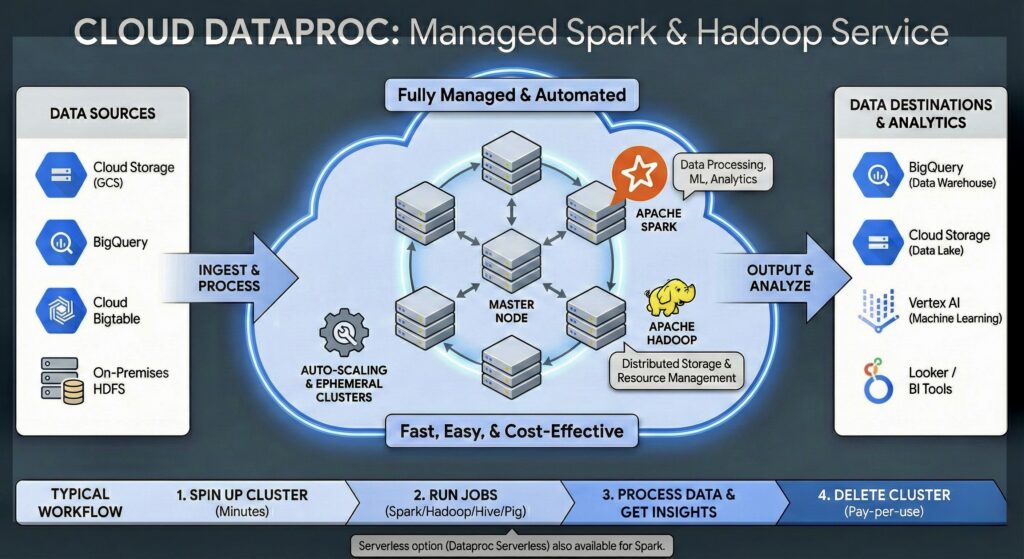
Dataproc is a managed service that lets you run open-source Apache Hadoop and Apache Spark clusters on Google Cloud.
Think of it this way If you wanted to run a web server, you could build a physical machine, install Linux, install Apache, configure it, and manage its lifecycle. Or, you could just spin up a Compute Engine instance with a startup script.
Dataproc is the same concept for big data. You could manually create 20 VMs, SSH into each one, install Hadoop, configure the master and worker nodes, and set up the networking. Or, you can run one gcloud command, and Dataproc will give you a fully configured, optimized, and scalable cluster in about 90 seconds.
It’s the “easy button” for Hadoop, Spark, Hive, Flink, and other tools in that ecosystem.
Core Components of the Ecosystem
Before we go deeper, let’s clarify the key players Dataproc manages for you.
First, A Quick Primer: What is MapReduce?
You can’t talk about Hadoop without understanding the concept that started it all: MapReduce. It’s a programming model for processing massive datasets in parallel, and it’s brilliantly simple.
Let’s use an analogy. Imagine you have 10,000 books and you need to count the total number of times the word “Google” appears.
You, as one person (a single-threaded process), would have to read every single book, one by one, keeping a tally. This would take months.
Instead, you use the MapReduce approach:
- The MAP Phase (The Mappers): You hire 10,000 people. You give one book to each person. Their only job is to read their book and count the word “Google.” Person 1 says “5 times,” Person 2 says “0 times,” Person 3 says “22 times,” and so on. They each write their total on a sticky note.
- In Data Terms: The “mappers” are worker nodes that each process a chunk of the total data (e.g., one block from the Google Cloud Storage bucket).
- The SHUFFLE Phase: You have one person (the “shuffler”) who collects all 10,000 sticky notes. Their job isn’t to add them up, just to group them. This phase is implicit and handles data locality.
- The REDUCE Phase (The Reducer): You hire one final person, an accountant. The shuffler hands them the stack of 10,000 sticky notes. The accountant’s (reducer’s) only job is to sum up all the numbers (5 + 0 + 22 + …) to get the final grand total.
That’s it. You’ve parallelized the work. MapReduce splits a giant task into thousands of small “map” tasks that can run at the same time, then “reduces” all their answers into one final result. Spark, its spiritual successor, takes this idea and makes it much faster by doing most of it in memory (RAM) instead of writing to disk after every step.
What about Apache Hive?
Writing complex MapReduce (or even Spark) jobs in Java or Python is powerful, but it’s not for everyone. Your data analysts know SQL, not object-oriented programming.
This is where Apache Hive comes in.
Hive is a data warehouse software built on top of Hadoop. Its key function is to provide a SQL-like interface (called HiveQL) to query data stored in HDFS (or, in our case, Google Cloud Storage).
Here’s how it works:
- An analyst writes a familiar SQL query:
SELECT department, COUNT(*) FROM employees GROUP BY department; - Hive takes this HiveQL query.
- Its “compiler” translates that query into a series of MapReduce jobs (or Spark jobs, depending on configuration).
- It runs those jobs on the cluster.
- It returns the result to the analyst as if they had just queried a standard SQL database.
For you, the cloud engineer, Hive is the SQL gateway to your data lake. Dataproc fully manages the Hive server and its “metastore” (which stores the table definitions), making it easy to offer SQL-on-Hadoop to your business users.
The Architecture: Multi-Regional and High Availability Setups
When you build for the cloud, you build for resilience. Dataproc, being a regional service, has two main patterns for this.
Standard High Availability (HA) Mode
By default, a standard Dataproc cluster has one master node. If that VM fails, your cluster management and job submission fail.
For production workloads, you can enable High Availability (HA) Mode. When you do this, Dataproc provisions three master nodes instead of one. These nodes use an internal ZooKeeper quorum to elect a leader. If the active master node fails, another master takes over, and your cluster keeps chugging along. This provides fault tolerance within a single region (across multiple zones).
Bash
# Example: Creating an HA cluster
gcloud dataproc clusters create my-ha-cluster \
    --region=us-central1 \
    --num-masters=3 \
    --num-workers=10 \
    ...
Multi-Regional Fault Tolerance
What if the entire us-central1 region goes offline?
This is where things get advanced. Dataproc itself is a regional service; you can’t create a single “Dataproc cluster” that spans us-central1 and us-east1.
However, you can achieve multi-regional resilience by running Dataproc on GKE.
In this model:
- You create a multi-regional GKE cluster (e.g., nodes in
us-east1andus-central1). - You then deploy your Dataproc jobs onto this GKE cluster.
- Dataproc’s control plane (which is still regional) submits the job to GKE.
- GKE’s multi-regional schedulers deploy your Spark “driver” and “executor” pods.
- If one region fails, GKE can reschedule the pods (your Spark workers) to the healthy region, allowing the job to continue.
This setup is complex and designed for mission-critical pipelines that absolutely cannot tolerate a regional outage.
DataProc Serverless
it’s essentially Google’s way of saying, “Give us your Spark code, and we’ll figure out the infrastructure.”
Since you like to get straight to the technical meat, let’s break this down. This isn’t just a “feature toggle”; it’s a fundamental shift in how you architect data pipelines on GCP.
The “No-Ops” Spark Experience
In the traditional Dataproc world (Standard), you are a shepherd. You tend to your flock of Master and Worker nodes. You worry about provisioning, scaling policies, graceful decommissioning, and whether you left a 50-node cluster running over the weekend (we’ve all been there).
Dataproc Serverless abstracts that entire layer. You don’t create a cluster. You submit a workload (a batch job or an interactive session). Google spins up ephemeral compute resources specifically for that job, runs it, auto-scales based on the pressure, and then evaporates the infrastructure the second the job is done
The Big Showdown: Dataproc vs. Dataflow
This is the classic question on the Professional Cloud Architect exam, and it’s the most important one to get right. Both run data jobs. Both can scale. How are they different?
| Feature | Dataproc | Dataflow |
|---|---|---|
| Primary Model | Batch (with Spark Streaming) | Streaming (and Batch) |
| Paradigm | Cluster-centric. You provision and size a cluster. recently Serverless was also introduced | Serverless. No cluster to manage. You submit code. |
| Ops Overhead | Medium. You manage cluster sizing, machine types, and scaling. | None. Fully managed, autoscaling from zero. |
| Core Tech | Apache Spark, Hadoop, Hive, Flink. | Apache Beam (a unified programming model). |
| Primary Use Case | Lift & Shift on-prem Hadoop/Spark/Hive jobs. | New, cloud-native ETL/ELT. Real-time analytics, event processing. |
| Analogy | Like using GKE. You get a managed environment to run your containers (jobs). | Like using Cloud Run. You just give it your code (pipeline) and it runs. |
When to Use Dataproc (And When to Run Away)
Here’s your cheat sheet.
✅ Use Dataproc When…
- You are migrating (Lift & Shift): You have an existing on-premises Hadoop, Spark, or Hive cluster. You want to move it to the cloud with minimal changes. This is Dataproc’s #1 use case.
- Your team are Spark/Hadoop experts: Your data scientists live and breathe PySpark or HiveQL. They don’t want to learn a new framework (like Apache Beam). Dataproc gives them the exact open-source environment they’re used to.
- You need specific open-source libraries: You have complex dependencies or need to run a very specific version of a Spark or Hive library that isn’t available in Dataflow.
- You are extremely cost-sensitive: For fault-tolerant batch jobs, you can run Dataproc clusters on Preemptible VMs and save up to 80%. If the job fails, it just restarts. This can be incredibly cheap.
🛑 Do NOT Use Dataproc When…
- Your job is small: You have 50 GB of data to process. Don’t spin up a 3-node cluster. Just use a BigQuery SQL query or a simple Python script on a single VM.
- You want true “set it and forget it”: You don’t want to ever think about machine types, the number of workers, or scaling policies. You have a “spiky” workload. This is Dataflow’s sweet spot.
- Your primary workload is streaming: While Spark has streaming capabilities, Dataflow is built from the ground up for streaming. Its concepts of “watermarks” and “windowing” for handling late data are considered best-in-class.
- Your team doesn’t know Spark/Hive: If your team’s background is SQL, don’t force them to learn PySpark. Point them to BigQuery, which is a massively parallel data processor that uses a familiar SQL interface.
Pitfalls & Pro-Tips from the Field
As an infra pro, these are the “gotchas” you need to watch out for.
- Pitfall 1: Forgetting to delete clusters. This is the #1 rookie mistake. A developer spins up a 100-node cluster for a “quick test” and forgets about it. Your bill will be astronomical.
- The Fix: Use the
--max-idleflag or the--expiration-timeflag on your cluster. Dataproc will automatically delete itself after a set period of inactivity or at a specific time.
- The Fix: Use the
- Pitfall 2: Storing data in HDFS. Dataproc clusters are ephemeral (temporary). The HDFS (Hadoop Distributed File System) on their local disks is also ephemeral. If you delete the cluster, that data is gone forever.
- The Fix: Always use Google Cloud Storage (GCS) as your data store. Read from a GCS bucket and write back to a GCS bucket. GCS is your persistent, cheap, and durable “data lake.” HDFS should only be used for temporary shuffle data during the job.
- Pitfall 3: Using one giant, long-running cluster. This is the on-prem mindset. In the cloud, you should create a cluster, submit the job, and tear it down.
- The Fix: Use Dataproc Workflow Templates. This allows you to define a DAG (Directed Acyclic Graph) of jobs. It will spin up the cluster, run Job A, then Job B, and then automatically delete the cluster. This is true cloud-native thinking.
- Pitfall 4: Ignoring Autoscaling. You have a job that needs 10 nodes for the first hour and 100 nodes for the “reduce” phase.
- The Fix: Don’t provision a 100-node cluster for the whole job. Use a Dataproc Autoscaling Policy. You can set policies based on YARN memory or CPU, and Dataproc will automatically add or remove worker nodes (especially preemptible ones) to match the job’s actual demand.
Command Reference Table
Here are the gcloud commands you’ll use 80% of the time.
| Command | Description |
|---|---|
gcloud dataproc clusters create | Creates a new cluster. (Your main command). |
gcloud dataproc clusters delete | Deletes a cluster. (Your most important command). |
gcloud dataproc jobs submit pyspark ... | Submits a PySpark job to an existing cluster. |
gcloud dataproc jobs submit hive ... | Submits a HiveQL script (-f script.q) or query (-e "QUERY..."). |
gcloud dataproc jobs submit spark-sql ... | Submits a Spark SQL script. |
gcloud dataproc clusters list | Lists all clusters in the current region. |
gcloud dataproc operations describe | Checks the status of a long-running operation (like cluster creation). |
gcloud dataproc autoscaling-policies ... | Creates and manages autoscaling policies for your clusters. |
Conclusion
Dataproc isn’t a magical new data-processing engine. It’s a pragmatic and powerful automation and management service. It acts as the bridge, allowing the massive, mature open-source ecosystem of Hadoop, Spark, and Hive to run effectively, cheaply, and scalably on Google Cloud.
For you, the cloud professional, it’s another powerful tool in your belt. It’s not the only tool—you’ve still got BigQuery for SQL-based analysis and Dataflow for serverless streaming—but for lift-and-shift migrations and Spark-centric teams, it’s the gold standard.