In the world of cloud computing, a robust and flexible network infrastructure is paramount. Google Cloud’s Virtual Private Cloud (VPC) offers precisely that, providing a powerful and highly customizable networking solution for your applications and services. But what exactly is a VPC, and how does it work within the Google Cloud ecosystem?
At its core, a VPC in Google Cloud is a logical network built on top of Google’s highly-optimized and globally distributed physical network. This abstraction allows you to provision and manage your own isolated network environment, complete with IP address ranges, subnets, routes, and firewall rules, all within Google’s extensive infrastructure. Think of it as having your own private data center, virtually, spanning across Google’s global reach.
One of the most defining characteristics of a Google Cloud VPC is its global nature. Unlike traditional on-premises networks or even VPCs in some other cloud providers that are confined to a single region, a Google Cloud VPC is a global resource. This means that a single VPC can extend across multiple Google Cloud regions worldwide. This global reach simplifies network design for distributed applications, enabling seamless communication between resources regardless of their geographical location.
While the VPC itself is global, the individual building blocks within it, called subnets, are regional resources. A subnet is a segment of your VPC’s IP address range and is associated with a specific region. This regional scope for subnets allows you to logically group resources within a particular geographic area, improving performance and reducing latency for applications and users in that vicinity. The beauty of this design is that two different regions can be part of the same VPC, each containing its own subnets, and resources in those subnets can communicate with each other securely and efficiently.
When you create a new Google Cloud project, you’re automatically provisioned with a default VPC. This default VPC comes pre-configured with a subnet in each available region, along with basic firewall rules that allow internal communication and outbound internet access. It’s a convenient way to get started quickly and is suitable for many basic use cases.
However, for more complex or production-grade deployments, you’ll likely opt for a custom VPC. A custom VPC gives you complete control over your network topology. You can define your own IP address ranges, create subnets exactly where you need them, implement specific routing policies, and meticulously configure firewall rules to meet your application’s security and connectivity requirements. This level of customization is crucial for adhering to compliance standards, implementing robust security postures, and optimizing network performance for demanding workloads.
To better visualize these concepts, consider the following diagram:
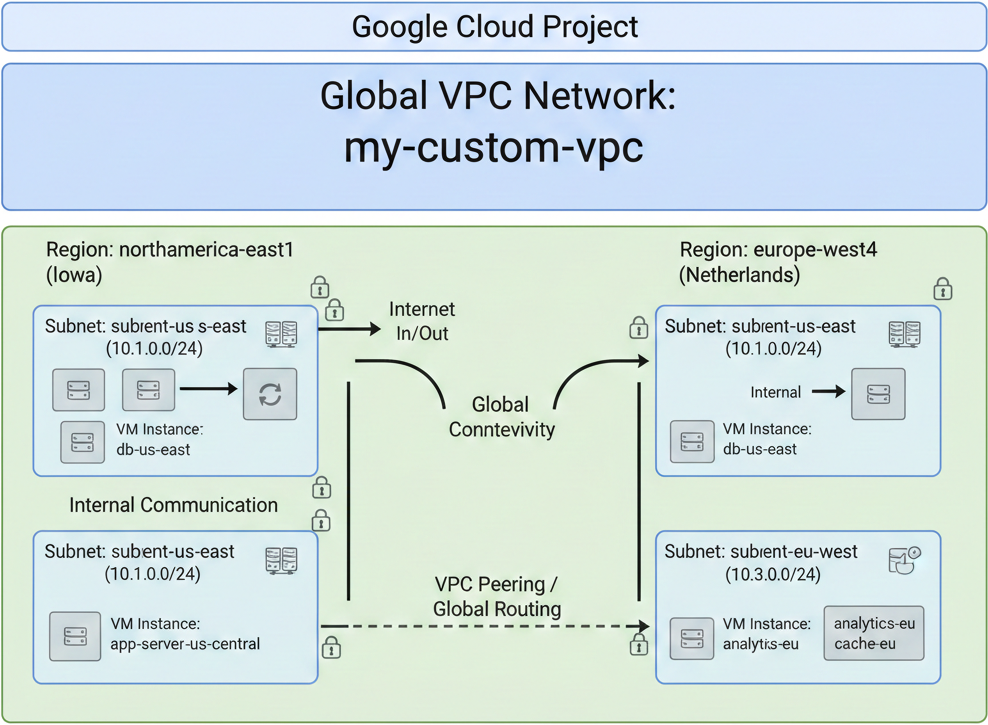
This diagram illustrates a Google Cloud Project containing a global VPC network named “my-custom-vpc.” Within this VPC, you can see two distinct regions: “northamerica-east1 (Iowa)” and “europe-west4 (Netherlands).” Each region hosts various subnets, such as “subient-us-east” and “subient-eu-west,” with their respective IP ranges (e.g., 10.1.0.0/24 and 10.3.0.0/24). Virtual Machine (VM) instances like “db-us-east,” “app-server-us-central,” “analytics-eu,” and “cache-eu” are deployed within these subnets. The diagram also depicts internal communication within a region, as well as global connectivity and VPC peering/global routing enabling cross-region communication. This setup highlights how a single global VPC can effectively manage resources and traffic across different geographical locations, providing a flexible and scalable network foundation for your cloud applications.
VPC peering a method where we make resources in different VPC’s communicate with each other which by default they cannot. We will talk more about VPC peering in the later articles.
The Mental Model: Automatic Mode is “The Default”
An Auto Mode VPC is effectively a clone of the “Default” VPC Google provides in every new project. It’s designed for speed over strategy.
- The Automatic Blueprint: Google creates one subnet in every single region automatically.
- No Manual Wiring: You don’t have to specify IP ranges or subnet locations.
- The “Illegal” Reality: Because every Auto Mode VPC uses the exact same CIDR blocks (starting at
10.128.0.0/20), you cannot peer them. If you try to connect Project A to Project B, they will collide.
Why Custom Mode is the Production Standard
In a Custom Mode VPC, you start with a blank canvas. You only build what you need, where you need it. This is the only sane choice for enterprise environments for three main reasons:
1. Zero Overlap (Hybrid Cloud Readiness)
If your on-premise data center or another cloud provider uses specific IP ranges, Custom Mode allows you to pick a non-conflicting CIDR. This is a prerequisite for Cloud VPN or Dedicated Interconnect.
2. Lean Infrastructure
In Auto Mode, you’re forced to have subnets in regions you’ll never use (like Tokyo or Finland). In Custom Mode, you only create subnets in the regions where your workloads live. This reduces “clutter” in your routing tables and simplifies management.
3. Security and “Blast Radius”
By only creating necessary subnets, you limit the surface area for potential misconfigurations. You control the IP boundaries from the start, rather than letting a default script decide them for you.
One often overlooked “gotcha” is the project quota. By default, Google Cloud limits you to 5 VPC networks per project to prevent unmanaged resource sprawl and keep the control plane efficient.If your architecture requires more (e.g., complex micro-segmentation), you can request a quota increase through the console. As long as your justification is solid (like “Production Isolation”), these are usually granted quickly.