As an Architect, your job isn’t to build cool models; it’s to solve business problems with the least amount of technical debt. When you look at Google Cloud’s AI stack, you aren’t looking at a single product. You are looking at a sliding scale of Control vs. Convenience.
You have three distinct choices:
- Pre-trained APIs (The “Buy” option)
- AutoML (The “Config” option)
- Custom Training (The “Build” option)
Here is how they actually work and, more importantly, when you should abandon one for the other.
1. Pre-trained APIs: The “I Have a Deadline” Option
Before you even think about training a model, check if Google already built it. Google has spent billions training generic models on the entire internet. You can rent them for pennies per call.
The Process:
There is no “process.” You don’t gather training data. You don’t spin up servers. You send a JSON request, and you get a JSON response.
- Vision API: Detects faces, text (OCR), or “unsafe content” in images.
- Video Intelligence API: Indexes videos, tracks objects, detects shot changes.
- Natural Language API: Sentiment analysis, entity extraction.
- Speech-to-Text / Text-to-Speech: Self-explanatory.
The Architecture:
It is purely transactional. Your application hits a public endpoint (vision.googleapis.com). Google handles the scaling, the model updates, and the infrastructure.You are just a consumer.
The Trade-off:
- Pros: Zero maintenance, zero training data, instant implementation.
- Cons: Zero flexibility. If the Vision API thinks your product looks like a “shoe” but you need it to distinguish between a “running shoe” and a “hiking boot,” you are out of luck. You cannot tweak the model.
2. Vertex AI AutoML: The “Middle Ground”
This is for when the Pre-trained API is too generic, but you don’t have a team of PhDs to write PyTorch code. You bring the data; Google brings the code.
The Process:
- Data Dump: You upload your specific dataset (e.g., photos of your specific manufacturing defects) to Cloud Storage or BigQuery.
- Point and Click: You go to the Vertex AI console and select “Image Classification.”
- The Black Box: You set a budget (e.g., “train for 2 hours”). Google’s backend spins up a cluster and runs a massive Neural Architecture Search (NAS). It tries ResNet, EfficientNet, and fifty other variations. It tunes hyper parameters automatically.
- Deploy: It spits out a model artifact. You click “Deploy,” and it exposes an endpoint.
The Trade-off:
- Pros: You get a state-of-the-art model customized to your data without writing a single line of training code.
- Cons: It’s a black box. If the model fails, you can’t debug the code because there is no code. You can only fix the data. It is also expensive—you pay a premium for the automation.
3. Vertex AI Custom Training: The “Control Freak” Option
This is the nuclear option. You use this when you need to do something weird, novel, or highly optimized. You are renting raw compute power to run your own Docker container.
The Process:
- Code: Your team writes the training application in Python (TensorFlow, PyTorch, JAX, scikit-learn). You define the layers, the loss function, and the data loader.
- Containerize: You pack that code and its dependencies into a Docker image and push it to Artifact Registry.
- Infrastructure Config: You tell Vertex AI: “I need 4 machines, each with 2 NVIDIA A100 GPUs.”
- Execution: Vertex AI provisions the VMs, pulls your container, networks the machines together (if distributed), runs your script, and shuts them down when finished.
The Trade-off:
- Pros: Infinite flexibility. You can use bleeding-edge research, custom loss functions, or obscure libraries. You own the architecture.
- Cons: You own the pain. If your training job crashes because of an Out-Of-Memory (OOM) error, that’s your problem. If your distributed networking fails, that’s your problem.
The Architectural Comparison
| Feature | Pre-trained APIs | Auto ML | Custom Training |
| Your Input | A single image/text | A dataset of 1,000+ items | Code + Docker + Dataset |
| ML Knowledge Needed | None (Developer) | Moderate (Data Analyst) | High (ML Engineer) |
| Development Time | Hours | Days | Weeks/Months |
| Maintenance | None (Google updates it) | Retrain on new data | Retrain + Code maintenance |
| Cost Model | Per API Call | Training Hours + Node Hours | Compute Hours (You pay for idle time if careless) |
The Decision Logic: When to use what?
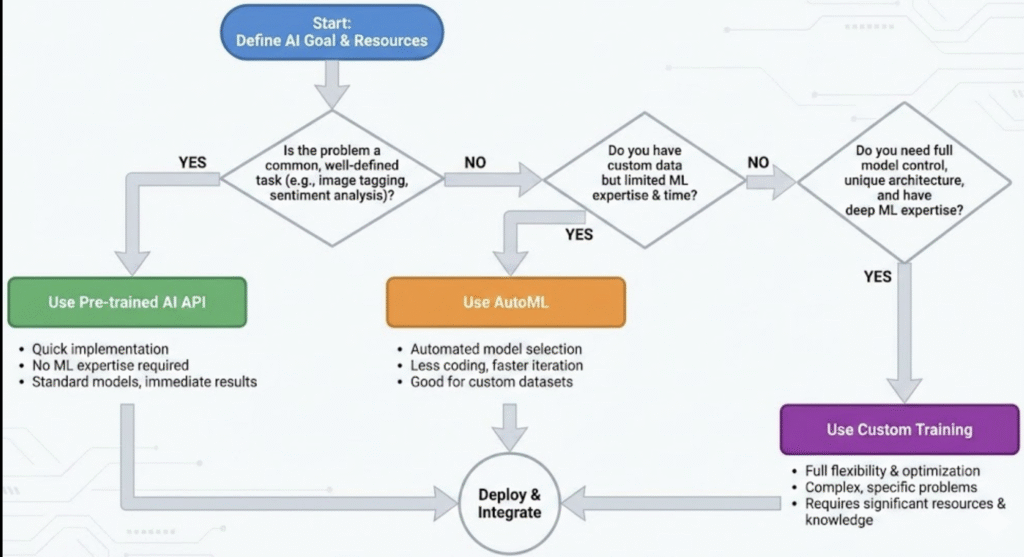
Do not start with Custom Training. That is “Resume Driven Development.” Follow this flowchart to save your sanity:
Step 1: The Generic Check
Does your problem exist in the general world? (e.g., “Read text from a PDF” or “Translate English to Spanish”).
- YES: Use Pre-trained APIs. Do not train an OCR model. You will not beat Google’s OCR.
- NO: Go to Step 2.
Step 2: The Data Check
Do you have your own unique data (e.g., “Classify X-rays of a specific machine part”), but the problem type is standard (Classification/Regression)?
- YES: Use AutoML. It will likely beat your hand-coded model unless you spend 3 months tuning it. It establishes a strong baseline.
- NO: Go to Step 3.
Step 3: The Custom Necessity
Do you need to use a specific research paper implementation, a custom reinforcement learning loop, or do you need to optimize the model size to run on a $5 microcontroller?
- YES: Use Custom Training.
- NO: Go back to Step 2 and stop over-engineering.