Let’s start with a common scenario. You’re building an e-commerce application. When a user finalizes an order, several things need to happen: the inventory service must be updated, a shipping label needs to be created, and a confirmation email must be sent.
The simple approach is to have your main “order” service make direct, sequential API calls to the “inventory,” “shipping,” and “email” services. This is called synchronous communication. The user clicks “Confirm Order,” and their browser waits… and waits… until all three backend services have responded.
But what happens if the email service is slow or temporarily down? The entire order process hangs, and eventually, the user gets an error. Your whole system is brittle. The services are tightly coupled; the failure of one can cause a cascade failure across the entire system. We need a way to decouple them. We need a digital post office.
The Decoupling Revolution
Instead of making direct phone calls, what if our services could communicate by sending letters? The order service’s only job would be to write three letters: “Update inventory for order #123,” “Create shipping label for order #123,” and “Send email for order #123.” It drops them off at a post office and immediately tells the user, “Success! Your order is being processed.”
The order service doesn’t know or care if the email service is busy. It trusts that the post office will hold the letter and deliver it when the email service is ready. This is asynchronous messaging, and it’s the key to building resilient, scalable, and modern applications. In Google Cloud, this post office is Cloud Pub/Sub.
Meet the Digital Postmaster: Cloud Pub/Sub
Cloud Pub/Sub is a fully managed, global, real-time messaging service. It allows you to send and receive messages between independent applications. It’s the central nervous system for many Google services and can scale to handle millions of messages per second.
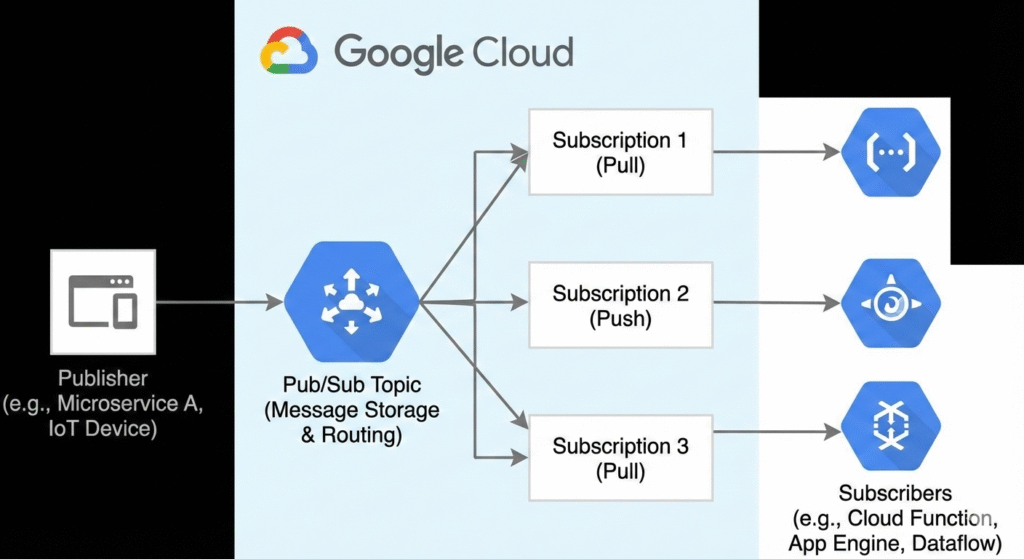
Let’s look inside this post office and meet its key staff.
The Mailbox (The Topic)
A publisher doesn’t send a message directly to a subscriber. It sends it to a named channel called a Topic. A topic is a simple, named resource that acts as the central hub for a specific type of message. For our e-commerce app, we might create topics like order-confirmations, inventory-updates, and shipping-requests.
Bash
gcloud pubsub topics create order-confirmations
Sending the Mail (The Publisher)
Any application that sends messages to a topic is a Publisher. Our “order” service is a publisher. When an order is confirmed, it creates a message (the “letter”) and sends it to the order-confirmations topic.
Bash
gcloud pubsub topics publish order-confirmations \
    --message="{'orderId': 123, 'userId': 456, 'total': 99.99}"
Subscribing to Mail (The Subscription)
The “email” service needs to receive these order confirmations. It expresses its interest by creating a Subscription to the order-confirmations topic. A subscription is a named resource that represents a stream of messages from a single topic. Think of it as your personal P.O. box for a specific magazine.
Bash
gcloud pubsub subscriptions create email-service-subscriber \
    --topic=order-confirmations
The brilliant part is that multiple, different services can subscribe to the same topic. The “shipping” service can also create its own subscription to the order-confirmations topic. When a single message is published, Pub/Sub delivers a copy of that message to each subscription independently.
Reading the Mail (The Subscriber)
An application that receives messages from a subscription is a Subscriber. Our “email” service and “shipping” service are subscribers. They connect to their respective subscriptions and start processing messages.
Getting Your Mail Delivered: Push vs. Pull
How does a subscriber actually receive the messages? There are two models.
Pull (The Standard Model)
This is the most common and robust method for backend services. The subscriber application actively polls the subscription, asking “Do you have any new messages for me?” This gives the subscriber full control over the rate of message consumption. If it’s busy, it can slow down; if it’s idle, it can ask for more. This is like going to the post office to check your P.O. box.
Push (The Webhook Model)
In this model, Pub/Sub becomes the mail carrier. You provide Pub/Sub with a publicly accessible HTTP endpoint (a webhook). When a message arrives in the topic, Pub/Sub immediately makes an HTTP POST request to your endpoint with the message in the request body. This is simpler for certain use cases, especially for triggering stateless services like Cloud Functions, but can be problematic if you have a sudden burst of messages that could overwhelm your endpoint.
The Certified Mail Guarantee: Acknowledgments & At-Least-Once Delivery
What if your email service pulls a message, and then the VM crashes before it can send the email? Is the message lost forever? No, and the mechanism that prevents this is the most critical concept in Pub/Sub.
When a subscriber receives a message, a timer starts. This is the Acknowledgment (ack) deadline. Your subscriber has this much time (e.g., 60 seconds) to process the message and then send an acknowledgment (ack) back to Pub/Sub, basically saying “I’m done with this one.”
- If Pub/Sub receives the
ackin time, it marks the message as delivered and deletes it from the subscription’s queue. - If Pub/Sub does not receive an
ackbefore the deadline expires, it assumes the subscriber failed and redelivers the message.
This leads to a powerful guarantee: at-least-once delivery. Pub/Sub guarantees your message will be delivered, but it also means that in some rare network failure scenarios, it might be delivered more than once.
This has a profound implication for your subscriber design: subscribers must be idempotent. An idempotent operation is one that can be performed multiple times with the same input and have the same result as if it were performed only once. For our email service, it might mean checking a database to see if the email for order #123 has already been sent before trying to send it again.
Handling Problem Mail: Dead-Letter Topics
What happens if a message is malformed and causes your subscriber to crash every single time it tries to process it? Without intervention, Pub/Sub would redeliver that message forever, clogging up your queue.
The solution is a Dead-Letter Topic (DLT). You can configure a subscription to say, “If you’ve tried to deliver a message 5 times and it still hasn’t been acknowledged, stop trying and move it to this other topic.” This gets the poison message out of your main workflow and allows you to inspect it later to debug the problem.
Special Delivery Instructions: Ordering and Filtering
By default, Pub/Sub does not guarantee the order in which messages are delivered. For many use cases, this is fine. But what if you need to process all updates for a specific user in the exact order they happened?
You can enable message ordering on a subscription. When publishing, you provide an ordering key (e.g., the userId). Pub/Sub guarantees that all messages published with the same ordering key will be delivered to a single subscriber in the order they were received.
Additionally, you can create a Subscription with a filter. This allows a subscriber to receive only a subset of messages from a topic. For example, you could add an attribute like priority: "high" to your messages and create a subscription that only receives high-priority orders.
Common Pitfalls & Best Practices
- Pitfall: Assuming exactly-once delivery and not making your subscribers idempotent. This will lead to duplicate processing and bugs.
- Best Practice: Always design your subscribers to be idempotent. This is the golden rule of working with Pub/Sub.
- Pitfall: Setting the
ackdeadline too short. If your processing takes longer than the deadline, Pub/Sub will think your subscriber failed and redeliver the message, causing an infinite loop. - Best Practice: Set your
ackdeadline to be longer than the expected time it takes to process a message. Your subscriber can also extend the deadline for a specific message if it knows it will take longer. - Pitfall: Not using a Dead-Letter Topic for important production workloads. A single poison message can halt your entire processing pipeline.
- Best Practice: Always configure a DLT on subscriptions that handle critical data.
- Pitfall: Choosing the Push model for a service that can’t handle sudden, large bursts of traffic.
- Best Practice: Default to the Pull model for most backend services, as it provides better flow control. Use Push for simple, stateless integrations like triggering Cloud Functions.
Quick Reference Command Center
Here’s a cheatsheet of gcloud commands for managing Pub/Sub.
| Action | Command |
|---|---|
| Create a Topic | gcloud pubsub topics create [TOPIC_NAME] |
| List Topics | gcloud pubsub topics list |
| Create a Subscription | gcloud pubsub subscriptions create [SUB_NAME] --topic=[TOPIC_NAME] |
| Publish a Message | gcloud pubsub topics publish [TOPIC_NAME] --message="Hello" |
| Pull Messages | gcloud pubsub subscriptions pull [SUB_NAME] --auto-ack --limit=5 |
| Create Subscription with DLT | gcloud pubsub subscriptions create [SUB_NAME] --topic=[TOPIC] --dead-letter-topic=[DLT_TOPIC] |
| Create Subscription with Filter | gcloud pubsub subscriptions create [SUB_NAME] --topic=[TOPIC] --message-filter="attributes.priority = 'high'" |