
The Bare-Metal Container Management Nightmare
If you pack your application code into containers, you’ve solved the “works on my machine” problem. But running those containers at scale in production introduces a new kind of pain. Suppose you spin up a few VMs and run your database, APIs, and frontend web servers as separate containers on those machines. What happens when VM number three crashes at 2:00 AM? The containers running on it vanish, your frontend throws gateway errors, and your paging system goes off.
You have to wake up, log in, figure out which machine died, locate a healthy VM, and run the startup commands manually. If traffic spikes, you repeat the manual process to scale up. Doing this with bash scripts is fragile and stressful. You quickly realize that managing container lifecycles across a pool of servers is a full-time job.
Even worse, you have to manage networking. How does the frontend container locate the backend API container when the API container is constantly rescheduled onto different VMs with changing IP addresses? How do you distribute traffic evenly across instances? If you try to manage host port mapping, IP tables, and custom routing tables by hand, you end up with a fragile infrastructure that breaks at the slightest change.
Orchestrating a Self-Healing Cluster
What you actually need is a system that treats your entire pool of physical or virtual machines as a single, unified computer. When you want to run a container, you shouldn’t have to choose a specific server. The system should look at the CPU and memory availability across the entire cluster, pick the best host automatically, and start the workload.
It must also monitor the health of your containers. If a container crashes, the orchestrator should restart it. If a whole VM fails, the system should instantly reschedule those workloads onto other healthy machines. When traffic changes, it should scale instances up or down dynamically, keeping the networking and routing configuration updated in real-time.
This is the promise of container orchestration. The system acts as the central coordinator, continuously reconciling the actual state of your running containers with your desired configuration. You define what should run, and the orchestrator handles the how.
The Control Plane and Worker Split
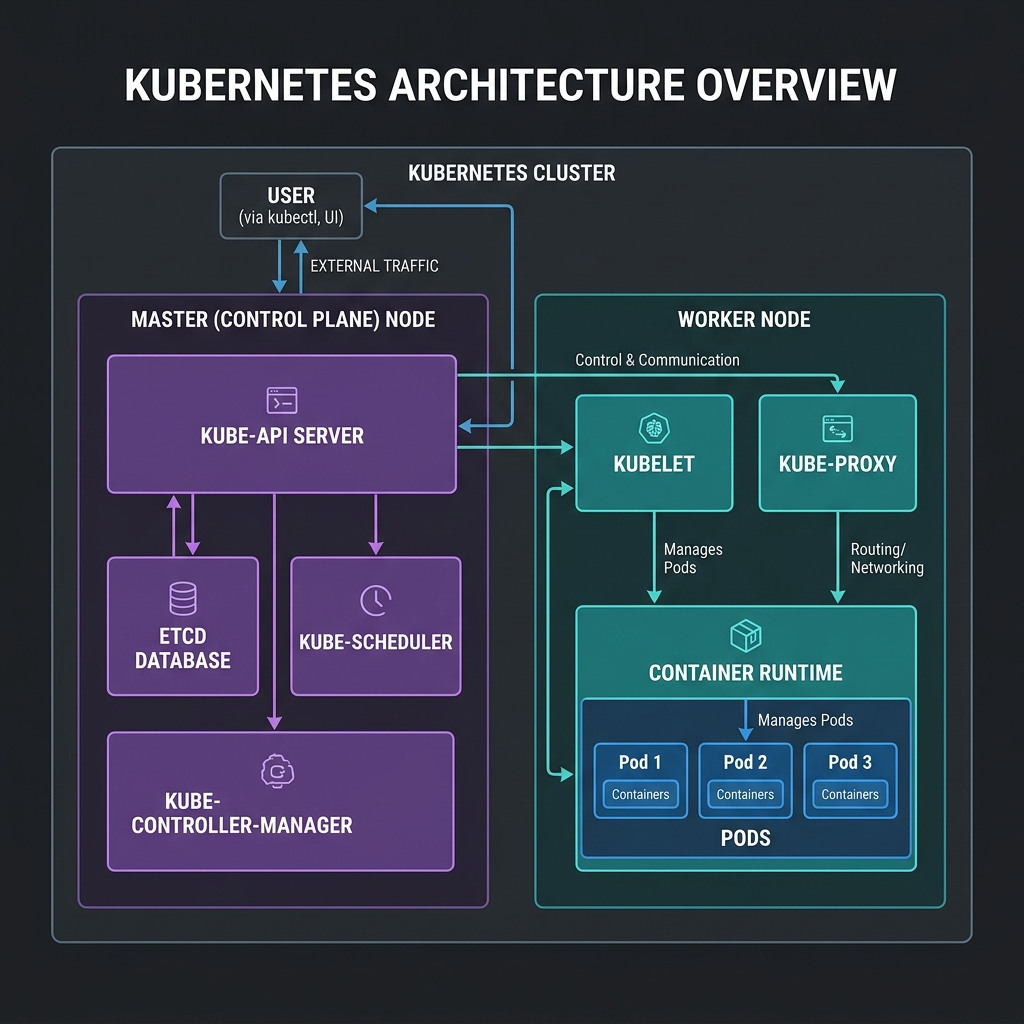
Kubernetes does exactly this by splitting the workload into two main zones: a Control Plane and a pool of Worker Nodes.
The Control Plane acts as the brain. It makes global decisions, monitors state, and schedules workloads. Worker Nodes are the physical or virtual machines where your application containers actually run under the supervision of the Control Plane.
Several specialized components collaborate to keep the system running:
* The API Server (kube-apiserver): The entry point for all administrative tasks. It exposes a JSON/YAML over HTTP REST API. Every component in the cluster—whether it is an external developer using kubectl or an internal agent like the scheduler—talks to the API Server. It handles authentication, authorization (RBAC), and schema validation before writing any data.
* The Cluster Store (etcd): A highly available, consistent, distributed key-value store. It acts as the single source of truth for the entire cluster. Every configuration, policy, and active state is saved here. The API Server is the only component allowed to write directly to etcd to prevent write conflicts.
* The Scheduler (kube-scheduler): The matchmaker. It monitors the API Server for newly created pods that lack an assigned host node. It filters out nodes that lack sufficient CPU, memory, or matching labels, and then ranks the remaining nodes using priority algorithms to find the best home for the pod.
* The Controller Manager (kube-controller-manager): The enforcement officer. It runs multiple continuous control loops (like the Node Controller, Job Controller, and Namespace Controller). Each loop constantly compares the current state of a resource with the desired state in etcd and takes corrective action if they drift.
* The Node Agent (kubelet): An agent that runs on every machine in the cluster. It receives PodSpecs (manifests describing containers) from the API Server and coordinates with the local container runtime to launch the containers, monitor their health, and report node resource status.
* The Network Proxy (kube-proxy): The traffic cop. Running on every node, it monitors the API Server for new Service resources and writes local host networking rules (using iptables or IPVS) to route external and internal traffic to the correct containers.
* The Container Runtime: The engine on the worker node that pulls container images from registries and executes the processes. Under the modern CRI spec, this is typically containerd or CRI-O.
Here is how these components fit together:
Interacting with the Cluster
To talk to this infrastructure, you use kubectl, a command-line tool that translates your human instructions into REST API calls for the kube-api-server.
Let’s list the nodes in our active cluster:
$ kubectl get nodes
NAME             STATUS   ROLES           AGE   VERSION
control-plane    Ready    control-plane   12d   v1.30.0
worker-node-1    Ready    <none>          12d   v1.30.0
worker-node-2    Ready    <none>          12d   v1.30.0
To see more details, including the IP addresses, operating systems, and container runtime versions running on these nodes, you can expand the output format:
$ kubectl get nodes -o wide
NAME            STATUS   ROLES           AGE   VERSION   INTERNAL-IP    EXTERNAL-IP   OS-IMAGE             KERNEL-VERSION      CONTAINER-RUNTIME
control-plane   Ready    control-plane   12d   v1.30.0   192.168.49.2   <none>        Ubuntu 22.04.4 LTS   5.15.0-101-generic   containerd://1.7.15
worker-node-1   Ready    <none>          12d   v1.30.0   192.168.49.3   <none>        Ubuntu 22.04.4 LTS   5.15.0-101-generic   containerd://1.7.15
worker-node-2   Ready    <none>          12d   v1.30.0   192.168.49.4   <none>        Ubuntu 22.04.4 LTS   5.15.0-101-generic   containerd://1.7.15
With this architecture, you no longer SSH into individual machines to manage container processes. You tell the API Server what you want, and the Control Plane coordinates with Kubelets to make it happen. If a worker node goes offline, the system self-heals by scheduling replacement containers elsewhere, letting you focus on writing code instead of playing server fireman.
