
1. Introduction to Enterprise Cloud DNS
Reliable Domain Name System (DNS) resolution is critical for enterprise cloud operations. Compute instances, microservices, databases, and hybrid on-premises applications rely on DNS to discover endpoints dynamically without hardcoding volatile IP addresses.
Oracle Cloud Infrastructure (OCI) provides an enterprise-grade DNS platform consisting of two main services: OCI Public DNS and OCI Private DNS.
This article focuses on OCI Private DNS, exploring Private Views, Private Zones, Private Resolver Endpoints (Inbound and Outbound), and hybrid DNS integrations with on-premises Active Directory / BIND infrastructure.
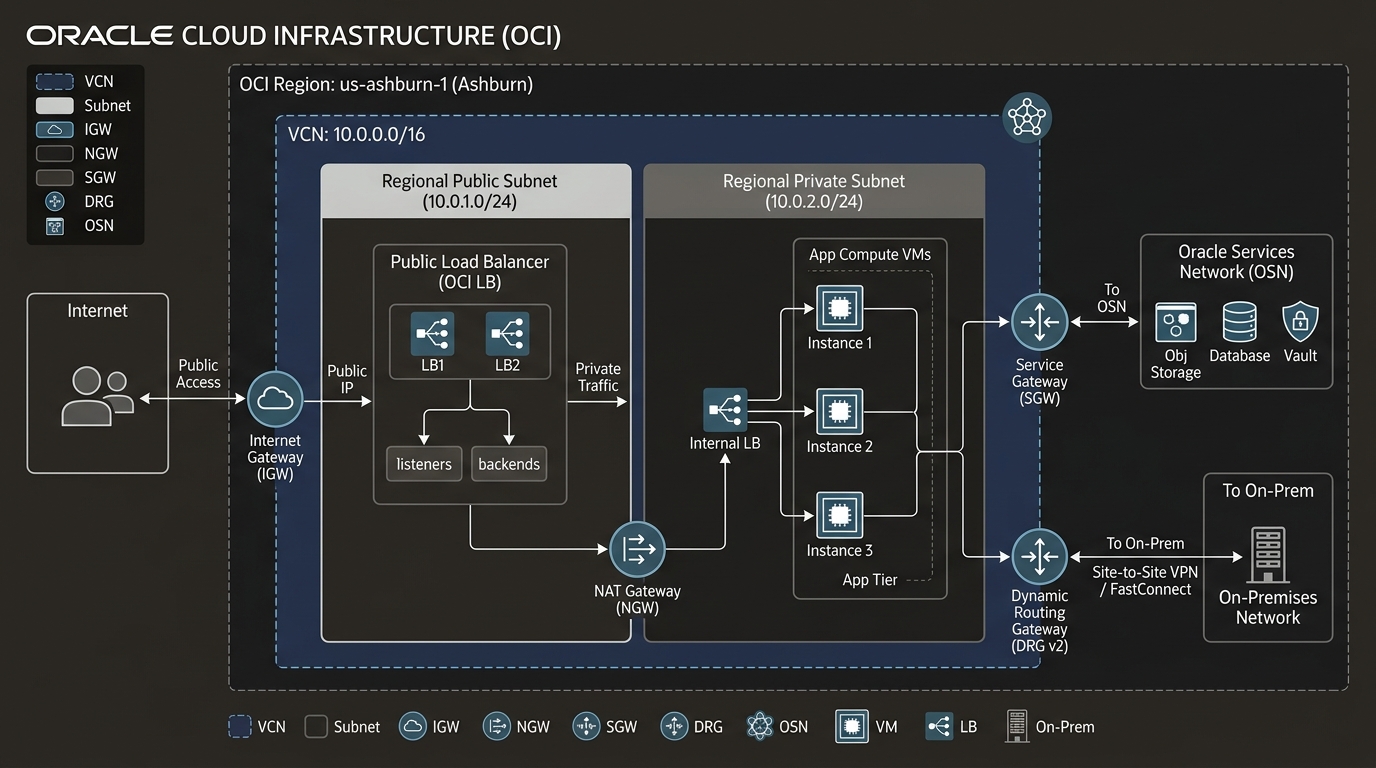
2. OCI Private DNS Architecture & Components
Every Virtual Cloud Network (VCN) in OCI is automatically provisioned with a managed Private DNS Resolver.
OCI Private DNS consists of 4 foundational building blocks:
1. Private DNS Zones
A Private Zone holds DNS resource records (A, AAAA, CNAME, TXT, SRV, PTR) that are accessible strictly within private network boundaries.
* Example: db.production.oraclevcn.com or custom domains like internal.company.com.
2. Private Views
A Private View is a logical container that groups one or more Private DNS Zones. Views act as split-horizon DNS boundaries:
* You can serve different IP address records for app.company.com depending on whether the query originates inside a VCN or from an external network.
3. Inbound DNS Endpoints
An Inbound Endpoint allocates a private IPv4 address inside a specific VCN subnet.
* Function: Accepts incoming DNS queries sent from on-premises DNS servers (or remote VCNs) and routes them into the local OCI Private DNS Resolver.
4. Outbound DNS Endpoints
An Outbound Endpoint allocates a private IPv4 address inside a specific VCN subnet.
* Function: Forwards DNS queries originating inside OCI for external domains (e.g., *.corp.example.com) out to on-premises DNS servers.
3. Hybrid DNS Resolution Workflow
Integrating OCI Private DNS with on-premises Active Directory Domain Services (AD DS) requires establishing a bidirectional resolver pipeline:
Direction A (On-Prem to OCI):
On-Prem Client ➔ On-Prem AD DNS ➔ (Conditional Forwarder) ➔ OCI Inbound Endpoint ➔ OCI Private Zone

Direction B (OCI to On-Prem):
OCI Compute VM ➔ OCI VCN Resolver ➔ Ruleset Forwarder ➔ OCI Outbound Endpoint ➔ On-Prem AD DNS
4. OCI Web Console (GUI) Step-by-Step Walkthrough
Follow these steps to configure an Inbound DNS Endpoint and establish hybrid DNS forwarding with an on-premises network.
Step 1: Navigating to Private DNS in the Console
- Open Navigation Menu (
≡) ➔ Networking ➔ DNS Management ➔ Private Views. - Select your compartment (
Network-Compartment).
Console Path: [≡ Main Menu] ➔ [Networking] ➔ [DNS Management] ➔ [Private Views]
Step 2: Creating a Custom Private DNS Zone
- Click Zones under DNS Management ➔ Click Create Zone.
- Configure settings:
- Zone Type: Select Private.
- Zone Name:
prod.oci.company.com - Compartment:
Network-Compartment - Private View: Select Create New View (
View-Production). - Click Create.
- Inside
prod.oci.company.com, click Add Record: - Name:
db-primary - Type:
A - IPv4 Address - RDATA / Address:
10.0.2.50 - TTL:
300 - Click Publish Changes.
Step 3: Configuring Private Resolver Inbound & Outbound Endpoints
- Navigate to Virtual Cloud Networks ➔ Select
VCN-Production-Ashburn. - Under Resources, click Private Resolver.
- Click Endpoints ➔ Click Create Endpoint:
- Name:
DNS-Inbound-EP - Endpoint Type: Select Inbound.
- Subnet: Select
Subnet-Private-Regional. - Private IP:
10.0.2.250(or dynamic). - Click Create Endpoint.
- Repeat for Outbound Endpoint:
- Name:
DNS-Outbound-EP| Type: Outbound | IP:10.0.2.251.
Step 4: Adding Conditional Forwarding Rules
- On the Private Resolver Details page, click Rulesets ➔ Click Manage Rulesets.
- Add Rule:
- Domain:
corp.example.com - Source Endpoint: Select
DNS-Outbound-EP. - Destination IP: Enter On-Premises DNS Server IP (
192.168.1.10). - Click Save Changes. OCI VMs querying
server.corp.example.comwill automatically forward requests across the outbound endpoint to on-premises DNS servers.
5. Common Architectural Misconceptions & Pitfalls
Misconception 1: “Default VCN Resolvers Resolve On-Premises Domains Automatically”
- Reality: The default OCI VCN Resolver only resolves local
.oraclevcn.comhostnames and public internet domains. It has no knowledge of internal corporate domains (*.corp.company.com) until an Outbound Endpoint and Ruleset are explicitly configured.
Misconception 2: “Security Lists Can Block DNS Probes Without Impacting Resolver Operations”
- Reality: Private DNS Endpoints use standard UDP/TCP Port 53. If the Security List or NSG assigned to the endpoint subnet blocks port 53 traffic from on-premises ranges, hybrid DNS queries will time out.
6. OCI Private DNS vs. Other Cloud Platforms
| Feature | Oracle Cloud Infrastructure (OCI) | Amazon Web Services (AWS) | Google Cloud Platform (GCP) |
|---|---|---|---|
| Private DNS Construct | OCI Private DNS | Route 53 Private Hosted Zones | Cloud DNS Private Zones |
| Resolver Endpoints | Inbound & Outbound Endpoints | Route 53 Resolver Endpoints | Cloud DNS Inbound / Outbound Policies |
| Split-Horizon DNS | Private Views | VPC Association Authorization | Private DNS Peering / Views |
| Default VCN IP Offset | .2 (e.g., 10.0.0.2) | .2 (e.g., 10.0.0.2) | .1 / Metadata Server |
