
1. Introduction to the OCI Resource Hierarchy
Oracle Cloud Infrastructure (OCI) structures all cloud resources using a unified, hierarchical container architecture. Unlike cloud platforms that rely on flat administrative sub-accounts or project-based silos, OCI separates resource organization from physical execution.
At the core of OCI Identity and Access Management (IAM) is the relationship between the Root Tenancy and Compartments. Understanding this hierarchy is essential before deploying compute workloads, virtual networks, databases, or storage buckets.
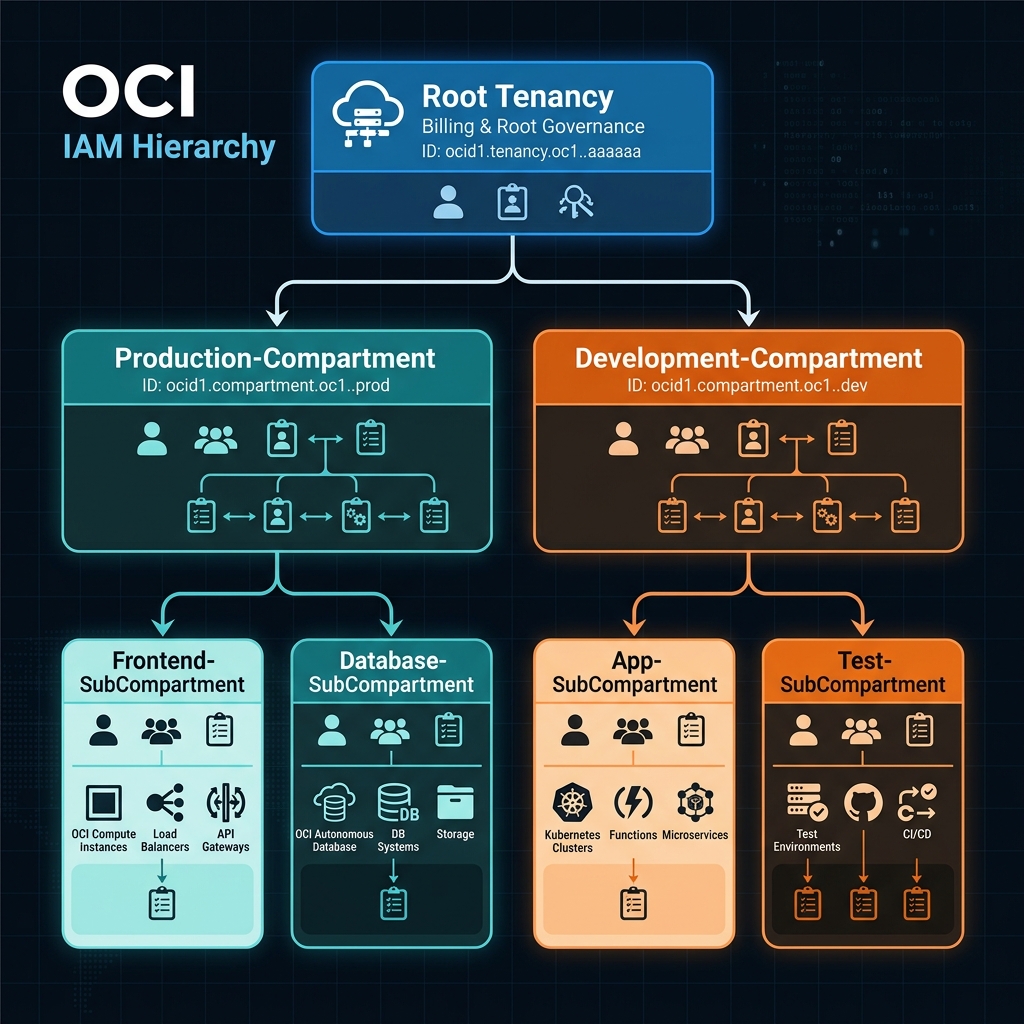
2. Core Architectural Components
The Root Tenancy
When an organization provisions an Oracle Cloud account, OCI creates a single Tenancy.
- Root Administrative Domain: The tenancy serves as the top-level root organization. It acts as the ultimate parent container for all regions, compartments, identity domains, users, and resources.
- Centralized Billing & Quota Anchor: All service limits, cloud credits, billing contracts, and global resource quotas are bound to the tenancy level. Global capacity is pooled centrally across the entire cloud footprint.
- Oracle Cloud Identifier (OCID): Every entity in OCI is assigned an immutable, globally unique identifier called an OCID. The root tenancy OCID follows this standard format:
text

ocid1.tenancy.oc1..aaaaaaaaxxxsampletenancyocid56789101112
[!IMPORTANT]
Understanding OCID String Structure
Notice the componenttenancyinocid1.tenancy.oc1... Every resource type in OCI includes its type string in the OCID. For example, a compartment OCID begins withocid1.compartment.oc1.., allowing systems and administrators to identify object types directly from the string syntax.
Compartments
A Compartment is a logical container used to organize, group, and isolate cloud resources (Compute VMs, Block Volumes, Virtual Cloud Networks, Object Storage Buckets, and Autonomous Databases).
A compartment is not a physical data center partition, a dedicated network segment, or a separate billing account. It is a logical label and policy enforcement boundary assigned to cloud resources.
Key Architectural Properties of Compartments:
- Logical Isolation: Resources in different compartments can communicate natively across internal virtual cloud networks (VCNs) if permitted by network routing and security rules.
- Hierarchical Nesting: Compartments can be nested inside other compartments up to six levels deep (excluding the root tenancy), establishing a tree hierarchy that mirrors organizational structures, environment lifecycles, or cost centers.
- Global Scope: Compartments span across all OCI availability domains and regions globally. A single compartment named
Productionexists simultaneously across Ashburn (us-ashburn-1), Frankfurt (eu-frankfurt-1), and Tokyo (ap-tokyo-1). - Dynamic Resource Mobility: Most OCI resources can be moved between compartments on the fly via the OCI Console or API without requiring resource destruction, downtime, IP address changes, or network re-configuration.
[!WARNING]
The 6-Level Compartment Nesting Constraint
OCI enforces a strict platform limit: Compartments can be nested up to 6 levels deep below the Root Tenancy. Attempting to create a 7th child level will be rejected by the OCI API.
3. Real-World Compartment Architecture Design
To maintain clean security boundaries and efficient IAM policy inheritance, tenancies should be structured into a hierarchy based on operational responsibilities and environment lifecycles.
Below is an enterprise-grade compartment hierarchy design diagram:
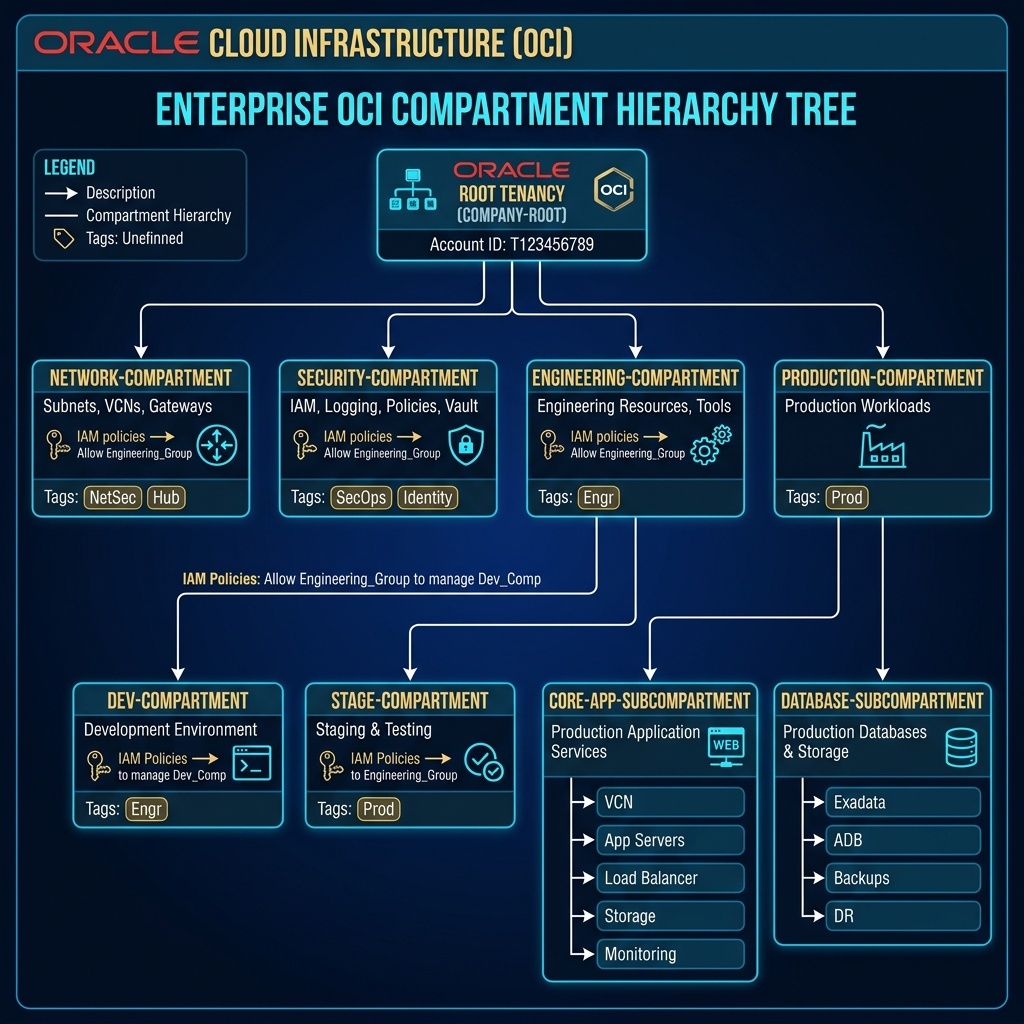
Architectural Benefits:
- Separation of Duties: Network administrators can be granted administrative rights (
manage virtual-network-family) strictly withinNetwork-Compartment, preventing unauthorized access to application data. - Policy Cascading: IAM policies declared at
Engineering-Compartmentautomatically inherit down toDev-CompartmentandStage-Compartment, avoiding duplicate policy maintenance. - Granular Blast Radius: Development teams receive full administrative rights inside
Dev-Compartmentwhile remaining completely blocked from viewing resources inProduction-Compartment.
4. OCI Web Console (GUI) Step-by-Step Walkthrough
Managing compartments and organizing resources is executed directly within the OCI Web Console GUI.
Step 1: Navigating to Compartments in the Console
- Log in to the Oracle Cloud Console at
https://cloud.oracle.com. - Click the Navigation Menu icon (
≡) in the top-left corner. - Select Identity & Security, then click Compartments under the Identity column.
Console Path: [≡ Main Menu] ➔ [Identity & Security] ➔ [Identity] ➔ [Compartments]
Step 2: Creating a Top-Level Compartment
- On the Compartments page, locate the root tenancy at the top of the compartment tree.
- Click Create Compartment.
- In the creation panel, specify:
- Name:
Production-Compartment - Description:
Container for production workloads, compute instances, and databases. - Parent Compartment: Select your Root Tenancy.
- Click Create Compartment.
Step 3: Creating a Nested Child Compartment
- Click
Production-Compartmentfrom the compartment list. - Click Create Compartment.
- Specify:
- Name:
Database-SubCompartment - Description:
Production Autonomous Databases and Exadata database shapes. - Parent Compartment: Ensure
Production-Compartmentis selected. - Click Create Compartment.
The Web Console updates to display the visual hierarchy: Root ➔ Production-Compartment ➔ Database-SubCompartment.
Step 4: Moving a Live Resource Between Compartments
To move an existing active resource (such as a Compute VM) from one compartment to another using the Console GUI:
- Navigate to Compute ➔ Instances.
- In the left-hand panel under Compartment, select
Dev-Compartment. - Click the name of the target compute instance.
- On the Instance Details page, click More Actions ➔ Move Resource.
Console Action: [More Actions ▾] ➔ [Move Resource]
- Select the destination compartment (
Production-Compartment) from the tree view. - Click Move Resource.
OCI updates the logical pointer in real-time. The VM instance, attached virtual network interface cards (VNICs), private IP addresses, and running processes remain fully operational without interruption.
Step 5: Configuring Compartment Quotas in the GUI
To restrict resource allocation within specific compartments, configure Compartment Quotas:
- Open the Navigation Menu
≡➔ Governance & Administration ➔ Quota Policies. - Select the target compartment (e.g.,
Dev-Compartment). - Click Create Quota Policy.
- Enter a policy name (e.g.,
CapDevCompute) and define the plain-text quota statement:
text

set compute quota zfq-standard-a1-flex-count to 10 in compartment Dev-Compartment - Click Create Policy.
5. Common Architectural Misconceptions & Pitfalls
When designing or operating an OCI environment, avoid these four common misconceptions regarding Tenancies and Compartments:
Misconception 1: “Moving a Resource Causes Downtime”
- Reality: Moving a resource between compartments is a pure metadata pointer update in the OCI Control Plane. There is zero downtime, no IP change, and no instance reboot required.
Misconception 2: “Compartments Are Bound to a Single Region”
- Reality: Compartments are global constructs. A single compartment exists across all availability domains and regions within a tenancy automatically.
Misconception 3: “Deleting a Parent Compartment Destroys Active Resources”
- Reality: OCI blocks compartment deletion if it contains any active cloud resources. You must first terminate or move all resources out of the compartment before OCI allows deletion.
Misconception 4: “Compartments Block Internal Network Traffic”
- Reality: Compartments enforce IAM security permissions, NOT network traffic filtering. Traffic flow is governed by VCN Route Tables, Security Lists, and Network Security Groups (NSGs).
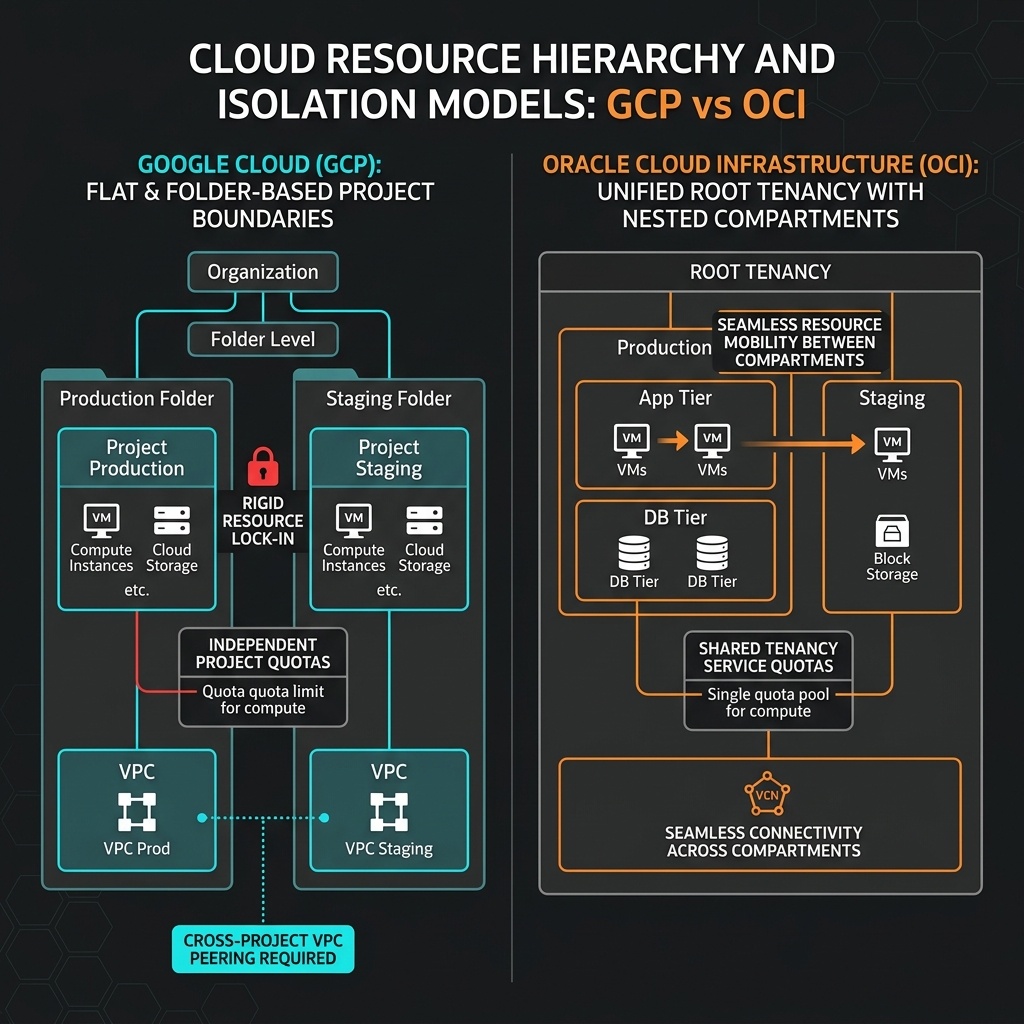
6. OCI Compartments vs. Google Cloud (GCP) Projects
For cloud architects familiar with Google Cloud Infrastructure, the following matrix compares the organizational primitives of GCP and OCI:
| Architectural Feature | Google Cloud (GCP) | Oracle Cloud Infrastructure (OCI) | Key Technical Difference |
|---|---|---|---|
| Organizational Unit | GCP Project | OCI Compartment | GCP Projects bind APIs, billing, and resources. OCI Compartments are pure logical policy boundaries within one tenancy. |
| Resource Portability | Fixed / Non-Portable (Resources cannot be moved between projects without destruction and rebuild) | Fluid / Portable (Resources can be re-assigned across compartments live via Console GUI or API) | OCI allows instant environment reorganization without network or compute re-provisioning. |
| Service Limits & Quotas | Enforced Per-Project (Independent quota allocations per project) | Centralized Tenancy Pool (Global limits managed centrally; capped via Compartment Quotas) | OCI eliminates unused quota silos by pooling tenancy capacity centrally. |
| Networking Boundary | Global VPC per Project (Subnets created under specific projects) | Regional VCN in a Compartment | OCI VCNs reside in compartments and route globally via Dynamic Routing Gateways (DRG). |
| IAM Attachment | IAM Roles bound to Users/Groups at Org, Folder, or Project level | Plain-Text IAM Policies attached to Compartments or Root Tenancy | OCI policies inherit automatically down nested compartment hierarchies. |
