
The Bloated Translator Problem
When Kubernetes was first built, Docker was the only game in town. The early Kubernetes source code was hardcoded to talk directly to Docker. But Docker is an entire developer toolchain, not just a bare container executor. It handles image building, volume storage, developer commands, and network overlays. For an orchestrator like Kubernetes, most of these features were redundant and added overhead.
As other container engines emerged (like CoreOS rkt), the Kubernetes team faced a scaling issue. If they kept hardcoding support for every new engine, the Kubelet code would become a mess of translation layers. They needed to decouple the core orchestrator from the underlying container technology.
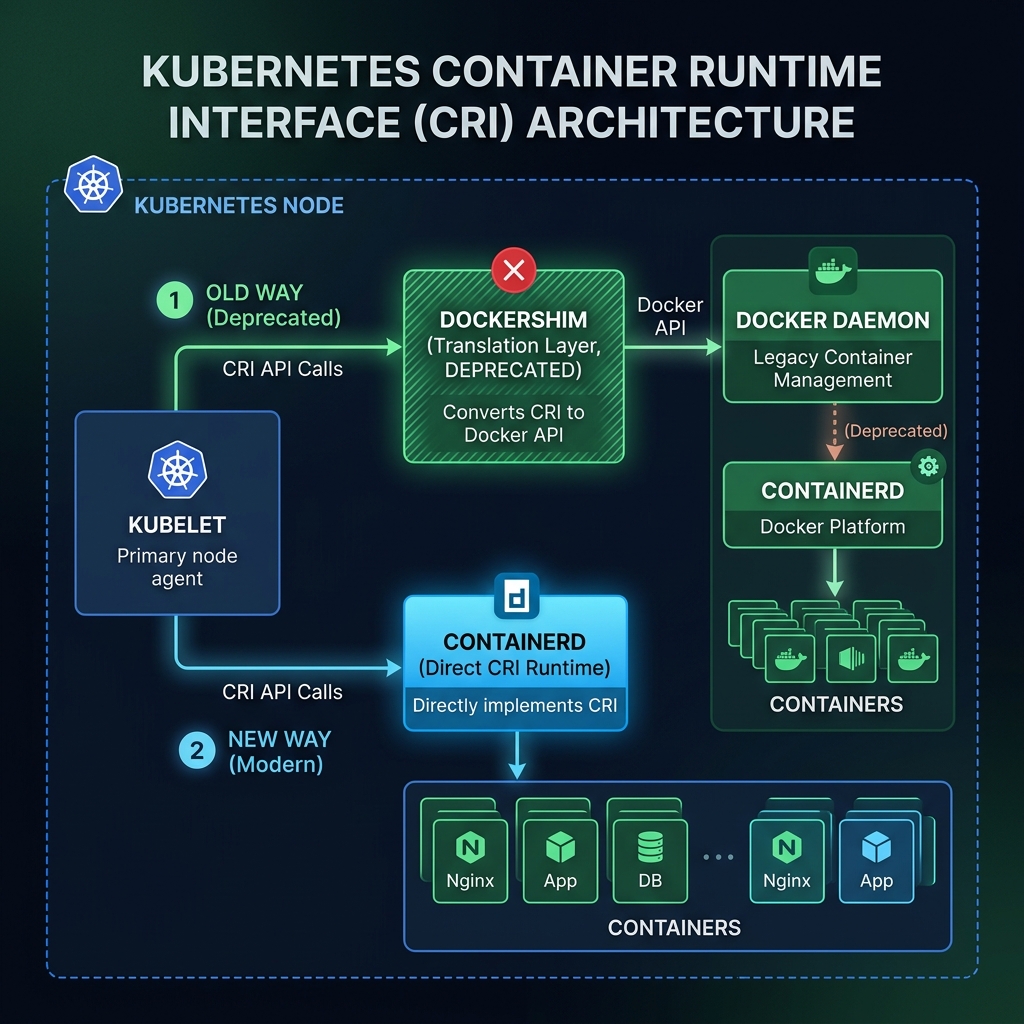
Furthermore, because Docker was not designed with a standard pluggable API, the Kubelet team had to maintain a complex, custom-built bridge called Dockershim. This translation layer intercepted Kubelet commands and translated them into Docker Daemon API requests, which then instructed Docker to start container processes. This was a maintenance nightmare, adding latency and resource usage.
Decoupling the Runtime Layer
To fix this, the community introduced the Container Runtime Interface (CRI) in 2016. The CRI is a gRPC protocol defining how the Kubelet should ask a runtime to manage containers. This created a plug-and-play architecture. Any runtime developer could implement the CRI spec, and Kubernetes would support it out of the box without code modifications.
Alongside the CRI, the Open Container Initiative (OCI) established standards for image formats and execution runtime specifications. This ensured that no matter what tool built a container, it could be run by any OCI-compliant engine. Runtimes were split into two categories:
* High-Level Runtimes (CRI Runtimes): Runtimes like containerd and CRI-O that implement the CRI spec, handle image management, resolve container configurations, and coordinate execution.
* Low-Level Runtimes (OCI Runtimes): Lightweight utilities like runc (and sandboxed options like gVisor or Kata Containers) that actually create and run the container namespaces, cgroups, and processes on the host kernel.
This architectural shift led to the “Docker deprecation” announcement, which caused significant confusion. Let’s be clear: your Dockerfiles and Docker images still work. Docker builds OCI-compliant images. The change is simply that Kubernetes no longer uses the heavy Docker daemon on host nodes. It bypassed the old translation bridge (Dockershim) to talk directly to lightweight runtimes like containerd or CRI-O using the CRI.
Here is the transition from Dockershim to direct CRI communication:
Another critical configuration is the Cgroup Driver. Linux uses control groups (cgroups) to limit container resource usage. The host systemd process manages cgroups, but container runtimes can also manage them using a driver called cgroupfs. If your runtime uses cgroupfs while the host OS uses systemd, you have two managers allocating resources, which can lead to instability when the host runs low on memory. In production, always configure both Kubelet and your container runtime (like containerd) to use the systemd cgroup driver.
Debugging Without Docker on the Host
Since the Docker daemon is no longer running on worker hosts, running docker ps on a node will fail. Cluster administrators need alternative tools to debug containers directly on the host:
* ctr: A low-level CLI shipped directly with containerd. It is highly raw and intended for containerd developers. Because containerd isolates resources using namespaces, you must explicitly pass the --namespace k8s.io flag to see Kubernetes-managed containers.
* nerdctl: A developer-friendly wrapper for containerd that mimics the familiar Docker CLI syntax (e.g., nerdctl run, nerdctl ps, nerdctl compose), making the transition away from Docker Daemon easier.
* crictl: A debugging CLI tool officially maintained by the Kubernetes SIG-Node team. It is designed specifically for CRI-compatible runtimes, allowing you to bypass the API Server to inspect node containers and pods.
Let’s look at how to use crictl to inspect containers directly on a worker node. First, SSH into the node and configure the runtime socket endpoint variable:
$ export CONTAINER_RUNTIME_ENDPOINT=unix:///run/containerd/containerd.sock
Now, list the active pods running on this specific node:
$ crictl pods
POD ID              CREATED             STATE               NAME                             NAMESPACE           ATTEMPT             RUNTIME
de78f83acb5df       2 hours ago         Ready               nginx-78f5d69f5c-2abcd           default             0                   (default)
9a12c8b4df5e2       5 hours ago         Ready               kube-proxy-lh5rt                 kube-system         1                   (default)
You can view the specific containers running inside those pods:
$ crictl ps
CONTAINER           IMAGE               CREATED             STATE               NAME                ATTEMPT             POD ID              USER
8b7fca12be03a       nginx:latest        2 hours ago         Running             nginx-container     0                   de78f83acb5df       root
If a container is failing or refusing to start, you can grab the logs directly from the runtime:
$ crictl logs 8b7fca12be03a
192.168.49.1 - - [05/Jun/2026:03:19:00 +0000] "GET / HTTP/1.1" 200 615 "-" "curl/7.81.0" "-"
By bypassing the API Server and inspecting the container runtime directly on the node, you can easily isolate networking or filesystem mount issues that occur during container initialization.
