
The Single Point of Database Failure
If you run a single instance of etcd in your cluster, you have a single point of failure. The moment the VM hosting that database crashes, your control plane goes offline. You won’t be able to deploy new pods, update configurations, or delete resources.
However, running etcd on multiple machines isn’t as simple as running a web server. If a network partition occurs and splits your database nodes, they might write conflicting updates. To prevent this split-brain data corruption, the database nodes must coordinate and agree on every single write.
Consensus, Quorum, and Topology Choices
etcd handles this coordination using the Raft Consensus Algorithm. Under Raft, the etcd nodes elect a single leader. All write requests go to this leader, which replicates the changes to the follower nodes. A write is only committed and saved to disk once it has been successfully written to a majority of the nodes.
To maintain consensus and elect a leader, etcd requires a quorum, which represents a simple majority of the cluster. The mathematical formula for quorum is:
$$\text{Quorum} = \lfloor \frac{N}{2} \rfloor + 1$$
Where $N$ is the total number of nodes in the database cluster.
Because of this formula, etcd clusters must always have an odd number of members, typically three or five nodes. A two-node cluster requires a quorum of two to write. If one node fails, you have one node left, which is less than the required quorum, causing writes to fail. A three-node cluster also requires a quorum of two. If one node fails, the remaining two nodes can still establish a majority and accept writes. This means a three-node cluster can tolerate one node failure.
When planning your cluster, you have two primary architectural layouts:
1. Stacked etcd: The database instances run directly on the same Control Plane hosts as your API Server and Controllers. This is simple to bootstrap and is the default for kubeadm.
2. External etcd: The database instances run on a dedicated pool of machines, separate from the Control Plane. This provides better security and workload isolation but requires double the infrastructure.
Here is the comparison between stacked and external etcd configurations:
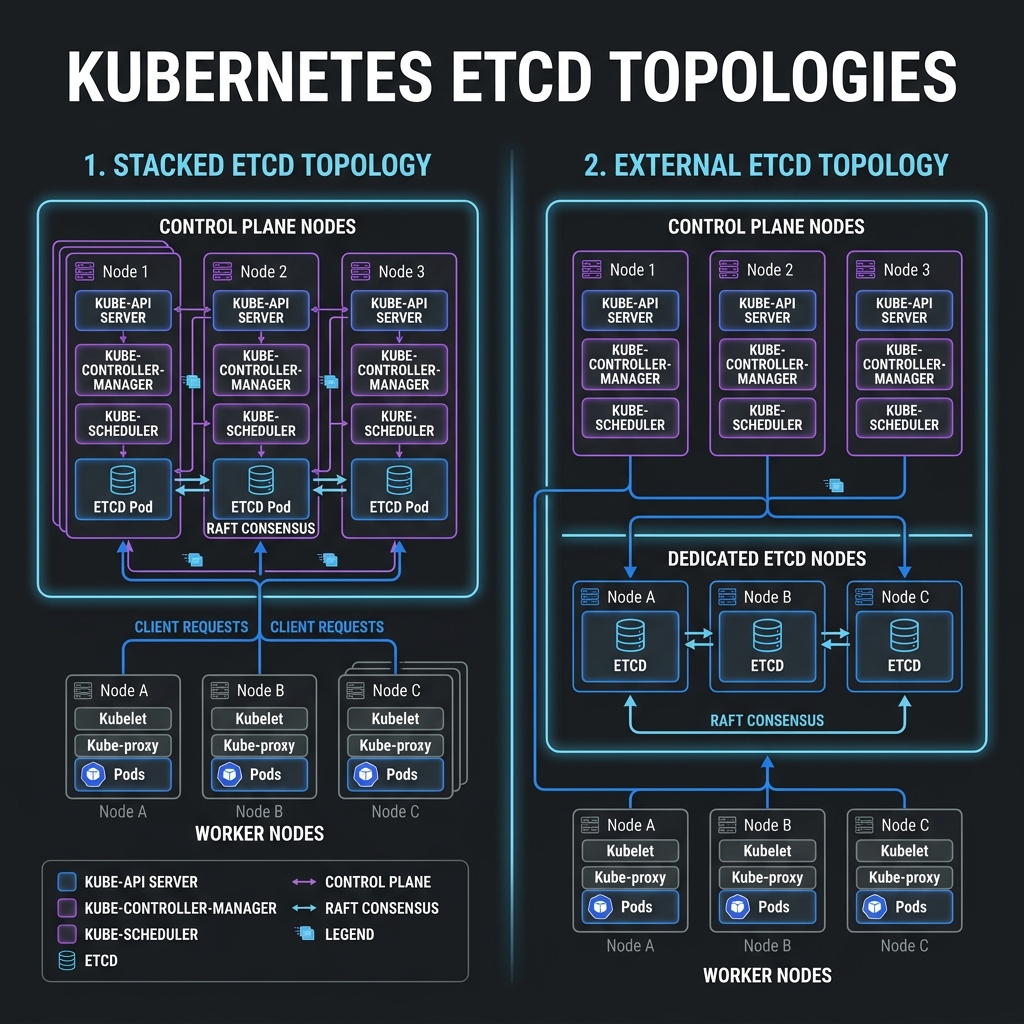
If you configure your cluster manually, you run etcd as a systemd service, managing certificates and peers yourself. If you use kubeadm, the bootstrap tool runs etcd automatically as a Static Pod. The Kubelet on the control plane node monitors the manifest directory at /etc/kubernetes/manifests/etcd.yaml and launches the database container locally, bypassing the API Server.
Verifying etcd Health and certificates in Kubeadm
Let’s look at how etcd runs inside a kubeadm-managed cluster. List the pods in the system namespace:
$ kubectl get pods -n kube-system | grep etcd
etcd-control-plane                      1/1     Running   2 (12d ago)   12d
Because kubeadm secures etcd with mutual TLS (mTLS), querying the datastore requires you to provide certificates. Let’s inspect the certificates folder generated by kubeadm:
$ sudo ls -l /etc/kubernetes/pki/etcd/
total 32
-rw-r--r-- 1 root root 1017 Jun  5 08:30 ca.crt
-rw------- 1 root root 1679 Jun  5 08:30 ca.key
-rw-r--r-- 1 root root 1094 Jun  5 08:30 healthcheck-client.crt
-rw------- 1 root root 1679 Jun  5 08:30 healthcheck-client.key
-rw-r--r-- 1 root root 1115 Jun  5 08:30 peer.crt
-rw------- 1 root root 1675 Jun  5 08:30 peer.key
-rw-r--r-- 1 root root 1115 Jun  5 08:30 server.crt
-rw------- 1 root root 1675 Jun  5 08:30 server.key
If you are on the control plane node, you can check the health of the database using these certificates:
$ sudo etcdctl \
  --endpoints=https://127.0.0.1:2379 \
  --cacert=/etc/kubernetes/pki/etcd/ca.crt \
  --cert=/etc/kubernetes/pki/etcd/peer.crt \
  --key=/etc/kubernetes/pki/etcd/peer.key \
  endpoint health

https://127.0.0.1:2379 is healthy: successfully committed proposal: took = 2.11301ms
To see the list of keys stored by Kubernetes inside the database:
$ sudo etcdctl \
  --endpoints=https://127.0.0.1:2379 \
  --cacert=/etc/kubernetes/pki/etcd/ca.crt \
  --cert=/etc/kubernetes/pki/etcd/peer.crt \
  --key=/etc/kubernetes/pki/etcd/peer.key \
  get / --prefix --keys-only | head -n 5

/registry/apiregistration.k8s.io/apiservices/v1.
/registry/apiregistration.k8s.io/apiservices/v1.apps
/registry/apiregistration.k8s.io/apiservices/v1.authentication.k8s.io
/registry/apiregistration.k8s.io/apiservices/v1.authorization.k8s.io
/registry/apiregistration.k8s.io/apiservices/v1.autoscaling
Isolating your database nodes and backing up the /etc/kubernetes/pki/etcd directory is the most effective way to ensure your cluster remains recoverable after a major node failure.
