
Routing Traffic to Transient Targets
In Kubernetes, pods are temporary. They are created, scale up, crash, and get replaced. Each time a pod is recreated, it receives a new IP address. If you configure your application to talk to backend databases by hardcoding pod IP addresses, your connections will break the moment a database pod restarts.
To solve this, Kubernetes uses a Service abstraction, providing a single, stable IP address. However, the host operating system kernel doesn’t natively recognize these virtual IPs. If a container sends a packet to the service IP, the host network will simply drop it. You need a system that constantly configures routing rules on the hosts to forward traffic from the virtual service IP to the active, physical pod IPs.
Managing Host Network Rules
This routing configuration is handled by Kube Proxy (kube-proxy). It runs on every node in the cluster, listening to the API Server for new services and their corresponding pod endpoints.
Here is how Kube Proxy directs traffic across host nodes to your containers:
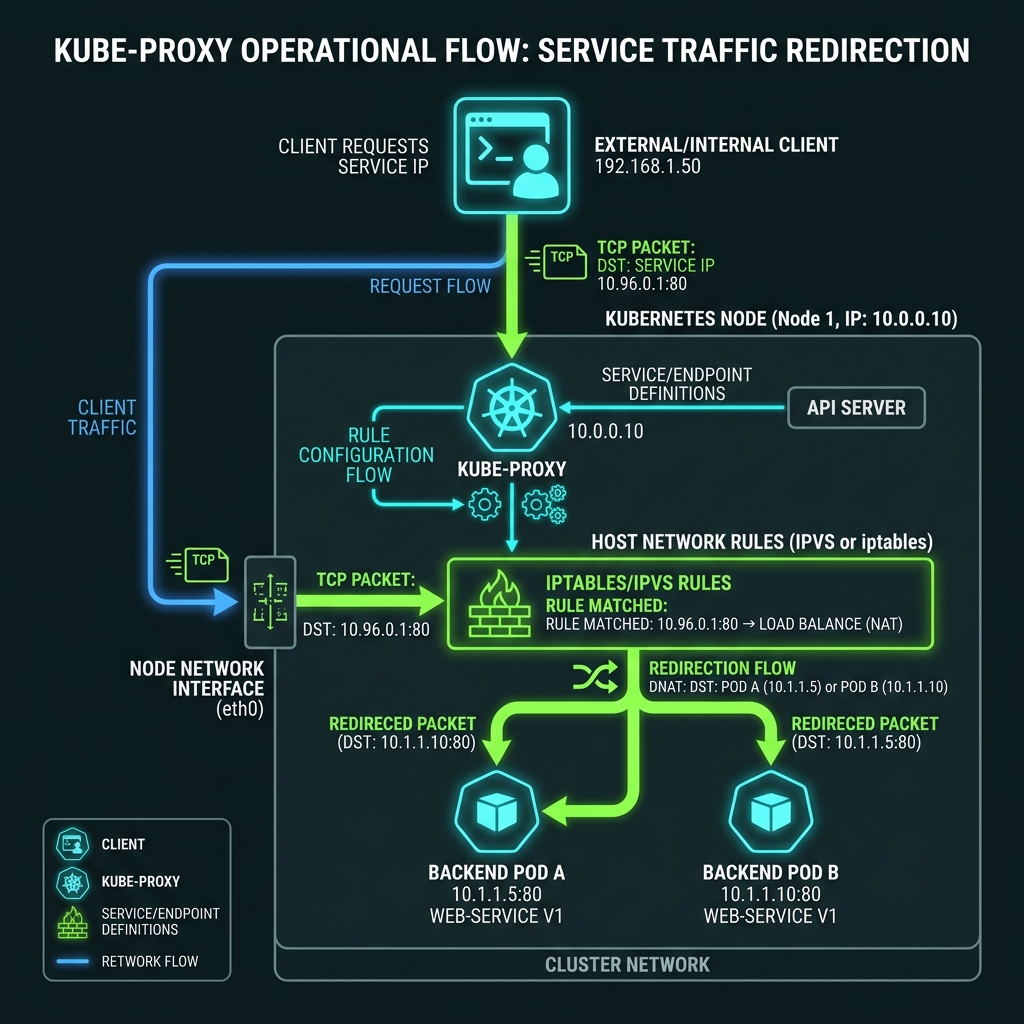
Kube Proxy typically operates in one of two modes:
1. iptables mode: Kube Proxy writes rules using the host’s Linux netfilter utility. When a packet targets a service IP, the host kernel intercepts it and rewrites the destination to a random backend pod IP. While reliable, this mode doesn’t scale well for large clusters. If you run thousands of services, the sequential list of iptables rules grows massive, slowing down packet evaluation because the kernel must scan the list line-by-line for every packet.
2. IPVS mode: Kube Proxy uses IPVS (IP Virtual Server), a transport-layer load-balancing technology built into the Linux kernel. IPVS uses hash tables to store routing rules, which scales efficiently ($O(1)$ search complexity instead of $O(N)$ sequential scans). It supports advanced load-balancing algorithms (like round-robin, least-connections, and source hashing).
When bootstrapping a cluster, you will encounter a classic catch-22 with kubeadm. The bootstrap tool installs Kube-proxy as a container inside the cluster. However, the tool cannot install the Kubelet because the Kubelet runs container runtimes on the host OS. To run Kube-proxy as a container, the Kubelet must already be running on the machine. Therefore, you must manually install the Kubelet on the host OS using your package manager before running kubeadm init.
Inspecting iptables Routing Rules
Let’s verify that Kube-proxy is active in the cluster. It runs as a DaemonSet:
$ kubectl get pods -n kube-system -l k8s-app=kube-proxy
NAME               READY   STATUS    RESTARTS   AGE
kube-proxy-lh5rt   1/1     Running   0          12d
kube-proxy-m7x8q   1/1     Running   0          12d
We can inspect the routing rules created by Kube-proxy on the host node. Suppose you have a service named payment-service with a ClusterIP of 10.104.135.150 on port 80. SSH into a worker node and search the host’s iptables chains:
$ sudo iptables-save | grep payment-service
-A KUBE-SERVICES -d 10.104.135.150/32 -p tcp -m comment --comment "default/payment-service" -m tcp --dport 80 -j KUBE-SVC-PaymentServiceHash
This rule directs any packet destined for the service IP on port 80 to the KUBE-SVC-PaymentServiceHash chain. Let’s inspect that chain:
$ sudo iptables-save | grep KUBE-SVC-PaymentServiceHash
-A KUBE-SVC-PaymentServiceHash -m comment --comment "default/payment-service" -m statistic --mode random --probability 0.33333333333 -j KUBE-SEP-PodHash1
-A KUBE-SVC-PaymentServiceHash -m comment --comment "default/payment-service" -m statistic --mode random --probability 0.50000000000 -j KUBE-SEP-PodHash2
-A KUBE-SVC-PaymentServiceHash -m comment --comment "default/payment-service"  -j KUBE-SEP-PodHash3
Kube-proxy load balances traffic across these three endpoints using the iptables statistic module, which routes traffic to each pod with a calculated probability. If you want to check IPVS mappings instead (when running Kube-proxy in IPVS mode), run:
$ sudo ipvsadm -ln
IP Virtual Server version 1.2.1 (size=4096)
Prot LocalAddress:Port Scheduler Flags
  -> RemoteAddress:Port           Forward Weight ActiveConn InActConn
TCP  10.104.135.150:80 rr
  -> 10.244.1.5:80                Masq    1      0          0
  -> 10.244.1.6:80                Masq    1      0          0
  -> 10.244.1.7:80                Masq    1      0          0
As you can see, IPVS maps the virtual IP directly to the backends using the Round-Robin (rr) scheduling algorithm, bypassing the complex chain lookup of iptables.
