
The Isolated Overlay Network
Every pod in your CNI network receives an IP address. However, these IPs are assigned from a private overlay network managed by the Container Network Interface (CNI). While pods can communicate with each other using these internal IPs, they are completely unreachable from outside the cluster. If you attempt to visit a pod’s IP (e.g., 10.244.1.5) from your laptop or an external client network, the request will time out.
To make your web applications accessible, you need a way to route external network requests into the private container network. Writing manual routing configurations on your host servers is not practical, since pods are transient and frequently reschedule onto different physical machines.
Exposing Ports with NodePort
The NodePort Service maps external traffic to your containers. When you configure a Service as a NodePort, Kubernetes allocates a dedicated port on every worker node host. By default, the assigned port is drawn from the range of 30000 to 32767.
The Kube-proxy agent on each worker host opens this port and listens for incoming connections. Any traffic that hits any node IP on this port is intercepted and forwarded to the target container.
To configure a NodePort Service, you define three main ports:
* targetPort: The port the container application is listening on (e.g., port 80 for an Nginx container). If omitted, it defaults to the same value as port.
* port: The internal port of the service itself, used for cluster-internal communication.
* nodePort: The high-range host port (30000-32767) opened on your worker VMs. If you do not specify this port, Kubernetes automatically assigns a random port from the range.
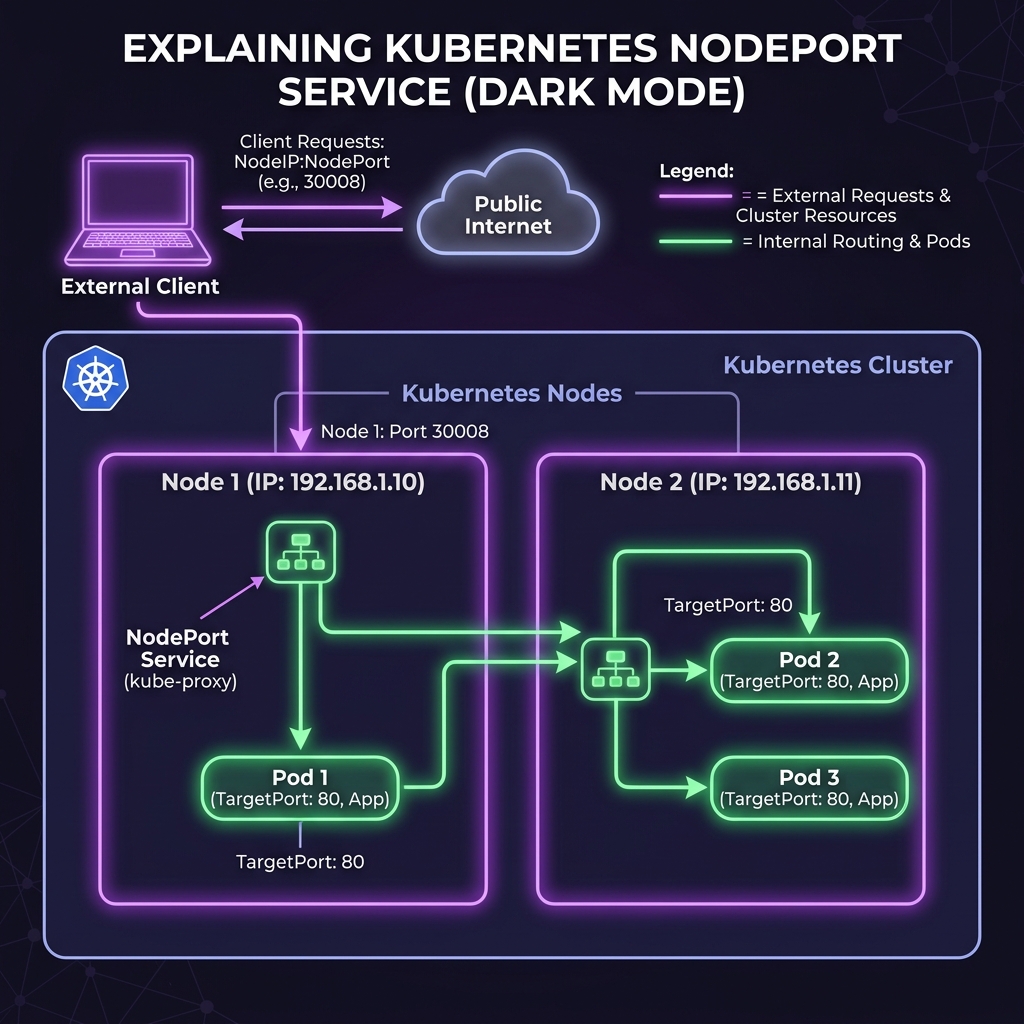
When an external request arrives at Node 1 on port 30008, the host’s networking stack performs Destination Network Address Translation (DNAT) to rewrite the target IP to the virtual ClusterIP of the Service on port 80. The packet is then evaluated by Kube-proxy’s load-balancing rules, which perform another DNAT to rewrite the target IP to one of the healthy Pod IPs on port 80. Finally, the packet is routed across the CNI network interface to the container.
The Service also acts as a basic load balancer. If your application has multiple active pod replicas distributed across different hosts, the NodePort Service automatically balances incoming traffic among them. Even if you hit the IP of Node 1, Kube-proxy can route that traffic across the CNI network to a pod running on Node 2.
Here is how traffic flows from an external client through a node’s high port to the active pods:
Deploying a NodePort Service
Let’s create a NodePort service to expose a web server deployment. First, create a deployment of web servers:
$ kubectl create deployment nginx-web --image=nginx --replicas=3
Save the following configuration as web-nodeport-service.yaml:
apiVersion: v1
kind: Service
metadata:
  name: web-nodeport-service
spec:
  type: NodePort
  ports:
  - port: 80
    targetPort: 80
    nodePort: 30008  # Exposes port 30008 on all node host IPs
  selector:
    app: nginx-web  # Must match the labels of your deployment pods
Apply the service configuration:
$ kubectl apply -f web-nodeport-service.yaml
service/web-nodeport-service created
View the services active in your namespace:
$ kubectl get services
NAME                   TYPE        CLUSTER-IP       EXTERNAL-IP   PORT(S)        AGE
kubernetes             ClusterIP   10.96.0.1        <none>        443/TCP        12d
web-nodeport-service   NodePort    10.104.180.222   <none>        80:30008/TCP   10s
The output shows that port 80 inside the cluster maps to port 30008 on the host VMs. You can access the Nginx web server by opening a browser and navigating to the IP address of any worker VM on port 30008:
http://<Node-IP-Address>:30008
If you want to view the active Endpoints associated with this service (which shows the current pod IPs mapped to the service):
$ kubectl get endpoints web-nodeport-service
NAME                   ENDPOINTS                                   AGE
web-nodeport-service   10.244.1.5:80,10.244.1.6:80,10.244.2.3:80   2m
If you are running a local development cluster using minikube, you can open a direct browser tunnel to the service using:
$ minikube service web-nodeport-service --url
http://192.168.49.2:30008
Incoming traffic to this endpoint will be distributed across the running web container instances.
