
Alright, so far we’ve covered the core commands. You know how to initialize repos, use branches, undo mistakes, & push things to GitHub. Pretty much fully self-sufficient. But in real engineering environments, it’s rarely a solo effort. Whether you’re working on enterprise scripts or jumping into big open-source projects, you can’t just git push your code directly to the main branch. It’s way too risky. What if a typo takes down a production server? To handle this properly, the industry follows a specific workflow. Let us understand Forks, Pull Requests, & Peer Reviews.
Working with Forks
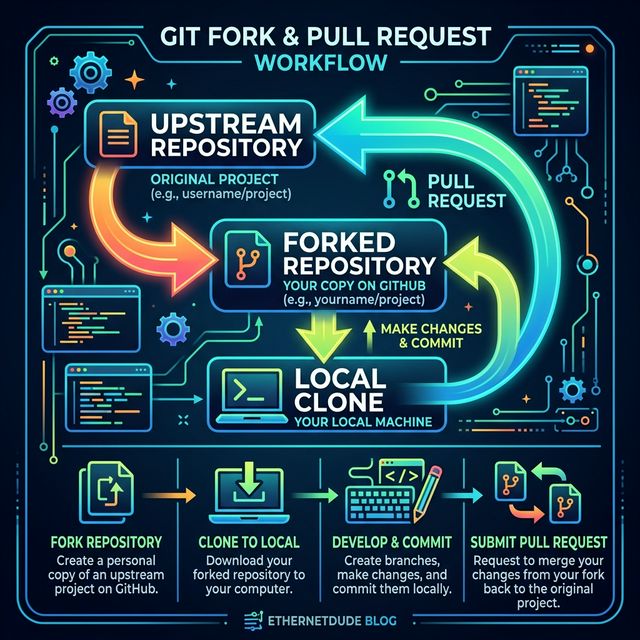
If you want to contribute to someone else’s project (we call it the “Upstream” repo), you won’t have write access. The problem here is that you can’t directly push changes there. So, you use GitHub’s “Fork” feature.
1. Forking the repo: A fork is basically a complete clone of the Upstream repository, but it lives under your personal GitHub profile. Because it’s yours, you have full write access to it.
2. Cloning locally: You generally don’t edit files directly on GitHub. I am going to clone my fork down to my laptop using git clone.
git clone https://github.com/your-username/upstream-fork.git
3. Using a Feature Branch: Even in your own fork, try to never commit directly to main. It has to be noted that you should always create a new branch for whatever feature you’re building.
git switch -c add-login-logging
4. Pushing your changes: Write your code, test it locally, commit it, & then push that specific branch back up to your fork on GitHub. Let me run the push command.
git push -u origin add-login-logging
Opening the Pull Request (PR)
So now your code is sitting safely in a branch on your personal fork. The ultimate goal is to get this code merged into the main Upstream repository. You do this by creating a Pull Request (PR). A PR isn’t a terminal command; it’s a feature on GitHub. You are literally requesting the maintainers of the upstream project to pull your branch into their main codebase. When you open a PR on GitHub, it shows a nice visual git diff of your changes. You add a description—basically explaining why you wrote the code the way you did—& submit it.
The Code Review Process
Once the PR is out there, it doesn’t just instantly merge. It goes through Code Review. Senior folks or repo maintainers will go through your code line by line. They’ll drop comments directly on the PR.
- “Any reason we’re looping twice here?”
- “We should probably add a try-catch block for this database call.”
- “Looks good, but please add a unit test for this case.”
If they ask for changes, do not close the PR. Just open your local editor, make the fixes on the exact same branch, commit them, & run git push again. GitHub automatically detects the new commits & updates the existing PR. Once everyone is satisfied with the code, you’ll usually get an LGTM (Looks Good To Me). The maintainer hits the merge button, & your code becomes officially part of the main project. This whole workflow is basically a safety net. As a junior engineer, you can freely fork repos, break things locally, & push code, all while knowing that senior engineers will double-check everything before it touches a live environment.
