
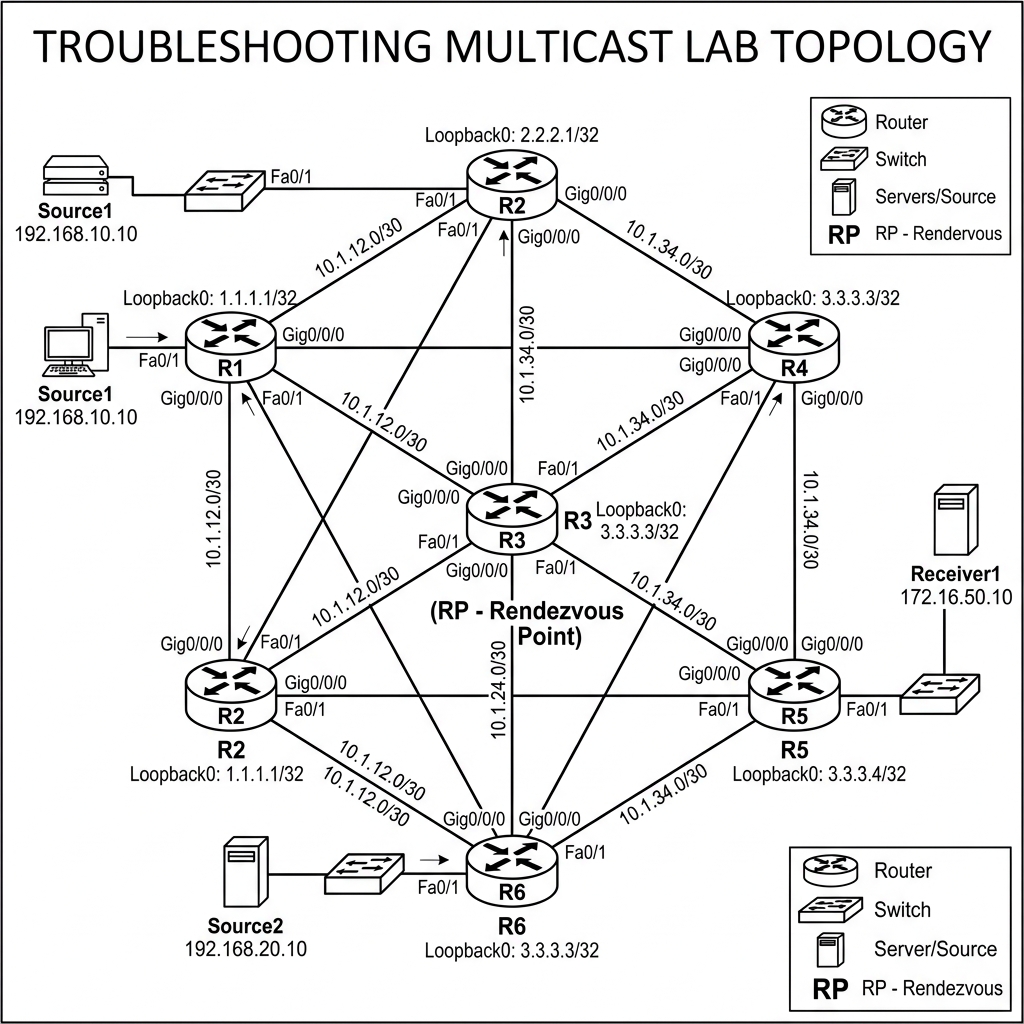
This article is different from the others. I am not going to teach you a protocol from scratch. Instead, I am going to hand you a broken network & ask you to fix it. Five different multicast failures, all pre-staged in the same topology. Each one simulates a failure I have personally encountered in production — & each one is the kind of problem that makes engineers stare at their screen for hours because multicast failures are almost always silent.
The way to use this article: load the “broken” configs into your EVE-NG lab, then work through each scenario methodically. For each one, I will give you the symptoms, the verification commands you should run, & then the fix. Try to diagnose each issue yourself before reading the solution.
Lab Topology
We are using a 6-router mesh that represents a realistic campus/enterprise multicast domain.
IP Addressing Table
| Device | Interface | IP Address | Subnet Mask | Description |
|---|---|---|---|---|
| R1 | Gi0/0 | 10.0.0.1 | 255.255.255.0 | To Source1 |
| R1 | Gi0/1 | 10.12.0.1 | 255.255.255.0 | To R2 |
| R2 | Gi0/0 | 10.12.0.2 | 255.255.255.0 | To R1 |
| R2 | Gi0/1 | 10.23.0.2 | 255.255.255.0 | To R3 |
| R2 | Gi0/2 | 10.24.0.2 | 255.255.255.0 | To R4 |
| R3 | Gi0/0 | 10.23.0.3 | 255.255.255.0 | To R2 |
| R3 | Gi0/1 | 10.35.0.3 | 255.255.255.0 | To R5 |
| R3 | Loopback0 | 3.3.3.3 | 255.255.255.255 | RP Address |
| R4 | Gi0/0 | 10.34.0.4 | 255.255.255.0 | To R3 |
| R4 | Gi0/1 | 10.56.0.4 | 255.255.255.0 | To R6 |
| R4 | Gi0/2 | 10.24.0.4 | 255.255.255.0 | To R2 |
| R5 | Gi0/0 | 10.35.0.5 | 255.255.255.0 | To R3 |
| R5 | Gi0/1 | 10.50.0.1 | 255.255.255.0 | To Receivers |
| R6 | Gi0/0 | 10.6.0.1 | 255.255.255.0 | To Source2 |
| R6 | Gi0/1 | 10.56.0.6 | 255.255.255.0 | To R4 |
| Source1 | Gi0/0 | 10.0.0.10 | 255.255.255.0 | Multicast Source 1 |
| Source2 | Gi0/0 | 10.6.0.10 | 255.255.255.0 | Multicast Source 2 |
| Receiver1 | Gi0/0 | 10.50.0.10 | 255.255.255.0 | Multicast Receiver 1 |
Load the Broken Configs
Apply these configurations to your routers. Each one has a deliberate fault embedded.
Source & Receiver Configuration (Cisco Routers):
We configure these as simple L2 hosts (using no ip routing to behave like a host).
!! Source1 (10.0.0.10)
hostname Source1
no ip routing
interface GigabitEthernet0/0
 ip address 10.0.0.10 255.255.255.0
 no shutdown
ip default-gateway 10.0.0.1

!! Source2 (10.6.0.10)
hostname Source2
no ip routing
interface GigabitEthernet0/0
 ip address 10.6.0.10 255.255.255.0
 no shutdown
ip default-gateway 10.6.0.1

!! Receiver1 (10.50.0.10)
hostname Receiver1
no ip routing
interface GigabitEthernet0/0
 ip address 10.50.0.10 255.255.255.0
 no shutdown
ip default-gateway 10.50.0.1
R1 — “Broken” Config:
hostname R1
!
interface GigabitEthernet0/0
 ip address 10.0.0.1 255.255.255.0
 ip pim sparse-mode
 no shutdown
!
interface GigabitEthernet0/1
 ip address 10.12.0.1 255.255.255.0
 ip pim sparse-mode
 no shutdown
!
router ospf 1
 network 10.0.0.0 0.0.0.255 area 0
 network 10.12.0.0 0.0.0.255 area 0
!
ip multicast-routing
ip pim rp-address 3.3.3.3
R2 — “Broken” Config:
hostname R2
!
interface GigabitEthernet0/0
 ip address 10.12.0.2 255.255.255.0
 ip pim sparse-mode
 no shutdown
!
interface GigabitEthernet0/1
 ip address 10.23.0.2 255.255.255.0
 ip pim sparse-mode
 no shutdown
!
interface GigabitEthernet0/2
 ip address 10.24.0.2 255.255.255.0
 !! NOTE: PIM is MISSING on this interface — Scenario 4
 no shutdown
!
router ospf 1
 network 10.12.0.0 0.0.0.255 area 0
 network 10.23.0.0 0.0.0.255 area 0
 network 10.24.0.0 0.0.0.255 area 0
!
ip multicast-routing
ip pim rp-address 3.3.3.3
R3 (RP) — “Broken” Config:
hostname R3
!
interface Loopback0
 ip address 3.3.3.3 255.255.255.255
 ip pim sparse-mode
!
interface GigabitEthernet0/0
 ip address 10.23.0.3 255.255.255.0
 ip pim sparse-mode
 no shutdown
!
interface GigabitEthernet0/1
 ip address 10.35.0.3 255.255.255.0
 ip pim sparse-mode
 no shutdown
!
router ospf 1
 !! NOTE: Loopback0 is NOT advertised in OSPF — Scenario 2
 network 10.23.0.0 0.0.0.255 area 0
 network 10.35.0.0 0.0.0.255 area 0
!
ip multicast-routing
ip pim rp-address 3.3.3.3
R4 — “Broken” Config:
hostname R4
!
interface GigabitEthernet0/0
 ip address 10.34.0.4 255.255.255.0
 ip pim sparse-mode
 no shutdown
!
interface GigabitEthernet0/1
 ip address 10.56.0.4 255.255.255.0
 ip pim sparse-mode
 no shutdown
!
interface GigabitEthernet0/2
 ip address 10.24.0.4 255.255.255.0
 ip pim sparse-mode
 no shutdown
!
router ospf 1
 network 10.34.0.0 0.0.0.255 area 0
 network 10.56.0.0 0.0.0.255 area 0
 network 10.24.0.0 0.0.0.255 area 0
!
ip multicast-routing
ip pim rp-address 3.3.3.3
!
!! NOTE: Static route creates RPF failure — Scenario 1
ip route 10.0.0.0 255.255.255.0 10.24.0.2
R5 — “Broken” Config:
hostname R5
!
interface GigabitEthernet0/0
 ip address 10.35.0.5 255.255.255.0
 ip pim sparse-mode
 no shutdown
!
interface GigabitEthernet0/1
 ip address 10.50.0.1 255.255.255.0
 ip pim sparse-mode
 ip igmp version 2
 !! NOTE: TTL threshold configured — Scenario 5
 ip multicast ttl-threshold 200
 no shutdown
!
router ospf 1
 network 10.35.0.0 0.0.0.255 area 0
 network 10.50.0.0 0.0.0.255 area 0
!
ip multicast-routing
ip pim rp-address 3.3.3.3
R6 — “Broken” Config:
hostname R6
!
interface GigabitEthernet0/0
 ip address 10.6.0.1 255.255.255.0
 ip pim sparse-mode
 no shutdown
!
interface GigabitEthernet0/1
 ip address 10.56.0.6 255.255.255.0
 ip pim sparse-mode
 no shutdown
!
router ospf 1
 network 10.6.0.0 0.0.0.255 area 0
 network 10.56.0.0 0.0.0.255 area 0
!
ip multicast-routing
!! NOTE: RP address is WRONG — Scenario 3 (only for Source2 testing)
ip pim rp-address 3.3.3.4
Scenario 1: RPF Failure
The Theory: Before you dive into the CLI, remember the most important rule of multicast troubleshooting: Follow the tree. Start at the receiver, work toward the RP, then work from the RP toward the source. At each hop, check PIM neighbors, RPF, and Oil.
Scenario 1 (RPF Failure) Testing:
!! On Receiver1 — join the group
Receiver1(config)# interface GigabitEthernet0/0
Receiver1(config-if)# ip igmp join-group 239.1.1.1

!! On Source1 — send pings
Source1# ping 239.1.1.1 repeat 1000
Now run the diagnosis:
R4# show ip rpf 10.0.0.10
Output:
RPF information for ? (10.0.0.10)
  RPF interface: GigabitEthernet0/2
  RPF neighbor: ? (10.24.0.2)
  RPF route/mask: 10.0.0.0/24
  RPF type: static
RPF points to Gi0/2 (toward R2 via static route), but actual multicast arrives on Gi0/0 (from R3), or on the shared tree via R3. The static route makes RPF expect traffic on a different interface.
R4# show ip mroute 239.1.1.1 count
Look for RPF Failures incrementing.
Root Cause: ip route 10.0.0.0 255.255.255.0 10.24.0.2 on R4 changes the RPF check away from the actual multicast tree path.
Fix:
R4(config)# no ip route 10.0.0.0 255.255.255.0 10.24.0.2
Scenario 2: RP Unreachable
Symptom: No multicast works for any group. show ip mroute on R5 shows (*, 239.1.1.1) but with RPF failure toward the RP.
Scenario 2 (RP Unreachable) Testing:
!! On Source1 — keep pining
Source1# ping 239.1.1.1 repeat 1000
Check the symptoms on R5:
R5# show ip mroute 239.1.1.1
% Network not in table
No route to the RP. Check why:
R3# show ip ospf interface brief
Output:
Interface    PID   Area            IP Address/Mask    Cost  State Nbrs F/C
Gi0/0        1     0               10.23.0.3/24       1     DR    1/1
Gi0/1        1     0               10.35.0.3/24       1     DR    1/1
Loopback0 is not in OSPF. R3 has ip address 3.3.3.3 on Loopback0 but never advertised it.
Root Cause: Missing network 3.3.3.3 0.0.0.0 area 0 in R3’s OSPF config.
Fix:
R3(config)# router ospf 1
R3(config-router)# network 3.3.3.3 0.0.0.0 area 0
Verify:
R5# show ip route 3.3.3.3
Routing entry for 3.3.3.3/32
  Known via "ospf 1", distance 110
Scenario 3: RP Address Mismatch
Symptom: Source2 (10.6.0.10) is sending multicast to 239.2.2.2. Receiver has joined on R5. Traffic from Source2 never arrives.
Scenario 3 (RP Address Mismatch) Testing:
!! On Source2 — send multicast pings
Source2# ping 239.2.2.2 repeat 1000
Check R6:
R6# show ip pim rp mapping
Output:
Group(s): 224.0.0.0/4
  RP: 3.3.3.3 (?), Static
R5# show ip pim rp mapping
Output:
Group(s): 224.0.0.0/4
  RP: 3.3.3.3 (?), Static
R6 is configured with RP 3.3.3.4, but the actual RP is 3.3.3.3. R6 tries to register Source2 with 3.3.3.4, which does not exist. The PIM Register fails.
Root Cause: Typo in R6’s ip pim rp-address — 3.3.3.4 instead of 3.3.3.3.
Fix:
R6(config)# no ip pim rp-address 3.3.3.4
R6(config)# ip pim rp-address 3.3.3.3
This is one of the most common mistakes in multicast deployments — the RP address must be identical on EVERY router in the domain. One typo & that router’s sources cannot register and its receivers’ joins go to the wrong place.
Scenario 4: PIM Neighbor Missing
Symptom: Traffic from Source1 reaches R2 but never gets to R4 via the R2→R4 direct link (10.24.0.0/24). R4 has no PIM neighbor on Gi0/2.
How to diagnose:
R4# show ip pim neighbor
Output:
Neighbor          Interface                Uptime/Expires    Ver
10.34.0.3         GigabitEthernet0/0       00:10:00/00:01:30 v2
10.56.0.6         GigabitEthernet0/1       00:10:00/00:01:28 v2
No neighbor on Gi0/2. Check R2:
R2# show ip pim interface
Output:
Interface          Ver/  Nbr    Query   DR        DR
                   Mode  Count  Intvl   Prior     Address
GigabitEthernet0/0 v2/S  1      30      1         10.12.0.2
GigabitEthernet0/1 v2/S  1      30      1         10.23.0.3
Gi0/2 is not listed as a PIM interface. PIM was never enabled on R2’s Gi0/2.
Root Cause: Missing ip pim sparse-mode on R2’s GigabitEthernet0/2.
Fix:
R2(config)# interface GigabitEthernet0/2
R2(config-if)# ip pim sparse-mode
Within 30 seconds, PIM neighbor adjacency forms:
R4# show ip pim neighbor
Now shows 10.24.0.2 on Gi0/2.
Scenario 5: TTL Threshold
Symptom: Traffic reaches R5 (verified in show ip mroute), but Receiver1 on R5’s Gi0/1 subnet never gets the multicast packets. IGMP groups are healthy on R5.
How to diagnose:
R5# show ip mroute 239.1.1.1
Output:
(10.0.0.10, 239.1.1.1), 00:02:00/00:01:00, flags: SJT
  Incoming interface: GigabitEthernet0/0, RPF nbr 10.35.0.3
  Outgoing interface list:
    GigabitEthernet0/1, Forward/Sparse, 00:02:00/00:01:00
The mroute looks perfect. Gi0/1 is in the OIL. Traffic is arriving. But check the interface detail:
R5# show ip pim interface GigabitEthernet0/1 detail | include TTL
Output:
Multicast TTL threshold: 200
TTL threshold is 200. The multicast packets from the source have a TTL that starts at 32 (or whatever the source sets). After traversing 3-4 routers, the TTL is around 28-29. Since 29 < 200, R5 drops the packet before forwarding it out Gi0/1.
Root Cause: ip multicast ttl-threshold 200 on R5’s Gi0/1. This command says “only forward multicast packets with TTL > 200 out this interface.” It is designed for scoping multicast domains, but someone set it absurdly high.
Fix:
R5(config)# interface GigabitEthernet0/1
R5(config-if)# no ip multicast ttl-threshold
TTL threshold is rarely used intentionally in campus networks. If you ever see it in a config, check if it was set on purpose or if someone copied a config from a different context.
Systematic Multicast Troubleshooting Methodology
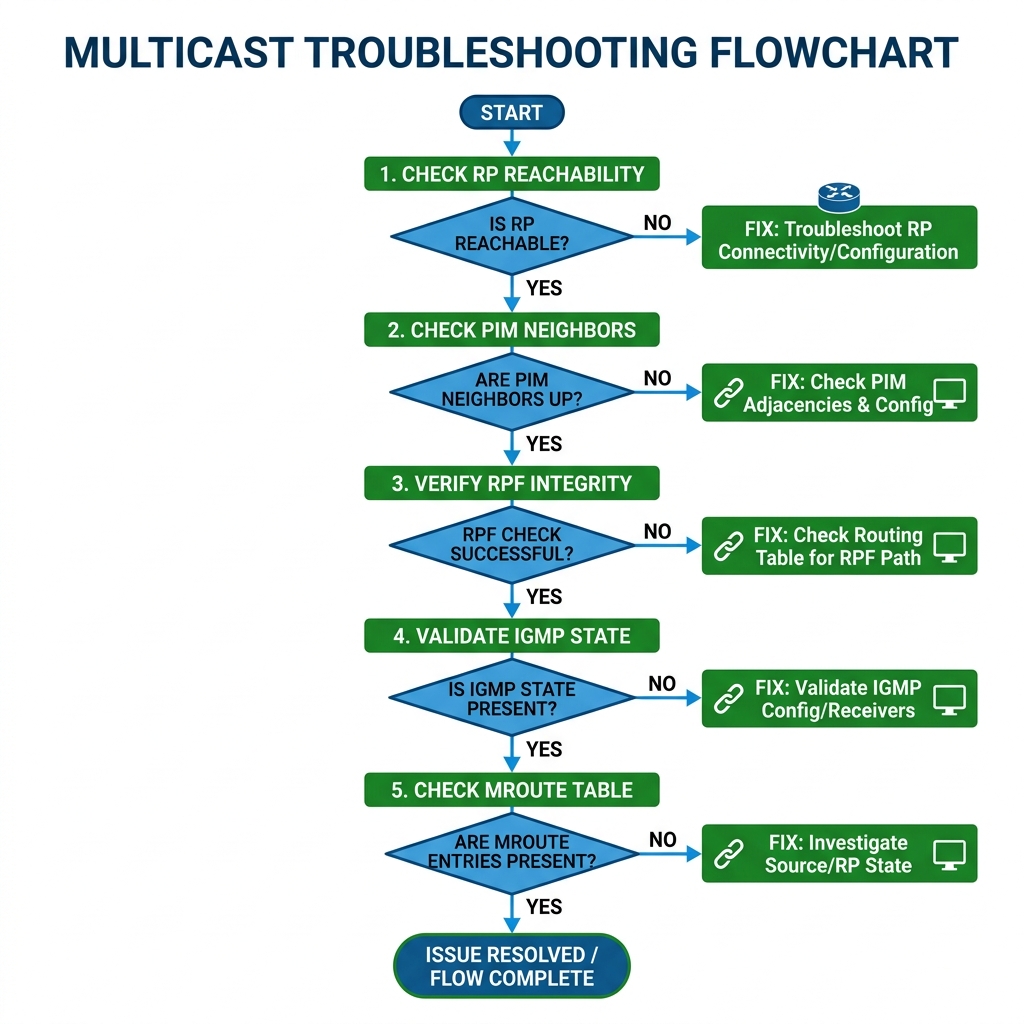
Use this order every time:
1. CHECK RP
   show ip pim rp mapping
   → Is the RP configured? Is it the same on all routers?
   → Can all routers reach the RP? (show ip route <RP>)

2. CHECK PIM NEIGHBORS
   show ip pim neighbor
   → Are all expected neighbors showing?
   → Is PIM enabled on every transit interface?

3. CHECK RPF
   show ip rpf <source>
   → Does the RPF interface match where traffic arrives?
   → show ip mroute count — any RPF failure counters?

4. CHECK IGMP
   show ip igmp groups
   → Are receiver groups showing on the last-hop router?
   → Version mismatch? (show ip igmp interface)

5. CHECK MROUTE TABLE
   show ip mroute <group>
   → Is there an (S,G) entry?
   → Is the outgoing interface list populated?
   → Any Prune flags? Null OIL?

6. CHECK DATA PLANE
   show ip mroute count
   → Are packets being received & forwarded?
   → If received but not forwarded: check TTL, ACLs, boundary
Key Takeaways
- Multicast failures are almost always silent — no syslog, no SNMP trap, just missing traffic
- Start from the RP & work outward — if the RP is broken, nothing else matters
- RPF failures are diagnosed with
show ip rpf&show ip mroute count - Missing PIM on a single transit interface silently breaks the tree
- RP address consistency across all routers is non-negotiable
- TTL threshold is an obscure but devastating misconfiguration
- Always check the mroute table on EVERY router in the path — the problem is usually in the middle, not at the edges
