
Tracking Ephemeral Pod IPs Internally
In a multi-tier application architecture, internal service discovery is a primary concern. The frontend web server needs to talk to the backend API, and the API needs to query the database. However, pods are temporary. They crash, scale, and relocate, resulting in frequently changing IP addresses.
If you hardcode these container IPs in your application configurations, your services will disconnect the moment a backend pod is rescheduled. Furthermore, using an external-facing NodePort service for internal communication forces packets out to the host network card and back, exposing internal databases and adding latency. You need a stable, internal-only communication point.
Stable Internal IPs and CoreDNS hostnames
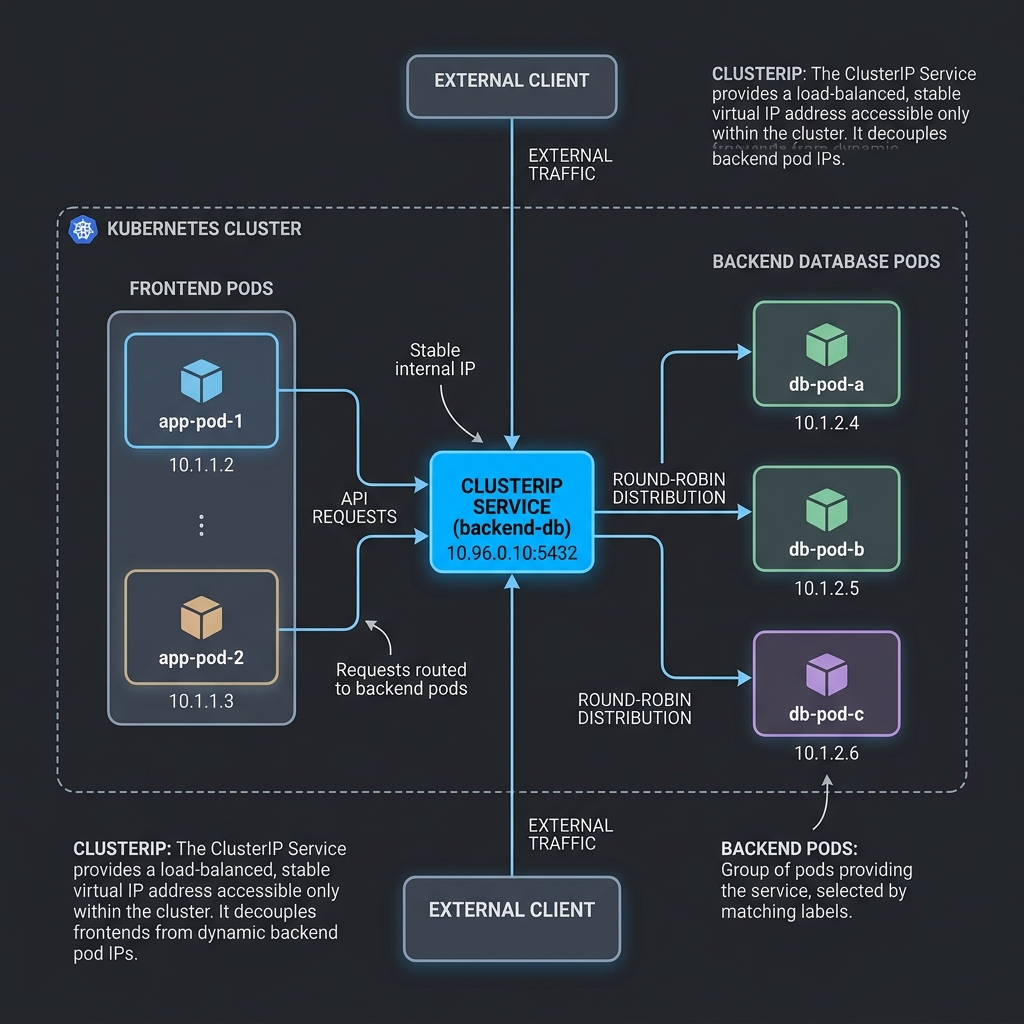
The ClusterIP Service address solves this issue. It is the default service type in Kubernetes. When you create a ClusterIP Service, Kubernetes allocates a stable, virtual IP address that is only accessible from within the cluster’s network.
Kube-proxy writes rules on the host to intercept traffic targeting this virtual IP, forwarding it to the active backend pod instances matching the service’s selector.
Under the hood, the Kubernetes Endpoints controller maintains the lists of target Pod IPs. In modern clusters, this is optimized using EndpointSlice resources, which split large lists of pod IPs into multiple smaller segments, reducing API server network load when scaling resources.
Kubernetes integrates this routing with its internal DNS engine, CoreDNS. When you create a Service named database-service in the default namespace, CoreDNS registers a corresponding DNS record. Your frontend application can then query the service using the stable hostname:
http://database-service
If the frontend and database reside in different namespaces (for example, frontend in web and database in db), you can query the service using the fully qualified domain name (FQDN):
http://database-service.db.svc.cluster.local
Here is how internal pods communicate through the virtual ClusterIP:
Deploying an Internal ClusterIP Service
Let’s deploy a backend service and expose it internally. First, create a database deployment (using a Redis instance as an example):
$ kubectl create deployment redis-db --image=redis:7.0 --replicas=2
Save the following configuration as redis-clusterip-service.yaml:
apiVersion: v1
kind: Service
metadata:
  name: redis-service  # This matches the internal DNS hostname
spec:
  type: ClusterIP  # Limits access to inside the cluster
  ports:
  - port: 6379
    targetPort: 6379
  selector:
    app: redis-db  # Routes traffic to pods running with this label
Apply the configuration:
$ kubectl apply -f redis-clusterip-service.yaml
service/redis-service created
Check the active services:
$ kubectl get services
NAME            TYPE        CLUSTER-IP      EXTERNAL-IP   PORT(S)    AGE
kubernetes      ClusterIP   10.96.0.1       <none>        443/TCP    12d
redis-service   ClusterIP   10.98.241.111   <none>        6379/TCP   10s
The service receives an internal virtual IP (10.98.241.111) but has no external IP.
You can inspect the EndpointSlice resource to see the active backends:
$ kubectl get endpointslice -l kubernetes.io/service-name=redis-service
NAME                  ADDRESSTYPE   PORTS   ENDPOINTS                 AGE
redis-service-abc12   IPv4          6379    10.244.1.15,10.244.2.10   45s
You can test the internal DNS resolution by running a temporary test pod in the cluster:
$ kubectl run test-client --image=busybox -it --rm -- restart=Never -- nslookup redis-service
Server:    10.96.0.10
Address:   10.96.0.10#53

Name:      redis-service.default.svc.cluster.local
Address:   10.98.241.111
The internal DNS successfully resolves the service name to the stable virtual IP. Your frontend applications can connect using redis://redis-service:6379, allowing you to scale or reschedule your database pods without breaking your configurations.
