
The Multi-Tool Security Headache
In many cloud environments, operational governance and system observability are fragmented across multiple disconnected services. If you want to secure an environment in Google Cloud, you configure Organization Policies at the resource folder level, monitor configurations via Security Command Center, manage encryption keys using Cloud KMS, and store database passwords in Secret Manager.
For observability, you write log filters in Cloud Logging, build dashboards in Cloud Monitoring, and use Identity-Aware Proxy (IAP) to establish SSH connections to private VMs. To deploy this infrastructure, you write Terraform but must self-manage the backend storage buckets, state locks, and compute workers.
Oracle Cloud Infrastructure (OCI) consolidates these capabilities.
By unifying key management and secrets, providing native declarative security zones, establishing a managed bastion proxy, and integrating a native, serverless Terraform execution engine (Resource Manager), OCI simplifies enterprise infrastructure management.
OCI Security: Cloud Guard and Security Zones
OCI secures resources at the configuration boundary using two primary governance engines:
1. OCI Cloud Guard
A Cloud Security Posture Management (CSPM) service that continuously scans your OCI tenancy configuration, audit logs, and resource activity for security issues.
* Detectors and Responders: Cloud Guard uses detector recipes to identify security risks (e.g., a public Object Storage bucket, or a compute instance with an open SSH port). When a risk is identified, it can trigger automated responders (such as disabling the public access, or stopping the instance).
* GCP Equivalent: GCP Security Command Center.
2. Security Zones
A Security Zone is a special type of compartment associated with a strict security recipe.
* Preventative Enforcement: Unlike Cloud Guard, which detects misconfigurations after they occur, Security Zones block insecure actions at the API boundary.
* If a user attempts to create a public subnet, launch a VM with a public IP, or attach an unencrypted block volume inside a Security Zone, the OCI API instantly rejects the request.
* GCP Equivalent: GCP Organization Policy Service applied to specific projects.
Vault (KMS & Secrets) and Bastion Service
OCI consolidates encryption and access control into specialized security services:
1. OCI Vault
A unified, managed security service for encryption keys and application secrets.
* Keys: Creates and manages master encryption keys stored in Hardware Security Modules (HSMs). OCI services (Compute, Block Volume, Object Storage) integrate natively with OCI Vault for Customer-Managed Keys (CMK) encryption.
* Secrets: Stores sensitive configuration details (e.g., DB passwords, SSH keys, API tokens) as encrypted payloads, managing secret versioning and access control.
* GCP Equivalent: Unified version of GCP Cloud KMS and Secret Manager.
2. OCI Bastion Service
Provides secure, temporary, and monitored SSH/RDP access to private resources within your VCN.
* When an administrator needs to SSH into a private VM, they request a Bastion Session (valid for a max of 3 hours) and provide their public SSH key.
* The Bastion service generates a temporary, single-use SSH tunnel endpoint. The administrator connects via standard SSH port forwarding.
* OCI logs every connection attempt and session lifecycle in the Audit log.
* GCP Equivalent: GCP Identity-Aware Proxy (IAP) TCP forwarding.
Centralized Observability: Monitoring and Logging
OCI observes infrastructure health through two integrated telemetry services:
- OCI Monitoring: Collects and aggregates metric data (CPU utilization, disk read operations, network packets) from your OCI resources. You can query metrics using Monitoring Query Language (MQL), create real-time dashboards, and configure Alarms to route notifications to ONS when thresholds are breached. (Equivalent to GCP Cloud Monitoring).
- OCI Logging: A centralized management engine for all logs. It categorizes logs into:
- Audit Logs: Automatically records API calls to all OCI services (Equivalent to GCP Cloud Audit Logs).
- Service Logs: Logs generated by OCI native services (VCN Flow Logs, Load Balancer traffic logs).
- Custom Logs: Application or OS logs collected via unified monitoring agents running on compute instances.
(Equivalent to GCP Cloud Logging).
Infrastructure as Code: OCI Resource Manager
To automate resource deployment, OCI includes Resource Manager, a fully managed, serverless platform that executes Terraform configurations.
* State Management: Resource Manager hosts your Terraform state files, managing concurrency locks, backend storage, and historical state history automatically.
* Stacks and Jobs: You upload your Terraform configuration as a Stack. You then run Jobs (Plan, Apply, Destroy) against the Stack. Resource Manager executes these jobs in isolated, containerized environments, rendering execution logs in real-time.
* GCP Equivalent: GCP Deployment Manager or managed Terraform Cloud.
The structural relationships between these security, observability, and automation components are shown below:
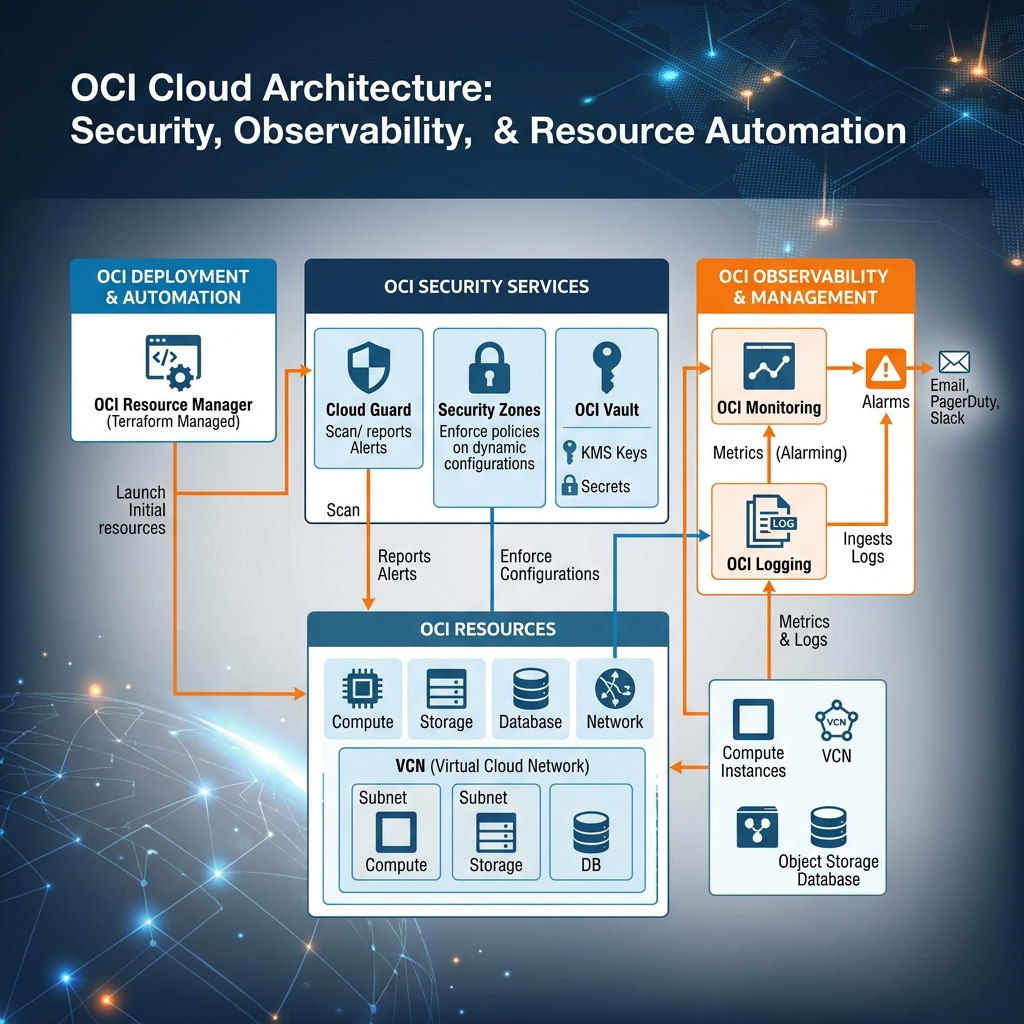
Declarative Provisioning via Terraform
Instead of scripting manual CLI commands, you configure OCI Security and Automation resources using Terraform. The following configuration defines a Security Zone (to enforce baseline policies), an OCI Vault Key for customer-managed encryption, and a Resource Manager Stack to automate your deployments:
# 1. Define a Security Zone compartment to enforce governance
resource "oci_security_zones_security_zone" "prod_security_zone" {
  compartment_id    = "ocid1.compartment.oc1..aaaaaaaadevvv..."
  display_name      = "Prod-Security-Zone"

  # Reference the security recipe OCID (e.g. OCI Maximum Security Recipe)
  security_zone_recipe_id = "ocid1.securityzonerecipe.oc1..aaaaaaaarecipe..."
}

# 2. Define an OCI Vault (KMS) Master Encryption Key
resource "oci_kms_key" "prod_master_key" {
  compartment_id      = "ocid1.compartment.oc1..aaaaaaaadevvv..."
  display_name        = "ProdMasterKey"

  # Point to the Vault Management Endpoint
  management_endpoint = "https://example-vault-management.kms.us-ashburn-1.oraclecloud.com"

  # Configure key shape properties (using standard AES-256 HSM keys)
  key_shape {
    algorithm = "AES"
    length    = 32
  }
}

# 3. Create a Resource Manager Stack to manage your Terraform state
resource "oci_resourcemanager_stack" "prod_network_stack" {
  compartment_id = "ocid1.compartment.oc1..aaaaaaaadevvv..."
  display_name   = "Prod-Network-Stack"

  # Specify the path or configuration source zip/directory
  config_source {
    config_source_type = "ZIP_UPLOAD"
    zip_file_base64url = "UEsDBAoAAAAAA..." %% Base64 encoded terraform config zip
  }

  terraform_version = "1.5.x"
}
By consolidating encryption keys inside Vault, enforcing organizational governance via Security Zones, and automating infrastructure deployment using managed Resource Manager stacks defined in Terraform, you can establish highly consistent cloud environments that are secure by default.
