
The Shared-Account Scaling Trap
Imagine you are building out a multi-tier cloud environment. In many cloud models, the default impulse is to spin up separate “accounts” or “projects” for every environment—one for development, one for staging, and one for production. While this creates a hard security and billing boundary, it introduces immediate management overhead. You end up managing multiple console logins, setting up complex billing consolidation, and configuring transit gateways or VPC peering just to let developers check service logs across environments.
Worse, resource limits are bound to these separate projects. If your production project hits its quota for virtual machines, you must open support tickets to increase it, even if your development project is sitting completely idle with plenty of unused capacity. If a developer accidentally builds a resource in the wrong project, moving it is rarely a simple click; it usually involves a tedious process of tearing down and rebuilding.
Oracle Cloud Infrastructure (OCI) approaches resource organization differently. Instead of using isolated projects as the base building blocks, OCI structures everything under a single, unified tenant, using a logical, hierarchical container system called Compartments.
Hierarchical Containment: Tenancies and Compartments
When you sign up for OCI, you are provisioned a single Tenancy, which represents your root organization and maps to a single billing account. Within this tenancy, you organize resources using Compartments.
Unlike Google Cloud’s project-centric model—where resources, billing, and API enablement are bound to a flat or folder-nested list of independent Projects—OCI Compartments are strictly logical.
* Logical Separation: A compartment is not a physical partition. It is a label attached to resources. You can nest compartments up to six levels deep, creating a tree structure that mirrors your organizational hierarchy.
* Global Resource Pools: Because all compartments share the same underlying tenancy, resource quotas, service limits, and billing are managed centrally.
* Mobility: Unlike GCP projects, where resources are permanently anchored, many OCI resources (such as compute instances, block volumes, and virtual cloud networks) can be moved between compartments on the fly without service disruption.
Here is how the hierarchy of compartments and policy enforcement is structured:
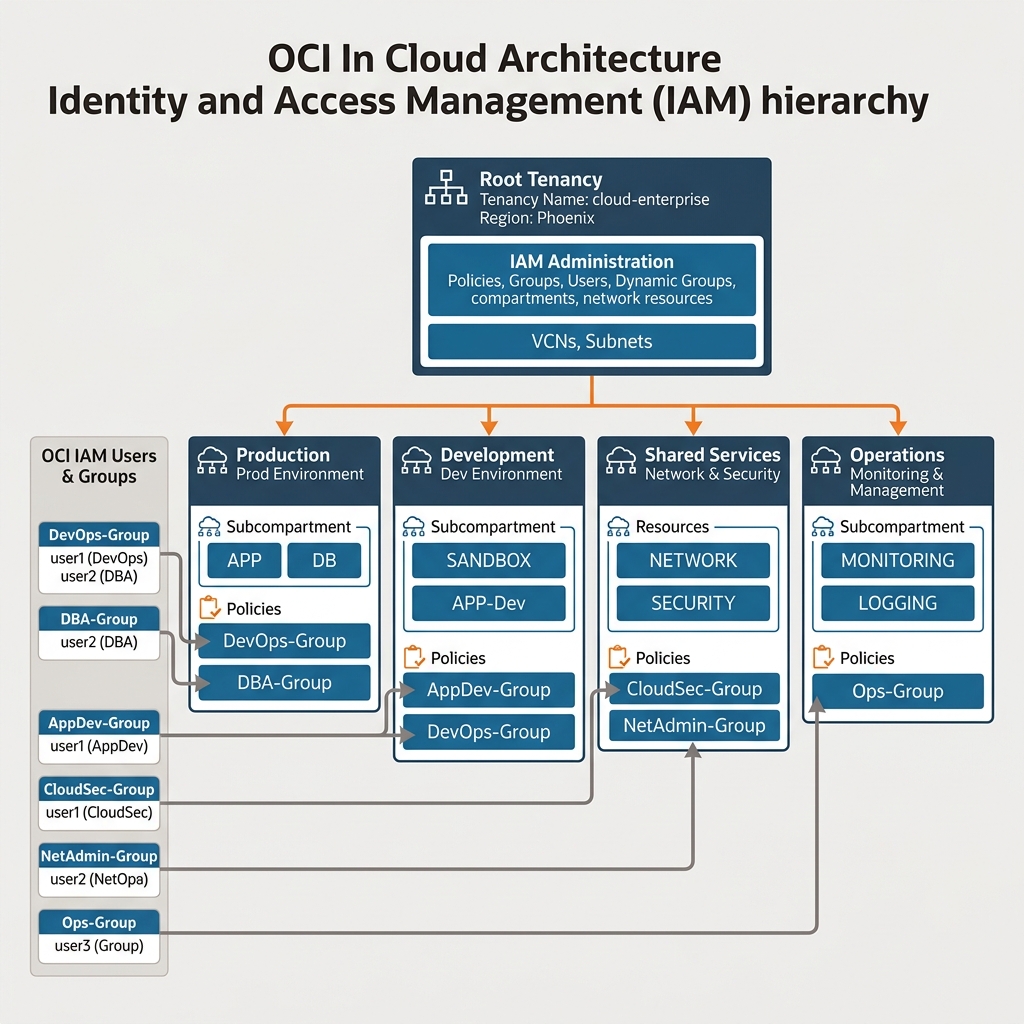
When designing a compartment structure, a standard practice is to create a top-level compartment for major business units or security zones, and then branch out into lifecycle stages:
Root Tenancy
└── Dev-Compartment
│   ├── Frontend-SubCompartment
│   └── Backend-SubCompartment
└── Prod-Compartment
    ├── Frontend-SubCompartment
    └── Backend-SubCompartment
Writing Declarative IAM Policies
In Google Cloud, permissions are granted by binding pre-defined or custom IAM roles (which pack specific API permissions) to users, groups, or service accounts at the Project, Folder, or Organization level. OCI does not use role bindings. Instead, it uses a SQL-like declarative policy language.
OCI policies are plain-text statements written using a specific syntax. They are attached directly to a compartment (or the root tenancy) and define exactly who can do what, and where.
The basic syntax of an OCI policy statement is:
Allow group <group_name> to <verb> <resource_type> in compartment <compartment_name>
The Four Verbs
To keep policies manageable, OCI groups API permissions into four progressive verbs:
1. inspect: The lowest level of access. Allows listing resources without viewing their details or sensitive metadata. (Equivalent to viewer or list-only roles).
2. read: Includes inspect plus the ability to get resource configurations. Does not allow viewing the actual content (e.g., you can read object storage bucket metadata, but not download the files inside).
3. use: Includes read plus the ability to work with the resource (e.g., start or stop compute instances, upload/download objects, attach block volumes). It does not allow creating or deleting the resource container itself.
4. manage: The highest level. Covers all actions, including creating, updating, and deleting resources.
Resource Types
OCI groups resources into broad families or specific types. For example:
* all-resources: Grants access to every resource in OCI.
* instance-family: Covers compute instances, console connections, and images.
* virtual-network-family: Covers VCNs, subnets, route tables, and gateways.
* volume-family: Covers block and boot volumes.
Let’s look at a concrete example. Suppose you want to allow a group of developers named Dev-Network-Admins to manage the networking infrastructure in your Dev-Compartment. You would write:
Allow group Dev-Network-Admins to manage virtual-network-family in compartment Dev-Compartment
If you wanted to allow another group named Dev-Operators to start, stop, and reboot VMs in that same compartment, but prevent them from deleting or creating new VMs, you would write:
Allow group Dev-Operators to use instance-family in compartment Dev-Compartment
Identity Domains and Dynamic Groups
Historically, OCI managed users and groups directly in its core IAM service. Modern tenancies use Identity Domains, which function as a native Identity-as-a-Service (IDaaS). An Identity Domain is a container for managing users, groups, federation, and security configurations. You can have multiple domains (e.g., a “Default” domain for core employees, and a “Partner” domain for external contractors) within a single tenancy.
Service-to-Service Authorization: Dynamic Groups
In GCP, when a virtual machine needs to access Cloud Storage or write to Cloud Logging, you assign a Service Account to the VM and grant IAM roles to that service account.
OCI does not use Service Accounts. Instead, it uses Dynamic Groups and Instance Principals.
Rather than creating a credentialed service account and attaching it to a VM, you define a Dynamic Group using a rule that queries resource metadata. Any compute instance that matches the rule is automatically a member of the group.
For example, to group all compute instances running in your Dev-Compartment, you would create a Dynamic Group named Dev-Instances with the following membership rule:
Any {instance.compartment.id = 'ocid1.compartment.oc1..aaaaaaaaxxx...'}
Once the Dynamic Group is created, you write a policy statement to grant those instances permissions. To allow the instances in the Dev-Instances group to read objects from an Object Storage bucket:
Allow dynamic-group Dev-Instances to read objects in compartment Dev-Compartment
The code running on the compute instance can now initialize the OCI SDK using Instance Principals, which automatically retrieves temporary session tokens from the local metadata service without requiring hardcoded API keys or service account key files.
Declarative Provisioning via Terraform
In OCI, cloud engineers rarely run manual CLI commands to configure environments. Instead, resource provisioning is managed declaratively using Terraform and the OCI Terraform Provider.
To create a new compartment and apply an IAM policy to it, you write standard .tf resource configurations.
1. Creating a Compartment
To define a new logical compartment inside your tenancy, you use the oci_identity_compartment resource:
resource "oci_identity_compartment" "dev_compartment" {
  # The OCID of the parent compartment (e.g., the root tenancy)
  compartment_id = "ocid1.tenancy.oc1..aaaaaaaaxxx..."
  description    = "Development environment resources"
  name           = "Dev-Compartment"

  # Enable the compartment (defaults to true)
  enable_delete  = false %% Set to true to allow deletion when destroyed
}
2. Creating an IAM Policy
Once the compartment is created, you write a policy using the oci_identity_policy resource to govern it. OCI policies are assigned directly to a compartment (or the root tenancy) and require defining the plain-text policy statements:
resource "oci_identity_policy" "dev_bucket_read_policy" {
  # The compartment where the policy itself resides
  compartment_id = oci_identity_compartment.dev_compartment.id
  description    = "Allow devs to read objects in dev"
  name           = "DevBucketReadPolicy"

  # The declarative statements list
  statements = [
    "Allow group Dev-Developers to read buckets in compartment Dev-Compartment"
  ]
}
By decoupling resource organization (Compartments) from physical environments (Projects) and defining governance using declarative Terraform resources, OCI simplifies multi-tenant cloud operations while keeping security boundaries clean and easily auditable.
