
The Rigidity of Rigid Instance Shapes
In many cloud platforms, provisioning a virtual machine requires selecting from a pre-defined matrix of instance types or machine families (e.g., General Purpose n2-standard-4 or Compute-Optimized c2-standard-8 in Google Cloud). Each machine type comes with a fixed, immutable ratio of virtual CPUs (vCPUs) to RAM.
If your application is memory-intensive but requires minimal processing power, you are forced to over-provision vCPUs just to acquire the necessary memory. You pay for cores that sit idle. Alternatively, you can use custom machine types, but even those have strict configuration ratios, step-increments, and pricing penalties.
Oracle Cloud Infrastructure (OCI) eliminates this sizing constraint through Flexible Shapes, allowing architects to customize compute resources precisely.
OCI Compute Architectures: VM vs. Bare Metal
OCI categorizes its compute instances into three primary deployment models:
1. Virtual Machines (VM)
A standard VM runs on a multi-tenant hypervisor. OCI guest VMs share physical host hardware with other VMs, isolated by a hardened hypervisor layer. This is equivalent to standard GCP Compute Engine instances.
2. Bare Metal (BM)
Unlike most cloud platforms that wrap physical servers in virtualized abstractions or limit bare metal to niche hosting (e.g., GCP Sole-Tenant Nodes or colocated hardware), OCI offers genuine Bare Metal instances as a first-class, API-managed service.
* When you launch a Bare Metal instance, you are provisioned a dedicated, physical server with no hypervisor overhead. You have root access to the physical hardware.
* This is ideal for performance-sensitive database engines, high-performance computing (HPC), and virtualized nesting workloads (such as running your own VMware hypervisors via Oracle Cloud VMware Solution).
3. Dedicated VM Hosts
If you require the flexibility of VMs but need physical isolation for compliance or license restrictions (such as running legacy database workloads), you can provision a Dedicated VM Host. You pay for a dedicated physical server in an OCI data center and run your guest VMs exclusively on that host. (Equivalent to GCP Sole-Tenant Nodes).
CPU Sizing: OCPUs vs. vCPUs
When configuring compute instances in OCI, you will size them using OCPUs (Oracle CPUs) instead of vCPUs.
* x86 Architecture (Intel/AMD): 1 OCPU represents a single physical CPU core with hyper-threading enabled. Therefore, 1 OCPU in OCI equates to 2 execution threads (what Google Cloud and other hyperscalers call 2 vCPUs).
* ARM Architecture (Ampere Altra): 1 OCPU represents a single physical core without hyper-threading. Thus, 1 OCPU equals 1 execution thread.
Always account for this 2:1 thread-to-core ratio when migrating workloads from GCP to OCI x86 instances to avoid over-provisioning and doubling your license costs.
Flexible Shapes: Tailored CPU and Memory
OCI’s flexible compute shapes (e.g., VM.Standard3.Flex utilizing Intel Xeon Ice Lake, or VM.Standard.E4.Flex utilizing AMD EPYC Rome/Milan) allow you to specify the exact number of OCPUs and the exact amount of memory (in GBs) for your instance.
For example, you can launch a VM with 3 OCPUs and 43 GB of RAM. If your workload spikes, you can adjust the OCPU count or memory on the fly.
* Many modern Linux OS configurations allow OCI to scale memory and CPU dynamically without restarting the instance.
* You pay a flat rate per OCPU-hour and per GB-RAM-hour, with no pricing penalties for selecting non-standard ratios.
Here is how flexible shapes, instance pools, and autoscaling scale dynamically in response to workload metrics:
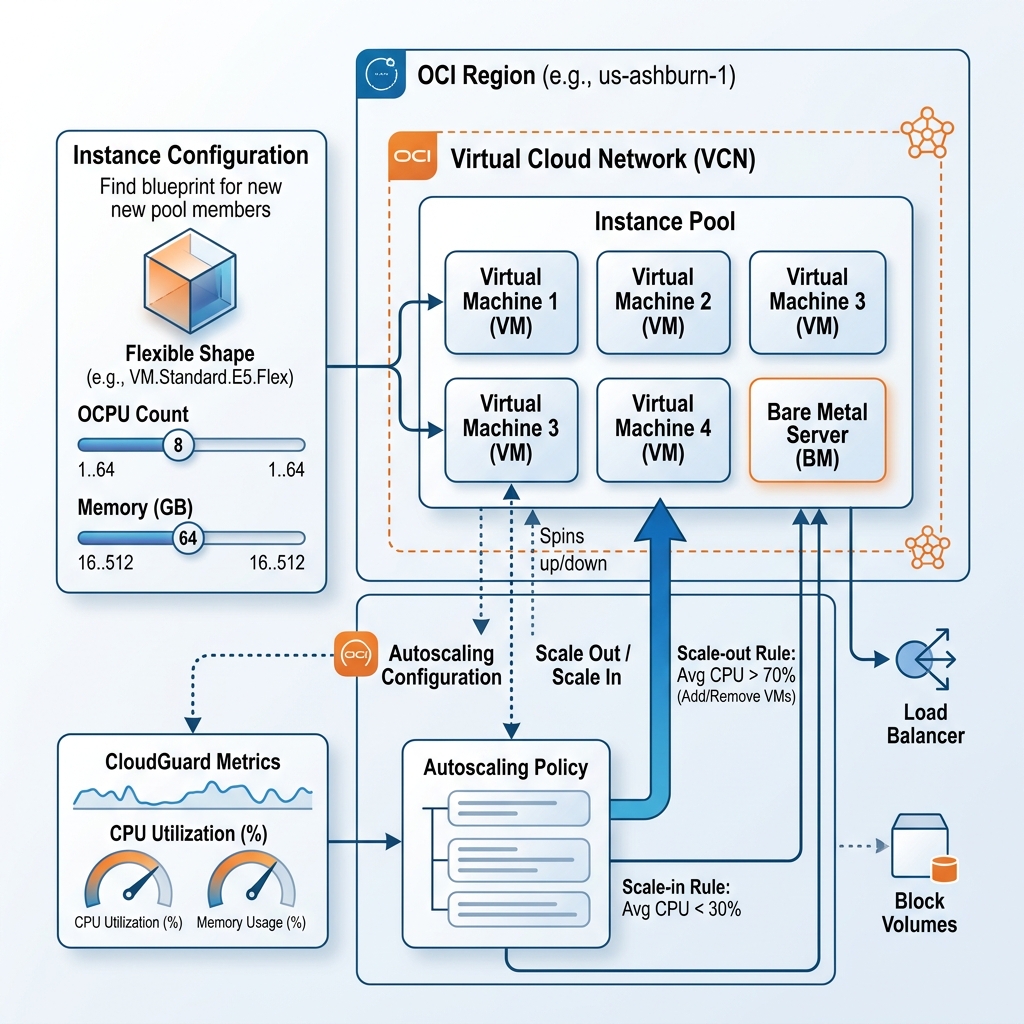
Automated Scale: Configurations, Pools, and Autoscaling
To manage groups of compute instances at scale, OCI provides a native orchestration framework consisting of three components:
1. Instance Configuration
An Instance Configuration is a template that defines the blueprint for a compute instance. It includes the OS image, shape (OCPUs and RAM), virtual disk attachments, metadata (SSH keys, startup scripts), and VCN network configuration. (Equivalent to a GCP Instance Template).
2. Instance Pool
An Instance Pool is a logical grouping of identical compute instances created from an Instance Configuration. It ensures that a specified number of instances are running across availability domains or fault domains. It manages the lifecycle of these instances, automatically recreating them if they fail. (Equivalent to a GCP Managed Instance Group (MIG)).
* You can associate an Instance Pool with an OCI Load Balancer Backend Set. When new instances are added to the pool, they are automatically registered with the load balancer.
3. Autoscaling
You apply an Autoscaling Policy to an Instance Pool to dynamically scale the number of instances up or down based on performance metrics (such as CPU or memory utilization) or a cron-like schedule. (Equivalent to GCP MIG Autoscaler).
Instance Lifecycle and OS Management (OSMS)
To manage OS patching, security vulnerabilities, and package updates, OCI includes the OS Management Service (OSMS) (or its updated iteration, OS Management Cloud).
* OSMS provides automated patching, package management, and compliance reporting for Oracle Linux, Red Hat Enterprise Linux (RHEL), and Windows Server instances.
* It operates via a lightweight agent pre-installed on OCI platform images, allowing you to schedule updates and monitor vulnerabilities across your fleet of instances directly from the OCI console.
* This is equivalent to Google Cloud OS Config (part of VM Manager).
Declarative Provisioning via Terraform
Instead of launching instances manually via the CLI, you declare OCI compute resources using Terraform. The following configuration defines a flexible virtual machine instance running Oracle Linux, specifying 2 OCPUs and 16 GB of RAM:
# Create a flexible compute instance
resource "oci_core_instance" "web_server_flex" {
  availability_domain = "UoNd:US-ASHBURN-AD-1"
  compartment_id      = "ocid1.compartment.oc1..aaaaaaaadevvv..."
  display_name        = "Web-Server-Flex"
  shape               = "VM.Standard.E4.Flex"

  # Configure the flexible CPU and memory allocations
  shape_config {
    ocpus         = 2
    memory_in_gbs = 16
  }

  create_vnic_details {
    subnet_id                 = "ocid1.subnet.oc1.iad.aaaaaaaasub1..."
    display_name              = "primary-vnic"
    assign_public_ip          = true
    assign_private_dns_record = true
  }

  source_details {
    source_type = "image"
    source_id   = "ocid1.image.oc1.iad.aaaaaaaaimg1..." %% The Oracle Linux 8 image OCID
  }

  metadata = {
    ssh_authorized_keys = "ssh-rsa AAAAB3NzaC1yc2E..."
  }

  preserve_boot_volume = false
}
By shifting from rigid instance matrices to flexible shapes and declaring configurations using Terraform, you can achieve highly optimized compute environments that match your workloads’ physical resource footprints exactly.
