
1. Introduction to OCI Identity Domains
In Oracle Cloud Infrastructure (OCI), human user accounts, administrative credentials, security groups, and single sign-on (SSO) configurations are governed by Identity Domains.
An Identity Domain is a container for managing users, groups, authentication policies, federated identity providers (IdPs), and security applications. It functions as a native Identity-as-a-Service (IDaaS) solution built directly inside your OCI tenancy.
Understanding how identity domains operate and how they partition user populations is essential for designing multi-tenant enterprise access models.
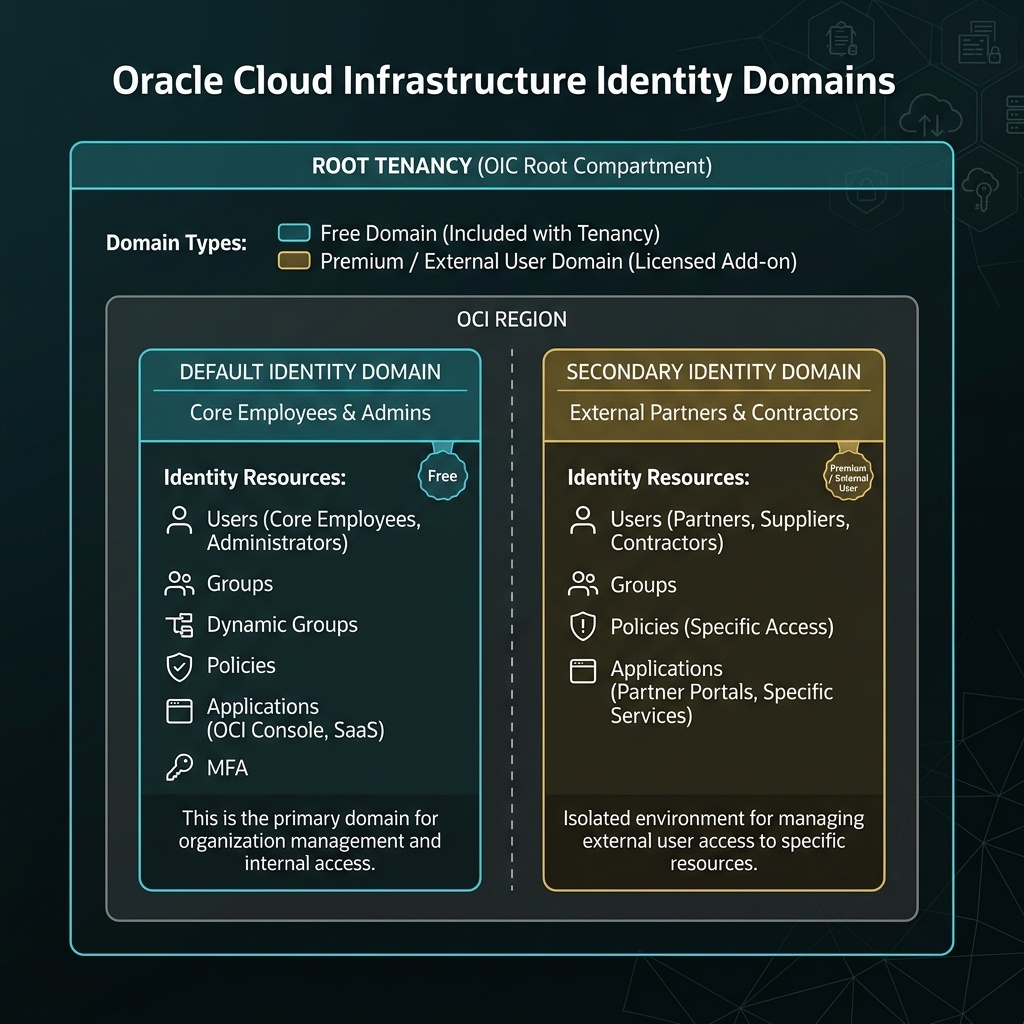
2. Core Architectural Components
Default Domain vs. Secondary Identity Domains
Every OCI tenancy contains at least one identity domain, but enterprise organizations often deploy multiple domains to segregate user populations.
- The Default Domain: When an OCI tenancy is provisioned, OCI automatically creates the Default Identity Domain. This domain houses the initial tenancy administrator, core cloud engineering teams, SecOps personnel, and tenancy-wide default settings.
- Secondary Identity Domains: Organizations can create custom secondary identity domains to isolate specific user groups—such as external contractors, partner organizations, customer-facing application users, or separate business units—preventing directory overlap and enforcing distinct authentication policies.
[!IMPORTANT]
Identity Domain Scope vs. Compartment Scope
An Identity Domain is a tenancy-level global construct. It does NOT reside inside a child compartment. While users in an identity domain can be granted permissions to resources in specific compartments via IAM policies, the domain container itself sits at the root tenancy level.
Identity Domain Types
OCI offers multiple Domain Types, each providing a specific tier of features, user capacity, and security capabilities.
| Domain Type | Primary Target Use Case | Key Features Included | Maximum User Limit |
|---|---|---|---|
| Free | Core OCI console administration | Basic directory, MFA (TOTP), SAML 2.0 federation, OCI Console login | Included free with tenancy |
| Office 365 | Integration with Microsoft environment | Office 365 provisioning, Basic IDaaS, SAML SSO | Based on Microsoft licensing |
| Premium | Full Enterprise IDaaS & Workforce | Advanced Risk-Based Sign-On Rules, Adaptive MFA, SCIM provisioning, FIDO2/WebAuthn | Flexible enterprise licensing |
| External User | Customer-facing B2C applications | Self-registration, social sign-on (Google, Facebook), passwordless login | Scaled per active consumer user |
[!WARNING]
Domain Type Upgrade Constraints
You can upgrade an Identity Domain type (e.g., from Free to Premium) via the OCI Console at any time. However, domain type downgrades are restricted if active premium features (such as custom SCIM bridges or risk-based policies) are currently in use.
3. Directory Management Architecture
Inside an Identity Domain, user identity management relies on four primary building blocks:
- Users: Individual human credentials (email, password, MFA state, API keys) or programmatic service users.
- Groups: Collections of users. OCI IAM policies assign permissions strictly to Groups, never directly to individual users.
- Dynamic Groups: Specialized collections of compute instances or cloud resources (evaluated dynamically via matching rules) used for credential-less service-to-service authorization.
- Sign-on Policies: Configurable rules governing login requirements (MFA enforcement, IP range restrictions, session timeouts, and password complexity).
4. OCI Web Console (GUI) Step-by-Step Walkthrough
Managing Identity Domains and provisioning users is executed directly within the OCI Web Console GUI.
Step 1: Navigating to Identity Domains
- Log in to the Oracle Cloud Console (
https://cloud.oracle.com). - Open the Navigation Menu (
≡) in the top-left corner. - Select Identity & Security, then click Domains under the Identity column.
Console Path: [≡ Main Menu] ➔ [Identity & Security] ➔ [Identity] ➔ [Domains]
Step 2: Creating a Secondary Identity Domain
- On the Domains list page, click Create Domain.
- In the creation panel, enter:
- Name:
Partner-Domain - Description:
Identity domain for third-party audit and vendor users. - Domain Type: Select
Free(orPremiumif advanced SCIM features are required). - Click Create Domain.
Step 3: Provisioning Users in the Web Console
- On the Domains page, click the target domain (e.g.,
Partner-Domain). - In the domain left-hand navigation menu, click Users.
- Click Create User.
- Fill in the user profile details:
- First Name:
Jane - Last Name:
Doe - Username / Email:
[email protected] - User Type: Select
EmployeeorContractor. - Click Create. OCI generates an automated activation email containing a temporary password link.
Step 4: Creating Groups and Assigning Users
- In the domain left-hand menu, click Groups.
- Click Create Group.
- Enter:
- Name:
External-Auditors - Description:
Third-party security audit team members. - Click Create.
- On the Group Details page, click Assign Users to Group.
- Select
[email protected]from the user table list and click Assign.
5. Common Architectural Misconceptions & Pitfalls
Misconception 1: “IAM Policies Are Granted Directly to Users”
- Reality: OCI IAM syntax does not support attaching policy statements directly to individual user accounts. Permissions MUST be granted to a Group, and users inherit permissions by being assigned to that group.
Misconception 2: “User Accounts Are Automatically Shared Across Domains”
- Reality: Identity Domains enforce strict directory boundaries. A user created in
Partner-Domaincannot log into the Console viaDefault-Domainunless explicitly provisioned in both domains or federated.
Misconception 3: “Deleting an Identity Domain Deletes Cloud Resources”
- Reality: Deleting a secondary Identity Domain removes user directories and authentication credentials, but does not delete Compute VMs, VCNs, or Databases in your compartments. However, resources may become inaccessible if no remaining admin groups have IAM policy access.
6. OCI Identity Domains vs. Google Cloud (GCP) Cloud Identity
For architects transitioning from Google Cloud, the following table compares identity management primitives:
| Identity Metric | Google Cloud (GCP) | Oracle Cloud Infrastructure (OCI) | Key Technical Difference |
|---|---|---|---|
| Directory Service | Google Cloud Identity / Workspace | OCI Identity Domains (IDaaS) | OCI Identity Domains are natively built into the tenancy console without requiring an external Google Workspace tenant. |
| Directory Partitioning | Managed via Organizational Units (OUs) or separate Cloud Identity accounts | Managed via Secondary Identity Domains within the same root tenancy | OCI allows isolated user directories (e.g. Contractors vs Employees) directly inside one cloud account. |
| Permission Binding | IAM Roles bound to Users, Groups, or Service Accounts | IAM Policies bound strictly to Groups or Dynamic Groups | OCI enforces group-level policy assignment exclusively. |
| MFA & Security Policies | Enforced at Workspace Org Level | Enforced per Identity Domain via Sign-on Policies | OCI allows different MFA and sign-on rules for different domains (e.g., stricter rules for Contractors). |
