If you ask an application developer how a load balancer works, they will describe NGINX or HAProxy: a reverse proxy that terminates incoming TCP handshakes, negotiates TLS, reads HTTP headers, rewrites URLs, and opens a secondary TCP connection to a backend server.
If you bring that mental model to Azure Standard Load Balancer (ALB), you will design broken architectures.
Azure Load Balancer is not a reverse proxy. It does not terminate TCP connections. It does not speak HTTP, SSL, or TLS. It does not inspect payloads, and it has no concept of URLs or cookies.
Azure Load Balancer is a stateless, Layer-4 hardware-accelerated packet multiplexer. It operates directly in Azure’s SDN fabric (the Ananta SLB Mux architecture), processing millions of packets per second with ultra-low, sub-millisecond latency.
To master Layer-4 delivery for AZ-700, you have to understand the 5-tuple hash, why HA Ports are mandatory for firewall clustering, and how Floating IP (Direct Server Return) powers SQL Server AlwaysOn Availability Groups.
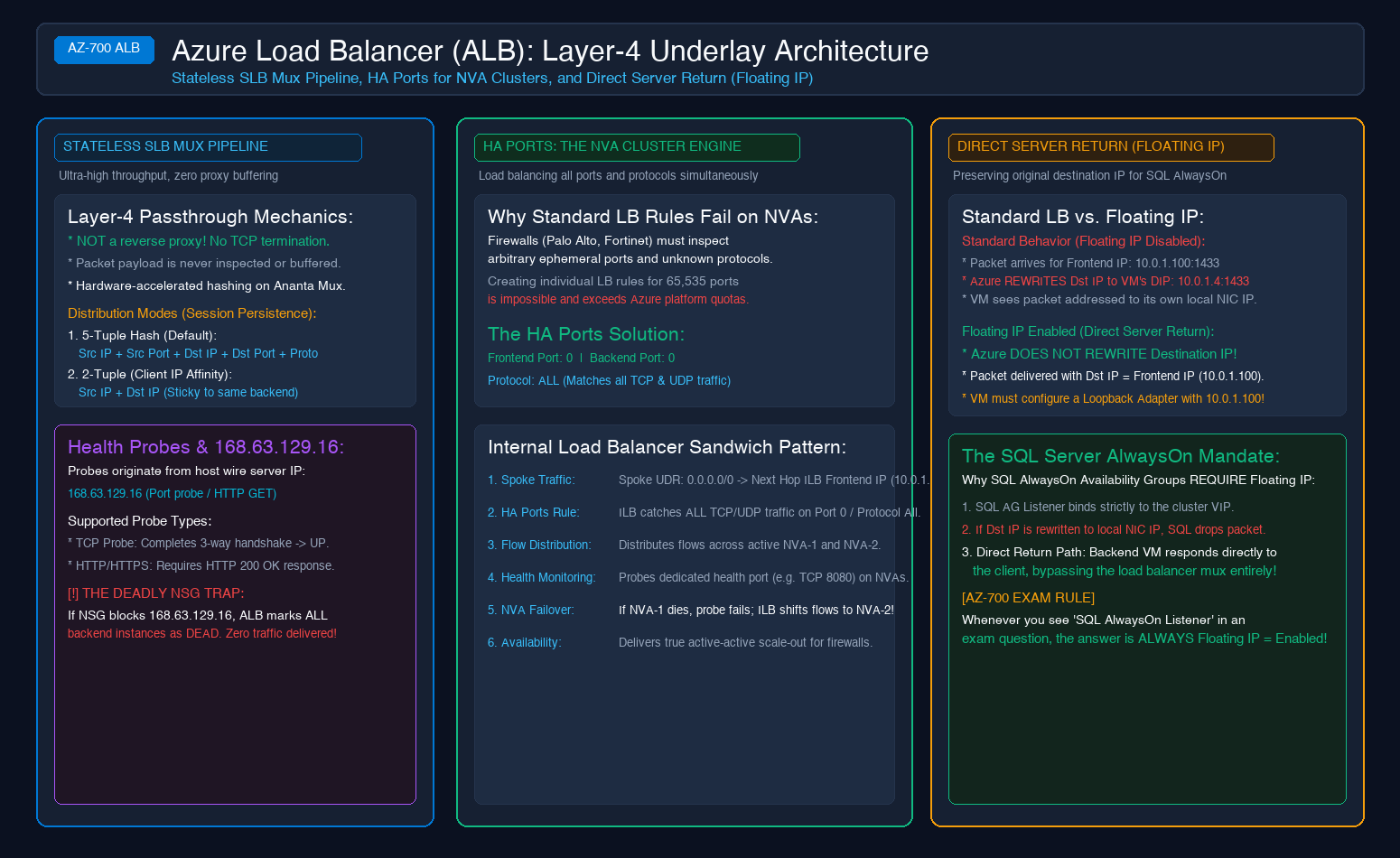
The Layer-4 Underlay: The Stateless Ananta Mux
When a client sends a packet to an Azure Load Balancer Frontend IP (Public or Private):
1. The packet hits a distributed cluster of software multiplexers (the SLB Mux).
2. The Mux does not complete a 3-way TCP handshake with the client.
3. Instead, the Mux hashes the packet header and maps it to a healthy virtual machine in the backend pool.
4. The Mux encapsulates the packet in a Geneve/NVGRE header and delivers it directly to the target host hypervisor.
5. The target VM’s virtual NIC receives the raw TCP SYN packet directly from the client.
Because the load balancer does not buffer packets, reassemble streams, or terminate crypto, it has virtually unlimited throughput and introduces zero queuing latency.
Hashing Algorithms & Session Persistence
Azure Load Balancer distributes incoming traffic using a mathematical hash. The hash determines which backend instance handles the flow:
1. 5-Tuple Hash (Default: “None”)
- The Formula: $\text{Source IP} + \text{Source Port} + \text{Destination IP} + \text{Destination Port} + \text{Protocol}$
- Behavior: Every time a client opens a new TCP connection (which uses a new ephemeral source port), the hash produces a different value. Traffic is randomly and evenly distributed across all healthy backend nodes.
- Drawback: Multiple connections from the same user land on different backend servers.
2. 2-Tuple Hash (“Client IP”)
- The Formula: $\text{Source IP} + \text{Destination IP}$
- Behavior: Successive connections from the same client IP address are guaranteed to land on the same backend VM instance.
- Use Case: Legacy stateful web applications that store user session state in local server memory rather than Redis.
3. 3-Tuple Hash (“Client IP and Protocol”)
- The Formula: $\text{Source IP} + \text{Destination IP} + \text{Protocol}$
- Behavior: All TCP connections from a specific client land on VM-1; all UDP connections from that same client land on VM-1.
Health Probes: The 168.63.129.16 Underlay
A load balancer is only as good as its health probe. If a backend VM crashes, the load balancer must immediately stop routing new flows to it.
The Three Probe Types:
- TCP Probe: The probe attempts to complete a 3-way TCP handshake (
SYN$\rightarrow$SYN-ACK$\rightarrow$ACK) on the configured port (e.g., 80 or 443). If the handshake succeeds, the VM is marked Healthy. If the TCP socket is closed or times out, it is marked Unhealthy. - HTTP Probe: The probe connects to a specific HTTP path (e.g.,
GET /healthz). It requires anHTTP 200 OKresponse within the timeout window. Any response other than 200 (including 301 redirects or 401 unauthorized) marks the host Unhealthy. - HTTPS Probe: Similar to HTTP, but establishes a TLS handshake before requesting the health endpoint. High CPU overhead on backend VMs; rarely used in production unless end-to-end TLS is contractually required.
Probe Evaluation Timing:
- Probe Interval: Default is 5 seconds (how often Azure queries the VM).
- Unhealthy Threshold: Default is 2 consecutive failures (10 seconds total).
- Once marked unhealthy, the load balancer stops sending new incoming connections to that VM. However, existing active TCP connections remain alive until closed or timed out (Connection Draining).
> Health probes **always originate from the Azure Platform Wire Server at `168.63.129.16`**.
> Azure Network Security Groups include a default rule: **`AllowAzureLoadBalancerInBound`** (Priority 65001), which explicitly permits traffic from `AzureLoadBalancer` (`168.63.129.16`).
> If an administrator creates a high-priority custom NSG rule that inadvertently blocks `168.63.129.16`, the health probes fail. **The Load Balancer marks every single backend VM as dead and drops 100% of customer traffic.**
HA Ports: The NVA Cluster Engine
In traditional networking, if you want to deploy a cluster of two active-active firewalls (Palo Alto, Fortinet, Check Point) to inspect traffic, you face a major problem:
Firewalls must inspect all traffic on all ports—HTTP (80), HTTPS (443), SSH (22), DNS (53), SMTP (25), and tens of thousands of ephemeral application ports.
Under standard load balancing rules, you must map specific ports: e.g., Frontend Port 80 $\rightarrow$ Backend Port 80. Azure limits you to a few hundred rules per load balancer. You cannot write 65,535 individual load balancing rules.
The Solution: High Availability (HA) Ports
HA Ports is a specialized rule type available exclusively on Internal Standard Load Balancers:
* Frontend Port: 0
* Backend Port: 0
* Protocol: All
When you configure an HA Ports rule on an Internal Load Balancer:
1. The load balancer catches every TCP and UDP packet across all 65,535 ports simultaneously.
2. It distributes flows across your active-active NVA cluster based on the 5-tuple hash.
3. You configure a single dedicated health probe (e.g., TCP port 8080) on the firewalls to verify appliance health.
4. The “Load Balancer Sandwich”: You place an Internal Load Balancer with HA Ports on the untrusted/inbound side of your firewalls, and a second Internal Load Balancer on the trusted/outbound side. Your firewalls scale out horizontally with zero downtime.
Direct Server Return (Floating IP): The SQL AlwaysOn Mandate
To pass the AZ-700, you must understand Floating IP, Microsoft’s term for Direct Server Return (DSR).
Look at how standard load balancing handles IP headers:
Standard Load Balancing (Floating IP = Disabled)
- Client sends a packet to the Load Balancer Frontend IP:
$$\text{Src: } 192.168.1.50 \;\;\longrightarrow\;\; \text{Dst: } \mathbf{10.0.1.100} \text{ (Frontend VIP)}$$ - The Load Balancer performs Destination NAT (DNAT). It rewrites the destination IP to match the target VM’s private IP:
$$\text{Src: } 192.168.1.50 \;\;\longrightarrow\;\; \text{Dst: } \mathbf{10.0.1.4} \text{ (Backend VM IP)}$$ - The VM receives a packet addressed to its own local NIC IP (
10.0.1.4).
Floating IP Enabled (Direct Server Return)
When Floating IP is enabled:
1. The Load Balancer DOES NOT REWRITE the Destination IP.
2. It encapsulates the packet and delivers it to VM-1 with the destination IP still set to 10.0.1.100 (the Frontend VIP)!
3. The Guest OS Requirement: Because the packet destination is 10.0.1.100, the operating system will drop the packet unless the VM has a local Loopback Adapter configured with 10.0.1.100.
4. The Direct Return Path: When the backend VM replies, it sends the response packet directly back to the client (192.168.1.50), sourced from 10.0.1.100. Return packets completely bypass the Load Balancer Mux!
The SQL Server AlwaysOn Availability Group Requirement
Why does Microsoft require Floating IP for SQL Server AlwaysOn Availability Groups and SAP?
* In a SQL AlwaysOn cluster, the Availability Group Listener VIP is tied to the active cluster node.
* The SQL Server service binds strictly to the Availability Group IP address (10.0.1.100).
* If the Load Balancer rewrites the destination to 10.0.1.4, the SQL Server instance rejects the connection because it was not addressed to the Availability Group listener!
* Furthermore, by enabling Direct Server Return, massive database query results flow directly from the database server to the client without traversing the load balancer, maximizing throughput.
Cross-Region Load Balancer: Global Anycast at Layer 4
Standard Load Balancers are regional constructs. But what if you have a multi-region active-active deployment (e.g., East US and West Europe) and want ultra-low latency Layer-4 routing?
Enter Cross-Region Load Balancer:
* Frontend: A single global Public IP address advertised across Microsoft’s global Edge network via Anycast.
* Backend Pool: Instead of virtual machine NICs, the backend pool contains Regional Standard Public Load Balancers.
* Global Geo-Routing: Incoming traffic from a client in London automatically routes across Microsoft’s backbone to the West Europe regional load balancer. If the West Europe region suffers an outage, traffic instantly redirects to East US.
Real-World Solution Scenarios: High-Availability Layer-4 Engineering
Scenario 12.1: The Silent SQL AlwaysOn Cluster Failure (Floating IP / DSR Misconfiguration)
- The Problem: A database engineering team deploys a SQL Server AlwaysOn Availability Group across two Azure VMs (
VM-SQL-01at10.1.1.10andVM-SQL-02at10.1.1.11). An Internal Load Balancer (ILB) is configured with frontend IP10.1.1.100to serve as the Availability Group Listener. The custom health probe on port59999is green. However, whenever client applications attempt to connect to10.1.1.100:1433, the TCP connection is immediately rejected withTCP Connection Refused. - Underlay Mechanics & Failure Root Cause: By default, Azure Load Balancer performs Destination NAT (DNAT): it rewrites the destination IP of incoming packets from the Frontend IP (
10.1.1.100) to the backend VM’s primary private IP (10.1.1.10). However, SQL Server Availability Group listeners do not listen on the VM’s primary IP; the SQL cluster service binds the listener socket exclusively to the Listener IP (10.1.1.100). When the VM OS receives a packet addressed to10.1.1.10:1433, the OS kernel drops or resets the connection because no process is listening on that address. - The Architecture Solution:
- Enable Floating IP (Direct Server Return): In the Load Balancing rule for port 1433, enable Floating IP (
enable-floating-ip = true). - Preserve Original VIP: With Floating IP enabled, Azure’s SDN underlay does not rewrite the destination IP. Packets arrive at the VM with destination
10.1.1.100:1433intact. - Configure Guest OS Loopback Adapter: On both Windows SQL VMs, configure a Microsoft KM-TEST Loopback Adapter with the listener IP
10.1.1.100/32(and configure weak host send/receive). The SQL cluster listener now recognizes and accepts the packet. - Direct Return Path: On the return path, the VM responds directly to the client with source IP
10.1.1.100, bypassing the Load Balancer entirely and maximizing throughput.
Scenario 12.2: Scaling Active-Active Firewalls with High Availability (HA) Ports
- The Problem: An enterprise hub network requires an active-active cluster of third-party firewalls (e.g., Fortinet or Palo Alto) to inspect spoke-to-spoke and spoke-to-internet traffic. The firewalls must inspect dozens of unpredictable protocols: DNS (UDP 53), HTTPS (TCP 443), NTP (UDP 123), RDP (TCP 3389), and custom enterprise ports. Creating individual load balancing rules for every single port exceeds Load Balancer rule limits and creates massive administrative overhead.
- Underlay Mechanics & Failure Root Cause: Standard load balancing rules require defining discrete port pairs (e.g., 80 $\rightarrow$ 80, 443 $\rightarrow$ 443). Traditional rules cannot handle dynamic or multi-port enterprise protocols across an NVA cluster.
- The Architecture Solution:
- Deploy Internal Standard Load Balancer: Deploy an ILB with frontend private IP
10.0.1.4in front of the NVA cluster. - Configure an HA Ports Rule: In the load balancing rule configuration, select Protocol: All, Frontend Port: 0, and Backend Port: 0.
- Underlay Multiplexing: The Azure SDN automatically balances all TCP and UDP flows across all 65,535 ports to the healthy firewall instances simultaneously.
- Dynamic Health Probes: Configure an independent TCP health probe (e.g. probing port
8080or443on the NVAs). If an NVA instance fails health checks, Azure instantly drains all traffic across all ports away from that instance and shifts the load to healthy peers.
Scenario 12.3: The Zombie Health Probe (Accidental NSG Blocking of 168.63.129.16)
- The Problem: A security auditor enforces a zero-trust NSG policy on a backend web tier: the default rule
AllowVNetInBoundis overridden with an explicit rule denying all private IP ranges. Minutes later, the Azure Load Balancer marks every single backend VM as “Unhealthy”. The public application goes down completely, even though the web server processes are running locally inside the VMs. - Underlay Mechanics & Failure Root Cause: Azure Load Balancer health probes originate from the SDN infrastructure wire server IP:
168.63.129.16. When the security team blocked non-VNet traffic, the VM’s Network Security Group blocked incoming TCP health probes from168.63.129.16. Because the load balancer received no probe responses, its health monitor declared all backend instances dead and withdrew them from the forwarding plane. - The Architecture Solution:
- Audit NSG Inbound Rules: In the subnet or VM NIC NSG, inspect inbound security rules.
- Inject Mandatory Azure Platform Rule: Add an inbound rule with Priority 100: Source:
AzureLoadBalancer(Service Tag), Destination: Any, Protocol: Any, Action: Allow. - Platform Wire Server Exemption: The
AzureLoadBalancerservice tag explicitly maps to168.63.129.16. Once added, probe traffic is permitted through the hypervisor vSwitch, health checks turn green, and the Load Balancer restores traffic distribution within 10 seconds.
Hands-On Azure CLI: Standard Load Balancer, HA Ports, and DSR
Let’s build an internal Layer-4 Load Balancer configured with HA Ports for an NVA firewall cluster, plus a Direct Server Return rule for SQL AlwaysOn.
1. Deploy Internal Standard Load Balancer with Backend Pool
az network lb create \
  --resource-group rg-az700-networking \
  --name ilb-firewall-ha \
  --sku Standard \
  --vnet-name vnet-hub-eastus \
  --subnet snet-workload-01 \
  --frontend-ip-name fe-internal-vip \
  --private-ip-address 10.100.1.100 \
  --backend-pool-name be-firewalls
2. Create TCP Health Probe on Port 443
az network lb probe create \
  --resource-group rg-az700-networking \
  --lb-name ilb-firewall-ha \
  --name probe-nva-health \
  --protocol Tcp \
  --port 443 \
  --interval 5 \
  --threshold 2
3. Configure HA Ports Rule (All Protocols, Port 0 to Port 0)
az network lb rule create \
  --resource-group rg-az700-networking \
  --lb-name ilb-firewall-ha \
  --name rule-ha-ports \
  --frontend-ip-name fe-internal-vip \
  --backend-pool-name be-firewalls \
  --probe-name probe-nva-health \
  --protocol All \
  --frontend-port 0 \
  --backend-port 0
4. Configure Direct Server Return (Floating IP) for SQL AlwaysOn
az network lb rule create \
  --resource-group rg-az700-networking \
  --lb-name ilb-firewall-ha \
  --name rule-sql-dsr \
  --frontend-ip-name fe-internal-vip \
  --backend-pool-name be-firewalls \
  --probe-name probe-nva-health \
  --protocol Tcp \
  --frontend-port 1433 \
  --backend-port 1433 \
  --enable-floating-ip true
The GIST: Important Summary & Key Points
Here are your core principles for Azure Load Balancer:
1. Stateless Layer-4 Multiplexer: ALB is not a reverse proxy; it does not terminate TCP, negotiate TLS, or inspect HTTP payloads.
2. Health Probes originate from 168.63.129.16: Never block this IP in your NSGs.
3. HA Ports rule for NVAs: Frontend Port 0, Backend Port 0, Protocol All on Internal Standard Load Balancers allows horizontal scaling of active-active firewalls.
4. Floating IP (Direct Server Return): Mandatory for SQL AlwaysOn Availability Groups; preserves original destination VIP and bypasses LB on the return path.
5. Session Persistence: 5-tuple (default, equal distribution) vs. 2-tuple (Client IP affinity for sticky sessions).