If you have ever worked in an enterprise datacenter with a legacy hardware firewall team, you know the drill: You request an IP whitelist change, and two weeks later someone opens a ticket asking you to justify why server 10.100.5.22 needs to speak to server 10.100.8.44 on port 3306.
Then the application team scales from two servers to twenty, the IPs change, and the entire application goes down because half the nodes aren’t on the firewall whitelist.
In Azure, micro-segmentation is built directly into the hypervisor underlay using Network Security Groups (NSGs) and Application Security Groups (ASGs).
NSGs are not virtual appliances. They do not consume CPU cycles on your VMs, they do not route packets, and they introduce zero queuing latency. They are distributed, stateful Layer-4 packet inspection rules enforced in silicon at the physical host virtual switch.
To pass the AZ-700, you have to understand the Two-Tier Gauntlet (why inbound and outbound rules are processed in reverse order), the truth about the AllowVNetInBound default rule, and how ASGs save you from IP management hell.
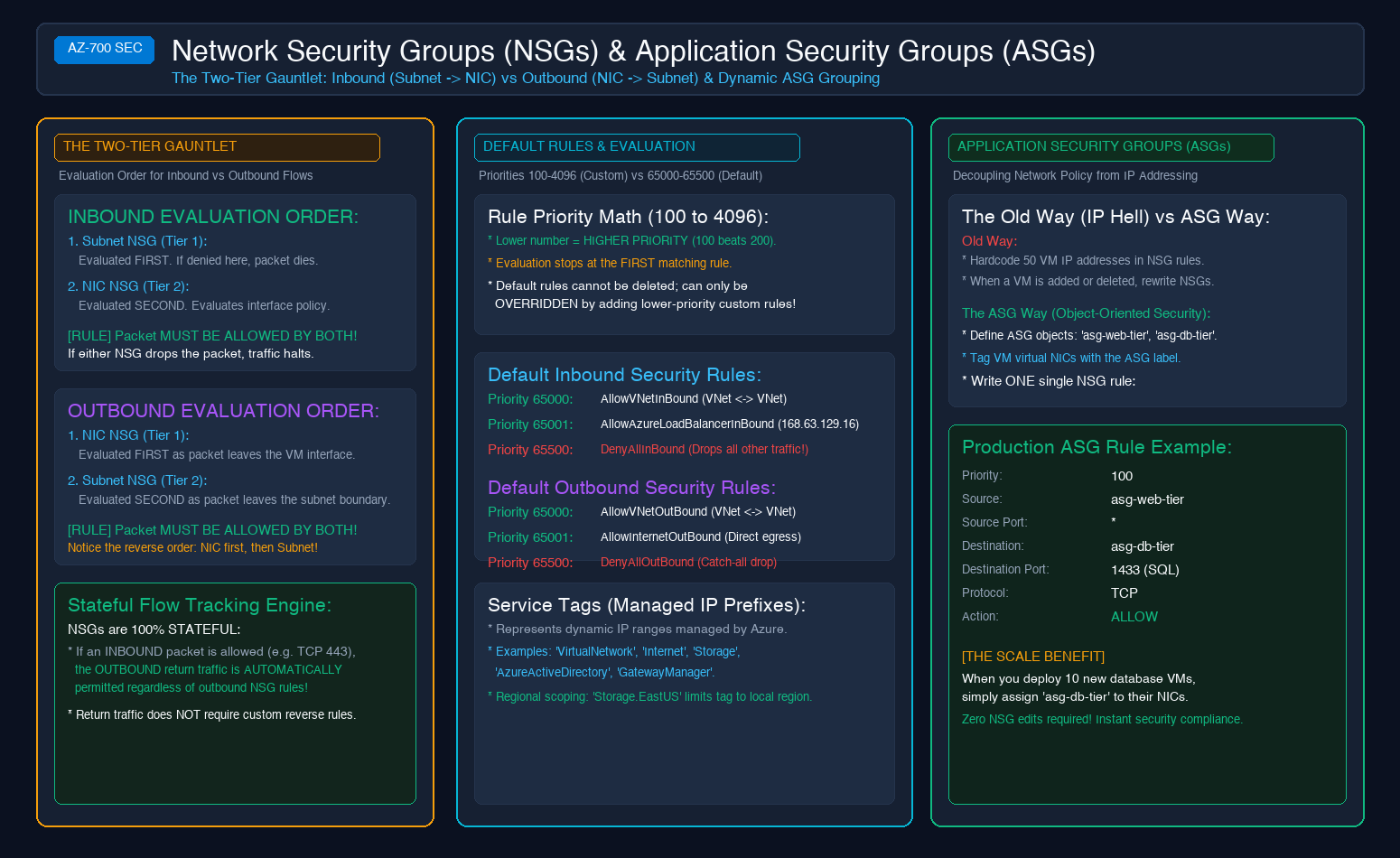
The Two-Tier Gauntlet: Subnet NSG vs. NIC NSG
In Azure, an NSG can be associated with two different objects:
1. A Subnet: Protects every virtual machine and private endpoint residing in that subnet.
2. A Network Interface (NIC): Protects strictly that specific VM network adapter.
When both are present, Azure enforces a Two-Tier Gauntlet. But here is the catch that burns engineers on the exam: The processing order is reversed depending on whether traffic is coming in or going out.
1. Inbound Traffic Processing Order
When a packet enters your VNet destined for a VM:
$$\mathbf{Incoming\;Packet} \;\;\longrightarrow\;\; \mathbf{1.\;Subnet\;NSG} \;\;\longrightarrow\;\; \mathbf{2.\;NIC\;NSG} \;\;\longrightarrow\;\; \mathbf{VM\;NIC}$$
- Tier 1 (Subnet NSG): Evaluated first. If the Subnet NSG drops the packet (
Deny), the packet dies immediately. The NIC NSG is never even consulted. - Tier 2 (NIC NSG): If the Subnet NSG permits the packet, it proceeds to the NIC NSG. If the NIC NSG permits it, the packet reaches the VM.
- The Rule: For an inbound packet to land, it must be allowed by BOTH the Subnet NSG AND the NIC NSG.
2. Outbound Traffic Processing Order
When a VM transmits a packet out toward the internet or another subnet:
$$\mathbf{VM\;NIC} \;\;\longrightarrow\;\; \mathbf{1.\;NIC\;NSG} \;\;\longrightarrow\;\; \mathbf{2.\;Subnet\;NSG} \;\;\longrightarrow\;\; \mathbf{Destination}$$
- Tier 1 (NIC NSG): Evaluated first as the packet leaves the virtual interface.
- Tier 2 (Subnet NSG): Evaluated second as the packet crosses the subnet perimeter.
- The Rule: For an outbound packet to egress, it must be allowed by BOTH the NIC NSG AND the Subnet NSG.
Stateful Flow Tracking: The Return Path Free Pass
Network Security Groups are 100% stateful.
When you create an NSG rule, you are defining a policy for the initial connection setup (the TCP SYN packet).
* Once the hypervisor allows an inbound connection on Port 443, Azure’s Virtual Filtering Platform (VFP) creates an entry in its host session state table.
* When the VM replies with outbound return traffic (TCP SYN-ACK or HTTP data), the host virtual switch checks the state table, recognizes the packet as part of an established session, and automatically permits the return traffic.
* You do not need an outbound rule to allow replies to inbound sessions.
* Conversely, if your VM initiates an outbound connection to an external API on port 443, the inbound reply packets are automatically permitted back in without an inbound allow rule.
Rule Priority Math & The Default Rules
Every custom rule you write inside an NSG has an integer Priority ranging from 100 to 4096.
The Priority Law:
- Lower numbers equal HIGHER priority. A rule with Priority
100will be evaluated before a rule with Priority200. - Evaluation stops at the first match. The moment a packet matches the 5-tuple criteria of a rule, Azure executes the action (
AlloworDeny) and terminates evaluation. It never reads subsequent lower-priority rules.
The Default Rules (65000 to 65500)
Every NSG is born with six permanent default rules. You cannot delete or modify these rules. You can only override them by creating custom rules with a lower priority number (e.g., Priority 100 to 64999).
Default Inbound Rules:
- Priority 65000 (
AllowVNetInBound): Allows all inbound traffic fromVirtualNetworktoVirtualNetwork. - Priority 65001 (
AllowAzureLoadBalancerInBound): Allows health probes from168.63.129.16. - Priority 65500 (
DenyAllInBound): The catch-all blackhole. Drops all other inbound traffic.
Default Outbound Rules:
- Priority 65000 (
AllowVNetOutBound): Allows all outbound traffic fromVirtualNetworktoVirtualNetwork. - Priority 65001 (
AllowInternetOutBound): Allows all outbound traffic to the publicInternet. - Priority 65500 (
DenyAllOutBound): Drops all other outbound traffic.
The Fatal Misconception: What does “VirtualNetwork” Actually Mean?
Most engineers assume VirtualNetwork only refers to the local VNet address space.
This is dead wrong. In Azure SDN, the VirtualNetwork service tag includes:
1. The local VNet address space.
2. All peered VNets (Regional and Global).
3. All on-premises connected subnets advertised across Site-to-Site VPN or ExpressRoute!
If you deploy a VM in a private spoke VNet and leave the default rules intact, any machine in your on-premises datacenter or peered VNet can connect to that VM on all ports by default! To enforce Zero Trust, you must add a custom rule (e.g., Priority 4000) that explicitly denies unwanted lateral movement.
Application Security Groups (ASGs): Escaping IP Hell
In traditional networking, security policies are tied to IP addresses.
If your web tier needs to talk to your database tier:
* You write an NSG rule: Source 10.1.1.10, 10.1.1.11, 10.1.1.12 $\longrightarrow$ Destination 10.1.2.5 Port 1433.
* Every time a developer spins up a new web server, you have to edit the NSG rule to add the new IP.
Application Security Groups (ASGs) decouple security policy from IP addressing.
How ASGs Work:
- You create an empty metadata container called an Application Security Group: e.g.,
asg-web-tierandasg-db-tier. - You assign the ASG tag directly to the virtual machine’s Network Interface (NIC).
- In your NSG, you write a single, human-readable rule:
| Priority | Source | Source Port | Destination | Destination Port | Protocol | Action |
|---|---|---|---|---|---|---|
| 100 | asg-web-tier | * | asg-db-tier | 1433 | TCP | Allow |
The Operational Superpower:
When your autoscaling VMSS spins up 20 new web servers, Azure automatically stamps them with asg-web-tier.
They immediately inherit the right to talk to the database on port 1433. You write the rule once, and it scales dynamically forever.
> All Network Interfaces assigned to an ASG **must reside within the same Virtual Network**. You cannot group NICs across different VNets into a single ASG.
Augmented Security Rules & Service Tags
Modern Azure NSGs support Augmented Rules:
* Instead of creating separate rules for Port 80, Port 443, and Port 8080, you can specify multiple ports in a single rule: 80, 443, 8080.
* You can specify multiple CIDRs or IP ranges: 10.1.0.0/16, 192.168.5.0/24, 203.0.113.10.
Regional Service Tags
Azure provides managed Service Tags representing Microsoft IP ranges that are updated automatically (e.g., AzureCloud, Storage, Sql).
* You can scope service tags regionally: e.g., Storage.EastUS.
* This allows your VMs to reach Azure Storage in East US over public endpoints while blocking egress to Storage accounts in West Europe or Asia!
Effective Security Rules: Verifying the Host Silicon
Never look at a list of NSG rules on a subnet and assume you know what will happen to a packet. You must account for rule priorities, Subnet vs. NIC inheritance, and default overrides.
To see the compiled reality running inside the physical hypervisor, you check Effective Security Rules:
VM -> Networking -> Network Interface -> Effective Security Rules (or via Network Watcher).
The Effective Security Rules table displays:
* The consolidated list of all Subnet and NIC rules combined.
* Which specific rule won the evaluation.
* Whether the packet was allowed or denied.
Real-World Solution Scenarios: Advanced Micro-Segmentation & Gauntlet Defense
Scenario 17.1: The Two-Tier Gauntlet Mystery (Subnet Allowed, NIC Denied)
- The Problem: An engineer is tasked with opening HTTPS access to a newly deployed web server VM. The engineer opens the Azure Portal, finds the NSG attached to the subnet (
nsg-subnet-web), and adds an inbound rule: Priority 100, SourceInternet, Port 443, ActionAllow. The rule saves successfully, but external users still cannot connect tohttps://mywebserver.com. The engineer escalates claiming Azure NSG evaluation is failing. - Underlay Mechanics & Failure Root Cause: Azure NSG evaluation operates as a two-tier sequential gauntlet. For inbound traffic:
$$\text{Incoming Packet} \longrightarrow \mathbf{Subnet\;NSG} \longrightarrow \mathbf{NIC\;NSG} \longrightarrow \text{VM Guest OS}$$
Both tiers are evaluated independently. If either NSG denies the packet, the host hypervisor vSwitch drops the frame immediately. In this case, the VM’s network interface had an old legacy NSG attached directly to the NIC (nsg-vm-nic) which contained an explicit Deny rule that blocked port 443. Even though the Subnet NSG permitted the traffic, the NIC NSG dropped it. - The Architecture Solution:
- Run Network Watcher IP Flow Verify: Execute
IP Flow Verifytargeting the VM NIC for destination port 443. The tool immediately pinpoints that whilensg-subnet-weballowed the packet,nsg-vm-nicdropped it at the NIC evaluation stage. - Remove Redundant NIC NSGs: Standardize on the enterprise architectural best practice: remove NSGs attached directly to individual NICs. Enforce all network security boundaries uniformly at the subnet level to eliminate dual-tier configuration conflicts.
- Verify Effective Rules: Inspect the VM NIC’s Effective Security Rules view to verify that the consolidated evaluation results in an active
Allow.
Scenario 17.2: The Broad Lateral Movement Hole (VirtualNetwork Service Tag Exploitation)
- The Problem: An organization builds a staging VNet peered to their production Hub, which connects to the corporate on-premises datacenter via ExpressRoute. A contractor’s compromised VM in the staging VNet initiates port scans and lateral SMB attacks against production domain controllers. The security director asks how this was possible given that no rules were created permitting staging-to-production communication.
- Underlay Mechanics & Failure Root Cause: Every Azure NSG contains an immutable default rule with Priority 65000:
AllowVNetInBound. Many engineers mistakenly assumeVirtualNetworkmeans only the local VNet. In Azure’s SDN engine, theVirtualNetworkservice tag encompasses: - The local VNet CIDR block.
- All peered VNets (both regional and global).
- All on-premises networks connected via ExpressRoute or Site-to-Site VPN.
Because both staging and production shared hub connectivity, the defaultAllowVNetInBoundpermitted open, unhindered lateral communication across all ports between staging and production workloads! - The Architecture Solution:
- Implement Zero-Trust Overrides: In production and sensitive subnets, never rely on Azure’s default NSG rules.
- Override Priority 65000: Add an explicit inbound rule at Priority 4000: Source:
*(Any), Destination:*, Protocol:*, Action:Deny. - Create Explicit Whitelists: Above Priority 4000 (e.g., Priorities 100–500), create explicit whitelist rules allowing only authorized source IP ranges or Application Security Groups (ASGs). This completely closes the lateral movement risk inherent to the
VirtualNetworkservice tag.
Scenario 17.3: Dynamic VM Scale-Out Without IP Management Sprawl (ASG Micro-Segmentation)
- The Problem: An enterprise runs an elastic 3-tier application (Web, Application, Database) across dozens of VMs. Whenever the autoscaling scale set adds five new Web VMs, or when VMs are redeployed with new private IP addresses, network engineers had to manually update 15 different NSG rules with the new individual IP addresses. Configuration delays caused application outages and human errors created security exposures.
- Underlay Mechanics & Failure Root Cause: Hardcoding static IP addresses into NSG rules creates unmaintainable administrative sprawl in elastic, auto-scaling cloud environments.
- The Architecture Solution:
- Provision Application Security Groups (ASGs): Create three ASGs in the VNet:
asg-web,asg-app, andasg-db. - Define Semantic NSG Rules: Write intent-based rules on the workload subnet:
- Rule 100: Source
asg-web$\longrightarrow$ Destinationasg-appon Port 8080 $\longrightarrow$Allow. - Rule 200: Source
asg-app$\longrightarrow$ Destinationasg-dbon Port 1433 $\longrightarrow$Allow. - Rule 300: Source
*$\longrightarrow$ Destinationasg-dbon Port 1433 $\longrightarrow$Deny.
- Rule 100: Source
- Tag Virtual NICs at Provisioning: When new VMs are created (via Terraform, ARM, or VMSS), attach the respective ASG to the virtual NIC.
- Instant Underlay Compilation: The Azure hypervisors dynamically inject the VM’s private IP into the ASG membership tables within milliseconds. Security boundaries scale automatically with zero manual NSG modifications required.
Hands-On Azure CLI: NSGs, ASGs, and Micro-Segmentation
Let’s enforce zero-trust micro-segmentation using Application Security Groups and drop east-west lateral movement.
1. Create Application Security Groups (ASGs)
az network asg create --resource-group rg-az700-networking --name asg-web-tier
az network asg create --resource-group rg-az700-networking --name asg-db-tier
2. Tag Virtual NICs with ASGs
az network nic ip-config update \
  --resource-group rg-az700-networking \
  --nic-name nic-vm-web-01 \
  --name ipconfig1 \
  --application-security-groups asg-web-tier
3. Deploy NSG and Build Tier-to-Tier Rules
az network nsg create --resource-group rg-az700-networking --name nsg-microseg-prod

# Allow HTTPS Inbound from Internet to Web ASG
az network nsg rule create \
  --resource-group rg-az700-networking --nsg-name nsg-microseg-prod \
  --name Allow-Internet-to-Web --priority 100 --direction Inbound --access Allow \
  --source-address-prefixes Internet --source-port-ranges '*' \
  --destination-asgs asg-web-tier --destination-port-ranges 443 --protocol Tcp

# Allow Web ASG to Database ASG on Port 1433
az network nsg rule create \
  --resource-group rg-az700-networking --nsg-name nsg-microseg-prod \
  --name Allow-Web-to-DB --priority 110 --direction Inbound --access Allow \
  --source-asgs asg-web-tier --source-port-ranges '*' \
  --destination-asgs asg-db-tier --destination-port-ranges 1433 --protocol Tcp

# Block All Other Intra-VNet Lateral Traffic (East-West Isolation)
az network nsg rule create \
  --resource-group rg-az700-networking --nsg-name nsg-microseg-prod \
  --name Deny-VNet-EastWest-Lateral --priority 4000 --direction Inbound --access Deny \
  --source-address-prefixes VirtualNetwork --source-port-ranges '*' \
  --destination-address-prefixes VirtualNetwork --destination-port-ranges '*' --protocol '*'
4. Associate NSG to Subnet
az network vnet subnet update \
  --resource-group rg-az700-networking \
  --vnet-name vnet-spoke-prod \
  --name snet-workload \
  --network-security-group nsg-microseg-prod
The GIST: Important Summary & Key Points
Here is your AZ-700 security checklist:
1. The Inbound Gauntlet: Subnet NSG evaluated first $\longrightarrow$ NIC NSG evaluated second. Both must allow the packet.
2. The Outbound Gauntlet: NIC NSG evaluated first $\longrightarrow$ Subnet NSG evaluated second. Both must allow the packet.
3. Stateful Flow Tracking: Return packets are automatically permitted; no reverse rules needed.
4. Priority Rule: Lower number = higher priority (100 beats 200). Evaluation stops on first match.
5. Beware AllowVNetInBound: Encompasses local VNets, peered VNets, and all on-prem networks over VPN/ER.
6. ASGs decouple security from IPs: Use ASGs for scalable micro-segmentation; all NICs in an ASG must live in the same VNet.