Up until now, we’ve looked at private connectivity from the perspective of a consumer: you deploy an Azure Storage account, create a Private Endpoint, and access it from your VNet.
Now, let’s flip the table.
Imagine you are a SaaS vendor (like Snowflake, Databricks, or a custom payment gateway), or you run Central Shared Services in an enterprise with hundreds of independent business units. You host a proprietary application on an AKS cluster or VMSS behind an internal load balancer.
You need thousands of external customers—living in completely different Azure subscriptions, different Microsoft Entra ID tenants, and different corporate networks—to connect to your application securely over a private IP.
If you try to solve this with VNet Peering:
1. You have to establish thousands of peering links (exceeding Azure platform quotas).
2. Peering merges routing domains, exposing your provider network to the customer’s network.
3. If Customer A uses 10.0.0.0/16 and your SaaS VNet is 10.0.0.0/16, peering is physically impossible due to IP overlap.
The solution to the multi-tenant connectivity crisis is Azure Private Link Service (PLS).
Private Link Service lets you project your application into any external customer’s VNet as a private endpoint—unidirectional, cryptographically isolated, and completely immune to overlapping IP addresses.
Let’s dissect how PLS works, how NAT IPs prevent IP collisions, and how to use PROXY Protocol v2 so your backend servers don’t lose the caller’s real source IP.
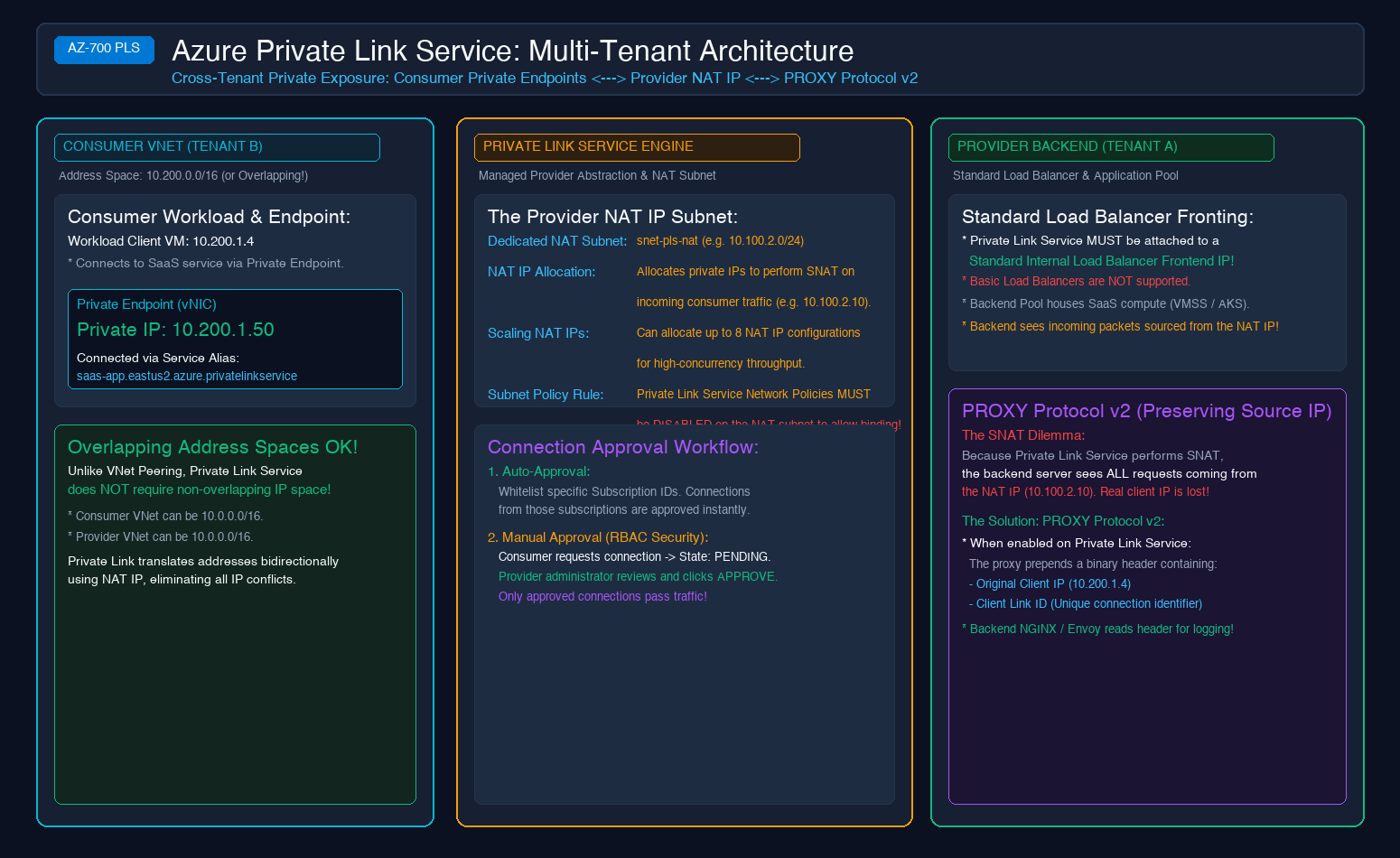
The Multi-Tenant Architecture: Provider vs. Consumer
In Private Link Service terminology, there are two distinct parties:
[Consumer VNet (Tenant B)]                               [Provider VNet (Tenant A)]
  Workload VM: 10.200.1.4                                  Backend SaaS App (AKS / VMSS)
       │                                                                ▲
       ▼                                                                │
 [Private Endpoint] ═══(Microsoft Private Backbone)═══> [Internal Standard Load Balancer]
  (IP: 10.200.1.50)                                                     ▲
                                                                        │
                                                            [Private Link Service]
                                                            (NAT IP: 10.100.2.10)
1. The Service Provider (Tenant A)
- Deploys their application into a private VNet behind a Standard Internal Load Balancer.
- Creates an Azure Private Link Service resource attached to the frontend IP of that Load Balancer.
- Azure generates a globally unique identifier called the Private Link Service Alias (e.g.,
saas-app.eastus2.azure.privatelinkservice).
2. The Service Consumer (Tenant B)
- Receives the Service Alias from the Provider.
- Creates a standard Private Endpoint in their own VNet, pointing to that Alias.
- Azure allocates a local private IP address (e.g.,
10.200.1.50) from the Consumer’s subnet. - The consumer accesses the SaaS application as if it were a local server on their own LAN!
The Magic of the NAT IP: Overlapping CIDRs Welcome
Why does Private Link Service succeed where VNet Peering fails?
Because Private Link Service is strictly a proxy architecture using Source NAT (SNAT).
The Provider NAT Subnet
When you configure a Private Link Service, you must associate it with a dedicated subnet in the Provider VNet called the NAT Subnet (e.g., snet-pls-nat).
* Azure allocates one or more private IP addresses from this subnet: the NAT IPs (e.g., 10.100.2.10).
* When Consumer B (10.200.1.4) transmits a packet to their local Private Endpoint (10.200.1.50), the packet travels across Microsoft’s private underlay fabric into the Provider VNet.
* The SNAT Rewrite: The Private Link Service intercepts the packet and rewrites the source IP:
$$\text{Original Src: } 10.200.1.4 \;\;\longrightarrow\;\; \mathbf{Rewritten\;Src:\;10.100.2.10} \text{ (NAT IP)}$$
* The packet is handed to the Standard Load Balancer, which delivers it to the backend VM.
Why Overlapping IPs Don’t Matter
Look at what just happened:
Because the provider’s backend application only ever sees packets arriving from the local NAT IP (10.100.2.10), it does not matter if the consumer’s VNet uses the exact same CIDR block as the provider!
Both networks could be 10.0.0.0/16. The Private Link proxy handles translation bidirectionally, completely isolating the two addressing spaces.
> `privateLinkServiceNetworkPolicies: Disabled`. If this toggle is not disabled, Azure Resource Manager blocks the association.
The Connection Approval Workflow: RBAC Across Tenants
How does a service provider prevent unauthorized Azure subscriptions from connecting to their private service?
Private Link Service includes a built-in authorization gate:
1. Auto-Approval (Whitelisting)
- In the Private Link Service settings, the provider can specify a list of approved Azure Subscription IDs.
- When a consumer belonging to an approved subscription creates a Private Endpoint, the connection status transitions directly to
Approved. Data flows immediately.
2. Manual Approval (Zero Trust)
- If the consumer’s subscription is not on the whitelist, the connection is created in a
Pendingstate. - The consumer cannot send a single packet.
- The provider’s administrator receives an alert in the Azure Portal or via Event Grid. The admin inspects the request, validates the customer’s account, and clicks Approve (or calls the CLI/API).
- The provider can revoke an approved connection at any time, instantly severing the data path.
PROXY Protocol v2: The Real Client IP Problem
While the NAT IP architecture solves the overlapping IP problem, it introduces a severe operational headache for the provider’s engineering team:
$$\text{The Problem: } \mathbf{All\;incoming\;traffic\;appears\;to\;come\;from\;10.100.2.10!}$$
If 500 different corporate customers connect to your SaaS API:
* Every entry in your NGINX or Envoy web access log shows source IP 10.100.2.10.
* You cannot enforce per-client rate-limiting.
* You cannot geo-locate the client for fraud detection.
* Security incident audits are impossible because you cannot determine which specific customer sent a malicious payload.
The Solution: PROXY Protocol v2
Azure Private Link Service natively supports PROXY Protocol v2 (an industry standard developed by the HAProxy project).
When you enable PROXY Protocol v2 on your Private Link Service:
1. The Private Link proxy encapsulates incoming TCP streams.
2. Before the client’s HTTP payload is sent, the proxy prepends a small binary header containing:
* Source IP: The real, original private IP of the consumer (10.200.1.4).
* Source Port: The client’s ephemeral port.
* Link ID: A unique 64-bit identifier assigned by Azure representing that specific customer’s connection.
3. Backend Decoding: Modern web servers and proxies (NGINX, HAProxy, Envoy, Apache) have native directives to parse PROXY Protocol v2. They read the binary header, extract the real client IP, and write it into your standard application access logs.
Real-World Solution Scenarios: Multi-Tenant Architecture & Overlapping IP Resolution
Scenario 16.1: The B2B Multi-Tenant SaaS IP Collision Nightmare
- The Problem: A SaaS fintech provider hosts a proprietary payment processing engine in Azure VNet (
10.0.0.0/16). Fifty enterprise banking clients demand private, dedicated network connectivity to the provider’s API. However, 18 of these financial institutions already use10.0.0.0/16for their own internal corporate networks. Traditional VNet Peering is impossible due to overlapping CIDRs. Deploying Site-to-Site VPN with NAT would require 50 separate IPsec tunnels, conflicting crypto parameters, and ongoing subnet coordination nightmares. - Underlay Mechanics & Failure Root Cause: VNet Peering requires globally unique, non-overlapping address spaces. If two VNets have overlapping CIDR blocks, the Azure SDN controller rejects peering instantiation. Furthermore, peering grants broad bi-directional network reachability, exposing the provider’s entire virtual network to customer probing.
- The Architecture Solution:
- Deploy Behind an Internal Standard Load Balancer: Place the SaaS API backend VMs behind an Internal Standard Load Balancer (
10.0.1.100). - Provision a Private Link Service (PLS): Create an Azure Private Link Service attached to the Load Balancer frontend IP. Allocate a dedicated NAT subnet (
10.0.2.0/24) withprivateLinkServiceNetworkPolicies: disabled. - Distribute the Service Alias: Provide each banking client with the generated Service Alias (
pls-saas-app.12345678-abcd...eastus2.azure.privatelinkservice). - Consumer Private Endpoints: Each bank provisions a standard Azure Private Endpoint in their local VNet, pointing to the provider’s alias.
- Bidirectional SNAT Underlay Magic: When Bank A (
10.0.1.50) transmits a packet, the Private Endpoint routes it across Microsoft’s private backbone. The PLS receives the packet and translates the source IP to an address from its local NAT subnet (10.0.2.x). The SaaS backend receives traffic from10.0.2.xand responds cleanly. All 50 banks—even those with identical10.0.0.0/16spaces—communicate simultaneously with zero IP clashes, zero route exchanges, and zero cross-tenant lateral movement risks!
Scenario 16.2: The Ghost Client IP (Preserving Real Source IPs via PROXY Protocol v2)
- The Problem: In the SaaS architecture above, the corporate security and fraud prevention team reviews API audit logs and discovers that 100% of incoming transactions appear to originate from the provider’s own internal NAT subnet IP (
10.0.2.14). The anti-fraud engine, which relies on client IP geolocation and reputation scoring to detect credential stuffing and compromised accounts, is completely blinded. - Underlay Mechanics & Failure Root Cause: Azure Private Link Service operates a stateful Layer-4 Source NAT (SNAT) proxy. As packets traverse the PLS, the original client source IP is overwritten by an IP from the PLS NAT subnet so return packets can be mapped and delivered back across tenant boundaries. Because PLS operates strictly at Layer 4, it cannot inspect or rewrite Layer-7 HTTP headers like
X-Forwarded-For. - The Architecture Solution:
- Enable PROXY Protocol v2 on PLS: In the Private Link Service configuration, toggle Enable PROXY Protocol to true (
enableProxyProtocol = true). - Binary Header Injection: The Azure PLS engine prepends a standard Type-Length-Value (TLV) PROXY Protocol v2 binary header to the initial TCP payload. This header encapsulates the real client private IP (
10.200.1.4), client port, and unique 64-bit Azure Link ID. - Enable PROXY Protocol on Backend Web Servers: Configure the backend web servers (NGINX:
proxy_protocol on;, Envoy, Apache, or HAProxy) to parse the v2 binary header. - Audit Visibility Restored: The backend web server decodes the true client IP, sets it into
$remote_addrand application logs, restoring 100% visibility for anti-fraud auditing without altering network topology.
Scenario 16.3: Multi-Tenant RBAC Security & Connection Approval Control
- The Problem: A SaaS provider exposes a confidential medical analytics service via Private Link Service. Because the service alias is simply an alphanumeric string, an unauthorized Azure subscriber who discovers the alias attempts to create a Private Endpoint to access the service.
- Underlay Mechanics & Failure Root Cause: If a Private Link Service has its visibility set to Public with auto-approval enabled, any Azure subscription in the same region can establish a Layer-4 socket to the provider’s backend pool.
- The Architecture Solution:
- Restricted Visibility Configuration: Set PLS visibility to Restricted, explicitly listing only the approved Azure Subscription IDs of contracted clients.
- Enforce Manual Approval Workflow: For clients not on the auto-approval list, connection requests enter a
Pendingstate. The SaaS provider’s security operations team verifies the customer’s tenant and subscription details and clicks Approve. - Instant Access Revocation: If a customer terminates their contract, the provider simply clicks Reject or deletes the Private Endpoint Connection on the PLS, immediately tearing down the underlying SDN circuit without modifying firewall rules or NSGs.
Hands-On Azure CLI: Azure Private Link Service (Provider & Consumer)
Here is how a SaaS provider exposes a multi-tenant backend via Azure Private Link Service and approves consumer connections.
1. Provider: Create NAT Subnet (Disable PLS Network Policies)
az network vnet subnet create \
  --resource-group rg-az700-networking \
  --vnet-name vnet-hub-eastus \
  --name snet-pls-nat \
  --address-prefixes 10.100.5.0/24 \
  --private-link-service-network-policies Disabled
2. Provider: Deploy Private Link Service Behind Internal Load Balancer
LB_FE_ID=$(az network lb frontend-ip show -g rg-az700-networking --lb-name ilb-firewall-ha -n fe-internal-vip --query id -o tsv)
SNET_PLS_ID=$(az network vnet subnet show -g rg-az700-networking --vnet-name vnet-hub-eastus -n snet-pls-nat --query id -o tsv)

az network private-link-service create \
  --resource-group rg-az700-networking \
  --name pls-core-api-service \
  --vnet-name vnet-hub-eastus \
  --subnet "$SNET_PLS_ID" \
  --lb-frontend-ip-configs "$LB_FE_ID" \
  --auto-approval-subscriptions "<trusted-partner-subscription-id>" \
  --visibility "*"
3. Consumer: Request Connection to Provider via Service Alias
PLS_ALIAS=$(az network private-link-service show -g rg-az700-networking -n pls-core-api-service --query alias -o tsv)

az network private-endpoint create \
  --resource-group rg-consumer-tenant \
  --name pe-to-provider-api \
  --vnet-name vnet-consumer \
  --subnet snet-consumer-workloads \
  --private-connection-resource-id "$PLS_ALIAS" \
  --connection-name conn-pls-tenant \
  --request-message "Requesting production API query access"
4. Provider: Inspect and Approve the Connection
az network private-link-service connection update \
  --resource-group rg-az700-networking \
  --service-name pls-core-api-service \
  --name conn-pls-tenant \
  --action Approve \
  --description "Approved enterprise tenant query access"
The GIST: Important Summary & Key Points
Here is your AZ-700 checklist for Azure Private Link Service:
1. You are the Provider: Use PLS when you want to expose a service to other tenants or subscriptions privately.
2. Prerequisites: Must sit behind an Internal Standard Load Balancer (Basic LB is not supported).
3. NAT Subnet: Requires a dedicated subnet with disable-private-link-service-network-policies: true.
4. Overlapping IPs are supported: SNAT handles bidirectional translation; customer and provider CIDRs can collide without issues.
5. Connection Workflow: Whitelist Subscription IDs for auto-approval, or enforce manual review.
6. PROXY Protocol v2: The only mechanism to preserve the consumer’s original client IP address past the NAT layer.