If an attacker tries to knock your web application offline, they usually choose one of two playbooks:
- The Sledgehammer (Volumetric DDoS): They blast 500 Gigabits per second of raw UDP, SYN flood, or NTP reflection traffic at your public IP address, saturating the physical fiber pipes and crashing the hypervisors.
- The Scalpel (Layer-7 Web Attacks): They send a single, perfectly crafted 2-Kilobyte HTTP POST request containing
' OR '1'='1or<script>document.cookie</script>that slips straight past your Layer-4 firewalls, bypasses your NSGs, and extracts your entire customer database via SQL Injection.
A stateful network firewall (like Azure Firewall or a Cisco NVA) cannot protect you against the scalpel. It sees a valid TCP handshake on port 443 and happily routes the malicious SQL injection packet straight to your web server.
To defend modern cloud applications, you need a two-tier defense:
* Web Application Firewall (WAF) to neutralize Layer-7 application exploits.
* Azure DDoS Protection to absorb multi-terabit volumetric floods.
Let’s tear down how Azure’s WAF engine operates, how Anomaly Scoring prevents broken applications, and how Azure’s DDoS Cost Mitigation Guarantee protects your corporate bank account.
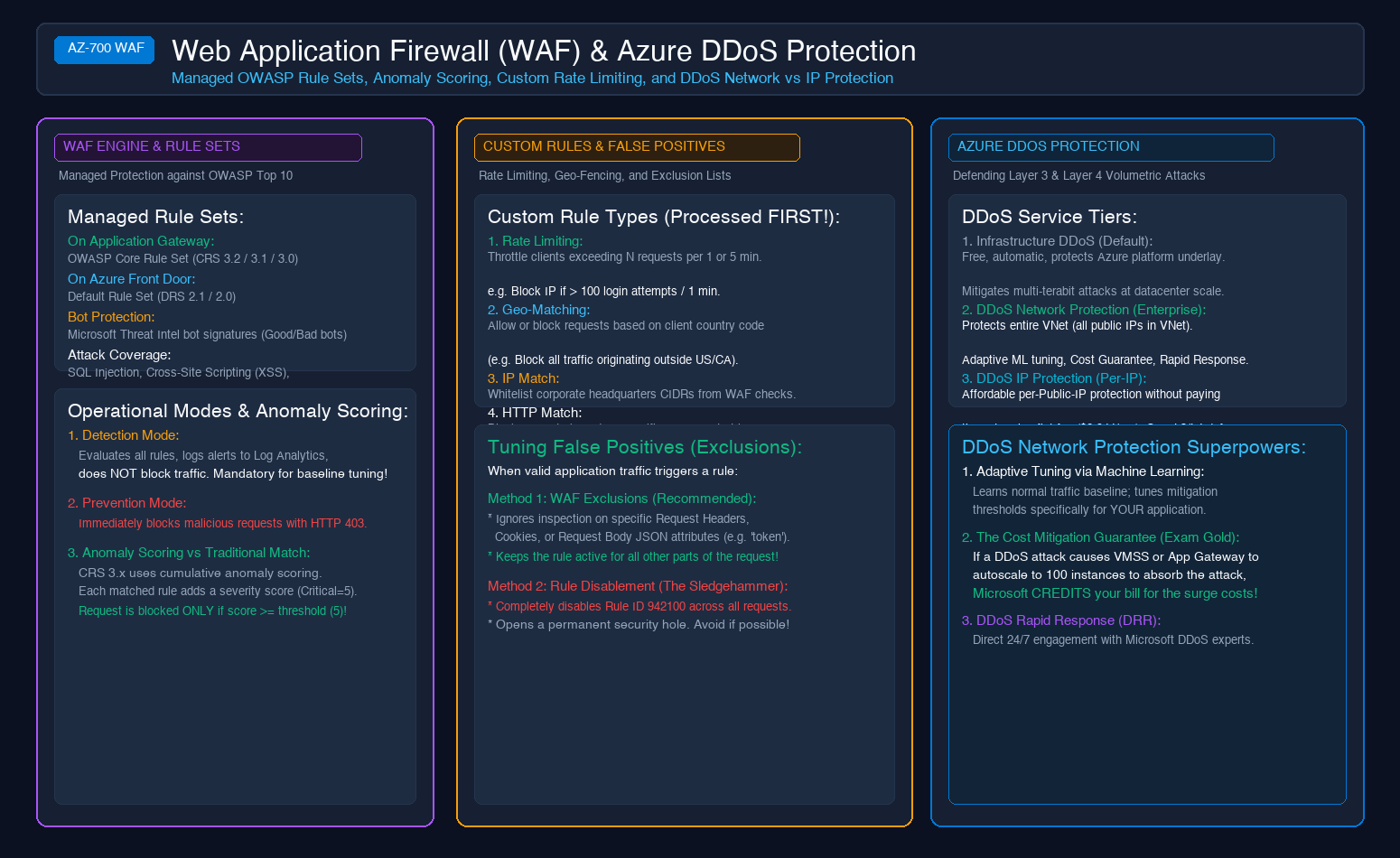
Where WAF Lives in Azure: Front Door vs. Application Gateway
In Azure, a Web Application Firewall policy is not a standalone virtual machine. A WAF Policy is an L7 security engine that attaches to one of two application delivery services:
1. WAF on Azure Front Door (Global Edge Defense)
- Where it runs: Deployed at hundreds of Microsoft Edge Points of Presence (POPs) globally.
- The Strategic Benefit: Inspects and blocks malicious traffic at the internet edge, thousands of miles away from your Azure datacenters. Attack payloads (SQLi, XSS, bots) never enter your virtual networks or touch your backend servers.
- Managed Rule Set: Uses Microsoft’s Default Rule Set (DRS 2.0 / 2.1) and Microsoft Threat Intelligence Bot Manager.
2. WAF on Application Gateway v2 (Regional Perimeter Defense)
- Where it runs: Inside your dedicated VNet subnet in a specific Azure region.
- The Strategic Benefit: Protects applications hosted on internal private VNets, regional public IPs, or hybrid workloads routed through private ExpressRoute connections.
- Managed Rule Set: Uses the industry-standard OWASP Core Rule Set (CRS 3.2 / 3.1 / 3.0).
Detection Mode vs. Prevention Mode & Anomaly Scoring
When you provision a WAF, you must configure its operational mode:
1. Detection Mode (The Testing Ground)
- The WAF engine monitors incoming HTTP/HTTPS requests, compares them against all active rules, and logs all matching violations to Log Analytics.
- It does NOT block any traffic. Requests flow to your backend servers unobstructed.
- Mandatory Best Practice: Always run a new WAF in Detection Mode for at least 7 to 14 days in production. This allows you to identify false positives and tune exclusions before turning on blocking.
2. Prevention Mode (Active Defense)
- When an incoming request matches an attack signature or exceeds the anomaly score threshold, the WAF immediately drops the connection and returns an
HTTP 403 Forbiddento the attacker.
Anomaly Scoring: The Antidote to False Positives
Legacy WAFs used “Traditional Matching”: The moment a request triggered a single regex rule, it was blocked immediately. This caused massive false positives on valid user traffic.
Modern Azure WAF engines (OWASP CRS 3.x and DRS 2.x) use Anomaly Scoring:
1. When a request arrives, it is evaluated against all rules in the rule set.
2. Each triggered rule adds a severity score to the request:
* Critical: Score = 5 (e.g., SQL Injection, Remote Code Execution)
* Error: Score = 4
* Warning: Score = 3
* Notice: Score = 2
3. The Threshold (High Exam Yield): A request is blocked in Prevention Mode only if the cumulative anomaly score reaches or exceeds 5.
* A single low-severity warning (Score = 3) will be logged, but the user is not blocked.
* A severe SQL injection signature (Score = 5) triggers an instant block.
Custom WAF Rules: The First Line of Defense
Managed OWASP rules are powerful, but they are evaluated after custom rules. Custom WAF rules are always processed FIRST (Stage 1).
Common Custom Rule Patterns:
1. Rate Limiting (Brute-Force & Scraping Defense)
- The Logic: Tracks incoming requests per client IP address over a rolling 1-minute or 5-minute window.
- Example: “If an individual IP address submits more than 100 requests to
/login.phpwithin 1 minute, block that IP for 10 minutes.” - Essential for preventing credential-stuffing attacks against authentication portals.
2. Geo-Matching (Compliance & Geo-Fencing)
- The Logic: Uses the client’s public IP address to determine their ISO two-letter country code.
- Example: “If client country code is NOT IN [‘US’, ‘CA’], deny traffic with HTTP 403.”
3. IP Whitelisting / Blacklisting
- Immediately permits trusted corporate headquarters CIDRs, bypassing managed OWASP checks.
- Immediately denies known malicious attacker subnets.
Tuning False Positives: Exclusions vs. Rule Disablement
In real-world web applications, legitimate traffic will occasionally look like an attack to a WAF. For example, a JSON payload containing an encrypted session token or XML snippet might trigger an OWASP Cross-Site Scripting (XSS) signature (Rule ID 942100).
When this happens, you have two choices:
Method 1: WAF Exclusion Lists (The Surgical Scalpel – Recommended)
Instead of turning off the security rule, you configure an Exclusion:
* You tell the WAF: “When evaluating Rule 942100, do not inspect the Request Body JSON attribute named auth_token.”
* The Benefit: The rule remains 100% active for all other request headers, cookies, query strings, and body fields! The security hole is minimized.
Method 2: Rule Disablement (The Sledgehammer – Avoid)
You go into the WAF policy and toggle Rule ID 942100 to Disabled.
* The Risk: You have now disabled that XSS signature across every single parameter of every single URL on your website. Attackers can exploit that exact vulnerability elsewhere in your application.
Azure DDoS Protection: Defending the Wire
While WAF protects Layer 7, volumetric Distributed Denial of Service (DDoS) attacks strike at Layer 3 and Layer 4 (SYN floods, UDP amplification, fragmented packet storms).
Azure provides three tiers of DDoS defense:
1. Infrastructure DDoS Protection (Default)
- Cost: Free (built into the Azure platform).
- Coverage: Protects the physical Azure datacenter infrastructure and hypervisor underlays from massive, multi-terabit volumetric attacks.
- The Limitation: It only activates when an attack is large enough to threaten Microsoft’s physical networking hardware. A 2 Gbps SYN flood that completely saturates your single virtual machine won’t trigger infrastructure mitigation because it poses no threat to Azure’s physical datacenter.
2. Azure DDoS Network Protection (The Enterprise Standard)
- Scope: Enabled per Virtual Network. Protects all Public IP addresses residing within that VNet (App Gateways, Firewalls, Load Balancers, VMs).
- Adaptive Tuning via Machine Learning: Azure constantly monitors your application’s normal traffic patterns. It uses ML to build a customized mathematical baseline. If your normal peak traffic is 50 Mbps, Azure automatically kicks in mitigation when traffic spikes to 80 Mbps!
- The Cost Mitigation Guarantee (Exam Essential):
If an autoscaling resource (like a Virtual Machine Scale Set or Application Gateway) scales out to 100 instances to absorb a volumetric attack, Microsoft will issue financial service credits to refund the compute surge costs incurred during the attack! - DDoS Rapid Response (DRR): Grants your SecOps team 24/7 direct access to Microsoft’s specialized DDoS engineering team during an active incident.
3. Azure DDoS IP Protection (Per-Public-IP)
- Scope: Designed for SMBs or single-workload environments.
- Pricing Model: Billed at a flat monthly fee per Public IP address (around $199/month per IP), avoiding the large enterprise flat fee of DDoS Network Protection (~$2,944/month per tenant).
- Delivers the same adaptive ML tuning and L3/L4 mitigation as Network Protection, but does not include the Cost Mitigation Guarantee or Rapid Response team.
Real-World Solution Scenarios: Application Defense & DDoS Financial Protection
Scenario 19.1: The Critical Checkout False Positive (Surgical WAF Exclusions vs. Disablement)
- The Problem: An online retailer deploys an Application Gateway WAF policy in Prevention mode using the OWASP CRS 3.2 ruleset. Immediately following release, legitimate customers attempting to complete checkout receive “HTTP 403 Forbidden – Request Blocked”. The site is losing \$10,000 in revenue every minute. Under intense pressure, developers demand that the security team completely disable Rule
942100(SQL Injection Detection) to unblock customers. - Underlay Mechanics & Failure Root Cause: The checkout platform uses a Base64-encoded session cookie named
auth-tokencontaining dashes and hyphens that match the regular expression pattern of Rule942100. In Anomaly Scoring mode, triggering this critical rule assigns an anomaly score of 5, immediately crossing the blocking threshold ($\ge 5$) and triggering an HTTP 403 block. Disabling Rule942100globally across the entire application would leave the enterprise defenseless against real SQL injection attacks across all URL parameters and form fields. - The Architecture Solution:
- Analyze WAF Logs in Log Analytics: Query
AzureDiagnostics | where ResourceProvider == "MICROSOFT.NETWORK" and Category == "ApplicationGatewayFirewallLog". The query reveals:RuleId: 942100,details_message: SQL Injection,details_data: Matched Data: ' found within RequestCookieNames:auth-token. - Apply a Targeted WAF Exclusion: In the WAF Policy settings under Exclusions, add a surgical exclusion:
- Match Variable:
Request Cookie Names - Operator:
Equals - Selector:
auth-token - Rule Association: Associate specifically with Rule Set
OWASP 3.2$\rightarrow$ Rule942100.
- Match Variable:
- Security Integrity Maintained: The WAF bypasses inspection only for that specific cookie on that specific rule, while Rule
942100remains active, inspecting all query strings, POST bodies, and headers against real SQL injection attacks.
Scenario 19.2: Collaborative Anomaly Scoring Mechanics (Cumulative Scoring Thresholds)
- The Problem: A security analyst converts an Application Gateway WAF from legacy Detection mode to OWASP CRS 3.2 in Prevention mode. The analyst observes that a request triggering Rule
920300(Missing Accept Header, Severity: Notice / Score: 2) is allowed, while another request triggering both920300and920270(Invalid Host Header, Score: 3) is blocked. The analyst suspects intermittent WAF malfunction. - Underlay Mechanics & Failure Root Cause: Unlike legacy WAFs where any single rule match triggered an immediate block, OWASP CRS 3.x uses Collaborative Anomaly Scoring:
- Critical severity adds 5 points.
- Error severity adds 4 points.
- Warning severity adds 3 points.
- Notice severity adds 2 points.
The WAF evaluates the entire request against all rules before making a decision. Only if the cumulative anomaly score reaches 5 or higher does the WAF issue an HTTP 403 Forbidden. The first request scored 2 ($< 5$, allowed); the second request scored $2 + 3 = 5$ ($\ge 5$, blocked). - The Architecture Solution:
- Baseline in Detection Mode: Run newly deployed WAF policies in Detection mode for 7 to 14 days to observe cumulative anomaly scores under regular traffic patterns.
- Analyze Scoring Distribution: Query Log Analytics to isolate requests accumulating scores between 3 and 7.
- Tune Low-Severity Anomalies: Instead of disabling rules, apply targeted exclusions or tune client request headers to prevent multiple low-severity rules from cumulatively triggering false-positive blocks.
Scenario 19.3: The $50,000 Autoscaling Surge (Claiming the DDoS Cost Mitigation Guarantee)
- The Problem: A mobile gaming backend is struck by an 80 Gbps UDP reflection and TCP SYN flood volumetric DDoS attack over a holiday weekend. Because the backend is hosted on an Azure Virtual Machine Scale Set (VMSS) with auto-scale rules based on CPU load, the VMSS scaled out from 5 to 100 instances for 72 hours to process the incoming flood. At month-end, the finance team receives an unexpected \$52,000 overage for VM compute and outbound bandwidth.
- Underlay Mechanics & Failure Root Cause: Volumetric DDoS attacks frequently induce “economic denial of service” (EDoS), where elastic cloud infrastructure scales out to absorb attacking traffic, driving enormous hosting bills. Azure’s free basic infrastructure protection mitigates attacks at the fabric level but provides zero financial reimbursement for autoscaling compute charges incurred during an attack.
- The Architecture Solution:
- Enable Azure DDoS Network Protection: The enterprise had previously enabled an Azure DDoS Protection Plan on the Virtual Network containing the VMSS.
- Extract Attack Telemetry: Export the DDoS mitigation logs and metrics from Azure Monitor verifying the attack timeframe (
DDoS attack: Under DDoS attack = 1). - Submit a DDoS Cost Mitigation Claim: File a support ticket with Microsoft requesting financial reimbursement under the official Azure DDoS Cost Mitigation Guarantee.
- Financial Credit Issuance: Microsoft’s DDoS engineering team verifies that the resource scale-out directly coincided with an active volumetric DDoS mitigation event. Microsoft issues a 100% financial service credit refunding the entire \$52,000 compute and egress surge!
Hands-On Azure CLI: WAF Policy, Rate Limiting, and DDoS Protection
Here is how to configure a DDoS Network Protection Plan and enforce a WAF policy in Prevention mode with custom rate limiting.
1. Provision DDoS Protection Plan & Link to Hub VNet
az network ddos-protection create \
  --resource-group rg-az700-networking \
  --name ddos-protection-prod \
  --location eastus

DDOS_ID=$(az network ddos-protection show -g rg-az700-networking -n ddos-protection-prod --query id -o tsv)

az network vnet update \
  --resource-group rg-az700-networking \
  --name vnet-hub-eastus \
  --ddos-protection true \
  --ddos-protection-plan "$DDOS_ID"
2. Create WAF Policy in Prevention Mode (DRS 2.1)
az network application-gateway waf-policy create \
  --resource-group rg-az700-networking \
  --name waf-pol-edge \
  --location eastus \
  --mode Prevention \
  --type Microsoft_DefaultRuleSet \
  --version 2.1
3. Add Custom Rate-Limiting Rule (Block > 100 reqs/min)
az network application-gateway waf-policy custom-rule create \
  --resource-group rg-az700-networking \
  --policy-name waf-pol-edge \
  --name RateLimit-AggressiveClients \
  --priority 10 \
  --rule-type RateLimit \
  --action Block \
  --rate-limit-threshold 100 \
  --rate-limit-duration OneMinute \
  --match-conditions "[{match-variables:[{variable-name:RemoteAddr}],operator:IPMatch,values:[0.0.0.0/0]}]"
4. Fix Authorization Header False-Positives with Surgical Exclusion
az network application-gateway waf-policy managed-rule exclusion add \
  --resource-group rg-az700-networking \
  --policy-name waf-pol-edge \
  --rule-set-type Microsoft_DefaultRuleSet \
  --rule-set-version 2.1 \
  --target-symbol-name RequestHeaderNames \
  --match-operator Equals \
  --target "Authorization"
5. Bind WAF Policy to Application Gateway
az network application-gateway update \
  --resource-group rg-az700-networking \
  --name agw-ingress-prod \
  --waf-policy waf-pol-edge
The GIST: Important Summary & Key Points
Here are your key takeaways for AZ-700:
1. WAF operates at Layer 7: Inspects HTTP payloads for OWASP Top 10 vulnerabilities (SQLi, XSS, RCE); attaches to Application Gateway (regional) or Front Door (global).
2. Detection vs. Prevention: Always deploy in Detection mode first to baseline logs before enforcing Prevention mode (HTTP 403).
3. Anomaly Scoring Threshold: Requests are blocked only when the cumulative score of all triggered rules is $\ge 5$.
4. Fix False Positives with Exclusions: Never disable an entire rule if you can surgically exclude a specific header or cookie.
5. DDoS Protection Tiers:
* Infrastructure: Free, protects Azure fabric.
* IP Protection: Billed per Public IP for smaller architectures.
* Network Protection: Billed per VNet; includes adaptive ML baselines, Cost Mitigation Guarantee, and DDoS Rapid Response.