If you have ever spent six hours staring at a Wireshark capture on a Linux VM wondering why TCP SYN packets leave your interface, reach the on-premises database, and then vanish into a blackhole before the TCP handshake ever finishes, congratulations: you’ve met the Azure asymmetric routing trap.
In traditional networking, routing tables are pushed dynamically across routers via OSPF, EIGRP, or BGP. If you want to steer traffic through a firewall, you change next-hop metrics, configure policy-based routing (PBR), or manipulate VRFs.
In Azure, the SDN virtual switch handles routing on a per-subnet basis using Route Tables populated with User-Defined Routes (UDRs).
UDRs give you God-mode control over the SDN underlay. But if you don’t understand how UDRs interact with BGP route propagation, the default 0.0.0.0/0 internet route, and the GatewaySubnet, you will inadvertently engineer production-killing routing loops and asymmetric blackholes.
Let’s tear down how UDRs actually work, how to force traffic through a central hub inspection point, and how to fix the return-path problem once and for all.
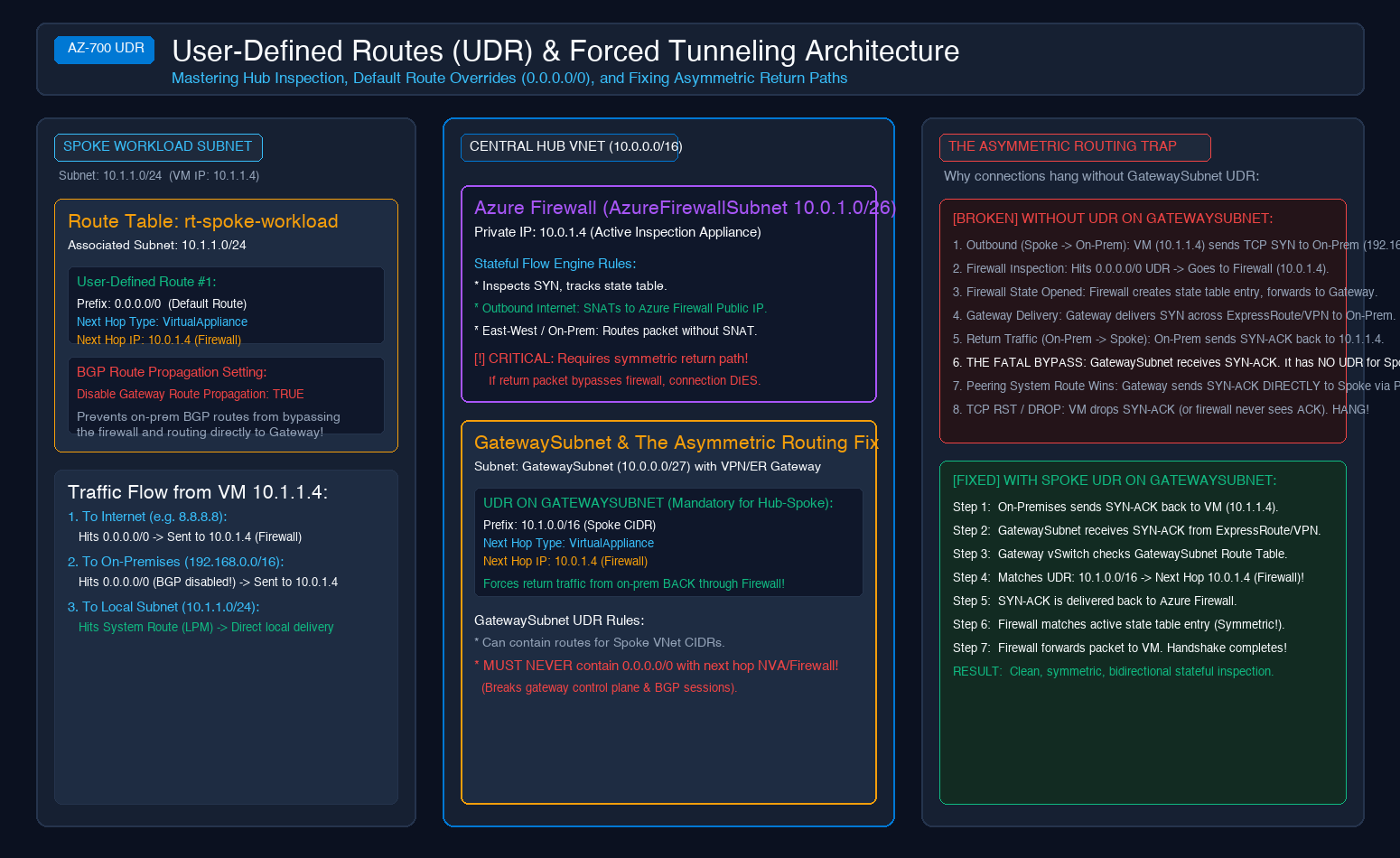
The Anatomy of a User-Defined Route (UDR)
In Azure, you don’t apply route tables to individual virtual NICs; you associate a Route Table resource with a Subnet. Every network interface residing inside that subnet inherits the route table.
When you create a custom route inside a Route Table, you specify two parameters:
1. Address Prefix (Destination CIDR): The target destination (e.g., 10.2.0.0/16, 192.168.0.0/16, or 0.0.0.0/0).
2. Next Hop Type: The mechanism Azure uses to forward packets matching that prefix.
The 5 Next Hop Types in Azure:
1. VirtualAppliance
- What it means: Forwards matching packets to a private IP address within your VNet or peered VNet.
- Target: Azure Firewall, third-party firewall VMs (Palo Alto, Fortinet, Check Point), SD-WAN appliances, or an Internal Load Balancer frontend sitting in front of an NVA cluster.
- Requirement: The target IP must be reachable via Azure L3 routing. If you specify an IP that doesn’t exist or isn’t routable, Azure marks the route as
Invalidin the Effective Routes table.
2. VirtualNetworkGateway
- What it means: Forwards matching packets to the Azure VPN Gateway or ExpressRoute Gateway in the local VNet (or remote Hub VNet via Gateway Transit).
- Common Use Case: Manually steering specific traffic toward hybrid on-prem connections.
3. VNetLocal (Virtual Network)
- What it means: Overrides default routing to keep traffic local to the Virtual Network.
- Common Use Case: If you have a broad
10.0.0.0/8UDR pointing to an NVA, but you want10.1.0.0/16to stay purely local within the VNet without touching the firewall, you add a more specific UDR for10.1.0.0/16with next hopVirtual network.
4. Internet
- What it means: Sends matching packets directly out to the public internet using Azure’s platform default SNAT (or Azure NAT Gateway if attached).
- Common Use Case: Punching an exception through a forced-tunneling policy so specific public IPs bypass the central firewall.
5. None
- What it means: The ultimate blackhole. Matching packets are silently dropped at the host hypervisor vSwitch.
- Common Use Case: Isolating a sensitive subnet so it cannot reach certain private subnets or internet spaces under any circumstances.
The Default Route Override: Taming 0.0.0.0/0
Every subnet in Azure comes born with a system default route:
$$\mathbf{0.0.0.0/0} \;\;\longrightarrow\;\; \mathbf{Internet}$$
This default route allows any Azure VM with a private IP to reach the public internet via Azure’s transparent outbound SNAT underlay.
In an enterprise environment, this violates almost every compliance framework. You cannot allow arbitrary application VMs to initiate raw, uninspected connections to the global internet.
To seize control, you create a UDR on your workload subnets:
* Destination Prefix: 0.0.0.0/0
* Next Hop Type: VirtualAppliance
* Next Hop IP: 10.0.1.4 (The private IP of Azure Firewall or your central NVA)
The moment you attach this route table to the subnet, the host vSwitch swaps the next hop for all outbound internet traffic. Instead of egressing directly through the physical host’s internet gateway, all packets destined for non-local addresses are encapsulated and delivered directly to the firewall’s virtual NIC at 10.0.1.4.
The BGP Route Propagation Dilemma: Longest Prefix Match Strikes Back
Here is where network engineers who don’t read the fine print get burned on the AZ-700 exam.
Imagine you have this topology:
* You deploy a workload subnet: 10.1.1.0/24.
* You attach a Route Table with 0.0.0.0/0 $\rightarrow$ Next Hop 10.0.1.4 (Azure Firewall).
* You intend for all traffic—both outbound Internet and hybrid traffic destined for On-Premises (192.168.0.0/16)—to flow through the Azure Firewall for deep packet inspection.
* Your on-premises edge router is running BGP across ExpressRoute or S2S VPN, advertising 192.168.0.0/16 into Azure.
You log into a VM in the workload subnet, run a traceroute 192.168.1.50, and look at your firewall logs.
Zero packets hit the firewall. The traceroute goes straight to the ExpressRoute Gateway!
Why did the traffic bypass the firewall?
Remember Rule #1 of Azure Routing: Longest Prefix Match (LPM) Always Wins.
1. Your custom UDR has a mask of /0 (0.0.0.0/0).
2. The dynamic BGP route learned from on-premises has a mask of /16 (192.168.0.0/16).
3. /16 is more specific than /0.
4. The SDN flow engine looks at the destination (192.168.1.50), matches /16, ignores your 0.0.0.0/0 UDR entirely, and routes the packet straight to the Gateway.
The Solution: Disabling BGP Route Propagation
To stop dynamic BGP routes from overriding your central firewall policy, Azure Route Tables have a toggle:
$$\mathbf{Disable\;gateway\;route\;propagation} \;\;=\;\; \mathbf{True}$$
When you enable this setting on the Route Table attached to your spoke subnet:
* The Azure SDN controller purges all BGP-learned routes from that subnet’s effective route table.
* The VM no longer knows about the /16 BGP route.
* When the VM sends a packet to 192.168.1.50, the only matching route in its effective table is your 0.0.0.0/0 UDR.
* The packet is forced to the Azure Firewall at 10.0.1.4, which then inspects it and forwards it to the Gateway.
The Asymmetric Routing Disaster: The Return Path Trap
Stateful firewalls (Azure Firewall, Palo Alto, Fortinet, Check Point) maintain a state table in memory.
* When a client sends a TCP SYN, the firewall inspects it against policy, creates a session state entry, and forwards the packet.
* When the server replies with a TCP SYN-ACK, that packet must return to the exact same firewall instance so the state engine can validate the handshake.
* If the return packet bypasses the firewall, the client sends a TCP ACK that the firewall has never seen, or the client receives a packet it didn’t expect, and the connection drops immediately.
The Broken Flow (No UDR on GatewaySubnet)
Look closely at what happens without proper return-path routing:
[Spoke VM: 10.1.1.4] ────(1. TCP SYN)────> [Azure Firewall: 10.0.1.4]
                                                     │
                                            (2. State Opened)
                                                     │
                                                     ▼
[On-Prem Host: 192.168.1.10] <──(3. SYN)─── [GatewaySubnet / ER]
            │
      (4. TCP SYN-ACK)
            │
            ▼
   [GatewaySubnet / ER]
            │
     (5. FATAL BYPASS!)
     Gateway checks its routing table.
     It has a Peering route: 10.1.0.0/16 -> Spoke VNet directly!
            │
            ▼
   [Spoke VM: 10.1.1.4] <───(SYN-ACK delivered directly, bypassing Firewall!)
The Spoke VM sends an ACK back to the Firewall, but the Firewall has no record of the completed handshake. Or, if the Firewall was doing SNAT, the Spoke VM receives a SYN-ACK from 192.168.1.10 when it expected a packet from 10.0.1.4 and drops it with a TCP RST.
Your connection is dead.
The Fix: The GatewaySubnet Route Table
To enforce symmetric routing, you must create a Route Table and associate it directly with the GatewaySubnet in the Hub VNet.
Inside this GatewaySubnet Route Table, you add explicit UDRs for your spoke networks:
* Prefix: 10.1.0.0/16 (Spoke 1 CIDR) $\longrightarrow$ Next Hop: 10.0.1.4 (Azure Firewall)
* Prefix: 10.2.0.0/16 (Spoke 2 CIDR) $\longrightarrow$ Next Hop: 10.0.1.4 (Azure Firewall)
Now, when the Gateway receives the return SYN-ACK from on-premises:
1. It consults the GatewaySubnet effective route table.
2. It hits the UDR for 10.1.0.0/16 pointing to 10.0.1.4.
3. It sends the SYN-ACK back to the Azure Firewall.
4. The Firewall matches the active session in its state table, approves the packet, and forwards it to the Spoke VM.
5. Bidirectional, symmetric, stateful inspection is achieved.
> While you can and must add spoke CIDRs to the `GatewaySubnet` route table, **you must NEVER add a `0.0.0.0/0` route with a next hop of `VirtualAppliance` to the `GatewaySubnet`.**
> If you do, you will break the gateway’s internal control-plane communications with Azure management endpoints and BGP peers, knocking your entire hybrid connectivity offline.
Forced Tunneling Mechanics: Cloud to Datacenter
In many regulated environments (finance, healthcare, defense), enterprise security policy dictates that Azure cannot egress directly to the public internet under any circumstances. All internet-bound traffic must be backhauled across ExpressRoute or VPN to the on-premises datacenter’s proxy farm.
This architecture is called Forced Tunneling.
How Forced Tunneling is Implemented:
- Via BGP Advertisement (The Clean Way): Your on-premises edge router advertises
0.0.0.0/0over BGP across ExpressRoute or Site-to-Site VPN. Azure receives the default route and injects it into the VNet routing table with next hopVirtualNetworkGateway. - Via Static UDR: You manually configure
0.0.0.0/0on subnets with next hopVirtualNetworkGateway.
The Azure Firewall Forced Tunneling Quirk (Exam Essential)
If you deploy Azure Firewall in an environment where forced tunneling is enabled (i.e., 0.0.0.0/0 is advertised from on-prem), standard Azure Firewall will fail to deploy.
Why? Because Azure Firewall requires direct internet connectivity for its own platform dependencies (licensing, signature updates, health probes, and telemetry). If you backhaul its management packets to on-prem, the firewall gets blackholed.
To solve this, Microsoft introduced Azure Firewall Forced Tunneling Mode:
* When creating Azure Firewall with forced tunneling, you must provide a second dedicated subnet: AzureFirewallManagementSubnet (minimum /26).
* The firewall splits its traffic:
* Customer Data Path: Follows AzureFirewallSubnet and can be forced across the VPN/ER to on-premises.
* Management Control Path: Uses AzureFirewallManagementSubnet with its own dedicated Public IP, ensuring Microsoft’s platform health probes and update mechanisms never touch your on-prem network.
Real-World Solution Scenarios: Deterministic Traffic Engineering & Asymmetry Defense
Scenario 4.1: The Silent SYN-ACK Drop (The Gateway Return Asymmetry)
- The Problem: A financial institution deploys an Azure Firewall at
10.0.1.4in the Hub VNet. Workloads in Spoke VNet (10.10.0.0/16) initiate connections to on-premises banking core servers (192.168.50.0/24) over ExpressRoute. Workload subnets have a Route Table with0.0.0.0/0$\rightarrow$10.0.1.4(VirtualAppliance). Outbound TCP SYN packets pass through the firewall and reach on-premises. The on-prem server responds with a TCP SYN-ACK. However, the connection hangs and the client reportsConnection Timed Out. - Underlay Mechanics & Failure Root Cause: The return TCP SYN-ACK enters Azure via the ExpressRoute Gateway in
GatewaySubnet. The gateway host vSwitch inspects its effective route table for10.10.0.0/16. By default, the gateway has a system peering route10.10.0.0/16with next hopVNet Peering. The gateway forwards the SYN-ACK directly across the peering to the Spoke VM, completely bypassing the firewall! Because the firewall never sees the return SYN-ACK, it never completes the TCP state transition. If an on-prem client initiates inbound traffic to the spoke, the problem is fatal: the incoming SYN bypasses the firewall via peering, but the spoke’s return SYN-ACK hits the UDR and routes to the firewall, which immediately drops it as an out-of-state packet. - The Architecture Solution:
- Deploy a Dedicated Gateway Route Table: Create a Route Table specifically for
GatewaySubnet. - Add Spoke Return UDRs: Add explicit routes for all spoke address spaces:
10.10.0.0/16$\rightarrow$ Next Hop10.0.1.4(VirtualAppliance). - Never Add
0.0.0.0/0to GatewaySubnet: KeepGatewaySubnetroute propagation enabled (disable-bgp-route-propagation: false) and never inject a default0.0.0.0/0route ontoGatewaySubnet, as this would intercept the gateway’s direct platform communication to Azure management planes.
Scenario 4.2: The On-Premises Route Leak (BGP LPM Piercing the Default Route)
- The Problem: Corporate security policy mandates that all Spoke workload traffic must pass through a central firewall before reaching any internal or external destination. The network team associates a Route Table containing
0.0.0.0/0$\rightarrow$10.0.1.4with all Spoke subnets. However, packet captures on an on-premises server (172.16.10.20) show traffic from the Spoke arriving directly over ExpressRoute, completely bypassing the Azure Firewall. - Underlay Mechanics & Failure Root Cause: The on-premises routers were advertising
172.16.0.0/16via BGP over ExpressRoute to the Hub Gateway. Because Gateway Transit was active on the peering, Azure’s SDN automatically injected these BGP routes into the Spoke subnets. In the host hypervisor flow table,172.16.0.0/16(mask/16, sourceVirtualNetworkGateway) is a longer prefix match than the UDR0.0.0.0/0(mask/0). Azure’s routing engine always prioritizes prefix specificity over route source. Consequently, packets addressed to172.16.10.20matched the BGP route and took the direct path to the gateway. - The Architecture Solution:
- Disable BGP Route Propagation: In the Spoke Subnet Route Table configuration, toggle “Virtual network gateway route propagation” to Disabled (
disable-bgp-route-propagation: true). - SDN Underlay Effect: The host hypervisor instantly purges all dynamic BGP routes from the subnet’s effective routing table.
- Enforce Default Catch-All: With BGP routes purged, the only remaining route matching on-premises destinations is
0.0.0.0/0$\rightarrow$10.0.1.4, successfully forcing 100% of workload traffic through the firewall.
Scenario 4.3: The Brick-Walled Firewall (Forced Tunneling Deployment Deadlock)
- The Problem: A healthcare enterprise enforces enterprise forced tunneling by advertising
0.0.0.0/0from on-premises over BGP, pulling all cloud traffic back to their on-premises security stack. When the cloud team attempts to deploy an Azure Firewall intoAzureFirewallSubnetfor micro-segmentation, the deployment times out after 45 minutes with a provisioning failure. - Underlay Mechanics & Failure Root Cause: Standard Azure Firewall requires direct public internet egress to communicate with Microsoft platform controllers for licensing verification, threat intelligence signature updates, and health telemetry. When
0.0.0.0/0is propagated from on-premises, the firewall’s internal management packets are sucked into the on-premise tunnel, where perimeter firewalls drop or attempt to SSL-decrypt the proprietary control-plane traffic. Unable to establish health telemetry, the Azure control plane marks the firewall deployment as failed. - The Architecture Solution:
- Deploy Forced Tunneling Mode: Deploy Azure Firewall with Forced Tunneling enabled.
- Provision Management Subnet: Create a dedicated
/26subnet named strictlyAzureFirewallManagementSubnetwith its own dedicated public IP address. - Traffic Plane Separation: The firewall splits traffic into two separate planes: customer payload data passes through
AzureFirewallSubnet(which can be safely backhauled to on-premises), while platform management and telemetry traffic flows independently throughAzureFirewallManagementSubnetdirectly to the internet.
Hands-On Azure CLI: Engineering UDRs & Forced Tunneling
Let’s build a production route table, route default traffic through our central firewall, and fix the infamous GatewaySubnet return path.
1. Create Route Table for Spoke Workloads
az network route-table create \
  --resource-group rg-az700-networking \
  --name rt-spoke-workloads \
  --disable-bgp-route-propagation false
2. Inject 0.0.0.0/0 Pointing to Central Firewall IP (10.200.1.4)
az network route-table route create \
  --resource-group rg-az700-networking \
  --route-table-name rt-spoke-workloads \
  --name route-default-to-firewall \
  --address-prefix 0.0.0.0/0 \
  --next-hop-type VirtualAppliance \
  --next-hop-ip-address 10.200.1.4
3. Associate Route Table to Spoke Workload Subnet
az network vnet subnet update \
  --resource-group rg-az700-networking \
  --vnet-name vnet-spoke-prod \
  --name snet-workload \
  --route-table rt-spoke-workloads
4. Create the Mandatory GatewaySubnet Return Route Table
This route intercepts traffic returning from on-prem to the spoke CIDR (10.240.0.0/16) and redirects it to the firewall, eliminating asymmetric routing drops.
az network route-table create \
  --resource-group rg-az700-networking \
  --name rt-gatewaysubnet

az network route-table route create \
  --resource-group rg-az700-networking \
  --route-table-name rt-gatewaysubnet \
  --name route-spoke-via-firewall \
  --address-prefix 10.240.0.0/16 \
  --next-hop-type VirtualAppliance \
  --next-hop-ip-address 10.200.1.4

az network vnet subnet update \
  --resource-group rg-az700-networking \
  --vnet-name vnet-hub-eastus \
  --name GatewaySubnet \
  --route-table rt-gatewaysubnet
The GIST: Important Summary & Key Points
Here are your core takeaways for AZ-700 mastery:
1. UDRs provide deterministic routing: When you need traffic to hit an NVA or Firewall, a UDR is mandatory.
2. Watch out for LPM over 0.0.0.0/0: If on-prem advertises specific CIDRs, they will bypass a 0.0.0.0/0 UDR unless you set disable-bgp-route-propagation: true on the spoke subnet.
3. Always fix the return path on GatewaySubnet: Without a UDR for spoke CIDRs on the GatewaySubnet, return traffic from on-premises bypasses the firewall, causing asymmetric packet drops.
4. Never put 0.0.0.0/0 on GatewaySubnet: You will break gateway telemetry and BGP control-plane sessions.
5. Forced Tunneling with Azure Firewall: Always plan for the dedicated AzureFirewallManagementSubnet (/26) to separate management egress from customer data backhaul.