Ask any seasoned network engineer what breaks enterprise cloud migrations, and nine times out of ten the answer isn’t BGP route flapping or MTU blackholes. It’s DNS.
DNS in the cloud feels like a solved problem until you build a hybrid network. You connect your on-premises data center to Azure over ExpressRoute or IPsec VPN, you deploy an Azure Storage account with a Private Endpoint, and suddenly nobody in the branch office can resolve the storage account’s FQDN. Or worse, your Azure workloads can’t resolve your on-prem Active Directory domain controllers.
For nearly a decade, Azure engineers had to deploy and babysit pairs of Windows Server DNS or BIND forwarder VMs in a hub VNet just to bounce UDP 53 packets back and forth.
That architectural hack is finally obsolete. Enter the Azure DNS Private Resolver.
To master hybrid cloud networking for AZ-700, you have to understand how Azure handles DNS under the hood, why the “magic” wire server IP behaves the way it does, and how to build zero-maintenance bidirectional name resolution.
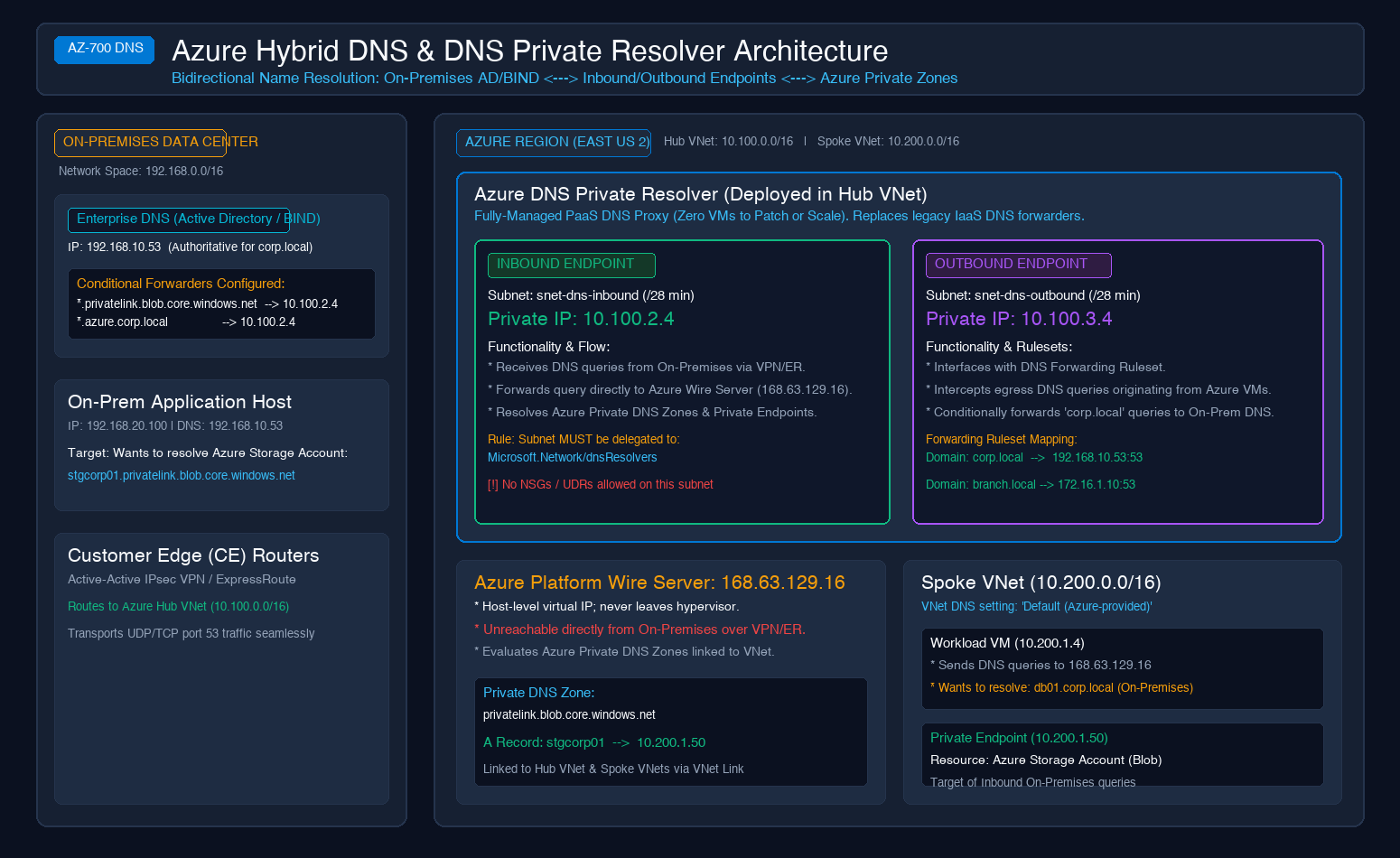
DNS Essentials for the Network Engineer: Zones, Forwarders & Records
Most network engineers spend their careers living in Layers 2 through 4—dealing with prefixes, VLANs, VRFs, MTU, and BGP tables. DNS is often brushed off as “that application server thing” right up until name resolution fails and completely halts a multi-million-dollar hybrid cloud migration.
If you aren’t a DNS specialist, don’t worry. Let’s demystify the core DNS concepts using network analogies before we dissect Azure’s resolver architecture.
1. What is a DNS Zone? (Think of it as a Routing Table for Names)
A DNS Zone is a distinct administrative boundary and container that holds authoritative DNS records for a specific slice of the global domain namespace.
* Think of the root internet domain as a global backbone router. A zone like ethernetdude.com or privatelink.database.windows.net is a dedicated routing table partition (like a VRF) responsible for answering queries for hosts inside that domain.
* Every zone has a Start of Authority (SOA) record specifying who owns it and the TTL (Time-to-Live) refresh timers.
* In Azure, an Azure Private DNS Zone is simply an authoritative zone that doesn’t exist on the public internet. It lives inside Azure’s SDN hypervisor fabric and is only accessible to VNets you explicitly link to it.
2. What is a Conditional Forwarder? (Policy-Based Routing for DNS)
Normally, when a DNS server receives a query for a name it doesn’t host locally, it either forwards the request to an upstream recursive resolver or walks the global internet root hints (. $\rightarrow$ .com $\rightarrow$ microsoft.com).
* A Conditional Forwarder is essentially Policy-Based Routing (PBR) for DNS queries.
* Instead of sending all unknown requests out to the public internet, a conditional forwarder checks a policy rule: “If the query domain ends with *.corp.internal, DO NOT ask the internet. Send the query directly to the on-prem domain controllers at 192.168.1.10.”
* In hybrid cloud networking, conditional forwarding is the vital bridge. On-premises DNS servers conditionally forward Azure private domains (*.privatelink.*) into Azure, while Azure conditionally forwards corporate domain queries back across ExpressRoute or VPN to on-premises.
3. The Core DNS Record Types You Must Know for AZ-700
You don’t need to be a BIND administrator, but you must recognize how these record types function when designing and troubleshooting cloud networks:
ARecord (Address):- What it does: Maps a human-friendly hostname directly to a 32-bit IPv4 address.
- Example:
webserver01.corp.internal$\rightarrow$10.100.1.4. This is the fundamental record type you create for VMs, internal load balancers, and private endpoints. AAAARecord (Quad-A):- What it does: Maps a hostname to a 128-bit IPv6 address (
2001:db8::1). CNAMERecord (Canonical Name / Alias):- What it does: An alias that points one domain name to another domain name (never directly to an IP address).
- Why network engineers MUST understand this for Azure: Microsoft PaaS services (SQL, Storage, Key Vault) rely heavily on CNAME redirection for Azure Private Endpoints. When your application queries
mydb.database.windows.net, public DNS returns a CNAME pointing tomydb.privatelink.database.windows.net. Inside Azure, your Private DNS Zone intercepts thatprivatelinkquery and resolves it to your private IP (10.100.1.50). If that CNAME chain breaks, your traffic erroneously tries to egress out to the public IP! PTRRecord (Pointer / Reverse DNS):- What it does: The exact opposite of an
Arecord. Maps an IP address back to its hostname (Reverse Lookup). - Example: Querying
4.1.100.10.in-addr.arpareturnswebserver01.corp.internal. Essential for network troubleshooting tools, firewall log inspection, and Kerberos authentication. TXTRecord (Text):- What it does: Holds arbitrary text strings.
- In cloud networking: Extensively used for domain ownership validation (e.g., proving you own
ethernetdude.combefore Azure Front Door or App Service issues an automated SSL certificate) and email anti-spoofing (SPF, DKIM). SOA(Start of Authority) &NS(Name Server):- What it does: The
SOAidentifies the authoritative master server for the zone and caching timers. TheNSrecords delegate authority, listing the specific name servers answering queries for the domain. SRVRecord (Service Locator):- What it does: Defines both the hostname and port number for specific enterprise services. Widely used in Active Directory to help domain members locate Domain Controllers and LDAP/Kerberos ports (
_ldap._tcp.dc._msdcs.corp.local).
With these fundamentals established, let’s see why Azure’s “magic” wire server IP behaves the way it does.
The Magic Wire Server: 168.63.129.16
Before we touch private zones or resolvers, we have to talk about 168.63.129.16. If you’ve looked at an ipconfig /all or /etc/resolv.conf on any Azure VM, you’ve seen this IP address.
168.63.129.16 is not a physical server in a rack. It is a virtual IP address provided directly by the physical host hypervisor. It is a non-routable link-local construct embedded in Azure’s SDN layer.
The wire server has three distinct jobs in Azure:
1. Platform Recursive DNS Resolver
When an Azure VM’s VNet is set to “Default (Azure-provided) DNS”, the VM sends all DNS queries to 168.63.129.16:53. The host hypervisor intercepts these packets locally, resolves internet domains recursively, and queries any Azure Private DNS Zones linked to that VNet.
2. Load Balancer Health Probing
Standard and Basic Azure Load Balancers send their health probes (HTTP, HTTPS, TCP) from 168.63.129.16. If you block this IP on your VM’s OS firewall or NSG, the load balancer marks your backend instances as dead and drops all traffic.
3. VM Guest Agent Communication
The Azure Linux and Windows guest agents use this IP to send heartbeats, receive extension commands, and signal readiness to the fabric controller.
The Hybrid Problem with 168.63.129.16
Here is the catch that trips up every traditional network admin: 168.63.129.16 is physically unreachable outside of an Azure VNet.
If an on-premises workstation on 192.168.20.100 sends a DNS query over ExpressRoute or VPN to 168.63.129.16, the packet dies at the gateway. The Azure gateway router has no route for 168.63.129.16 because it is not a routed network address; it is a hypervisor loopback hook.
Because on-premises servers cannot query 168.63.129.16 directly, on-prem cannot resolve Azure Private DNS Zones out of the box.
Public DNS vs. Private DNS: The Foundation
Azure provides two distinct DNS services:
Azure Public DNS Zones
- Global Anycast Infrastructure: Hosted on Microsoft’s globally distributed DNS servers. Highly resilient, low-latency, and protected against volumetric DDoS.
- Alias Record Sets: A critical AZ-700 topic. In standard RFC DNS, you cannot create a
CNAMErecord at the zone apex (@orcontoso.com). Azure Public DNS supports Alias Records, which allow the zone apex to point directly to Azure resources (Traffic Manager profiles, Azure Front Door endpoints, or Public IP addresses) while maintaining standardAorAAAAresponses to clients.
Azure Private DNS Zones
- Isolated Cloud Name Resolution: Used for private domains (e.g.,
corp.internal) and mandatory for Private Endpoints (e.g.,privatelink.blob.core.windows.net). - Virtual Network Links: A Private DNS Zone is completely invisible to a VNet until you create an explicit Virtual Network Link. There are two types of links:
- Resolution Links: Allows VMs in the linked VNet to resolve records in the zone. You can link up to 1,000 VNets to a single private zone.
- Registration Links: In addition to resolving names, VMs in this VNet automatically register their hostnames and private IPs in the zone (Dynamic DNS). When the VM is deleted, Azure automatically removes the record. Exam Rule: A Private DNS Zone can have only one registration link attached to it at any time.
The Split-Horizon Pattern
In an enterprise, you often own contoso.com. You want external internet users to hit www.contoso.com and resolve your Public IP (20.50.10.15), but you want internal Azure VMs hitting www.contoso.com to resolve your internal private backend (10.100.1.50).
With Azure DNS, you create an Azure Public DNS Zone named contoso.com and an Azure Private DNS Zone named contoso.com. The private zone is linked to your VNets. Azure workloads automatically resolve the private records; the rest of the world resolves the public records. No DNS views or complex BIND zone files required.
The Legacy Workaround: The IaaS DNS Forwarder Pain
Before 2022, solving hybrid DNS required a clumsy pattern:
1. Spin up two Windows Server or Linux BIND VMs in the Hub VNet.
2. Put an Internal Load Balancer in front of them for high availability.
3. Configure on-premises DNS servers to conditionally forward *.privatelink.* queries to the Load Balancer IP.
4. The forwarder VMs would take the query, forward it to 168.63.129.16, get the private IP answer, and send it back to on-prem.
5. In reverse, you had to change the DNS settings on every VNet from “Default” to the custom forwarder IP, and configure the forwarder to send corp.local queries back across the VPN to on-premises.
If those forwarder VMs crashed, ran out of file descriptors, or missed a Windows patch, your entire hybrid infrastructure went dark.
Azure DNS Private Resolver: The Modern Architecture
Azure DNS Private Resolver is a fully-managed, highly available PaaS proxy service that natively bridges on-premises DNS and Azure DNS without deploying a single VM.
It consists of four core building blocks:
[Azure DNS Private Resolver]
   ├── Inbound Endpoint (Listens on Hub Subnet IP: 10.100.2.4)
   │     └── Receives queries FROM on-prem --> Forwards to 168.63.129.16
   │
   ├── Outbound Endpoint (Egresses from Hub Subnet IP: 10.100.3.4)
   │     └── Proxies queries FROM Azure VMs --> Forwards to On-Prem DNS
   │
   └── DNS Forwarding Ruleset
         ├── Linked to Target VNets
         └── Rules: "corp.local" --> 192.168.10.53:53
1. Dedicated Subnet Requirements
This is a heavily tested AZ-700 requirement. Azure DNS Private Resolver requires dedicated subnets:
* Minimum Subnet Size: Each endpoint requires at least a /28 subnet (16 total IPs, 11 usable).
* No Resource Sharing: You cannot put VMs, Load Balancers, or other resources into these subnets.
* Separation of Concerns: The Inbound Endpoint and Outbound Endpoint cannot share the same subnet. You must create two distinct subnets: e.g., snet-dns-inbound and snet-dns-outbound.
* Mandatory Subnet Delegation: Both subnets must be delegated to Microsoft.Network/dnsResolvers.
* No NSGs or UDRs: You must not apply Network Security Groups or User Defined Routes to these subnets; Azure manages the ingress and egress flow rules directly.
2. The Inbound Endpoint
- Sits on a private IP inside your Hub VNet (e.g.,
10.100.2.4). - Listens on standard UDP and TCP port 53.
- Acts as a listening proxy. When on-premises DNS servers forward queries for
privatelink.blob.core.windows.netto10.100.2.4, the Inbound Endpoint takes the packet, hands it directly to the local platform resolver (168.63.129.16), retrieves the Private Endpoint IP from the linked Private DNS Zone, and replies to the on-prem DNS server.
3. The Outbound Endpoint & DNS Forwarding Rulesets
The outbound endpoint does not listen for incoming queries. Instead, it serves as the egress gateway for resolving external and on-premises domains.
* An Outbound Endpoint is paired with one or more DNS Forwarding Rulesets.
* A Ruleset contains conditional forwarding rules:
* Domain: corp.local $\rightarrow$ Target DNS: 192.168.10.53:53
* Domain: branch.local $\rightarrow$ Target DNS: 172.16.1.10:53
* Virtual Network Links for Rulesets: You link the DNS Forwarding Ruleset to your VNets (Hub and Spoke VNets). When a VM in that VNet issues a query for db01.corp.local, the local SDN resolver checks the linked Ruleset, recognizes the domain, and forwards the packet out through the Outbound Endpoint across the hybrid link to on-prem.
Step-by-Step Packet Walks: Following UDP 53
Let’s trace the actual packets across both directions so you can visualize the wire behavior.
Scenario A: On-Premises Client Resolves an Azure Private Endpoint
- Goal: On-prem host
192.168.20.100needs to resolvestgcorp01.privatelink.blob.core.windows.net. - The host queries its local on-prem DNS server (
192.168.10.53). - The on-prem DNS server checks its conditional forwarders:
- Rule matches:
*.privatelink.blob.core.windows.net$\rightarrow$ Forward to10.100.2.4(Resolver Inbound Endpoint). - The DNS server routes the UDP 53 packet over the IPsec VPN / ExpressRoute gateway into the Azure Hub VNet.
- The Inbound Endpoint at
10.100.2.4receives the query and hands it to the host wire server (168.63.129.16). 168.63.129.16evaluates the Private DNS Zoneprivatelink.blob.core.windows.netlinked to the Hub VNet and finds theArecord:stgcorp01$\rightarrow$10.200.1.50(Private Endpoint in Spoke VNet).- The Inbound Endpoint returns the DNS answer (
10.200.1.50) back over the VPN tunnel to the on-prem DNS server. - The on-prem DNS server caches the answer and returns it to the client workstation.
- The client initiates application traffic (HTTPS port 443) directly to
10.200.1.50.
Scenario B: Azure Workload VM Resolves an On-Premises Server
- Goal: Azure VM
10.200.1.4in Spoke VNet needs to resolvedb01.corp.local. - Important: The Spoke VNet DNS is kept on “Default (Azure-provided)”!
- The VM sends a DNS query for
db01.corp.localto its local SDN default resolver at168.63.129.16. - The platform resolver checks if the Spoke VNet has any linked DNS Forwarding Rulesets.
- It finds a match:
corp.local$\rightarrow$ Forward via Outbound Endpoint (10.100.3.4) to192.168.10.53. - The Outbound Endpoint initiates a UDP 53 packet sourced from its interface (
10.100.3.4) destined to192.168.10.53. - The packet routes across the VNet Peering to the Hub VNet, hits the Gateway, and travels across ExpressRoute to the on-prem DNS server.
- The on-premises DNS server checks its authoritative zone for
corp.localand findsdb01$\rightarrow$192.168.10.100. - The response travels back to the Outbound Endpoint, is relayed through
168.63.129.16, and delivered to the Azure VM.
Real-World Solution Scenarios: Solving Hybrid DNS Disasters
Let’s look at three classic production DNS failure scenarios that frequently appear on the AZ-700 exam:
Scenario 1: The Broken Private Endpoint Resolution in Multi-Spoke Topology
- The Problem: A developer provisions an Azure SQL database with a Private Endpoint in Spoke 2 (
10.200.2.50). The portal wizard automatically creates a Private DNS Zone (privatelink.database.windows.net) and links it strictly to Spoke 2. - The Symptom: Virtual machines in Spoke 1 and on-premises workstations try to query
sql-prod.database.windows.net. Instead of getting the private IP (10.200.2.50), they get the public IP (40.112.x.x), which is completely blocked by the SQL firewall! - The Root Cause: Azure Private DNS Zones are completely invisible to any VNet that does not have an explicit Virtual Network Link. Because the wizard only linked Spoke 2, Spoke 1 and the Hub VNet were completely blind to the private record and fell back to public DNS recursion.
- The Solution Architecture:
- Centralize all Private DNS Zones in the Hub Subscription / Hub VNet.
- Create Virtual Network Links from the central Private DNS Zone to all Spoke VNets (Spoke 1, Spoke 2, etc.).
- Deploy the Azure DNS Private Resolver in the Hub VNet so on-premises forwarders hit the Inbound Endpoint and inherit the exact same centralized resolution architecture.
Scenario 2: The Custom DNS Forwarding Loop & Hairpin Trap
- The Problem: An engineer deploys an Azure DNS Private Resolver with an Inbound Endpoint at
10.100.2.4. They mistakenly go into the VNet properties and change the DNS Servers setting from “Default (Azure-provided)” to “Custom: 10.100.2.4”. - The Disaster: VMs in that VNet suddenly lose the ability to resolve on-premises domains (
corp.local)! - Why it Breaks: DNS Forwarding Rulesets are evaluated strictly by the Azure Platform Wire Server (
168.63.129.16). When you set custom DNS to10.100.2.4, VMs bypass168.63.129.16completely and query the Inbound Endpoint directly. The Inbound Endpoint is only designed to listen for incoming external queries; it does not evaluate outbound forwarding rulesets! - The Fix: Never set VNet DNS to the Inbound Endpoint IP. Always keep your VNets configured with “Default (Azure-provided)” DNS. Let the platform wire server intercept queries, check linked rulesets, and proxy egress via the Outbound Endpoint.
Scenario 3: The Active Directory Split-Brain Dilemma
- The Problem: An enterprise’s on-premises Active Directory domain is
contoso.com. A cloud team deploys an Azure Private DNS Zone namedcontoso.comto manage cloud VMs. Suddenly, Azure VMs can no longer authenticate with on-premises Domain Controllers because the Azure Private DNS Zone is authoritative forcontoso.com, but it is missing hundreds of on-premises SRV records (_ldap._tcp.dc._msdcs.contoso.com). - The Solution:
Never create a Private DNS Zone with the exact root name of an existing on-premises Active Directory domain unless you intend to replicate every single DNS record. Instead, use a delegated sub-domain for cloud workloads (e.g.,azure.contoso.comorcloud.contoso.com). Use conditional forwarding rulesets on the Azure DNS Private Resolver to route queries for the parentcontoso.comdomain back to on-premises domain controllers.
Hands-On Azure CLI: Deploying the Azure DNS Private Resolver
Let’s build a rock-solid hybrid DNS pipeline. We will carve two dedicated /28 subnets, deploy the Azure DNS Private Resolver, and establish conditional forwarding back to on-premises.
1. Carve Dedicated Subnets Delegated to dnsResolvers
The Private Resolver strictly requires subnets delegated to Microsoft.Network/dnsResolvers with zero NSGs or UDRs.
# Inbound Subnet (Where on-prem queries land)
az network vnet subnet create \
  --resource-group rg-az700-networking \
  --vnet-name vnet-hub-eastus \
  --name snet-dns-inbound \
  --address-prefixes 10.100.2.0/28 \
  --delegations Microsoft.Network/dnsResolvers

# Outbound Subnet (Where Azure forwarders originate)
az network vnet subnet create \
  --resource-group rg-az700-networking \
  --vnet-name vnet-hub-eastus \
  --name snet-dns-outbound \
  --address-prefixes 10.100.2.16/28 \
  --delegations Microsoft.Network/dnsResolvers
2. Provision the Azure DNS Private Resolver
VNET_ID=$(az network vnet show -g rg-az700-networking -n vnet-hub-eastus --query id -o tsv)

az network dns-resolver create \
  --resource-group rg-az700-networking \
  --name dns-resolver-hub \
  --location eastus \
  --id "$VNET_ID"
3. Deploy Inbound Endpoint (On-Premises to Azure Resolution)
SNET_IN_ID=$(az network vnet subnet show -g rg-az700-networking --vnet-name vnet-hub-eastus -n snet-dns-inbound --query id -o tsv)

az network dns-resolver inbound-endpoint create \
  --resource-group rg-az700-networking \
  --dns-resolver-name dns-resolver-hub \
  --name in-endpoint-hub \
  --ip-configurations [{private-ip-allocation-method:Dynamic,id:"$SNET_IN_ID"}]
4. Deploy Outbound Endpoint & Forwarding Ruleset (Azure to On-Premises)
SNET_OUT_ID=$(az network vnet subnet show -g rg-az700-networking --vnet-name vnet-hub-eastus -n snet-dns-outbound --query id -o tsv)

az network dns-resolver outbound-endpoint create \
  --resource-group rg-az700-networking \
  --dns-resolver-name dns-resolver-hub \
  --name out-endpoint-hub \
  --id "$SNET_OUT_ID"

OUT_ENDPOINT_ID=$(az network dns-resolver outbound-endpoint show -g rg-az700-networking --dns-resolver-name dns-resolver-hub -n out-endpoint-hub --query id -o tsv)

az network dns-forwarding-ruleset create \
  --resource-group rg-az700-networking \
  --name ruleset-corp-hybrid \
  --location eastus \
  --outbound-endpoints "[{id:'$OUT_ENDPOINT_ID'}]"
5. Add Forwarding Rule for On-Prem Active Directory Domain
Any query originating in Azure for corp.ethernetdude.com forwards to on-prem domain controller 192.168.1.10.
az network dns-forwarding-ruleset forwarding-rule create \
  --resource-group rg-az700-networking \
  --ruleset-name ruleset-corp-hybrid \
  --name rule-corp-ad \
  --domain-name "corp.ethernetdude.com." \
  --target-dns-servers "[{ip-address:192.168.1.10,port:53}]"
The GIST: Important Summary & Key Points
Here is the operational checklist for your AZ-700 toolkit:
1. Never fight 168.63.129.16: Keep your VNets set to “Default (Azure-provided)”. That IP is your friend; it powers health probes, private zones, and forwarding rulesets.
2. On-prem queries Azure? Point on-prem conditional forwarders to the Inbound Endpoint IP.
3. Azure queries On-prem? Link a DNS Forwarding Ruleset (backed by an Outbound Endpoint) to your VNets.
4. Subnet math: Exactly two dedicated /28 subnets, delegated to Microsoft.Network/dnsResolvers, no NSGs, no UDRs, no shared workloads.
5. Centralize Private Zones in Hub: Never scatter private zones across spokes; centralize them and link them globally.