If Azure Load Balancer is a high-speed traffic cop waving raw IP packets through an intersection without looking inside them, Azure Application Gateway v2 is an airport customs checkpoint.
It inspects the passport. It opens the luggage. It reads the HTTP headers, checks the hostname in the TLS SNI extension, decrypts the payload, rewrites the URL path, strips out insecure response headers, and routes the request to a specific backend microservice based on whether the URL path begins with /api/, /images/, or /checkout/.
Application Gateway v2 is a full Layer-7 Reverse Proxy.
Because it operates at Layer 7, it terminates client TCP connections, negotiates TLS certificates, and opens secondary TCP streams to your backend workloads.
To pass the AZ-700 and build production-grade web delivery in Azure, you have to understand the five-stage request pipeline, how Multi-Site Listeners work, why Azure App Service fails with a 404 behind App Gateway by default, and the mandatory NSG rule that breaks deployments if forgotten.
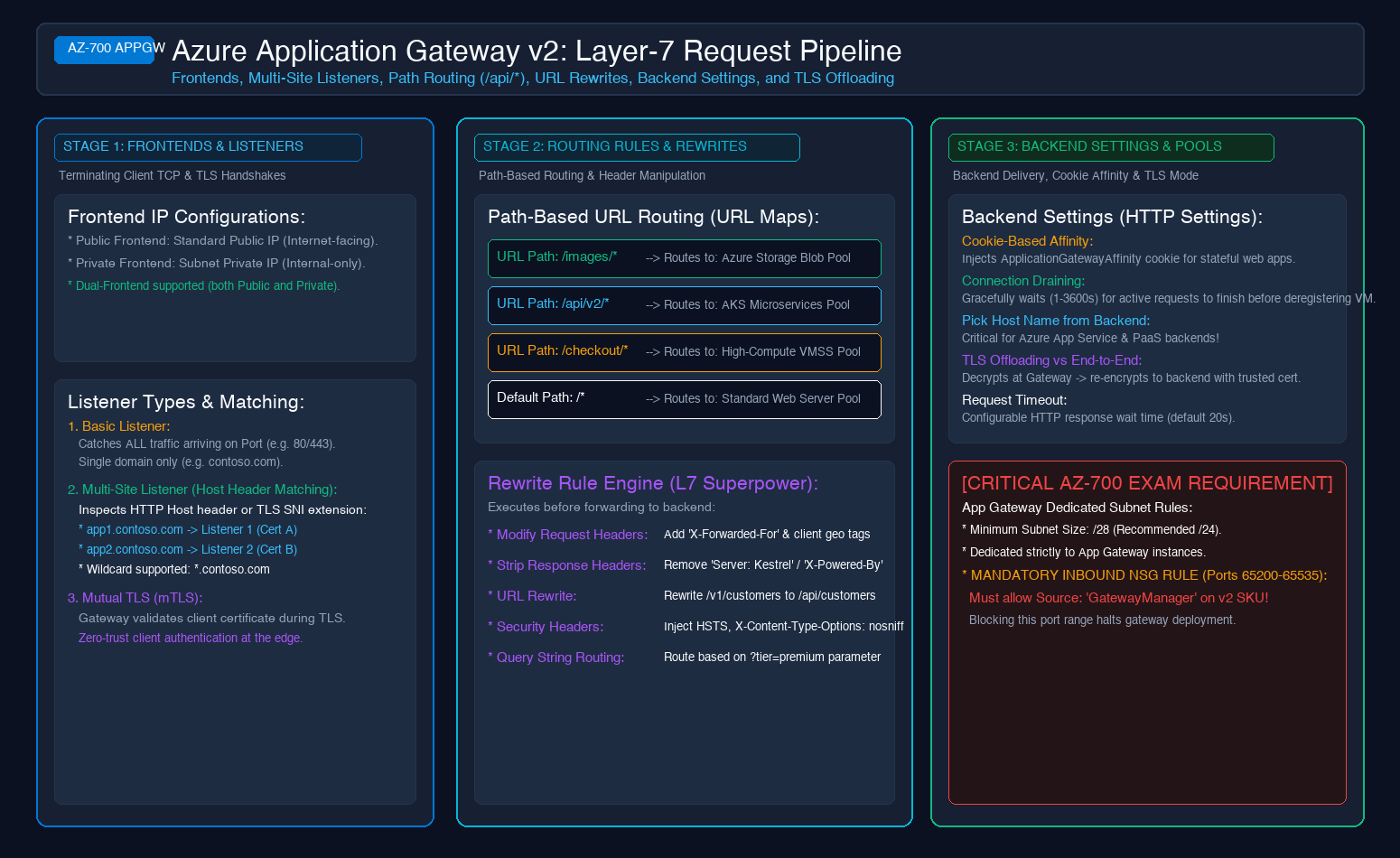
The Application Gateway v2 Architecture
Unlike the legacy v1 SKU (which is retired), Application Gateway v2 is built on modern, cloud-native proxy engines running on dedicated compute infrastructure inside your VNet:
* Autoscaling: Dynamically scales from 0 to 125 instances based on incoming traffic patterns and compute load (CPU, memory, TLS handshakes).
* Zone-Redundancy: When deployed as zone-redundant, Azure distributes the underlying gateway instances across Availability Zones 1, 2, and 3.
* Integrated WAF: Can be deployed with an integrated Web Application Firewall (WAF_v2) to protect against OWASP Top 10 vulnerabilities (covered deeply in Article-19).
The 5-Stage Request Pipeline
Whenever an HTTP/HTTPS request hits Application Gateway, it passes through a deterministic five-stage pipeline:
$$\mathbf{Frontend\;IP} \;\;\longrightarrow\;\; \mathbf{Listener} \;\;\longrightarrow\;\; \mathbf{Routing\;Rule} \;\;\longrightarrow\;\; \mathbf{Rewrite\;Rules} \;\;\longrightarrow\;\; \mathbf{Backend\;Settings} \;\;\longrightarrow\;\; \mathbf{Backend\;Pool}$$
Let’s dissect each stage:
Stage 1: Frontends & Listeners
Frontend IP Configuration
Application Gateway supports:
* Public Frontend: Bound to a Standard Public IP address.
* Private Frontend: Bound to a private IP within the dedicated gateway subnet.
* Dual-Frontend: Houses both a Public IP and a Private IP simultaneously (e.g., public internet users enter via Public VIP; internal branch workers enter via Private VIP).
Listener Types & Host Matching
A Listener waits for incoming requests on a specific IP, port, and protocol:
1. Basic Listener
- Listens on a single port (e.g., Port 80 or 443) and accepts any request arriving at that port, regardless of what domain name is in the host header.
- Limitation: You can only have one Basic Listener per port on a given frontend IP.
2. Multi-Site Listener (The Enterprise Standard)
- Evaluates the HTTP
Hostheader (for plain HTTP) or the TLS Server Name Indication (SNI) extension (for HTTPS). - Allows you to host hundreds of distinct websites on a single frontend IP:
- Request for
app1.contoso.com$\longrightarrow$ Matches Listener 1 (presents SSL Cert A). - Request for
app2.contoso.com$\longrightarrow$ Matches Listener 2 (presents SSL Cert B). - Supports wildcard hostnames:
*.contoso.com.
3. Mutual TLS (mTLS)
Application Gateway v2 supports Mutual TLS authentication. In addition to the gateway presenting a certificate to the client, the gateway demands that the client present a valid Client Certificate. The gateway validates the client cert against an uploaded trusted client CA certificate chain, enforcing zero-trust identity before the request ever reaches your backend code.
Stage 2: Routing Rules & Path-Based Maps
Once a listener catches a request, it invokes a Request Routing Rule. There are two flavors:
1. Basic Routing Rule
Maps all traffic from a listener directly to a single backend pool.
2. Path-Based Routing Rule (URL Maps)
Inspects the URL path (/path) and routes traffic to specialized backend pools:
* https://contoso.com/images/* $\longrightarrow$ Steered to an Azure Blob Storage Static Website.
* https://contoso.com/api/v2/* $\longrightarrow$ Steered to an Azure Kubernetes Service (AKS) ingress pool.
* https://contoso.com/checkout/* $\longrightarrow$ Steered to a high-memory Virtual Machine Scale Set (VMSS) pool.
* Default Path (/*) $\longrightarrow$ Steered to the primary web server pool.
Stage 3: The Rewrite Rule Set Engine
Before forwarding a request to the backend—or before returning a response to the client—Application Gateway can execute Rewrite Rule Sets. This eliminates the need to configure complex URL rewrite modules inside NGINX or Apache on every individual VM.
Common Rewrite Superpowers:
1. Security Header Injection: Injects Strict-Transport-Security: max-age=31536000, X-Content-Type-Options: nosniff, and X-Frame-Options: DENY onto all outbound HTTP responses.
2. Server Cloaking: Strips sensitive revealing headers like Server: Kestrel or X-Powered-By: ASP.NET so attackers cannot fingerprint your backend framework.
3. URL Path Rewriting: Rewrites an incoming clean URL like /v1/products/42 into /app.php?id=42 before handing it to the backend server.
4. Client IP Tagging: Injects X-Forwarded-For and X-Forwarded-Proto headers so backend microservices know the true public client IP address.
Stage 4: Backend Settings (HTTP Settings)
The Backend Settings resource defines how Application Gateway communicates with the backend servers:
- Protocol & Port: The gateway can listen on HTTPS port 443 externally, and speak plain HTTP port 80 to internal backend VMs (TLS Termination).
- Cookie-Based Affinity: When enabled, Application Gateway injects a cookie named
ApplicationGatewayAffinityinto the client’s browser. Subsequent requests containing this cookie are routed to the exact same backend VM instance, preserving state for non-stateless legacy applications. - Connection Draining (Deregistration Delay): When you remove a VM for patching or during a scale-in event, the gateway stops sending new connections to that VM, but gracefully waits (from 1 to 3,600 seconds) for existing active transactions to complete before severing the socket.
- Request Timeout: How long the gateway waits for a backend server to reply (default: 20 seconds; tunable up to 86,400 seconds for massive batch report generation).
The Azure App Service 404 Trap (High Exam Yield)
This is one of the most common gotchas on the AZ-700 exam:
* The Scenario: You deploy an Azure App Service (myapp.azurewebsites.net). You place an Application Gateway in front of it. You browse to https://contoso.com, and your browser throws an HTTP 404 Not Found.
* Why it Breaks: Multi-tenant Azure App Service routes traffic internally based on the HTTP Host header. Because the client browsed to contoso.com, the client’s browser sent Host: contoso.com. Application Gateway forwarded that exact header to Azure App Service. App Service looked at contoso.com, realized it only knows about myapp.azurewebsites.net, and dropped the request with a 404!
* The Fix: In the Application Gateway Backend Settings, you must enable:
$$\mathbf{Pick\;host\;name\;from\;backend\;target} \;\;=\;\; \mathbf{True}$$
When checked, the gateway strips contoso.com and rewrites the Host header to myapp.azurewebsites.net when proxying the request to the App Service.
Stage 5: TLS Termination vs. End-to-End TLS
1. TLS Termination (Offloading)
- How it works: Client negotiates TLS with Application Gateway. The gateway decrypts the packet. The gateway forwards unencrypted plain HTTP to backend VMs over your private VNet.
- Advantage: Offloads expensive cryptographic math from backend servers; simplifies certificate lifecycle management (you only install the SSL cert on the gateway).
2. End-to-End TLS (Zero Trust)
- How it works: Client negotiates TLS with the gateway. The gateway decrypts the packet to run WAF inspection and URL routing rules, and then re-encrypts the packet into a brand-new TLS session before delivering it to the backend VM.
- The Certificate Trust Requirement (Exam Essential):
- When Application Gateway v2 re-encrypts traffic to the backend, it must verify the backend server’s TLS certificate.
- If your backend servers use private certificates signed by an internal corporate PKI, you must upload the public root certificate (
.cer) of your enterprise Certificate Authority into the Backend Settings as a Trusted Root Certificate. If Azure cannot validate the trust chain, it marks the backend as unhealthy and returns anHTTP 502 Bad Gateway.
Subnet Requirements & The GatewayManager NSG Rule
Deploying an Application Gateway requires strict adherence to subnet networking rules:
1. Dedicated Subnet
- Application Gateway must live in its own dedicated subnet. You cannot deploy virtual machines, load balancers, or private endpoints in this subnet.
- Minimum size:
/28(recommended:/24to accommodate autoscaling compute nodes).
2. The Mandatory GatewayManager Inbound NSG Rule
If you attach a Network Security Group (NSG) to the Application Gateway subnet, you must explicitly permit inbound management traffic:
* Source: GatewayManager (Service Tag)
* Source Port Range: *
* Destination: *
* Destination Port Range: 65200 - 65535 (for the v2 SKU!)
* Protocol: TCP
* Action: Allow
Real-World Solution Scenarios: Layer-7 Application Delivery Mastery
Scenario 13.1: The Mystifying 404 Web App Error (The Host Header Mismatch)
- The Problem: A cloud team publishes an internal Azure App Service web application (
mycorp-app.azurewebsites.net) through an Application Gateway v2 using the custom corporate domainportal.contoso.com. TLS offloading is configured on the frontend listener. Browsing tohttps://portal.contoso.comreturns an Azure App Service branded “Error 404 – Web App Not Found”, yet testing the App Service directly works without issue. - Underlay Mechanics & Failure Root Cause: Application Gateway operates as a full reverse proxy. When a user requests
https://portal.contoso.com, Application Gateway receives the request and, by default, forwards the original incoming HTTPHostheader (Host: portal.contoso.com) to the backend pool. Azure App Service is a multi-tenant platform; its front-door reverse proxies inspect incomingHostheaders to route requests to the correct customer container. Becauseportal.contoso.comwas not registered as a custom domain inside the App Service, App Service’s ingress routing engine has no matching binding and returns HTTP 404. - The Architecture Solution:
- Configure Backend Host Name Override: In Application Gateway’s Backend Settings (HTTP Settings), toggle “Override with new host name” to Yes.
- Enable Backend Target Binding: Select “Pick host name from backend target” (
pick-host-name-from-backend-address = true). - Proxy Header Transformation: Application Gateway automatically strips
Host: portal.contoso.comand injectsHost: mycorp-app.azurewebsites.netwhen establishing the backend HTTP connection, while preserving the user’s original domain inX-Forwarded-Host. App Service accepts and serves the traffic immediately.
Scenario 13.2: The Indefinite Provisioning Hang (The GatewayManager Port 65200-65535 Block)
- The Problem: An enterprise security team applies a hardened Network Security Group to the
snet-appgwsubnet. The NSG allows inbound TCP 80/443 fromInternetand denies all other inbound traffic. Immediately, subsequent Application Gateway configuration updates (such as updating SSL certificates or adding backend pools) hang for over 90 minutes and ultimately fail with a gateway provisioning timeout. Health probes and autoscaling metrics stop reporting. - Underlay Mechanics & Failure Root Cause: Application Gateway v2 relies on a dedicated platform control plane to monitor instance health, scale compute nodes dynamically, and deploy configuration changes. Microsoft’s platform management orchestrators communicate with the gateway compute instances using TCP ports
65200 - 65535. When the security team added the broad deny rule, they severed the control plane communication between Azure’s fabric controller and the gateway nodes. - The Architecture Solution:
- Add Mandatory Infrastructure Inbound NSG Rule: In the NSG attached to the Application Gateway subnet, add an inbound rule:
- Priority: 110 (evaluated before any Deny rules)
- Source:
GatewayManager(Azure Service Tag) - Source Port Range:
* - Destination:
* - Destination Port Range:
65200-65535 - Protocol:
TCP - Action:
Allow
- Underlay Recovery: The Azure fabric manager immediately reconnects to the gateway instances. Pending configuration deployments complete successfully, autoscaling metrics restore, and the gateway returns to an
Activeoperational state.
Scenario 13.3: End-to-End TLS Security & The Enterprise Certificate Chain Dilemma
- The Problem: A healthcare organization mandates end-to-end encryption from the client browser to backend Linux virtual machines. TLS is terminated on Application Gateway v2 for WAF inspection, and a secondary TLS connection is initiated to the backend VMs. The backend VMs use certificates issued by an internal corporate PKI. The Application Gateway backend health status reports
BackendHealthUnhealthywith error:The root certificate of the server certificate used by the backend does not match the trusted root certificate added to the application gateway. - Underlay Mechanics & Failure Root Cause: Application Gateway v2 enforces strict cryptographic validation when initiating outbound TLS connections to backend pools. If the backend VM presents a certificate issued by an internal corporate Certificate Authority (rather than a globally trusted public CA), Application Gateway’s operating system rejects the TLS handshake because it cannot build a trusted chain to a known root authority.
- The Architecture Solution:
- Export Enterprise Root CA Certificate: Export the public root certificate (
.cerformat, Base-64 encoded X.509) of the internal corporate Certificate Authority. - Upload to Application Gateway Backend Settings: In Application Gateway’s Backend Settings, set the backend protocol to HTTPS (Port 443) and upload the
.cerfile as a “Trusted Root Certificate”. - Backend CN/SAN Matching: Ensure the Common Name (CN) or Subject Alternative Name (SAN) on the backend VM certificate matches the FQDN configured in the Backend Setting’s host override.
- Cryptographic Verification: Application Gateway validates the backend certificate against the uploaded root authority, marks the backend pool
Healthy, and maintains end-to-end encrypted transport with full Layer-7 WAF inspection.
Hands-On Azure CLI: Deploying Azure Application Gateway v2 (WAF_v2)
Here is how to carve the dedicated subnet, configure the mandatory GatewayManager NSG rules, and deploy Application Gateway v2 with autoscaling.
1. Carve Dedicated Subnet & Configure GatewayManager NSG
az network vnet subnet create \
  --resource-group rg-az700-networking \
  --vnet-name vnet-hub-eastus \
  --name snet-appgw \
  --address-prefixes 10.100.4.0/24

az network nsg create -g rg-az700-networking -n nsg-appgw

# Inbound TCP 65200-65535 from GatewayManager is mandatory for v2 health & management
az network nsg rule create \
  --resource-group rg-az700-networking \
  --nsg-name nsg-appgw \
  --name Allow-GatewayManager-ControlPlane \
  --priority 100 \
  --direction Inbound \
  --access Allow \
  --source-address-prefixes GatewayManager \
  --source-port-ranges '*' \
  --destination-address-prefixes '*' \
  --destination-port-ranges 65200-65535 \
  --protocol Tcp

az network vnet subnet update \
  --resource-group rg-az700-networking \
  --vnet-name vnet-hub-eastus \
  --name snet-appgw \
  --network-security-group nsg-appgw
2. Allocate Static Standard Public IP
az network public-ip create \
  --resource-group rg-az700-networking \
  --name pip-appgw \
  --sku Standard \
  --allocation-method Static
3. Deploy Autoscaling Application Gateway v2
az network application-gateway create \
  --resource-group rg-az700-networking \
  --name agw-ingress-prod \
  --sku WAF_v2 \
  --vnet-name vnet-hub-eastus \
  --subnet snet-appgw \
  --public-ip-address pip-appgw \
  --frontend-port 80 \
  --http-settings-port 80 \
  --http-settings-protocol Http \
  --min-capacity 2 \
  --max-capacity 10
The GIST: Important Summary & Key Points
Here is your AZ-700 master checklist for Application Gateway v2:
1. Layer-7 Reverse Proxy: Terminates client TCP, negotiates TLS, inspects HTTP headers, and rewrites URLs.
2. Multi-Site Listeners: Inspects HTTP Host header and TLS SNI to host multiple independent domains on one public IP.
3. App Service 404 Fix: Always enable pick-host-name-from-backend-address in Backend Settings when routing to PaaS backends.
4. End-to-End TLS: Requires uploading the enterprise CA’s public .cer file as a Trusted Root Certificate in Backend Settings.
5. Cookie Affinity: Injects ApplicationGatewayAffinity cookie to keep stateful client sessions pinned to a single VM.
6. Mandatory NSG Ports: Inbound TCP 65200-65535 from GatewayManager is mandatory on the dedicated subnet.