You have reached the finish line.
Over the last nineteen articles, we have dismantled Azure networking piece by piece. We pulled back the curtain on the hypervisor underlay, demystified the magic 168.63.129.16 wire server, built resilient BGP multi-circuit failovers, tamed SNAT port exhaustion, and secured multi-tenant perimeters.
Now, it’s time to put all the puzzle pieces together on the workbench.
In real-world enterprise architecture—and on the AZ-700 exam—you are never tested on a single service in a vacuum. You are tested on how an entire ecosystem functions as a unified whole when a live packet hits the wire.
In this capstone article, we will execute The Grand Unified Packet Walk: following a single packet across eight distinct hops from an on-premises workstation, across ExpressRoute, through the central Azure Firewall, into Application Gateway, and landing on a private database backend via Private Link.
We’ll then arm you with the Network Watcher Troubleshooting Playbook and the Top 15 High-Yield Exam Traps so you can walk into the AZ-700 exam room and crush it.
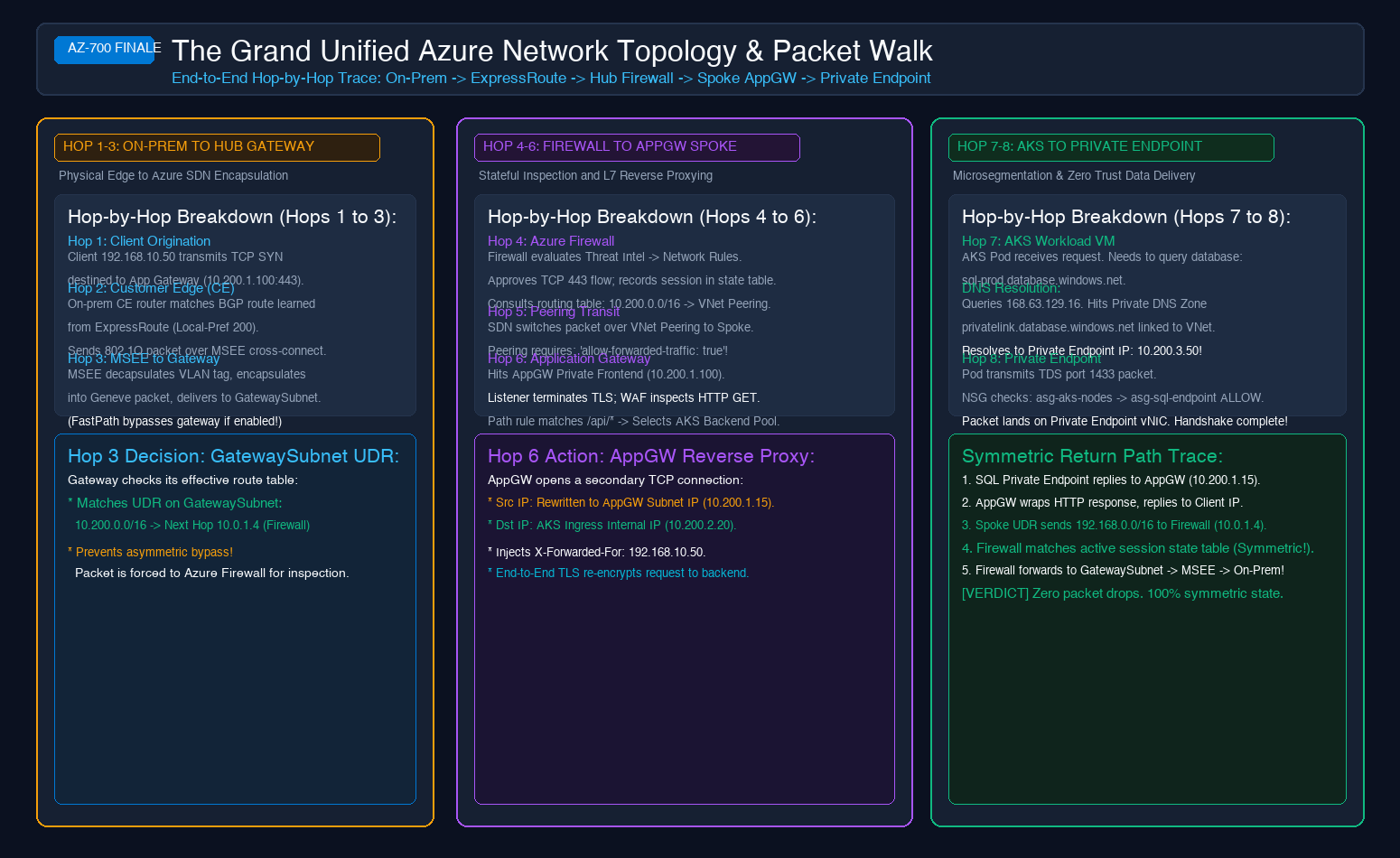
The Grand Topology: The Enterprise Architecture
Here is the production architecture we have built throughout this series:
[On-Premises Datacenter: 192.168.0.0/16]
   │ (CPE-1: Local-Pref 200 on ER / 100 on VPN)
   ├─── Dual MSEE Cross-Connects (FastPath Enabled)
   │
   ▼
[Hub VNet: 10.0.0.0/16]
   ├── GatewaySubnet (10.0.0.0/27): ER Gateway + VPN Gateway (Coexistence)
   │     └── UDR: 10.200.0.0/16 -> Next Hop 10.0.1.4 (Firewall)
   ├── AzureFirewallSubnet (10.0.1.0/26): Azure Firewall Premium (10.0.1.4)
   ├── RouteServerSubnet (10.0.2.0/27): Azure Route Server (BGP ASN 65515)
   └── Private Resolver Subnets: DNS Inbound (10.0.3.4) & Outbound (10.0.4.4)
         │
         ├── (VNet Peering: allow-forwarded-traffic: true)
         ▼
[Spoke VNet 1: 10.200.0.0/16 - App Delivery]
   ├── snet-appgw (10.200.1.0/24): Application Gateway v2 + WAF (10.200.1.100)
   ├── snet-aks (10.200.2.0/24): AKS Microservices (asg-aks-nodes)
   │     └── Azure NAT Gateway (for outbound internet SNAT)
   └── snet-db (10.200.3.0/24): Azure SQL Private Endpoint (10.200.3.50)
         └── Private DNS Zone: privatelink.database.windows.net
The Grand Packet Walk: An 8-Hop Journey
An employee at the on-premises headquarters on laptop 192.168.10.50 opens an internal web browser and navigates to:
$$\mathbf{https://app.corp.contoso.com/api/v1/orders}$$
Let’s trace the physics of what happens across every hop:
Hop 1: On-Premises DNS Resolution & TCP SYN Generation
- The laptop queries the on-premises DNS server (
192.168.10.53). - The on-prem DNS server has a conditional forwarder matching
*.corp.contoso.com, pointing to the Azure DNS Private Resolver Inbound Endpoint (10.0.3.4). - The Inbound Endpoint resolves the name against the linked Private DNS Zone and returns the private IP of the Application Gateway Private Frontend:
10.200.1.100. - The client’s OS generates an initial TCP SYN packet:
$$\text{Source: } 192.168.10.50:\text{54231} \;\;\longrightarrow\;\; \text{Destination: } 10.200.1.100:\text{443}$$
Hop 2: Customer Edge (CE) Routing Over ExpressRoute
- The packet hits the corporate core router.
- The routing table has two paths to
10.200.0.0/16: - Path A: ExpressRoute Circuit (BGP Local-Preference = 200)
- Path B: Backup S2S VPN Tunnel (BGP Local-Preference = 100)
- Decision: Because Local-Preference 200 wins, the router selects ExpressRoute.
- The packet is encapsulated with an IEEE 802.1Q VLAN C-Tag and switched out the primary optical interface to the Meet-Me room.
Hop 3: MSEE to GatewaySubnet (FastPath Evaluation)
- The packet arrives at Microsoft Enterprise Edge router
MSEE-1. - The MSEE strips the 802.1Q tag.
- FastPath Check:
- If FastPath is disabled: The MSEE encapsulates the packet into Geneve and sends it to the ExpressRoute Gateway compute instances in
GatewaySubnet. - If FastPath is enabled: The MSEE routes the data plane directly to the target host vSwitch, bypassing the gateway CPU entirely.
Hop 4: The GatewaySubnet UDR (Preventing Asymmetric Bypass)
- The packet enters the Azure SDN underlay in the Hub VNet.
- The virtual switch consults the Route Table associated with
GatewaySubnet. - It finds a User-Defined Route:
$$\text{Prefix: } 10.200.0.0/16 \;\;\longrightarrow\;\; \mathbf{Next\;Hop:\;VirtualAppliance\;(10.0.1.4)}$$ - The Critical Trap Avoided: Without this UDR, the gateway would have used the VNet Peering system route to send the packet straight to Spoke 1, bypassing the Azure Firewall and causing an asymmetric packet drop on the return path!
- The SDN encapsulates the packet and delivers it to the Azure Firewall virtual NIC at
10.0.1.4.
Hop 5: Azure Firewall Stateful Inspection & Peering Transit
- Azure Firewall receives the raw packet.
- The 4-Stage Rule Pipeline executes:
- Threat Intel: Clean.
- DNAT: No DNAT needed for internal private traffic.
- Network Rules: Evaluates
rule-allow-onprem-to-appgw(Source:192.168.0.0/16, Dst:10.200.1.100, Port:443, Action:Allow). - State Table Entry Created: The firewall logs the active 5-tuple session in memory.
- The firewall checks its route table:
10.200.0.0/16$\rightarrow$ Next HopVNet Peering. - Peering Check: The Hub-to-Spoke peering has
allow-forwarded-traffic: trueenabled. The packet is forwarded across the peering fabric into Spoke 1.
Hop 6: Application Gateway v2 & WAF Termination
- The packet lands on the Application Gateway Private Frontend (
10.200.1.100:443). - Subnet NSG Check: The NSG allows inbound TCP 443 from
192.168.0.0/16. - TCP & TLS Termination: App Gateway completes the 3-way TCP handshake and decrypts the TLS session using its enterprise SSL certificate.
- WAF Inspection: The WAF engine runs OWASP CRS 3.2 anomaly scoring on the HTTP payload:
- URL Path:
/api/v1/orders(Valid). - Request Headers: Clean.
- Anomaly Score: 0 (Allowed).
- Routing & Rewrite Execution:
- Path-based rule matches
/api/*$\rightarrow$ selects backend poolbe-pool-aks. - Rewrite rule injects
X-Forwarded-For: 192.168.10.50. - Secondary TCP Connection: Application Gateway initiates a brand-new TCP connection from its internal subnet IP (
10.200.1.15) to the backend AKS Ingress Controller (10.200.2.20:443) using End-to-End TLS.
Hop 7: AKS Microservice Processing & Database Query
- The AKS Pod receives the HTTP order request and prepares an SQL
INSERTstatement. - The Pod must connect to:
sql-prod.database.windows.net. - DNS Resolution:
- The Pod queries the SDN Wire Server (
168.63.129.16). - Azure resolves the public CNAME
sql-prod.privatelink.database.windows.netagainst the linked Private DNS Zone. - It returns the Private Endpoint IP:
10.200.3.50. - The AKS Pod transmits an SQL TDS packet to
10.200.3.50:1433.
Hop 8: Landing on the Private Endpoint via Private Link
- The packet leaves the AKS subnet.
- NSG & ASG Validation:
- The NSG checks: Source
asg-aks-nodes$\longrightarrow$ Destinationasg-sql-endpointon Port 1433. - Action:
Allow. - The packet travels across Azure Private Link and lands on the Private Endpoint Virtual NIC (
10.200.3.50). - The Azure SQL PaaS service processes the SQL query, commits the order transaction, and returns the response.
The Return Path: Symmetric Perfection
- Azure SQL returns data to AKS (
10.200.2.20). - AKS responds to Application Gateway (
10.200.1.15). - Application Gateway packages the HTTP 200 OK response and addresses it to the client:
$$\text{Source: } 10.200.1.100:\text{443} \;\;\longrightarrow\;\; \text{Destination: } 192.168.10.50:\text{54231}$$ - Spoke UDR Execution: The Spoke Subnet route table has a UDR:
192.168.0.0/16$\longrightarrow$ Next Hop10.0.1.4(Firewall). - Firewall Symmetric Match: The packet arrives at Azure Firewall. The firewall checks its state table, recognizes the active session opened in Hop 5, and permits the packet through without re-evaluating rules.
- The firewall forwards to
GatewaySubnet$\rightarrow$ MSEE $\rightarrow$ ExpressRoute $\rightarrow$ On-premises laptop. - The browser renders the webpage. Zero dropped packets. 100% symmetric state.
The Network Watcher Troubleshooting Playbook
When something breaks in an Azure network, you don’t guess. You use Azure Network Watcher:
| Tool | What it Does | Real-World Scenario |
|---|---|---|
| IP Flow Verify | Tests 5-tuple against NSGs | “Why can’t VM-1 SSH into VM-2?” Runs instant check and outputs the exact NSG name and Rule ID blocking or allowing the packet. |
| Next Hop | Tests routing tables | “Why is my traffic bypassing the firewall?” Outputs the next hop type (VirtualAppliance, VNetPeering, Internet) and next-hop IP. |
| Connection Troubleshooter | End-to-end hop analysis | Tests connectivity between source and destination; detects intermediate gateway and firewall packet drops. |
| Connection Monitor | Continuous synthetic probing | Sends active probes every 60s; graphs latency, jitter, and packet loss over time across hybrid links. |
| Packet Capture | Wire capture on VM NICs | Captures raw .pcap files on remote VMs without logging in via SSH/RDP; opens directly in Wireshark. |
| NSG Flow Logs (v2) | L4 audit logging | Logs all accepted and denied flows to Log Analytics; includes bytes sent/received and Traffic Analytics geo-IP mapping. |
The Top 15 AZ-700 High-Yield Exam Traps
Here are the specific, deceptive scenarios Microsoft loves putting in AZ-700 questions:
- The 5 Reserved IPs: Every subnet loses 5 addresses (
.0,.1,.2,.3,.255). A/29has only 3 usable host IPs. - Subnet Sizing Minimums:
GatewaySubnet(min/29, rec/27),AzureFirewallSubnet(min/26),RouteServerSubnet(min/27),AzureBastionSubnet(min/26), Private Resolver subnets (min/28). - GatewaySubnet NSG Rule: Never attach an NSG to
GatewaySubnet. It breaks platform management traffic. - Standard Public IPs are Closed by Default: Inbound traffic drops unless an explicit NSG rule allows it.
- Longest Prefix Match (LPM) Always Wins: A
/24BGP route beats a/16UDR every time. - Tie-Breaker Precedence: When prefixes match: $\mathbf{UDR} > \mathbf{BGP} > \mathbf{System\;Routes}$. Within BGP: $\mathbf{ExpressRoute} > \mathbf{S2S\;VPN}$.
- Peering is Non-Transitive: Spoke 1 cannot talk to Spoke 2 across a Hub via peering alone; requires NVA/Firewall with UDRs or direct peering.
- Gateway Transit Flags:
allow-gateway-transiton Hub;use-remote-gatewayson Spoke. Spoke can only use ONE remote gateway. - Firewall Rule Processing Order: Threat Intel $\longrightarrow$ DNAT $\longrightarrow$ Network $\longrightarrow$ Application.
- Network Rules Beat App Rules: If a Network rule blocks Port 443, Application rules for that port will never be evaluated!
- Floating IP (DSR): Mandatory for SQL Server AlwaysOn Availability Group listeners; requires Loopback adapter in guest OS.
- HA Ports Rule: Frontend Port
0, Backend Port0, ProtocolAllon Internal Standard Load Balancers enables horizontal NVA scaling. - App Service 404 Behind App Gateway: Must enable “Pick host name from backend target” in Backend Settings.
- App Gateway Dedicated NSG Rule: Inbound TCP ports
65200-65535fromGatewayManagerare mandatory on v2 SKU. - Service Endpoints vs. Private Endpoints: Service Endpoints cannot be reached from on-premises; Private Endpoints are real vNICs accessible over VPN and ExpressRoute.
Hands-On Azure CLI: Network Watcher & Packet Walk Troubleshooting
When packets drop in production, do not guess. Run these Network Watcher commands directly against the SDN hypervisors to inspect effective flows and routes.
1. IP Flow Verify: Test Inbound/Outbound NSG Filtering
Quickly determine if the hypervisor vSwitch drops a packet due to an NSG rule before it reaches the virtual NIC.
az network watcher test-ip-flow \
  --resource-group rg-az700-networking \
  --direction Inbound \
  --protocol TCP \
  --local 10.240.1.4:443 \
  --remote 192.168.1.50:52134 \
  --vm vm-spoke-workload
2. Next Hop: Verify SDN Route Table Evaluation
Verify whether the next hop for internet traffic is your Azure Firewall Virtual Appliance or the default Internet gateway.
az network watcher show-next-hop \
  --resource-group rg-az700-networking \
  --vm vm-spoke-workload \
  --source-ip 10.240.1.4 \
  --dest-ip 8.8.8.8 \
  --output table
3. Connection Troubleshoot: End-to-End Hop Latency & Loss
az network watcher test-connectivity \
  --resource-group rg-az700-networking \
  --source-resource vm-spoke-workload \
  --dest-address 10.100.1.100 \
  --dest-port 443 \
  --output json
4. Dump the True Effective Route Table from Hypervisor Host Memory
The Azure Portal GUI can hide propagated routes; the effective route table shows the absolute truth calculated by the hypervisor.
az network nic show-effective-route-table \
  --resource-group rg-az700-networking \
  --name nic-vm-spoke-workload \
  --output table
5. Dump Effective NSG Rules
az network nic list-effective-nsg \
  --resource-group rg-az700-networking \
  --name nic-vm-spoke-workload \
  --output json
The GIST: Important Summary & Key Points
You now possess the deep, under-the-hood architectural knowledge required to design, deploy, and troubleshoot complex Microsoft Azure networks at global enterprise scale.
You understand the physics of the SDN fabric, the mathematics of BGP route selection, the nuances of Layer-4 vs. Layer-7 delivery, and the disciplined security of Zero-Trust segmentation.
Go take the AZ-700 exam with total confidence—you’ve got this.