
The Disk Provisioning Trade-Off
In many cloud platforms, storage performance is directly bound to storage capacity. If you deploy a database VM in Google Cloud and require 10,000 IOPS, but only need 100 GB of data storage, you cannot simply provision a 100 GB disk. On standard Persistent Disks (PD), performance scales linearly with size. You are forced to provision a much larger disk (e.g., 333 GB of PD-SSD) simply to hit your IOPS target, paying for block storage space you will never use.
Furthermore, if your application experiences predictable seasonal spikes, changing performance profiles in GCP requires altering disk types or resizing volumes permanently—there is no native way to temporarily “throttle up” performance and then dial it back down to save costs.
Oracle Cloud Infrastructure (OCI) separates capacity from performance through Elastic Performance Tiers on Block Volumes, and utilizes a highly efficient Mount Target model for shared file storage.
OCI Block Volumes: Elastic Performance
OCI Block Volumes provide network-attached block storage for compute instances. Unlike GCP’s Persistent Disks, where performance is determined by disk size and disk type, OCI block volumes use a single volume type where you configure performance independently of size using Volume Performance Units (VPUs).
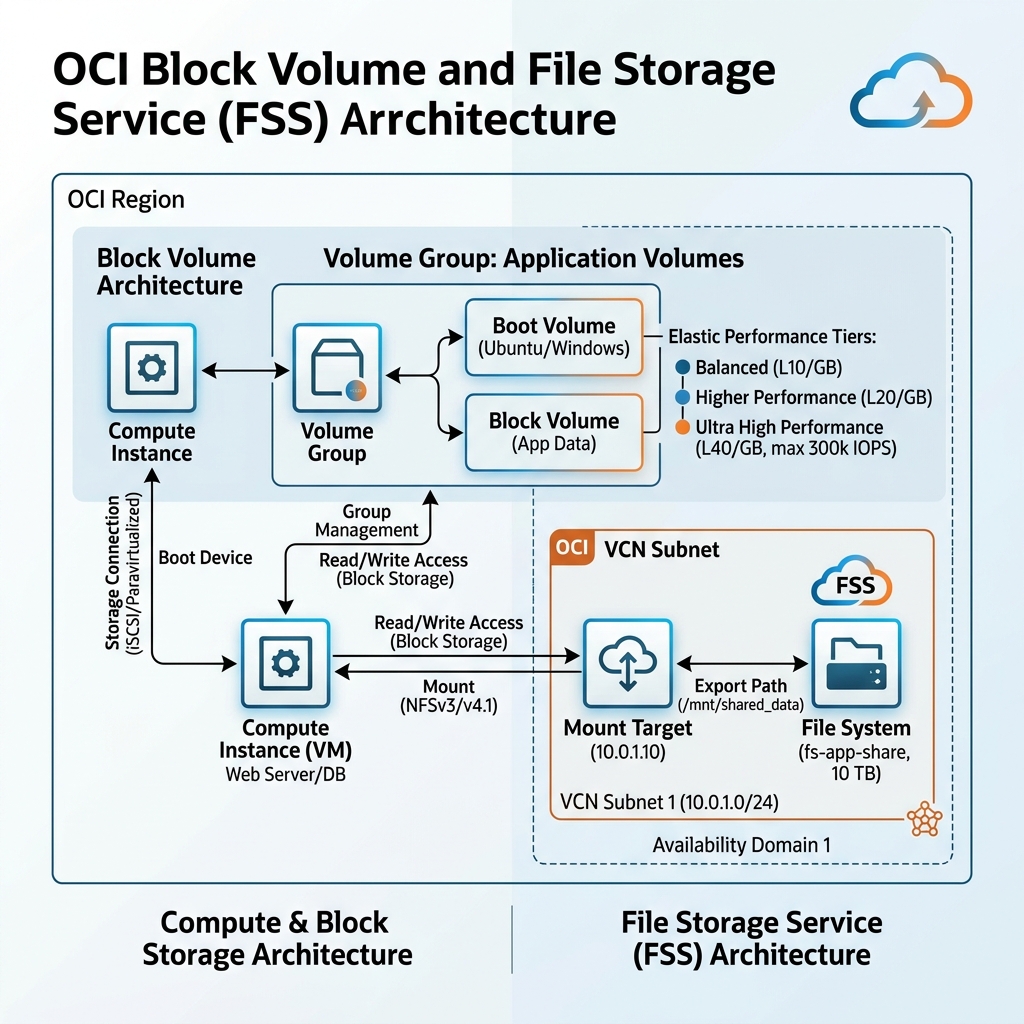
You can dynamically adjust the performance of an active volume on the fly without rebooting the instance or resizing the disk. OCI offers four performance tiers:
1. Lower Cost (0 VPUs/GB): Optimized for throughput-heavy workloads like streaming, log processing, and cold data storage. (Max 3,000 IOPS per volume).
2. Balanced (10 VPUs/GB): The default tier. Designed for general workloads, including boot disks and standard web databases. (Max 25,000 IOPS per volume).
3. Higher Performance (20 VPUs/GB): Optimized for transactional databases and IOPS-sensitive enterprise workloads. (Max 50,000 IOPS per volume).
4. Ultra High Performance (30 to 120 VPUs/GB): Designed for performance-critical databases and workloads requiring sub-millisecond latency. (Up to 300,000 IOPS per volume).
This allows you to write automation scripts (or use OCI CLI commands) to dynamically scale a database volume from the Balanced tier to Ultra High Performance during a heavy batch run, and scale it back down afterward to reduce costs.
Volume Groups: Consistent Multi-Disk Backups
When managing multi-tier applications, an instance often utilizes multiple block volumes (e.g., one boot volume, one volume for database binaries, and one for database logs).
* In GCP, taking a backup of these disks requires snapshotting each disk individually, which can result in write skew and data inconsistency if snapshots are taken at slightly different times.
* OCI solves this with Volume Groups. You can group multiple boot and block volumes across multiple instances into a single Volume Group.
* When you take a backup or clone of a Volume Group, OCI coordinates the write buffers across all volumes in the group, ensuring a crash-consistent backup of the entire application state in a single action.
OCI File Storage Service (FSS): Shared File Systems
For shared, concurrent file systems, OCI provides the File Storage Service (FSS), a fully managed elastic network file system supporting the NFSv3 protocol. (Equivalent to GCP Filestore).
However, FSS separates the underlying storage from the network endpoint, resulting in an architecture that is highly IP-efficient compared to GCP.
1. Mount Targets
A Mount Target is an NFS listener that resides in a specific VCN subnet. It is allocated a private IP address and acts as the network entry point for client instances mounting the file system.
2. File Systems and Export Paths
A File System is the actual logical storage container.
* Instead of deploying one Mount Target (and consuming one VCN IP) for every file system, OCI allows you to associate multiple File Systems with a single Mount Target.
* You distinguish between different file systems using Export Paths (e.g., /project-a and /project-b) on the Mount Target.
* Clients mount the share using the Mount Target’s single IP address followed by the export path:
bash

$ sudo mount 10.0.1.50:/project-a /mnt/share-a
This architecture is illustrated below, showing how a compute instance accesses block volumes with elastic performance, and mounts shared file systems via NFS export paths:
Declarative Provisioning via Terraform
Instead of running manual CLI commands, you configure OCI Block Volumes and File Storage (FSS) using Terraform. The following configuration defines a block volume at the Higher Performance tier (20 VPUs per GB), a shared File System, and an Export Path on a Mount Target:
# 1. Create a Block Volume with Higher Performance
resource "oci_core_volume" "db_data_vol" {
  availability_domain = "UoNd:US-ASHBURN-AD-1"
  compartment_id      = "ocid1.compartment.oc1..aaaaaaaadevvv..."
  size_in_gbs         = 100
  display_name        = "DB-Data-Vol"

  # Configure performance independently of size (20 VPUs/GB = Higher Performance)
  vpus_per_gb         = 20
}

# 2. Create the File Storage System
resource "oci_file_storage_file_system" "shared_assets_fs" {
  availability_domain = "UoNd:US-ASHBURN-AD-1"
  compartment_id      = "ocid1.compartment.oc1..aaaaaaaadevvv..."
  display_name        = "Shared-Assets-FS"
}

# 3. Create an Export to expose the File System on a Mount Target
resource "oci_file_storage_export" "assets_export" {
  # The export set ID associated with the Mount Target
  export_set_id  = "ocid1.exportset.oc1.iad.aaaaaaaaset1..."
  file_system_id = oci_file_storage_file_system.shared_assets_fs.id
  path           = "/assets"

  # Optional: Configure NFS export options (client IP access and permissions)
  export_options {
    source          = "10.0.0.0/16"
    require_privileged_source_port = false
    access          = "READ_WRITE"
    identity_squash = "NONE"
  }
}
By decoupling storage capacity from performance via Elastic Performance VPUs, managing shared file exports, and declaring these configurations using Terraform, you can build highly optimized, enterprise storage systems that scale dynamically.
