
Let me tell you about the single most frustrating multicast troubleshooting session I ever had. It was a campus network running IPTV for about 200 rooms, PIM-SM, RP properly configured, IGMP groups all healthy. Everything worked perfectly from one source, but a second source on a different subnet produced zero traffic to receivers. The mroute table had entries, PIM neighbors were up, IGMP was clean. It took me three hours of debug output to realize the RPF check was failing because of an asymmetric static route somebody had added six months earlier for a completely unrelated application.
RPF — Reverse Path Forwarding — is the gatekeeper of all multicast routing. Every single multicast packet that enters a router is subjected to an RPF check before it gets forwarded. If the check fails, the packet is silently dropped. No log, no error, no SNMP trap. Just silence. Understanding RPF deeply will save you more troubleshooting hours than any other multicast concept.
What You Will Need
| Component | Quantity | EVE-NG Image |
|---|---|---|
| Cisco IOSv Router (Network) | 5 | i86bi_Linux-L3-AdvEnterpriseK9-M2_157_3_May_2018.bin |
| Cisco IOSv Router (Source/Receiver) | 2 | i86bi_Linux-L3-AdvEnterpriseK9-M2_157_3_May_2018.bin |
Total RAM required: approximately 4 GB.
Lab Topology
We need a topology with two paths between the source & receiver — this lets us create the asymmetric routing condition that causes RPF failures.
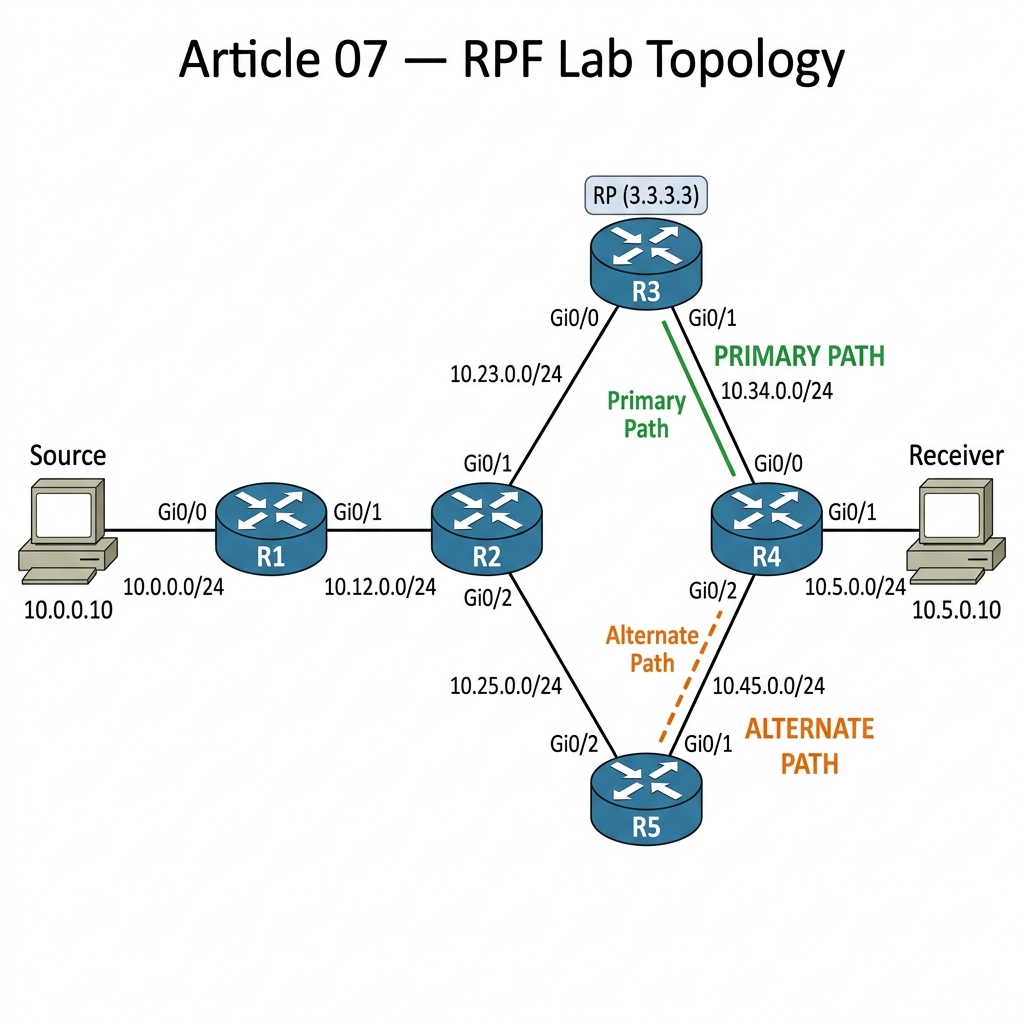
Two paths to R4:
– Primary path: R1 → R2 → R3 → R4 (through the RP)
– Alternate path: R1 → R2 → R5 → R4 (direct shortcut)
IP Addressing Table
| Device | Interface | IP Address | Subnet Mask | Description |
|---|---|---|---|---|
| R1 | Gi0/0 | 10.0.0.1 | 255.255.255.0 | To Source |
| R1 | Gi0/1 | 10.12.0.1 | 255.255.255.0 | To R2 |
| R2 | Gi0/0 | 10.12.0.2 | 255.255.255.0 | To R1 |
| R2 | Gi0/1 | 10.23.0.2 | 255.255.255.0 | To R3 |
| R2 | Gi0/2 | 10.25.0.2 | 255.255.255.0 | To R5 |
| R3 | Gi0/0 | 10.23.0.3 | 255.255.255.0 | To R2 |
| R3 | Gi0/1 | 10.34.0.3 | 255.255.255.0 | To R4 |
| R3 | Loopback0 | 3.3.3.3 | 255.255.255.255 | RP Address |
| R4 | Gi0/0 | 10.34.0.4 | 255.255.255.0 | To R3 |
| R4 | Gi0/1 | 10.5.0.1 | 255.255.255.0 | To Receiver |
| R4 | Gi0/2 | 10.45.0.4 | 255.255.255.0 | To R5 |
| R5 | Gi0/1 | 10.45.0.5 | 255.255.255.0 | To R4 |
| R5 | Gi0/2 | 10.25.0.5 | 255.255.255.0 | To R2 |
| Source | Gi0/0 | 10.0.0.10 | 255.255.255.0 | Multicast Source |
| Receiver | Gi0/0 | 10.5.0.10 | 255.255.255.0 | Multicast Receiver |
Step 1 — Base Configuration (Everything Working)
Configure OSPF & PIM on all routers with default metrics first. Everything should work.
R1 Configuration:
hostname R1
!
interface GigabitEthernet0/0
 ip address 10.0.0.1 255.255.255.0
 ip pim sparse-mode
 no shutdown
!
interface GigabitEthernet0/1
 ip address 10.12.0.1 255.255.255.0
 ip pim sparse-mode
 no shutdown
!
router ospf 1
 network 10.0.0.0 0.0.0.255 area 0
 network 10.12.0.0 0.0.0.255 area 0
!
ip multicast-routing
ip pim rp-address 3.3.3.3
R2 Configuration:
hostname R2
!
interface GigabitEthernet0/0
 ip address 10.12.0.2 255.255.255.0
 ip pim sparse-mode
 no shutdown
!
interface GigabitEthernet0/1
 ip address 10.23.0.2 255.255.255.0
 ip pim sparse-mode
 no shutdown
!
interface GigabitEthernet0/2
 ip address 10.25.0.2 255.255.255.0
 ip pim sparse-mode
 no shutdown
!
router ospf 1
 network 10.12.0.0 0.0.0.255 area 0
 network 10.23.0.0 0.0.0.255 area 0
 network 10.25.0.0 0.0.0.255 area 0
!
ip multicast-routing
ip pim rp-address 3.3.3.3
R3 Configuration (RP):
hostname R3
!
interface Loopback0
 ip address 3.3.3.3 255.255.255.255
 ip pim sparse-mode
!
interface GigabitEthernet0/0
 ip address 10.23.0.3 255.255.255.0
 ip pim sparse-mode
 no shutdown
!
interface GigabitEthernet0/1
 ip address 10.34.0.3 255.255.255.0
 ip pim sparse-mode
 no shutdown
!
router ospf 1
 network 3.3.3.3 0.0.0.0 area 0
 network 10.23.0.0 0.0.0.255 area 0
 network 10.34.0.0 0.0.0.255 area 0
!
ip multicast-routing
ip pim rp-address 3.3.3.3
R4 Configuration:
hostname R4
!
interface GigabitEthernet0/0
 ip address 10.34.0.4 255.255.255.0
 ip pim sparse-mode
 no shutdown
!
interface GigabitEthernet0/1
 ip address 10.5.0.1 255.255.255.0
 ip pim sparse-mode
 no shutdown
!
interface GigabitEthernet0/2
 ip address 10.45.0.4 255.255.255.0
 ip pim sparse-mode
 no shutdown
!
router ospf 1
 network 10.34.0.0 0.0.0.255 area 0
 network 10.5.0.0 0.0.0.255 area 0
 network 10.45.0.0 0.0.0.255 area 0
!
ip multicast-routing
ip pim rp-address 3.3.3.3
R5 Configuration:
hostname R5
!
interface GigabitEthernet0/1
 ip address 10.45.0.5 255.255.255.0
 ip pim sparse-mode
 no shutdown
!
interface GigabitEthernet0/2
 ip address 10.25.0.5 255.255.255.0
 ip pim sparse-mode
 no shutdown
!
router ospf 1
 network 10.25.0.0 0.0.0.255 area 0
 network 10.45.0.0 0.0.0.255 area 0
!
ip multicast-routing
ip pim rp-address 3.3.3.3
Source & Receiver Configuration (Cisco Routers):
We set these up as simple hosts.
!! Source config
hostname Source
no ip routing
interface GigabitEthernet0/0
 ip address 10.0.0.10 255.255.255.0
 no shutdown
ip default-gateway 10.0.0.1

!! Receiver config
hostname Receiver
no ip routing
interface GigabitEthernet0/0
 ip address 10.5.0.10 255.255.255.0
 no shutdown
ip default-gateway 10.5.0.1
Verify everything works:
The Theory: Before we break things, let us verify the “happy path”. The receiver joins, the source sends, and the multicast traffic follows the path where the RPF check passes.
!! On Receiver — join group 239.1.1.1
Receiver(config)# interface GigabitEthernet0/0
Receiver(config-if)# ip igmp join-group 239.1.1.1

!! On Source — send multicast pings
Source# ping 239.1.1.1 repeat 10000 size 1000
R4# show ip mroute 239.1.1.1
Output:
(10.0.0.10, 239.1.1.1), 00:00:15/00:02:45, flags: SJT
  Incoming interface: GigabitEthernet0/0, RPF nbr 10.34.0.3
  Outgoing interface list:
    GigabitEthernet0/1, Forward/Sparse, 00:00:15/00:02:45
Good — traffic is flowing via R3 (Gi0/0). RPF check passes because R4’s route to 10.0.0.0/24 (the source) goes through 10.34.0.3 (R3), matching the interface where multicast arrives.
Step 2 — Understanding the RPF Check
The RPF check answers one simple question: “If I were to send a unicast packet BACK to the source, which interface would I use?” If the multicast packet arrived on that interface, the RPF check passes. If it arrived on any other interface, the check fails & the packet is dropped.
R4# show ip rpf 10.0.0.10
Output:
RPF information for ? (10.0.0.10)
  RPF interface: GigabitEthernet0/0
  RPF neighbor: ? (10.34.0.3)
  RPF route/mask: 10.0.0.0/24
  RPF type: unicast (ospf 1)
  Doing distance-preferred lookups across tables
  RPF topology: ipv4 multicast base, originated from ipv4 unicast base
R4 would use Gi0/0 (toward R3) to reach 10.0.0.0/24. So multicast from 10.0.0.10 must arrive on Gi0/0. If it arrives on Gi0/2 (from R5), it fails.
Step 3 — Create the RPF Failure
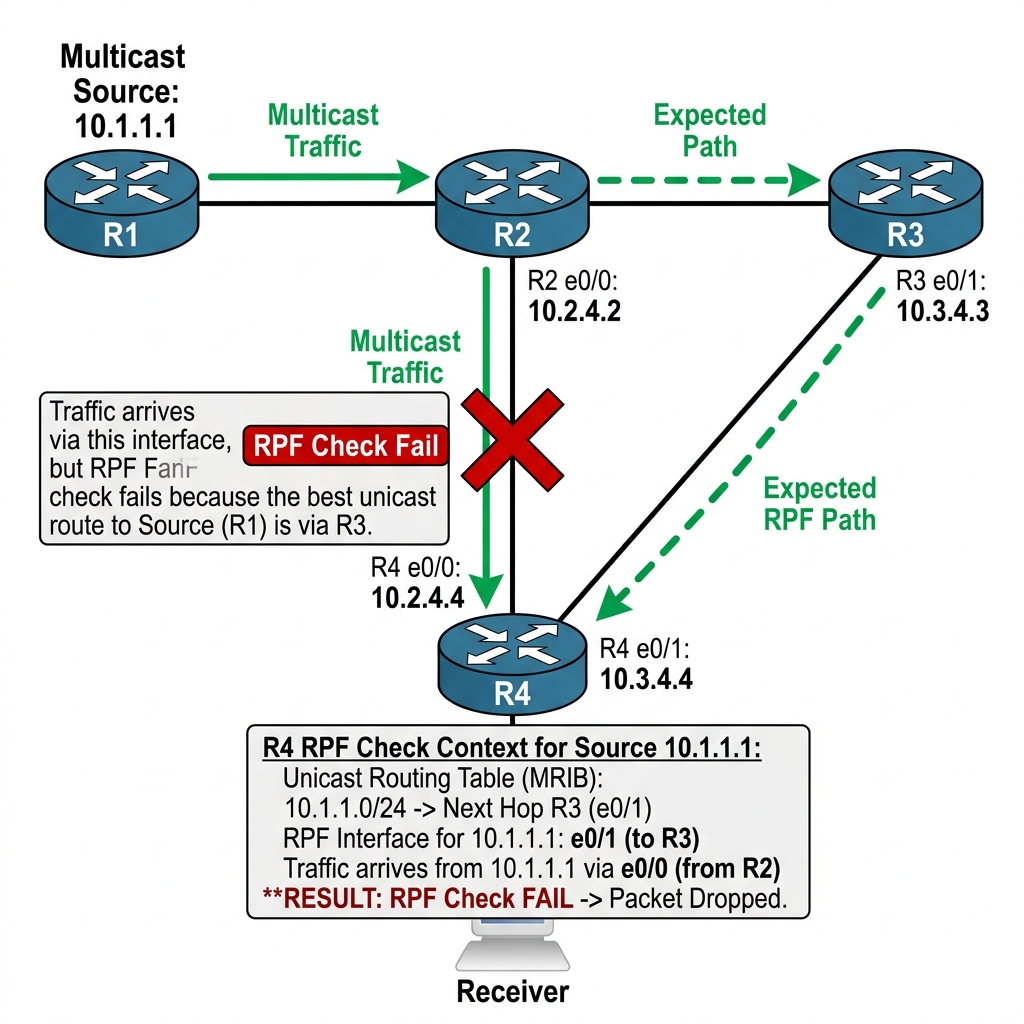
Now let us break it. We are going to manipulate the OSPF cost on R4’s Gi0/0 interface (the link toward R3). By increasing the cost, R4’s OSPF routing table will prefer the alternate path through R5 to reach the source subnet 10.0.0.0/24. But the PIM shared tree was already built through R3 — so multicast traffic still arrives on Gi0/0 while the RPF check now expects it on Gi0/2.
!! On R4 — increase OSPF cost on the R3-facing interface
!! This makes R4 prefer the R5 path (Gi0/2) in the unicast routing table
R4(config)# interface GigabitEthernet0/0
R4(config-if)# ip ospf cost 100
With default OSPF costs of 1 on all links, R4 now calculates:
– Via R3 (Gi0/0): cost = 100 + 1 + 1 + 1 = 103 (R4→R3→R2→R1→Source)
– Via R5 (Gi0/2): cost = 1 + 1 + 1 + 1 = 4 (R4→R5→R2→R1→Source)
R5 wins by a huge margin. The RPF check shifts to Gi0/2. Let us verify:
R4# show ip rpf 10.0.0.10
Output:
RPF information for ? (10.0.0.10)
  RPF interface: GigabitEthernet0/2
  RPF neighbor: ? (10.45.0.5)
  RPF route/mask: 10.0.0.0/24
  RPF type: unicast (ospf 1)
RPF now expects traffic on Gi0/2 (from R5). But the PIM-SM shared tree was built through R3→R4 (Gi0/0). The multicast traffic arriving on Gi0/0 now fails the RPF check.
R4# show ip mroute 239.1.1.1
Output:
(10.0.0.10, 239.1.1.1), 00:00:30/00:02:30, flags: SJT
  Incoming interface: GigabitEthernet0/2, RPF nbr 10.45.0.5
  Outgoing interface list:
    GigabitEthernet0/1, Forward/Sparse, 00:00:30/00:02:30

  RPF failure count: 47
RPF failure count is incrementing. Traffic arriving on Gi0/0 from R3 is being dropped because the RPF check expects it on Gi0/2. The receiver gets nothing.
R4# show ip mroute count
Output:
IP Multicast Statistics

Group: 239.1.1.1, Source count: 1, Packets forwarded: 0, Packets received: 47
  Source: 10.0.0.10/32, RPF Failures: 47, No Route: 0
47 packets received, 0 forwarded, 47 RPF failures. This is the silent killer of multicast.
Step 4 — Fix 1: Make Routing Symmetric
The cleanest fix is to make unicast routing match the desired multicast path.
!! On R4 — revert the OSPF cost change
R4(config)# interface GigabitEthernet0/0
R4(config-if)# no ip ospf cost
After OSPF reconverges:
R4# show ip rpf 10.0.0.10
Output:
RPF interface: GigabitEthernet0/0
RPF neighbor: ? (10.34.0.3)
RPF is back to Gi0/0. Traffic flows again. This is always the preferred fix — make your unicast routing consistent with your multicast topology design.
Step 5 — Fix 2: Static Mroute
Sometimes you cannot change the unicast routing (policy reasons, traffic engineering). In that case, use ip mroute to create a static multicast route that overrides the RPF lookup for multicast only.
First, re-break the RPF:
R4(config)# interface GigabitEthernet0/0
R4(config-if)# ip ospf cost 100
Now apply the static mroute fix:
!! On R4 — tell the RPF check to use Gi0/0 for source 10.0.0.0/24
R4(config)# ip mroute 10.0.0.0 255.255.255.0 10.34.0.3
R4# show ip rpf 10.0.0.10
Output:
RPF information for ? (10.0.0.10)
  RPF interface: GigabitEthernet0/0
  RPF neighbor: ? (10.34.0.3)
  RPF route/mask: 10.0.0.0/24
  RPF type: static mroute
The RPF lookup now uses the static mroute instead of the unicast routing table. Traffic flows again. The static mroute has a default administrative distance of 0 (highest priority), so it always wins over OSPF.
!! Remove the static mroute when done
R4(config)# no ip mroute 10.0.0.0 255.255.255.0 10.34.0.3
Step 6 — Fix 3: Multicast RPF Redirect (ip rpf static)
On newer IOS versions, you can also use ip rpf commands for more granular control:
!! Alternate RPF fix syntax
R4(config)# ip mroute 10.0.0.0 255.255.255.0 GigabitEthernet0/0 10.34.0.3
This explicitly tells the router: “For multicast traffic from the 10.0.0.0/24 source, the RPF interface is Gi0/0 & the RPF neighbor is 10.34.0.3.”
Step 7 — RPF for (*, G) vs (S, G)
There is a subtlety that trips up even experienced engineers. The RPF check works differently for shared tree entries (*, G) vs source-specific entries (S, G):
| Entry Type | RPF Lookup Target | RPF Points Toward |
|---|---|---|
(*, G) | RP address (e.g., 3.3.3.3) | The RP |
(S, G) | Source address (e.g., 10.0.0.10) | The source |
This means you can have an RPF failure for the (S,G) entry but NOT for the (*,G) entry — or vice versa. If the RP is reachable but the source is not (from a routing perspective), the shared tree works but SPT switchover fails.
!! Check RPF for the RP
R4# show ip rpf 3.3.3.3
Output:
RPF interface: GigabitEthernet0/0
RPF neighbor: ? (10.34.0.3)
!! Check RPF for the Source
R4# show ip rpf 10.0.0.10
These might point to different interfaces — & that is perfectly fine. The issue only occurs when the RPF interface does not match the interface where multicast traffic actually arrives.
Break It — Tunnel-Induced RPF Failure
Here is a sneaky scenario. Someone creates a GRE tunnel between R1 & R4 for a completely unrelated application. The tunnel creates a /32 route to R1’s loopback, & OSPF redistributes it. Suddenly, the RPF check for the source subnet changes because the tunnel interface now appears as a “directly connected” path.
!! On R1
R1(config)# interface Tunnel0
R1(config-if)# ip address 192.168.99.1 255.255.255.252
R1(config-if)# tunnel source GigabitEthernet0/1
R1(config-if)# tunnel destination 10.45.0.4

!! On R4
R4(config)# interface Tunnel0
R4(config-if)# ip address 192.168.99.2 255.255.255.252
R4(config-if)# tunnel source GigabitEthernet0/2
R4(config-if)# tunnel destination 10.12.0.1
R4(config-if)# ip pim sparse-mode
If OSPF learns about the source subnet via the tunnel, RPF might point to the Tunnel0 interface. But multicast traffic arrives on a physical interface. RPF fails.
R4# show ip rpf 10.0.0.10
If the output shows RPF interface: Tunnel0, that is your problem. Fix: either exclude the tunnel from OSPF redistribution, or add a static mroute.
!! Clean up
R1(config)# no interface Tunnel0
R4(config)# no interface Tunnel0
RPF Troubleshooting Cheat Sheet
!! Step 1: Check what RPF expects
show ip rpf <source-ip>

!! Step 2: Check if traffic is arriving on that interface
show ip mroute <group> | include Incoming

!! Step 3: Check for RPF failure counters
show ip mroute count

!! Step 4: Debug RPF decisions in real-time
debug ip mfib

!! Step 5: If RPF is wrong, override with static mroute
ip mroute <source-network> <mask> <correct-rpf-neighbor>
Key Takeaways
- RPF is the #1 multicast troubleshooting issue — if traffic is not arriving on the interface the unicast routing table expects, the packet is silently dropped
- RPF check = “which interface would I use to reach the source?” — the multicast packet must arrive on that interface
show ip rpf <source>is your best diagnostic tool — it tells you exactly what the router expects- RPF failure counters in
show ip mroute countare the smoking gun - Three fixes: (1) Make routing symmetric, (2) Static mroute, (3) ip mroute with explicit interface
- (*, G) RPF checks toward the RP; (S, G) RPF checks toward the source — they can fail independently
- Tunnels, static routes, & route redistribution are the most common causes of unexpected RPF changes
