
If I had a dollar for every time someone told me “multicast is working, so what is the problem?” while their access switch was flooding multicast traffic out every single port like a broadcast storm, I could probably retire. The thing is, multicast at Layer 3 can be perfectly configured — PIM neighbors up, RP healthy, mroute table looking clean — & your L2 switches are still treating multicast frames like broadcast. That is because switches, by default, have absolutely no idea what to do with a multicast destination MAC address. It is not in the CAM table, so they flood it everywhere.
IGMP Snooping fixes this. In this lab, we are going to physically see the flooding, turn on snooping, & watch it stop. Then we are going to break it by removing the querier & watch everything fall apart again.
What You Will Need
| Component | Quantity | EVE-NG Image |
|---|---|---|
| Cisco IOSv Router (Network) | 1 | i86bi_Linux-L3-AdvEnterpriseK9-M2_157_3_May_2018.bin |
| Cisco IOSv Router (Source/Receiver) | 4 | i86bi_Linux-L3-AdvEnterpriseK9-M2_157_3_May_2018.bin |
| Cisco IOSvL2 Switch | 1 | i86bi_Linux-L2-AdvEnterpriseK9-M_152_May_2018.bin |
Total RAM required: approximately 3 GB.
Lab Topology
Our setup is a single VLAN environment where everything is connected to SW1. R1 is the gateway & importantly, the IGMP Querier. We’ve added four ports on the switch—three for receivers & one “canary” port that remains empty. If our theories about flooding are correct, we’ll see traffic hitting that empty port’s counters too.
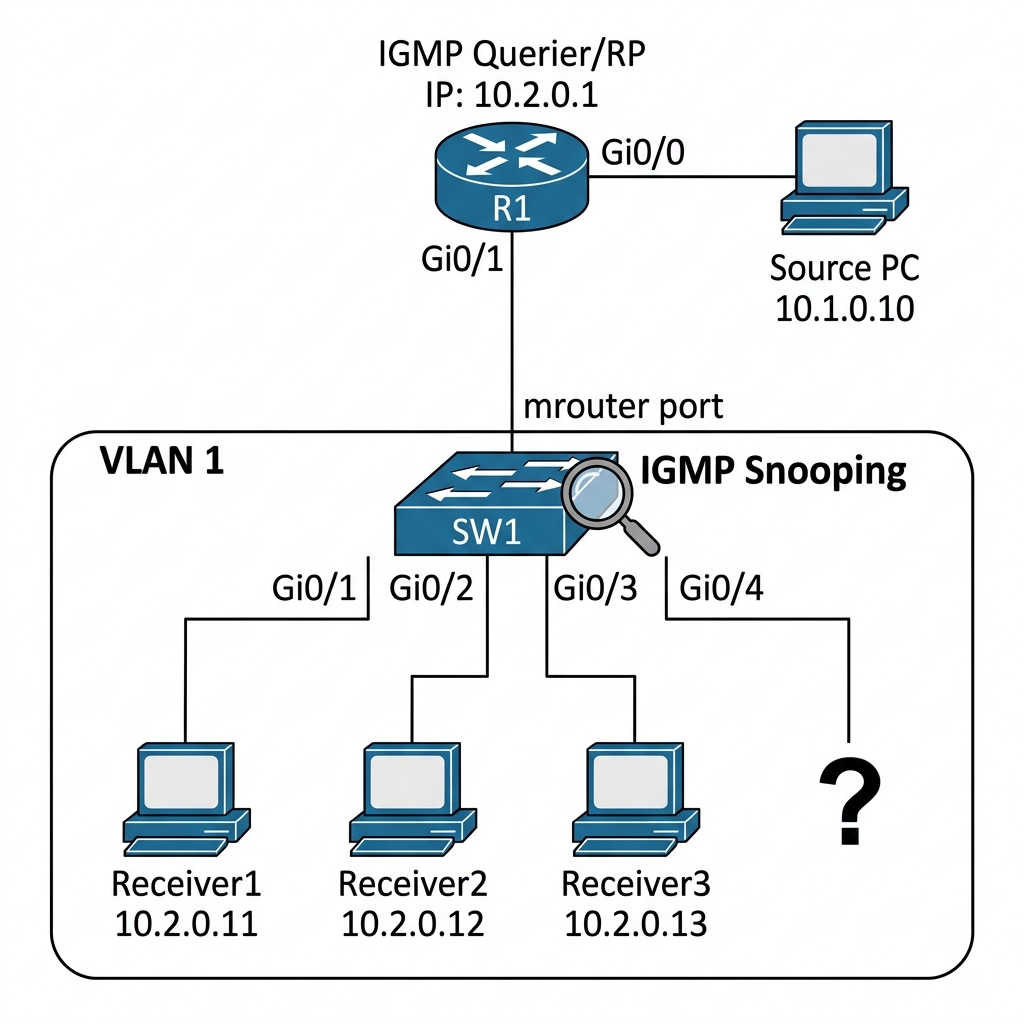
The empty port on Gi0/4 is intentional — it is our canary. If we see multicast traffic on an empty port, we know the switch is flooding.
IP Addressing Table
| Device | Interface | IP Address | Subnet Mask | Description |
|---|---|---|---|---|
| R1 | Gi0/0 | 10.1.0.1 | 255.255.255.0 | To Source |
| R1 | Gi0/1 | 10.2.0.1 | 255.255.255.0 | To SW1 (Receiver LAN) |
| R1 | Loopback0 | 1.1.1.1 | 255.255.255.255 | RP Address |
| SW1 | VLAN 1 | 10.2.0.254 | 255.255.255.0 | Management |
| Source | Gi0/0 | 10.1.0.10 | 255.255.255.0 | Multicast Source |
| Receiver1 | Gi0/0 | 10.2.0.11 | 255.255.255.0 | Multicast Receiver |
| Receiver2 | Gi0/0 | 10.2.0.12 | 255.255.255.0 | Multicast Receiver |
| Receiver3 | Gi0/0 | 10.2.0.13 | 255.255.255.0 | Multicast Receiver |
Step 1 — Base Configuration
R1 Configuration:
hostname R1
!
interface Loopback0
 ip address 1.1.1.1 255.255.255.255
 ip pim sparse-mode
!
interface GigabitEthernet0/0
 ip address 10.1.0.1 255.255.255.0
 ip pim sparse-mode
 no shutdown
!
interface GigabitEthernet0/1
 ip address 10.2.0.1 255.255.255.0
 ip pim sparse-mode
 ip igmp version 2
 no shutdown
!
router ospf 1
 network 1.1.1.1 0.0.0.0 area 0
 network 10.1.0.0 0.0.0.255 area 0
 network 10.2.0.0 0.0.0.255 area 0
!
ip multicast-routing
ip pim rp-address 1.1.1.1
SW1 Configuration — Start with snooping DISABLED:
hostname SW1
!
no ip igmp snooping
!
interface range GigabitEthernet0/0 - 4
 switchport mode access
 switchport access vlan 1
 no shutdown
!
interface Vlan1
 ip address 10.2.0.254 255.255.255.0
 no shutdown
!
ip default-gateway 10.2.0.1
Source & Receiver Configuration (Cisco Routers):
We set these up as simple hosts. No routing, just an IP & a gateway.
!! Receiver 1 config (repeat for Source/Recv2/Recv3 with their IPs)
hostname Receiver1
!
no ip routing
!
interface GigabitEthernet0/0
 ip address 10.2.0.11 255.255.255.0
 no shutdown
!
ip default-gateway 10.2.0.1
We are deliberately disabling IGMP snooping first so we can see the flooding problem.
Step 2 — Observe the Flood (Snooping Disabled)
The Theory: Switches make forwarding decisions based on destination MAC addresses. For a unicast packet, the switch looks up the MAC in its CAM table and sends it out the correct port. But a multicast destination MAC (like 01:00:5E:xx:xx:xx) is never “learned” as a source address. Therefore, the switch treats it as an “Unknown Multicast” frame and, by default, floods it to every port in the same VLAN.
Have Receiver1 join group 239.1.1.1 — only Receiver1, not the others.
!! On Receiver1 — join the group
Receiver1(config)# interface GigabitEthernet0/0
Receiver1(config-if)# ip igmp join-group 239.1.1.1
Now start sending multicast from the Source. We’ll use a continuous ping.
!! On Source — flood the group with pings
Source# ping 239.1.1.1 repeat 1000000 size 1000
Now here is the test. Let us check the interface counters on SW1 for ports Gi0/2 and Gi0/3. Even though Receiver2 & Receiver3 never joined the group, they are being bombarded with traffic.
SW1# show interfaces Gi0/2 | include output rate
SW1# show interfaces Gi0/3 | include output rate
Output:
5 minute output rate 5242000 bits/sec, 655 packets/sec
Receiver2 is getting multicast traffic it never asked for. The switch has no idea who wants 239.1.1.1, so it floods the frame out every port in the VLAN. If you checked Receiver3 & even the empty port Gi0/4, you would see the same traffic.
Check the switch’s MAC table:
SW1# show mac address-table | include 0100.5e
Output:
1 0100.5e01.0101 STATIC Gi0/0 Gi0/1 Gi0/2 Gi0/3 Gi0/4
The multicast MAC 0100.5e01.0101 (which corresponds to 239.1.1.1) is being forwarded out all ports. This is the default switch behavior for unknown multicast — identical to broadcast flooding.
In a production campus with 48-port switches & hundreds of multicast groups (IPTV, digital signage, building management), this flooding consumes bandwidth on every access port & wastes CPU on every connected device. It is bad.
Step 3 — Enable IGMP Snooping
Now let us fix this.
SW1(config)# ip igmp snooping
That is it. One command globally enables IGMP Snooping. But there is more to it — let us verify what happened.
SW1# show ip igmp snooping
Output:
Global IGMP Snooping configuration:
-------------------------------------------
IGMP snooping                 : Enabled
IGMPv3 snooping               : Enabled
Report suppression             : Enabled
TCN solicit query              : Disabled
TCN flood query count          : 2
Global IGMP Snooping configuration for Vlan1:
-------------------------------------------
IGMP snooping                 : Enabled
Multicast router learning mode : pim-dvmrp
IGMP snooping querier          : Disabled
Snooping is enabled. Now let us see if the switch learned the group membership.
SW1# show ip igmp snooping groups
Output:
Vlan      Group                    Type        Ports
----      -----                    ----        -----
1         239.1.1.1                igmp        Gi0/0, Gi0/1
The switch now knows that 239.1.1.1 traffic should only go to Gi0/0 (the mrouter port — where R1 is) & Gi0/1 (where Receiver1 is). It intercepted the IGMP Membership Report from Receiver1 & built a forwarding table entry.
Now check SW1’s interface counters for Gi0/2 (Receiver2):
SW1# show interfaces Gi0/2 | include output rate
Output:
5 minute output rate 0 bits/sec, 0 packets/sec
No more flooding. Receiver2 is clean. The switch is only forwarding 239.1.1.1 traffic to the ports that actually have receivers.
Step 4 — Understanding the Mrouter Port
You noticed that Gi0/0 appeared in the snooping group entry. This is the mrouter port — the port where the switch detected a multicast router (R1). The switch always forwards all multicast traffic toward the mrouter port, regardless of group membership.
SW1# show ip igmp snooping mrouter
Output:
Vlan      Ports
----      -----
1         Gi0/0(dynamic)
The switch detected R1 as a multicast router because it saw PIM Hello messages or IGMP General Queries coming from Gi0/0. This detection is automatic.
The mrouter port is critical. If the switch cannot identify a mrouter port, snooping will not work correctly because the switch will not know where to send upstream traffic.
Step 5 — Adding & Removing Receivers Dynamically
Let us add Receiver2 to the group & watch the switch update its table.
!! On Receiver2 — join the group
Receiver2(config)# interface GigabitEthernet0/0
Receiver2(config-if)# ip igmp join-group 239.1.1.1
SW1# show ip igmp snooping groups
Output:
Vlan      Group                    Type        Ports
----      -----                    ----        -----
1         239.1.1.1                igmp        Gi0/0, Gi0/1, Gi0/2
Gi0/2 (Receiver2) is now in the list. Multicast traffic for 239.1.1.1 is being forwarded to Gi0/1 & Gi0/2, plus the mrouter port Gi0/0. Gi0/3 & Gi0/4 are still clean.
Now remove Receiver1:
!! On Receiver1 — leave the group
Receiver1(config)# interface GigabitEthernet0/0
Receiver1(config-if)# no ip igmp join-group 239.1.1.1
Wait a few seconds for the IGMP Leave & Group-Specific Query process to complete, then check:
SW1# show ip igmp snooping groups
Output:
Vlan      Group                    Type        Ports
----      -----                    ----        -----
1         239.1.1.1                igmp        Gi0/0, Gi0/2
Gi0/1 is gone. The switch saw the IGMP Leave from Receiver1, observed the router’s Group-Specific Query, & since Receiver1 did not respond, the switch removed Gi0/1 from the group. Clean & dynamic.
Step 6 — The Snooping Querier
Here is where things get interesting — & where most deployments break. IGMP Snooping depends on seeing IGMP messages to build its forwarding table. But what if there is no router on the VLAN? No router means no IGMP Queries, which means no IGMP Reports from hosts, which means the switch has no idea who wants what.
Let us simulate this. I am going to disconnect R1 from the switch (shut down the interface).
R1(config)# interface GigabitEthernet0/1
R1(config-if)# shutdown
Wait 2 minutes for the mrouter port to time out, then check:
SW1# show ip igmp snooping mrouter
Output:
Vlan      Ports
----      -----
No mrouter port. Now check the snooping groups:
SW1# show ip igmp snooping groups
Output:
(empty)
The entire snooping table is gone. Without a querier sending IGMP Queries, hosts stop sending IGMP Reports (they only report in response to queries), & the snooping table entries time out. The result? Either all multicast traffic gets dropped (on some switch platforms) or it gets flooded again (on others). Either way, it is broken.
The fix — configure a snooping querier on the switch:
SW1(config)# ip igmp snooping querier
SW1(config)# ip igmp snooping querier address 10.2.0.254
SW1(config)# ip igmp snooping querier query-interval 60
Now the switch itself will send IGMP General Queries to 224.0.0.1, which triggers hosts to send IGMP Reports, which repopulates the snooping table.
SW1# show ip igmp snooping querier
Output:
Vlan      IP Address      IGMP Version   Port
----      ----------      ------------   ----
1         10.2.0.254      v2             Switch
Have a receiver rejoin:
!! On Receiver2 — rejoin
Receiver2(config)# interface GigabitEthernet0/0
Receiver2(config-if)# ip igmp join-group 239.1.1.1
SW1# show ip igmp snooping groups
Output:
Vlan      Group                    Type        Ports
----      -----                    ----        -----
1         239.1.1.1                igmp        Gi0/2
The snooping table is back. Now bring R1 back up:
R1(config)# interface GigabitEthernet0/1
R1(config-if)# no shutdown
SW1# show ip igmp snooping querier
Output:
Vlan      IP Address      IGMP Version   Port
----      ----------      ------------   ----
1         10.2.0.1        v2             Gi0/0
R1 (10.2.0.1) took over as querier because its IP is lower than the switch’s 10.2.0.254. The switch gracefully steps aside.
Break It — Snooping Enabled, No Querier, No Router
This is the scenario that bites people in production. Let me set it up:
- IGMP Snooping is enabled on the switch (default on most Cisco switches)
- No router on the VLAN (maybe it is a pure L2 VLAN)
- No snooping querier configured
- Multicast source & receivers are on the same VLAN
!! Remove the snooping querier config
SW1(config)# no ip igmp snooping querier

!! Shut down R1's connection
R1(config)# interface GigabitEthernet0/1
R1(config-if)# shutdown
Now try to have a receiver join & a local source send on the same VLAN. Since R1 is down, our original “Source” router is unreachable. Instead, we will use Receiver1 to act as a local multicast source, sending traffic to Receiver2 on the same subnet.
!! On Receiver2 — join
Receiver2(config)# interface GigabitEthernet0/0
Receiver2(config-if)# ip igmp join-group 239.1.1.1
!! On Receiver1 — act as local source & send traffic
Receiver1# ping 239.1.1.1 repeat 1000
!! On Receiver2 — check if traffic arrives
Receiver2# show interface Gi0/0 | include input rate
Output:
5 minute input rate 0 bits/sec, 0 packets/sec
Nothing. Receiver1 is sending, Receiver2 has joined, they are on the same VLAN, but the switch is dropping the multicast traffic because:
- Snooping is enabled, so the switch does not flood multicast
- There is no querier, so no IGMP Queries are being sent
- Without queries, the host’s IGMP Report was never triggered (or was never snooped correctly)
- The snooping table is empty, so the switch has nowhere to forward the traffic
This is a silent, devastating failure. The fix is either:
!! Option 1: Configure a snooping querier
SW1(config)# ip igmp snooping querier
SW1(config)# ip igmp snooping querier address 10.2.0.254

!! Option 2: Disable snooping (not recommended — goes back to flooding)
SW1(config)# no ip igmp snooping

!! Option 3: Add a router to the VLAN (the proper fix)
One mistake I have seen multiple times: a network team enables IGMP snooping globally on all switches (which is often the default), but they do not realize that VLANs without routers now need a snooping querier. Nobody notices until a multicast application — digital signage, building automation, AV-over-IP — stops working on a “pure L2” VLAN.
IGMP Snooping Best Practices
Based on years of dealing with this in campus & DC environments, here is what I recommend:
- Always enable IGMP snooping — flooding multicast is never acceptable at scale
- Always have a querier — either a PIM router on the VLAN or a configured snooping querier
- Use
ip igmp snooping querieras a backup — configure it on your distribution switches as a failsafe in case the router goes down - Check mrouter ports —
show ip igmp snooping mrouteris your best friend for verifying that the switch can see a router - Watch out for vPC/MLAG — in dual-homed switch topologies, snooping can behave unexpectedly because IGMP Reports may only reach one switch
Verification Command Reference
!! Global snooping status
show ip igmp snooping

!! Per-VLAN snooping groups
show ip igmp snooping groups

!! Mrouter ports
show ip igmp snooping mrouter

!! Querier info
show ip igmp snooping querier

!! Detailed per-VLAN info
show ip igmp snooping vlan [vlan-id]

!! MAC address table for multicast entries
show mac address-table multicast
Key Takeaways
- Switches flood multicast by default — they treat unknown multicast MACs like broadcast
- IGMP Snooping intercepts IGMP messages at L2 & builds a per-port, per-group forwarding table
- The mrouter port is essential — the switch always forwards all multicast toward the router
- No querier = no snooping — without periodic IGMP Queries, hosts stop reporting & the snooping table empties
- Configure
ip igmp snooping querieras a backup on switches in VLANs that might lose their router - Snooping + no querier + no router = total blackout — this is the most common “everything looks fine but multicast is dead” scenario
