
The Global vs. Regional VPC Design Shift
In Google Cloud, a Virtual Private Cloud (VPC) is inherently a global resource. You create a single VPC network, and you can instantly provision regional subnets across North America, Europe, and Asia, all communicating natively over Google’s private global fiber backbone. Routing between these regional subnets is set up automatically.
Oracle Cloud Infrastructure (OCI) approaches network topology differently. In OCI, a Virtual Cloud Network (VCN) is strictly a regional resource. It resides entirely within a single OCI region (e.g., US East (Ashburn) or Germany Central (Frankfurt)). If you need resources in Ashburn to communicate with resources in Frankfurt, you cannot place them in the same VCN; you must create separate VCNs in each region and explicitly peer them.
This regional boundary impacts how you design subnets, route traffic, and enforce security.
Subnets and Gateway Architecture
A VCN is defined by an IPv4 CIDR block (e.g., 10.0.0.0/16). Within this VCN, you carve out smaller IP blocks to create Subnets.
OCI subnets fall into two categories:
1. Regional Subnets: The subnet spans all Availability Domains (ADs) within the region. This is the modern, recommended approach. Any instance launched in this subnet can be placed in any AD in the region while sharing the same subnet configuration, route tables, and security lists.
2. AD-Specific Subnets: The subnet is physically constrained to a single Availability Domain (data center). While useful for legacy architectures, it limits your design’s high-availability options.
Unlike GCP’s VPC, where outbound internet access and private access to Google APIs are mostly automated, OCI requires you to configure and attach specific Gateways to your VCN to direct traffic.
Core Gateways
To route traffic outside the VCN, you attach one or more of the following gateways:
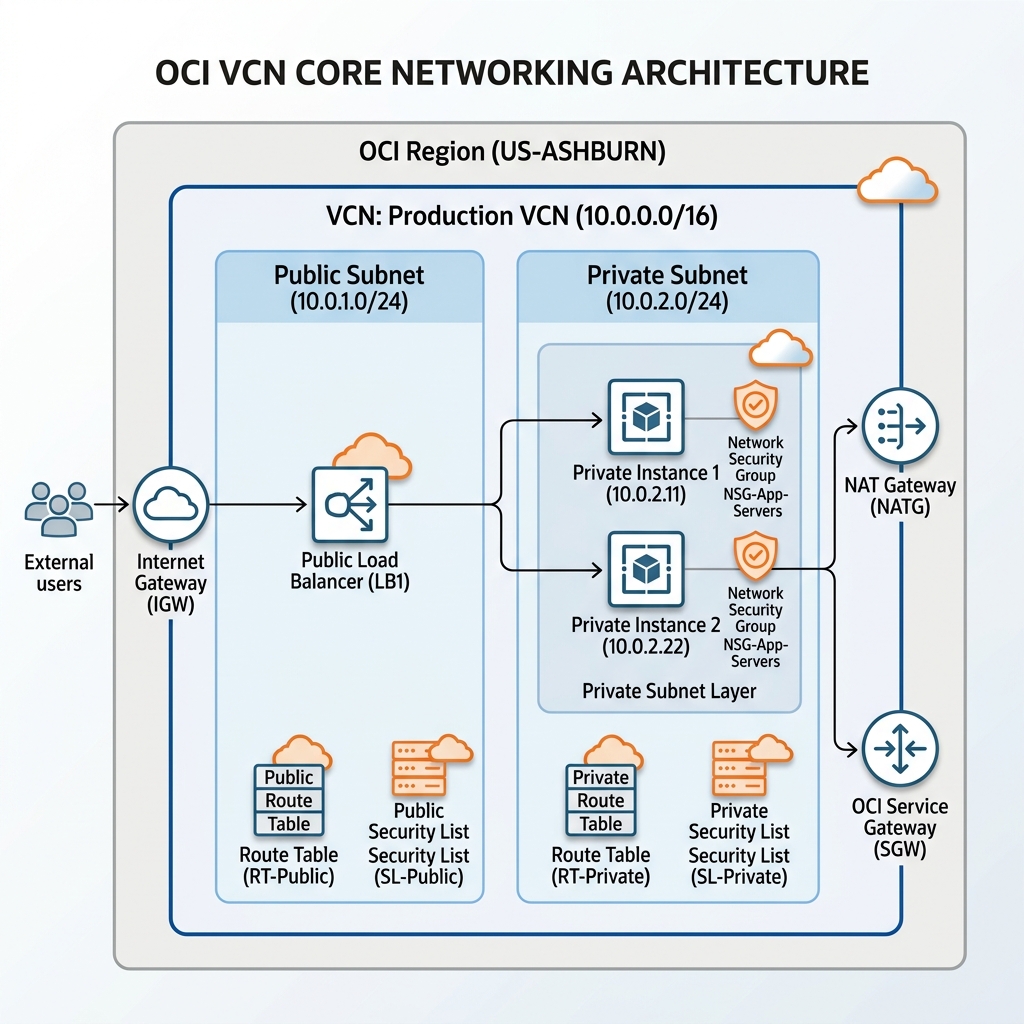
* Internet Gateway (IGW): Provides a path for bidirectional traffic between public-facing resources (with public IP addresses) and the internet. (Equivalent to attaching an external IP to a GCP VM with default internet routing).
* NAT Gateway: Allows private resources (without public IPs) to initiate outbound connections to the internet to download updates or patches, while blocking inbound connections from the public internet. (Equivalent to GCP’s Cloud NAT).
* Service Gateway: Enables private resources in your VCN to access OCI public services—such as Object Storage, Monitoring, and Autonomous Databases—privately. Traffic stays entirely within the Oracle network backbone and never traverses the public internet. (Equivalent to GCP’s Private Google Access).
Here is how these subnets and gateways fit together within a regional VCN topology:
Security Lists vs. Network Security Groups
OCI provides two distinct firewalls to secure traffic at the packet level: Security Lists and Network Security Groups (NSGs). Understanding when to use which is a core requirement for OCI architecting.
1. Security Lists (Subnet-Level)
A Security List acts as a virtual firewall applied at the subnet level. Every virtual Network Interface Card (vNIC) created within that subnet automatically inherits the Security List’s ingress and egress rules.
* Rules can be stateful (where OCI tracks the connection, allowing return traffic automatically) or stateless (where you must write matching rules for both incoming and outgoing packets; useful for high-volume traffic like CDN backend servers).
* The limitation of Security Lists is their lack of granularity. If you have a database server and a web server in the same subnet, they both share the same security list rules unless you write complex source/destination IP filters.
2. Network Security Groups (NSGs) (vNIC-Level)
An NSG acts as a virtual firewall applied directly to individual vNICs. Instead of defining rules for an entire subnet, you group specific vNICs together under an NSG and apply rules directly to that group.
* This allows for micro-segmentation. You can place your web servers, application servers, and databases in a single regional subnet, but apply a Web-NSG to the web vNICs and a DB-NSG to the database vNICs.
* OCI recommends using NSGs for application components that have distinct security postures, reserving Security Lists for baseline, subnet-wide rules (like allowing SSH/RDP from an admin bastion).
This maps directly to GCP’s approach of using Network Tags or Service Accounts on VM instances to target specific firewall rules, bypassing the rigid subnet boundary.
Path Validation: Network Path Analyzer (NPA)
When debugging connectivity issues in GCP, you use Connectivity Tests (part of the Network Intelligence Center) to trace packet flow. OCI provides an equivalent native tool called the Network Path Analyzer (NPA).
NPA allows you to run a simulated traceroute between a source and a destination (such as a compute instance vNIC and a database endpoint). It analyzes the configuration of VCN route tables, security lists, NSGs, and gateways along the path, visually highlighting which specific routing rule or security block is dropping the packets.
Declarative Provisioning via Terraform
Instead of scripting manual CLI commands, you configure OCI networking resources using Terraform. The following configuration defines a VCN, an Internet Gateway, a custom Route Table, and a regional Public Subnet:
# 1. Create the Virtual Cloud Network (VCN)
resource "oci_core_vcn" "prod_vcn" {
  compartment_id = "ocid1.compartment.oc1..aaaaaaaadevvv..."
  cidr_block     = "10.0.0.0/16"
  display_name   = "Prod-VCN"
  dns_label      = "prodvcn"
}

# 2. Create the Internet Gateway
resource "oci_core_internet_gateway" "prod_igw" {
  compartment_id = "ocid1.compartment.oc1..aaaaaaaadevvv..."
  vcn_id         = oci_core_vcn.prod_vcn.id
  enabled        = true
  display_name   = "Prod-IGW"
}

# 3. Create a custom Route Table pointing default traffic to the Internet Gateway
resource "oci_core_route_table" "public_route_table" {
  compartment_id = "ocid1.compartment.oc1..aaaaaaaadevvv..."
  vcn_id         = oci_core_vcn.prod_vcn.id
  display_name   = "Public-Route-Table"

  route_rules {
    destination       = "0.0.0.0/0"
    destination_type  = "CIDR_BLOCK"
    network_entity_id = oci_core_internet_gateway.prod_igw.id
  }
}

# 4. Create a regional Public Subnet and associate it with the Route Table
resource "oci_core_subnet" "public_subnet_1" {
  compartment_id    = "ocid1.compartment.oc1..aaaaaaaadevvv..."
  vcn_id            = oci_core_vcn.prod_vcn.id
  cidr_block        = "10.0.1.0/24"
  display_name      = "Public-Subnet-1"
  route_table_id    = oci_core_route_table.public_route_table.id
  dns_label         = "pubsub1"

  # Ensure the subnet allows public IP assignment (defaults to false if private)
  prohibit_public_ip_on_vnic = false
}
By understanding OCI’s regional network boundaries and defining configurations declaratively using Terraform, you can manage complex, multi-subnet environments with consistent routing policies and security boundaries.
