
1. Introduction to the OCI Policy Engine
In Oracle Cloud Infrastructure (OCI), authorization is controlled by a plain-text, SQL-like declarative policy language.
Unlike platforms that rely on complex JSON permission documents or predefined role assignments, OCI policies use human-readable statements that explicitly define who can perform what actions on which resources inside a specific location.
By default, OCI enforces a strict zero-trust denial model: users have no permissions to perform any actions on any resources until an explicit policy statement grants them access.
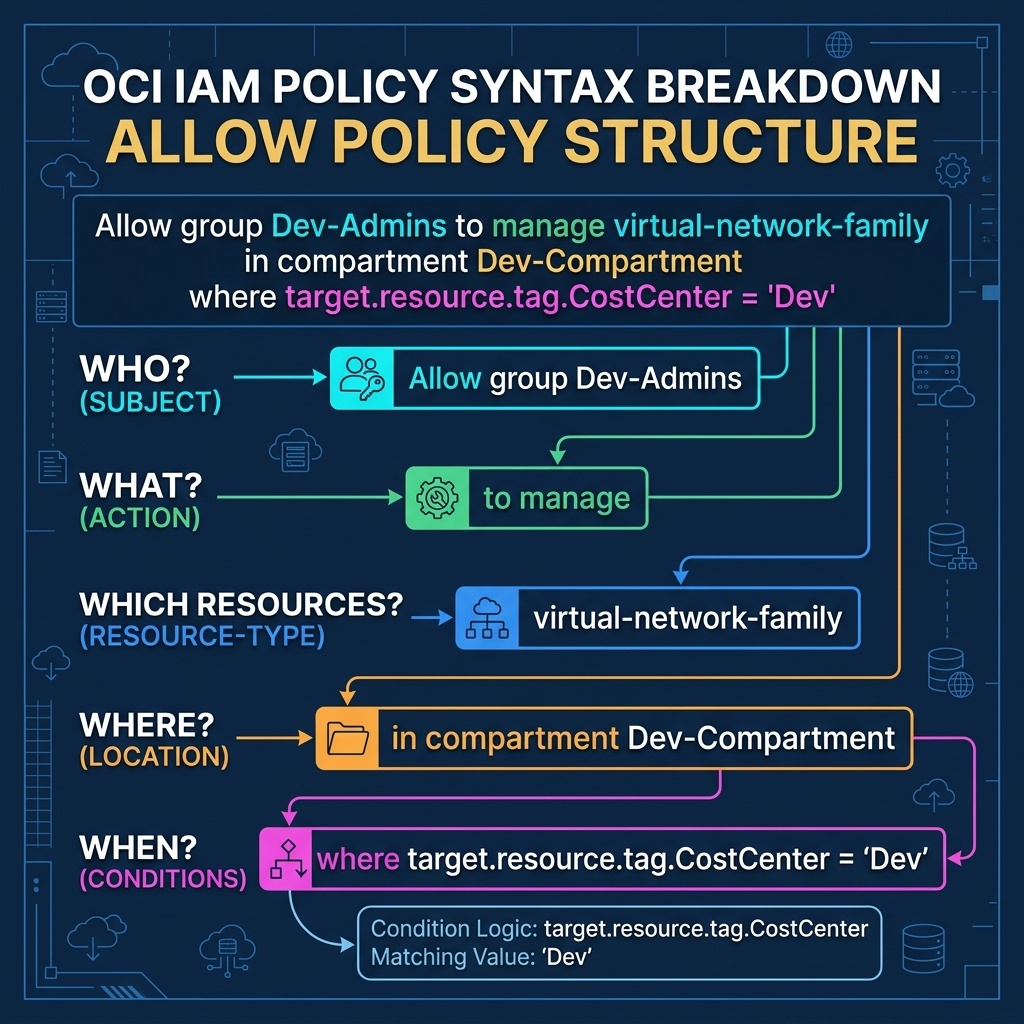
2. Policy Statement Structure and Syntax
Every OCI policy consists of one or more plain-text statements following a standardized grammar:
Allow <subject> to <verb> <resource-type> in <location> [where <conditions>]
Breakdown of Syntax Elements:
Allow: The mandatory opening keyword. OCI policies are exclusively allow-based.<subject>: Specifies who receives the permissions. This must be a Group, a Dynamic Group, or a Service (e.g.,group Dev-Admins,dynamic-group App-Instances).<verb>: Specifies the level of access granted. OCI groups all API operations into four progressive verbs:inspect,read,use, ormanage.<resource-type>: Specifies the target cloud service or resource family (e.g.,instance-family,virtual-network-family,buckets).<location>: Defines the compartment boundary where the policy applies (in compartment Dev-Compartmentorin tenancy).where <conditions>(Optional): Additional conditional clauses restricting access based on tags, IP sources, user attributes, or target metadata.
3. The Four Progressive Verbs
To keep access control simple and auditable, OCI compresses thousands of granular API operations into four progressive verbs:
inspect ➔ read ➔ use ➔ manage (Increasing level of access)
| Verb | Access Level | Included Capabilities | Example Use Case |
|---|---|---|---|
inspect | Lowest Access | List resources without viewing metadata, OCIDs, or sensitive details. | Security audit tools verifying resource counts. |
read | Read Metadata | Includes inspect PLUS viewing resource configurations and metadata. (Does not allow downloading object content or starting VMs). | Monitoring dashboards and compliance scanners. |
use | Work With Resources | Includes read PLUS working with existing resources (e.g., start/stop VMs, attach volumes, download storage objects). Cannot create or delete container resources. | Operators managing existing infrastructure. |
manage | Full Administration | Highest access level. Covers all actions, including creating, updating, and deleting resources. | Cloud Architects and Lead Engineers. |
[!IMPORTANT]
The Critical Difference Betweenuseandmanage
Grantinguse instance-familyallows an operator to reboot, stop, and attach VNICs to an existing VM. However, it does NOT grant permission to create a new VM or terminate (delete) an existing VM. Creating or destroying compute workloads requires themanageverb.
4. Policy Inheritance and Location Scope
OCI IAM policies are attached to a specific container in the resource hierarchy—either the Root Tenancy or a Child Compartment.
Rules of Policy Inheritance:
- Top-Down Cascading: A policy attached at a parent container automatically applies to all child compartments nested beneath it.
- Root Tenancy Scope: A policy written
in tenancyapplies globally across all compartments and regions in the account. - Compartment Scope: A policy written
in compartment Engineeringautomatically inherits down toEngineering ➔ DevandEngineering ➔ Stage, but has zero effect on sibling compartments likeProduction.
Policy Attached at Root Tenancy:
Allow group SecOps to read all-resources in tenancy
       │
       ▼ (Inherits Down Automatically)
├── Network-Compartment (Read Access Granted)
├── Engineering-Compartment (Read Access Granted)
│   └── Dev-Compartment (Read Access Granted)
└── Production-Compartment (Read Access Granted)
[!WARNING]
No Explicit “Deny” Statements in OCI
OCI IAM policies do NOT supportDenystatements. You cannot grant access at the Root Tenancy and then add aDenystatement at a child compartment to block inheritance. Authorization is strictly additive based onAllowrules.
5. OCI Web Console (GUI) Step-by-Step Walkthrough
Managing IAM policies is executed directly inside the OCI Web Console GUI.
Step 1: Navigating to the Policy Interface
- Log in to the Oracle Cloud Console (
https://cloud.oracle.com). - Click the Navigation Menu (
≡) in the top-left corner. - Select Identity & Security, then click Policies under the Identity column.
Console Path: [≡ Main Menu] ➔ [Identity & Security] ➔ [Identity] ➔ [Policies]
Step 2: Creating a Policy Using the GUI Policy Builder
- On the Policies page, select the target compartment from the left-hand Compartment dropdown (e.g.,
Dev-Compartment). - Click Create Policy.
- In the panel, specify:
- Name:
DevNetworkManagementPolicy - Description:
Allow network team to manage VCNs in Dev. - Compartment: Ensure
Dev-Compartmentis selected. - Under Policy Builder:
- Toggle the switch to Show manual editor to type raw policy statements, OR use the GUI dropdowns:
- Verb:
manage - Resource Type:
virtual-network-family - Group:
Dev-Network-Admins - Location:
Dev-Compartment
- Verb:
- Click Create.
Generated Policy Statement:
Allow group Dev-Network-Admins to manage virtual-network-family in compartment Dev-Compartment
6. Common Architectural Misconceptions & Pitfalls
Misconception 1: “IAM Policies Can Be Attached to Individual Users”
- Reality: OCI policies can ONLY be assigned to Groups or Dynamic Groups. You cannot write
Allow user john.doe to....
Misconception 2: “Attaching a Policy in a Compartment Restricts the Subject to That Compartment”
- Reality: The location clause in the policy statement (
in compartment Dev-Compartment) determines where the resources live, NOT where the policy document file is saved in the Console UI.
Misconception 3: “Verb Permissions Can Be Selectively Disabled”
- Reality: Verbs are cumulative. Granting
manageautomatically includes all permissions fromuse,read, andinspect. You cannot grantmanagewhile revokingread.
7. OCI Policy Language vs. Google Cloud (GCP) IAM Roles
For architects familiar with Google Cloud, the following table compares permission assignment models:
| Access Control Aspect | Google Cloud (GCP) | Oracle Cloud Infrastructure (OCI) | Key Technical Difference |
|---|---|---|---|
| Permission Format | Pre-defined or Custom IAM Roles (collection of permissions like compute.instances.start) | Human-readable declarative policy statements using progressive verbs | OCI simplifies permissions into 4 verbs (inspect, read, use, manage) rather than managing thousands of individual API permission strings. |
| Target Subject | Bound to Users, Service Accounts, or Groups | Bound strictly to Groups or Dynamic Groups | OCI enforces group-level policy binding exclusively. |
| Policy Attachment | Bound to Projects, Folders, or Organization nodes | Attached to Root Tenancy or specific Compartments | OCI policies inherit automatically down nested compartment hierarchies. |
| Deny Rules | Supports Deny Policies at Organization level | No Deny statements (Pure zero-trust Allow model) | OCI authorization is strictly additive. |
