
1. Introduction to OCI Network Virtualization
Oracle Cloud Infrastructure (OCI) approaches network virtualization differently from first-generation public clouds. Rather than running network abstraction layers inside hypervisor software on host CPUs—which introduces latency jitter and noisy-neighbor contention—OCI decouples network virtualization entirely from compute hypervisors using off-box network virtualization (SmartNICs).
Every virtual machine (VM) or bare metal server in OCI communicates directly with custom SmartNIC hardware cards embedded in the physical server chassis. This architectural foundation enables Virtual Cloud Networks (VCNs) to deliver predictable, wire-speed packet processing, isolation down to individual Virtual Network Interface Cards (VNICs), and native support for non-virtualized bare metal instances.
At the core of OCI Networking is the Virtual Cloud Network (VCN)—a software-defined, private network constructed within an OCI region.
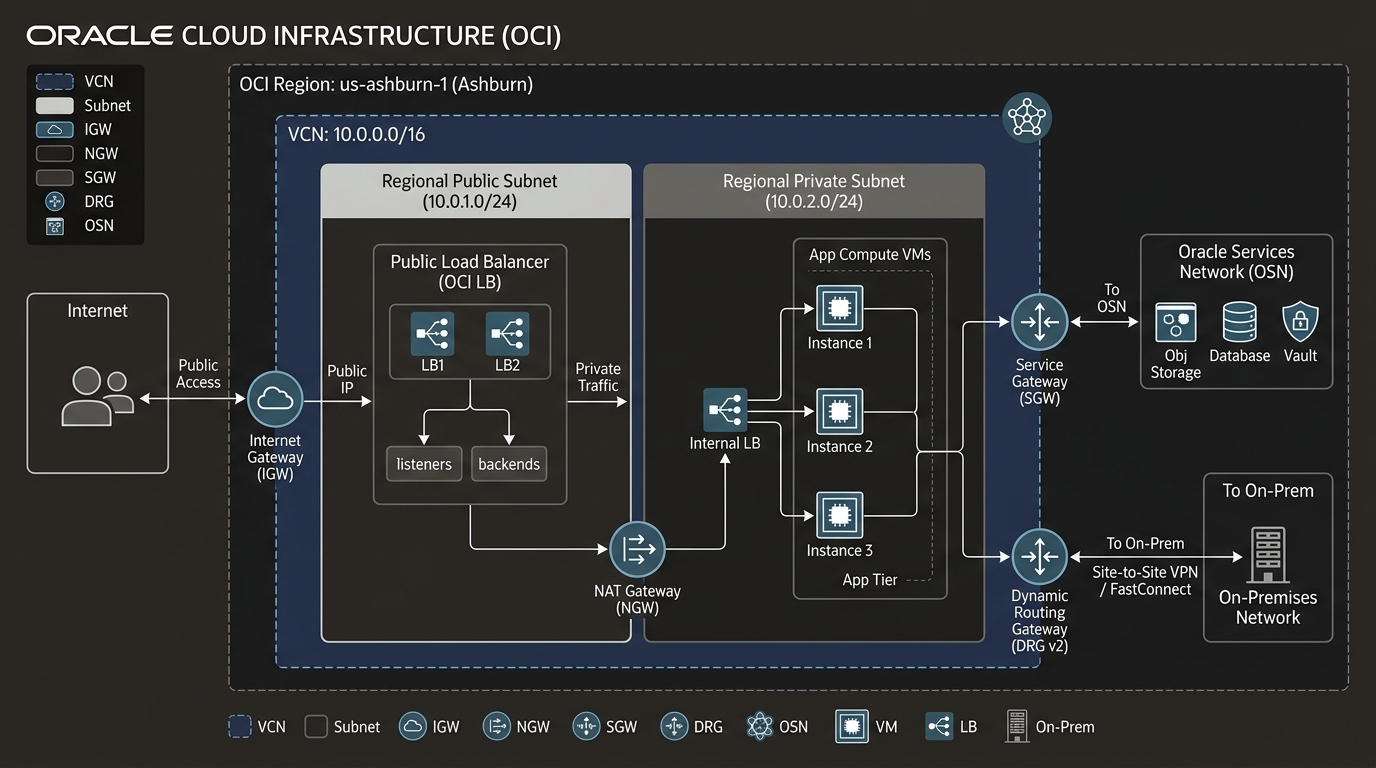
2. Core Architectural Components
The Virtual Cloud Network (VCN)
A VCN is a customizable, private IP network spanning a single OCI region. When you provision a VCN, you define one or more contiguous IPv4 Classless Inter-Domain Routing (CIDR) blocks.
- CIDR Range Limits: VCN CIDR block sizes can range from
/16(65,536 addresses) down to/30(4 addresses). OCI allows up to 5 IPv4 CIDR blocks per VCN. - RFC 1918 Compliance: Standard private IP ranges are supported:
10.0.0.0/8172.16.0.0/12192.168.0.0/16- Non-RFC 1918 public CIDRs can also be assigned if your organization owns or routes proprietary prefixes inside OCI.
- Dual-Stack IPv6 Support: You can enable Oracle-allocated GUA (Global Unicast Address)
/56IPv6 prefixes or bring your own IPv6 prefixes (BYOIPv6).
[!IMPORTANT]
VCN Scope vs. Compartment Scope
A VCN resides in a single OCI region and is assigned to a specific compartment. However, resources attached to the VCN (such as Compute instances in child compartments) can reside in different compartments from the VCN itself. Network boundaries are enforced by VCN routing and security configurations, not by compartment boundaries.
Regional Subnets vs. Availability Domain-Specific Subnets
A VCN is subdivided into Subnets, which partition the VCN CIDR space into contiguous blocks (minimum /30, maximum matching the parent VCN).
OCI supports two subnet deployment models:
| Subnet Type | Geographic Scope | Fault Domain Resilience | Recommendation |
|---|---|---|---|
| Regional Subnet (Default) | Spans across all Availability Domains (ADs) within a region. | High. Instances in AD-1, AD-2, and AD-3 connect to the exact same subnet and routing table. | OCI Recommended. Simplifies routing, security rules, and high-availability workload placement. |
| AD-Specific Subnet | Bound strictly to a single Availability Domain (e.g., AD-1 only). | Isolated to one AD. Traffic moving to AD-2 requires routing across AD boundaries. | Legacy configuration. Useful only for strict legacy app alignment or specialized AD-isolated hardware. |
Public vs. Private Subnets:
- Public Subnet: VNICs attached to a public subnet can optional accept Public IP addresses (Ephemeral or Reserved). Routing via an Internet Gateway allows bidirectional internet access.
- Private Subnet: VNICs attached to a private subnet are strictly prohibited from holding public IP addresses. Inbound access from the public internet is impossible. Egress to the internet requires outbound-only NAT Gateways.
[!WARNING]
Subnet Type Immutability
Once a subnet is created as Public or Private, its access type cannot be changed. If you accidentally create a Public Subnet for database workloads, you must create a new Private Subnet, migrate the resources, and delete the old subnet.
Virtual Network Interface Cards (VNICs)
Compute instances, database nodes, and load balancers do not connect directly to subnets—they attach via VNICs. A VNIC resides inside a specific subnet and anchors IP configurations, MAC addresses, and network security policies.
- Primary VNIC: Created automatically when an instance is launched. Attached to the primary private IP address in the selected subnet. Cannot be detached from the instance during its lifecycle.
- Secondary VNICs: Can be dynamically created and attached to running VM instances across different subnets or VCNs within the same Availability Domain. Enables multi-homed appliances, network firewalls, and isolated administrative interfaces.
Instance OCID: ocid1.instance.oc1.iad.sampleinstance123
├── Primary VNIC (Subnet-App: 10.0.1.10) -> Production Traffic
└── Secondary VNIC (Subnet-Mgmt: 10.0.99.10) -> Out-of-Band Admin Traffic
3. OCI Web Console (GUI) Step-by-Step Walkthrough
Follow this operational workflow to provision a VCN with a Regional Private Subnet and a Regional Public Subnet via the OCI Console.
Step 1: Navigating to Networking in the Console
- Log in to the Oracle Cloud Console at
https://cloud.oracle.com. - Open the Navigation Menu (
≡) in the upper-left corner. - Select Networking, then click Virtual Cloud Networks.
Console Path: [≡ Main Menu] ➔ [Networking] ➔ [Virtual Cloud Networks]
Step 2: Creating a Custom VCN
- On the VCN list page, select your target compartment (e.g.,
Network-Compartment). - Click Create VCN.
- In the creation form, enter:
- Name:
VCN-Production-Ashburn - Compartment:
Network-Compartment - IPv4 CIDR Blocks:
10.0.0.0/16 - Leave Use IPv6 Prefix unchecked (or select Oracle-allocated prefix if dual-stack is required).
- Click Create VCN.
Step 3: Creating a Regional Public Subnet
- Inside the newly created
VCN-Production-Ashburndetails page, locate the Subnets section under Resources. - Click Create Subnet.
- Configure the following settings:
- Name:
Subnet-Public-Regional - Subnet Type: Select Regional (Recommended).
- CIDR Block:
10.0.1.0/24 - Subnet Access: Select Public Subnet.
- Route Table: Select
Default Route Table for VCN-Production-Ashburn. - Security Lists: Select
Default Security List for VCN-Production-Ashburn. - Click Create Subnet.
Step 4: Creating a Regional Private Subnet
- Click Create Subnet again on the VCN details page.
- Configure:
- Name:
Subnet-Private-Regional - Subnet Type: Select Regional.
- CIDR Block:
10.0.2.0/24 - Subnet Access: Select Private Subnet.
- Click Create Subnet.
4. Common Architectural Misconceptions & Pitfalls
Misconception 1: “A Private Subnet Is Fully Secure Without Security Rules”
- Reality: Private subnets block public internet ingress by preventing Public IP assignment. However, private subnets still permit full internal communication from any other subnet inside the same VCN unless explicit Security Lists or Network Security Groups (NSGs) are configured to block inter-subnet traffic.
Misconception 2: “Secondary VNICs Can Bridge Subnets Across Different Regions”
- Reality: A Secondary VNIC attached to an instance must belong to a subnet located in the same Availability Domain as the host instance. Cross-region network attachment is impossible; cross-region communication must route via Dynamic Routing Gateways (DRG v2) and Remote Peering Connections (RPC).
5. OCI Networking vs. Other Cloud Platforms
| Feature | Oracle Cloud Infrastructure (OCI) | Amazon Web Services (AWS) | Google Cloud Platform (GCP) |
|---|---|---|---|
| Virtual Network Construct | Virtual Cloud Network (VCN) | Amazon VPC | GCP VPC Network |
| Default Subnet Scope | Regional (spans all ADs in region) | Availability Zone specific | Global (spans all regions globally) |
| Network Virtualization | Off-Box SmartNICs (Hardware-isolated) | Xen / Nitro Hypervisor abstraction | Andromeda SDN Controller |
| Bare Metal Integration | Native VNIC attachment directly to physical host | Limited (AWS Bare Metal Nitro) | Not supported natively in standard VPC |
| Secondary IP Multi-homing | Native Secondary VNICs across multiple VCNs | Secondary ENIs within same VPC | Alias IP Ranges / Multiple VPC Interfaces |
