
1. Introduction to Edge Connectivity in OCI
Public cloud workloads require controlled mechanisms to interact with external networks. In Oracle Cloud Infrastructure (OCI), outbound internet egress and inbound public ingress are managed using two virtual edge gateways: the Internet Gateway (IGW) and the NAT Gateway (NGW).
Both gateways operate as highly available, horizontally scalable software-defined virtual services managed by the OCI control plane. They eliminate single points of failure, avoid throughput bottlenecks, and remove the need for managing manual NAT EC2/VM instances.
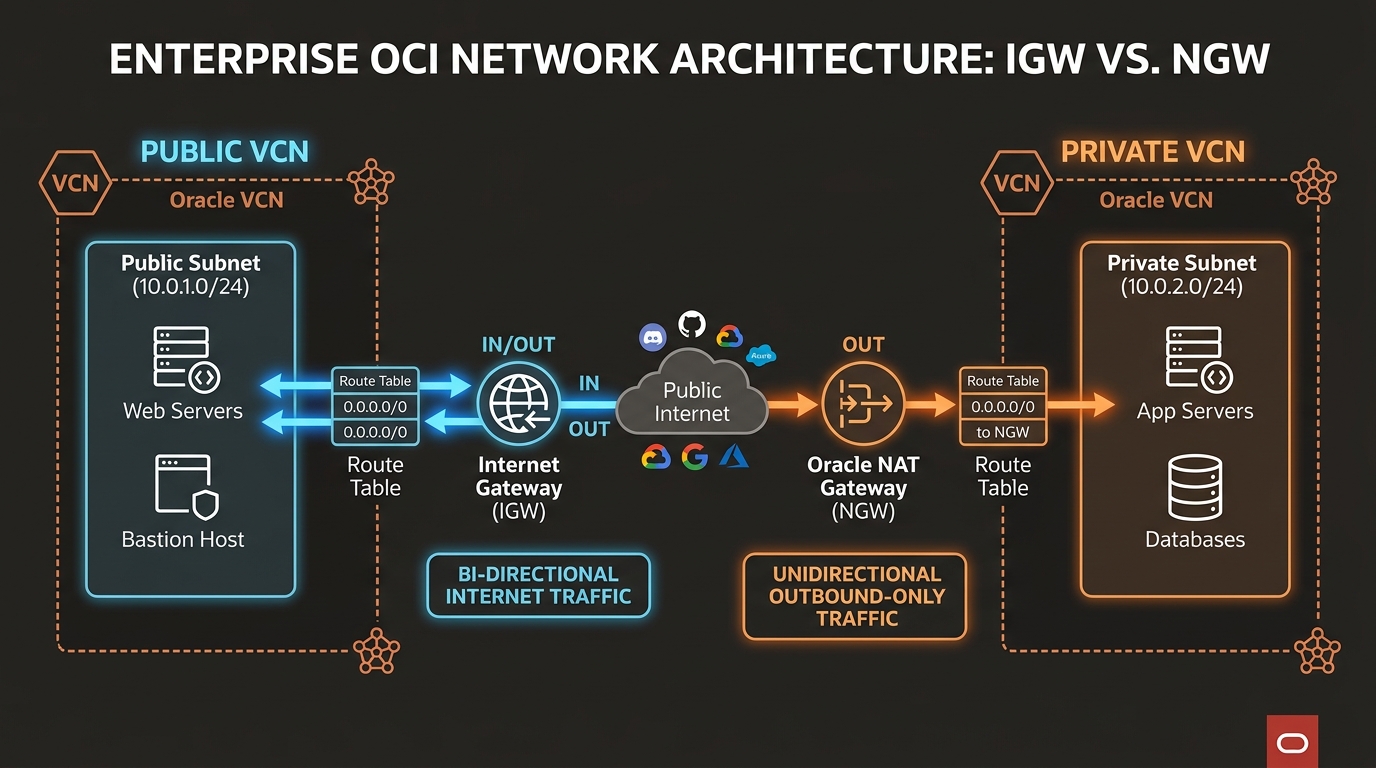
2. Gateway Comparison: IGW vs. NGW
Understanding the architectural differences between an Internet Gateway and a NAT Gateway ensures proper subnet isolation and compliance:
| Feature | Internet Gateway (IGW) | NAT Gateway (NGW) |
|---|---|---|
| Traffic Directionality | Bidirectional (Inbound & Outbound). | Unidirectional / Outbound Only (Inbound connections blocked). |
| Subnet Placement Target | Bound to Public Subnets. | Bound to Private Subnets. |
| Public IP Requirement | Target compute instances must hold a Public IP (Ephemeral or Reserved). | Compute instances do not require Public IPs; NGW translates private IPs. |
| Public IP Pool Origin | Instance’s assigned Public IP address. | NGW’s dedicated, OCI-assigned public IP address. |
| Connection Limits | Unlimited stateful connections. | Up to 20,000 concurrent stateful connections per NAT Gateway. |
| Security Risk Profile | Higher. Instances are directly addressable from public internet if ports are open. | Lower. Protects database and backend application tiers from internet scanning. |
3. Technical Mechanics of OCI Edge Gateways
1. Internet Gateway (IGW) Mechanics
- 1:1 NAT & Direct Routing: When an instance in a public subnet sends a packet to
8.8.8.8, the IGW inspects the packet. If the instance has a Public IP assigned, the IGW translates the source IP from private (10.0.1.10) to public (129.213.10.5) and forwards it to the internet backbone. - Inbound Destination Translation: For incoming internet packets destined for
129.213.10.5, the IGW translates the destination IP back to10.0.1.10and routes it into the VCN.
2. NAT Gateway (NGW) Mechanics
- N:1 Source NAT (SNAT): Multiple private instances inside a private subnet (e.g.,
10.0.2.20,10.0.2.21,10.0.2.22) route outbound traffic to the NAT Gateway. - Address Translation: The NGW rewrites the source IP of all outbound packets to the NGW’s single public IP address (e.g.,
140.238.50.12). - Connection Tracking Table: The NGW maintains a state table tracking source IP, source port, destination IP, and destination port. When external servers reply, the NGW translates destination parameters back to the initiating private VM IP.
- Block Inbound Unsolicited Traffic: External internet hosts attempting to open connections directly to the NGW public IP are dropped instantly by the OCI control plane.
[!WARNING]
NAT Gateway Connection Limit & Port Exhaustion
An OCI NAT Gateway supports up to 20,000 concurrent stateful connections per public IP. If thousands of microservices perform outbound API queries simultaneously, source port exhaustion can cause connection timeouts. For massive outbound scale, deploy multiple NGWs across dedicated subnets or use OCI Load Balancers for outbound SNAT pools.
4. OCI Web Console (GUI) Step-by-Step Walkthrough
Follow these steps to provision a NAT Gateway and configure outbound internet egress for private application servers.
Step 1: Navigating to Gateways in the Console
- Open the Navigation Menu (
≡) ➔ Networking ➔ Virtual Cloud Networks. - Click
VCN-Production-Ashburn. - Under Resources on the left panel, click NAT Gateways.
Console Path: [≡ Main Menu] ➔ [Networking] ➔ [Virtual Cloud Networks] ➔ [VCN Details] ➔ [NAT Gateways]
Step 2: Creating a NAT Gateway
- Click Create NAT Gateway.
- Configure settings:
- Name:
NGW-Production-Egress - Compartment:
Network-Compartment - Public IP Address: Select Ephemeral Public IP (or select Reserved Public IP if your external vendors whitelist specific IP ranges).
- Click Create NAT Gateway.
- Copy the assigned Public IP address from the details list.
Step 3: Updating Private Subnet Route Table
- Under Resources on the left menu of
VCN-Production-Ashburn, click Route Tables. - Click
RT-Private-Subnets. - Click Add Route Rules:
- Target Type:
NAT Gateway - Destination CIDR Block:
0.0.0.0/0 - Target NAT Gateway: Select
NGW-Production-Egress. - Click Add Route Rules. All private VMs bound to
RT-Private-Subnetsnow have secure outbound internet access for OS patches and software updates.
5. Common Architectural Misconceptions & Pitfalls
Misconception 1: “Adding an Internet Gateway to a VCN Automatically Grants Public Access”
- Reality: Creating an IGW is only the first step. For instances to communicate with the internet, 3 conditions must be met simultaneously:
- The VCN must have an active IGW attached.
- The subnet route table must contain a rule:
0.0.0.0/0 ➔ IGW. - The target compute instance VNIC must hold an assigned Public IP address.
Misconception 2: “Private Subnets Can Access Internet via an Internet Gateway”
- Reality: Private subnets explicitly forbid assigning Public IPs to VNICs. Because an IGW requires 1:1 public IP mapping, private instances cannot route through an IGW. Outbound traffic from private subnets must use a NAT Gateway.
6. OCI Internet Edge vs. Other Cloud Platforms
| Feature | Oracle Cloud Infrastructure (OCI) | Amazon Web Services (AWS) | Google Cloud Platform (GCP) |
|---|---|---|---|
| Direct Internet Gateway | Internet Gateway (IGW) | Internet Gateway (IGW) | Default Internet Gateway |
| Outbound Private Egress | NAT Gateway (NGW) | AWS NAT Gateway | Cloud NAT |
| NAT Managed Service Cost | Free hourly service (data transfer rates apply) | Hourly charge + Per-GB processed charge | Hourly charge + Per-GB processed charge |
| Static IP NAT Whitelisting | Supported via Reserved Public IP | Supported via Elastic IP | Supported via Static External IP |
