
1. Introduction to Private Oracle Service Egress
Modern cloud security frameworks demand that sensitive data inside private database servers, analytics clusters, and application instances never traverse the public internet—even when interacting with platform-as-a-service (PaaS) offerings like Object Storage, Autonomous Databases, or Key Management Services (KMS).
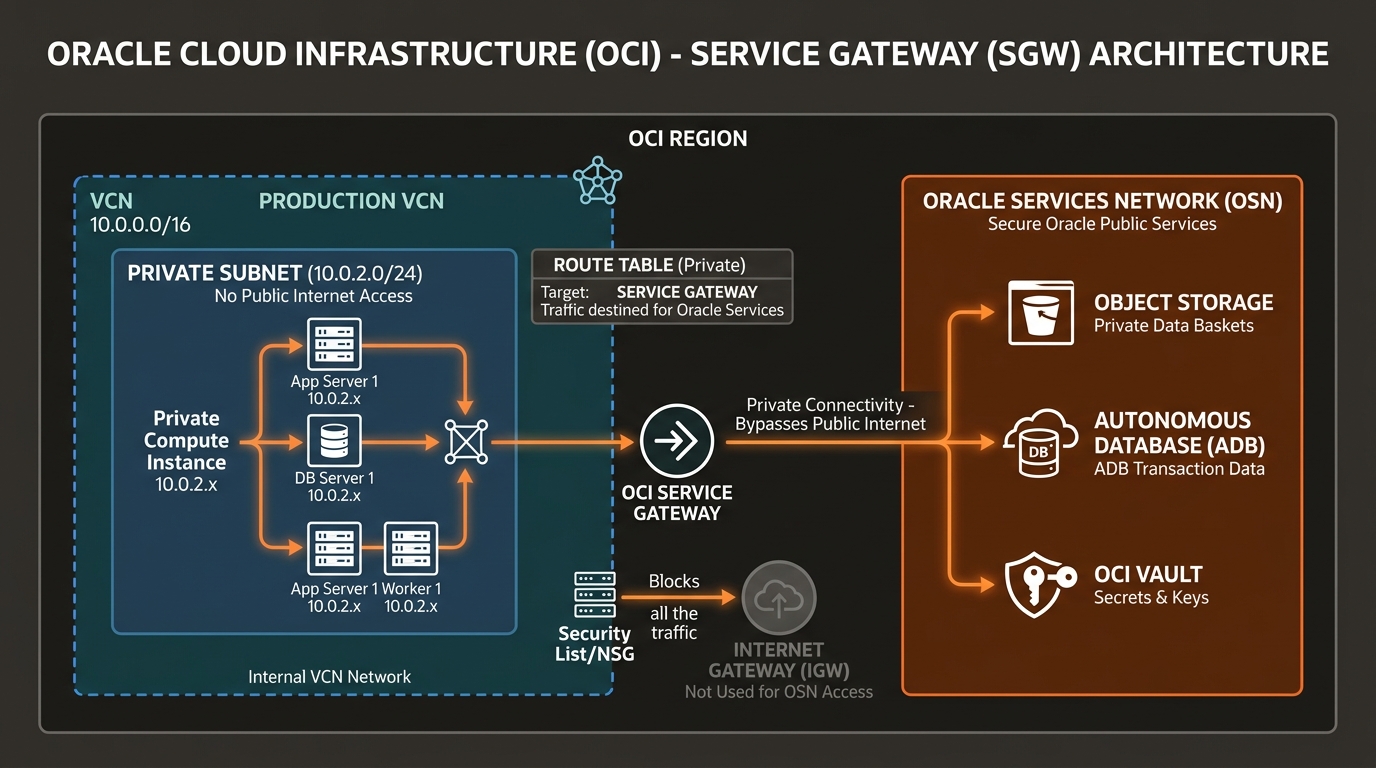
In Oracle Cloud Infrastructure (OCI), private connectivity to Oracle PaaS offerings is provided by the Service Gateway (SGW).
A Service Gateway allows resources inside a VCN with private IP addresses to access public services in the Oracle Services Network (OSN) without exposing traffic to public internet routing, NAT Gateways, or Public IP addresses.
2. Core Mechanics of the Service Gateway
1. The Oracle Services Network (OSN)
The Oracle Services Network (OSN) is a global network domain containing public-facing Oracle Cloud platform services. Each OCI region maintains its own regional OSN infrastructure.
Services residing in the OSN include:
* Object Storage & Archive Storage
* Autonomous Database (Serverless & Dedicated)
* OCI Vault / Key Management Service (KMS)
* Streaming Service & Events Service
* Logging, Monitoring, and Telemetry Services
* OCI Container Registry (OCIR)
2. Service CIDR Labels
Unlike internet routing where default destination routes are specified as 0.0.0.0/0, a Service Gateway uses predefined Service CIDR Labels maintained dynamically by Oracle control plane routing engines.
OCI provides two standard Service CIDR Labels per region:
| Service CIDR Label | Scope of OSN Coverage | Recommended Architectural Pattern |
|---|---|---|
All <REGION> Services in Oracle Services Network | Grants private access to all PaaS services in the local region (Object Storage, Autonomous DB, Vault, Streaming, etc.). | Standard Default. Ideal for general workload subnets requiring access to multiple OCI PaaS features. |
OCI <REGION> Object Storage | Restricts private access strictly to Object Storage buckets in the local region. | Restricted Security Tier. Ideal for compliance subnets that must backup to Object Storage but block access to other cloud services. |
[!IMPORTANT]
Dynamic Public IP Management
Public IPs assigned to Oracle services in the OSN change as Oracle scales regional infrastructure. The Service Gateway handles these underlying IP shifts automatically. Network engineers do not need to update route tables when Oracle adds new IP ranges to Object Storage or Autonomous DB endpoints.
3. Security Benefits & Traffic Isolation
Using a Service Gateway delivers 3 major enterprise security advantages over routing traffic via a NAT Gateway:
- Zero Public Internet Routing: Network traffic between your private compute instances and Object Storage never touches public internet routers, ISPs, or internet edge gateways.
- Data Exfiltration Defense: Combined with IAM storage policies and Bucket VCN Restrictions, a Service Gateway prevents compromised servers from uploading sensitive database dumps to external, non-corporate internet endpoints.
- No NAT Gateway Data Processing Fees: Traffic passing through a Service Gateway incurs zero data egress charges or NAT Gateway throughput processing costs.
4. OCI Web Console (GUI) Step-by-Step Walkthrough
Follow these steps to configure a Service Gateway and enable private Object Storage access for database servers in a Private Subnet.
Step 1: Navigating to Service Gateways in the Console
- Open the Navigation Menu (
≡) ➔ Networking ➔ Virtual Cloud Networks. - Click
VCN-Production-Ashburn. - Under Resources on the left panel, click Service Gateways.
Console Path: [≡ Main Menu] ➔ [Networking] ➔ [Virtual Cloud Networks] ➔ [VCN Details] ➔ [Service Gateways]
Step 2: Provisioning a Service Gateway
- Click Create Service Gateway.
- Configure options:
- Name:
SGW-Production-Services - Compartment:
Network-Compartment - Services: Select All us-ashburn-1 Services in Oracle Services Network.
- Click Create Service Gateway.
Step 3: Updating the Private Subnet Route Table
- Under Resources on the left menu, click Route Tables.
- Click
RT-Private-Subnets. - Click Add Route Rules:
- Target Type:
Service Gateway - Destination Service: Select
All us-ashburn-1 Services in Oracle Services Network. - Target Service Gateway: Select
SGW-Production-Services. - Click Add Route Rules.
Step 4: Verifying Service Gateway Routing via OCI CLI
From a private VM instance with no public IP, test private Object Storage API endpoint resolution:
# Query bucket details via OCI CLI over private Service Gateway
oci os bucket get --bucket-name prod-database-backups --region us-ashburn-1
The OCI CLI connects directly over internal OCI backplane routing via SGW-Production-Services.
5. Common Architectural Misconceptions & Pitfalls
Misconception 1: “Service Gateways Support Cross-Region Access to Object Storage”
- Reality: Service Gateways are strictly regional constructs. A Service Gateway created in Ashburn (
us-ashburn-1) can only route to Ashburn OSN endpoints (All us-ashburn-1 Services). To access an Object Storage bucket in Frankfurt (eu-frankfurt-1), traffic must route via a Dynamic Routing Gateway (DRG v2) over a Remote Peering Connection (RPC).
Misconception 2: “A Service Gateway Works Without Routing Rules”
- Reality: Provisioning a Service Gateway object inside a VCN does nothing by itself. You must explicitly add a route rule in your subnet’s route table pointing the destination Service CIDR Label to the Service Gateway target.
6. OCI Private Service Access vs. Other Cloud Platforms
| Feature | Oracle Cloud Infrastructure (OCI) | Amazon Web Services (AWS) | Google Cloud Platform (GCP) |
|---|---|---|---|
| Private PaaS Egress Mechanism | Service Gateway (SGW) | VPC Gateway Endpoints (S3/DynamoDB) | Private Google Access |
| Target Scope | Service CIDR Label (All Regional Services) | Gateway Endpoint per Service (S3 / DynamoDB) | Subnet-level flag (Private Google Access = On) |
| Pricing | Free (Zero service or data charges) | Free for Gateway Endpoints | Free (Standard data egress rules apply) |
| Transit Routing Support | Supported via DRG v2 Transit Routing | Supported via Transit Gateway + Interface Endpoints | Supported via VPC Network Peering + Custom Routes |
