
1. Introduction to Intra-Region VCN Peering
As cloud environments grow, organizations separate workloads into multiple Virtual Cloud Networks (VCNs) to enforce administrative segregation, isolated environment lifecycles (Development, Staging, Production), or shared-services models (logging, central DNS, security scanning).
In Oracle Cloud Infrastructure (OCI), connecting two VCNs within the same region so that instances communicate using private IP addresses without traversing the public internet can be achieved using a Local Peering Gateway (LPG).
While modern large-scale hub-and-spoke topologies typically leverage the Dynamic Routing Gateway (DRG v2), the Local Peering Gateway (LPG) remains an essential, lightweight point-to-point peering mechanism for direct, low-latency VCN interconnections.
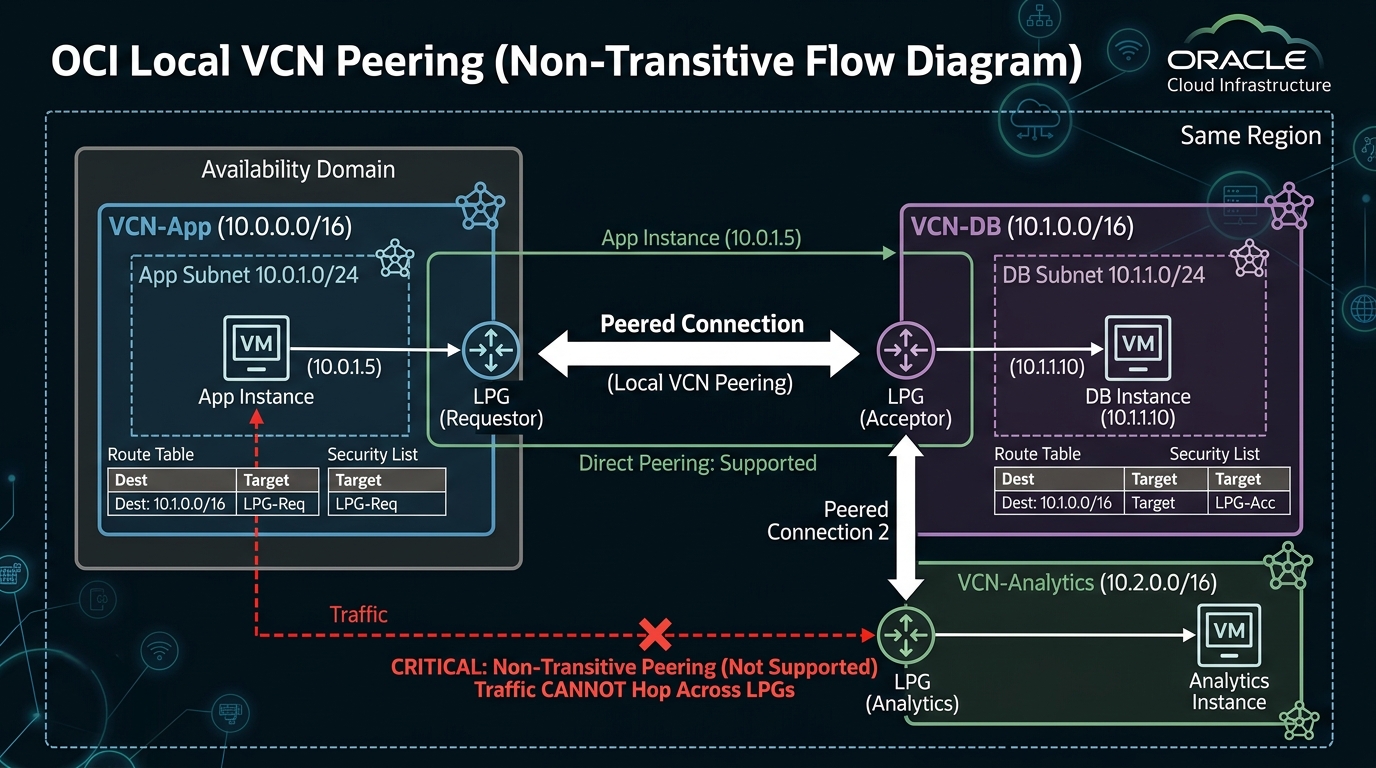
2. Core Architectural Principles of Local Peering
1. Peer Establishment: Requestor and Acceptor
To establish a local peering connection between two VCNs in the same region, an LPG object must be created inside each VCN:
* Requestor: The LPG that initiates the peering connection request.
* Acceptor: The LPG that receives and accepts the peering connection request.
Once peered, the connection is symmetric and bidirectional—traffic can initiate from either VCN.
2. Overlapping CIDR Constraint
Local peering requires that the two VCNs have non-overlapping IPv4 CIDR blocks.
* Permitted: Peering VCN-A (10.0.0.0/16) with VCN-B (10.1.0.0/16).
* Blocked: Attempting to peer VCN-A (10.0.0.0/16) with VCN-C (10.0.0.0/16 or 10.0.1.0/24). The OCI API will reject the peering connection request instantly.
3. The Non-Transitive Peering Constraint
A fundamental architectural rule of OCI Local Peering Gateways is that LPG peering is strictly non-transitive.
If VCN-Spoke-A is peered to VCN-Hub via an LPG, and VCN-Spoke-B is also peered to VCN-Hub via a separate LPG, Spoke-A cannot communicate with Spoke-B through the Hub VCN using LPGs.
[!IMPORTANT]
Overcoming Non-Transitive Limits
If your network design requires transitive hub-and-spoke routing (where spokes route through a central inspection VCN to communicate with each other or on-premises networks), you must use DRG v2 instead of LPGs.
3. Step-by-Step IAM Policy Requirements for LPG Peering
When VCN-App and VCN-DB reside in different compartments or belong to separate admin teams, IAM policies must grant permission for the LPG requestor to establish the peer:
# Policy in Network-Compartment (Requestor)
Allow group Network-Admins to manage local-peering-gateways in compartment Network-Compartment

# Policy in Database-Compartment (Acceptor)
Allow group Network-Admins to manage local-peering-gateways in compartment Database-Compartment
Allow group Network-Admins to associate local-peering-gateways in compartment Network-Compartment with local-peering-gateways in compartment Database-Compartment
4. OCI Web Console (GUI) Step-by-Step Walkthrough
Follow these steps to peer VCN-App (10.0.0.0/16) with VCN-DB (10.1.0.0/16) in the same region.
Step 1: Creating LPG Objects in Both VCNs
- Navigate to Networking ➔ Virtual Cloud Networks ➔ Select
VCN-App. - Click Local Peering Gateways under Resources ➔ Click Create Local Peering Gateway.
- Name:
LPG-App-To-DB - Compartment:
App-Compartment - Click Create Local Peering Gateway.
- Repeat the process in
VCN-DB: - Name:
LPG-DB-To-App - Compartment:
DB-Compartment
Step 2: Establishing the LPG Peering Connection
- On the
LPG-App-To-DBdetails page insideVCN-App, click the action menu (⋮) ➔ Establish Peering Connection. - Select Browse Available Local Peering Gateways.
- Select the target VCN (
VCN-DB) and chooseLPG-DB-To-App. - Click Establish Peering Connection.
- The status updates from Unpeered to Peered.
Step 3: Updating Route Tables in Both VCNs
Peering the LPGs establishes the physical pipe, but route rules must direct traffic into the LPG:
- In
VCN-AppRoute Table (RT-App-Private): - Click Add Route Rules.
- Target Type:
Local Peering Gateway - Destination CIDR Block:
10.1.0.0/16(VCN-DB CIDR) - Target LPG: Select
LPG-App-To-DB. - In
VCN-DBRoute Table (RT-DB-Private): - Click Add Route Rules.
- Target Type:
Local Peering Gateway - Destination CIDR Block:
10.0.0.0/16(VCN-App CIDR) - Target LPG: Select
LPG-DB-To-App.
Traffic between instances in 10.0.0.0/16 and 10.1.0.0/16 now flows securely over the OCI internal backplane.
5. Common Architectural Misconceptions & Pitfalls
Misconception 1: “Peering LPGs Automatically Allows All Subnet Traffic”
- Reality: Establishing an LPG connection only handles routing capability. Security Lists and NSGs on both ends must explicitly permit the ingress/egress traffic. If
VCN-DB‘s Security List drops port 1521 from10.0.0.0/16, packets reachingVCN-DBwill be dropped at the SmartNIC layer.
Misconception 2: “LPG Peering Supports Arbitrary Multi-Hop Transitive Routing”
- Reality: As emphasized in Section 2, LPGs do not forward packets across multi-hop topologies. Attempting to route on-premises FastConnect traffic through an LPG to a third VCN will fail. DRG v2 must be used for transit routing scenarios.
6. OCI Local Peering vs. Other Cloud Platforms
| Feature | Oracle Cloud Infrastructure (OCI) | Amazon Web Services (AWS) | Google Cloud Platform (GCP) |
|---|---|---|---|
| Point-to-Point Peering | Local Peering Gateway (LPG) | VPC Peering Connection | VPC Network Peering |
| Transitive Routing | Non-transitive (Requires DRG v2 for transit) | Non-transitive (Requires Transit Gateway) | Non-transitive (Requires Cloud Router / VPN) |
| Cross-Tenancy / Acct Peering | Supported via IAM Cross-Tenancy Policies | Supported via AWS Account ID & VPC ID | Supported across GCP Projects |
| Overlapping CIDR Support | Not supported | Not supported | Not supported |
