
1. Introduction to OCI DRG v2
As enterprise cloud footprints grow to dozens of Virtual Cloud Networks (VCNs) spanning hybrid on-premises environments, point-to-point peering using Local Peering Gateways (LPGs) becomes unmanageable due to $N(N-1)/2$ mesh connectivity complexity and non-transitive routing constraints.
To solve this, Oracle Cloud Infrastructure (OCI) introduced the Dynamic Routing Gateway v2 (DRG v2).
The DRG v2 acts as a highly available, ultra-low-latency software-defined virtual router inside OCI. It acts as a central hub connecting VCNs within a region, cross-region VCNs (via Remote Peering Connections), on-premises IPsec VPNs, and dedicated FastConnect circuits, enabling scalable Hub-and-Spoke topologies with full transitive routing capabilities.
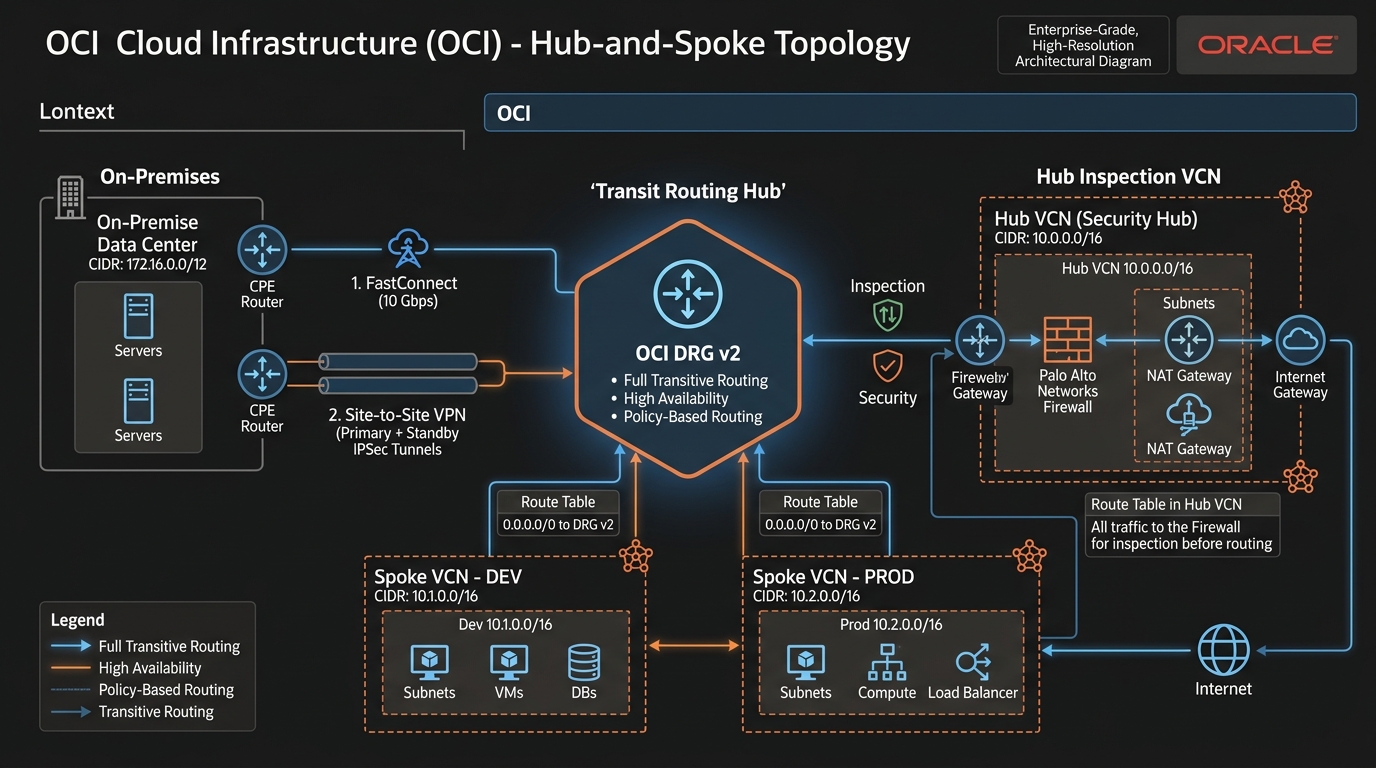
2. DRG v2 Architecture & Core Components
Unlike legacy DRGs which only supported simple on-premises gateway routing, DRG v2 operates as an extensible virtual router built around 4 core primitives:
1. DRG Attachments
An Attachment connects an external network construct to a DRG v2. Supported attachment types include:
* VCN Attachment: Connects a regional VCN to the DRG.
* IPsec Tunnel Attachment: Connects a Site-to-Site VPN tunnel.
* Virtual Circuit Attachment: Connects an OCI FastConnect circuit.
* Remote Peering Connection (RPC) Attachment: Connects to another DRG v2 in a different OCI region.
2. DRG Route Tables (DRG RTs)
Inside the DRG v2, routing decisions are governed by DRG Route Tables (which are separate from VCN Route Tables). You can create multiple DRG Route Tables inside a single DRG to isolate routing domains (e.g., preventing Dev Spoke VCNs from reaching Prod Spoke VCNs while allowing both to reach On-Premises).
Each attachment is bound to exactly one DRG Route Table for ingress lookup.
3. DRG Route Distributions
A Route Distribution controls how routes are dynamically imported into or exported from a DRG Route Table.
* Import Route Distributions: Define which attachments automatically advertise their CIDR blocks into a specific DRG Route Table.
* Export Route Distributions: Define which routes in a DRG Route Table are pushed back to connected attachments (such as advertising OCI VCN routes via BGP to on-premises routers over FastConnect).
VCN-Spoke-Dev (10.1.0.0/16) ──> [VCN Attachment] ──> [Import Distribution] ──> Added to DRG-RT-Spokes
3. High-Performance Hub-and-Spoke Topology Design
Using DRG v2, cloud architects can design a centralized Hub-and-Spoke architecture.
Key Architectural Benefits:
- Full Transitive Routing: Spoke 1 can communicate with Spoke 2 through the DRG without creating a full mesh of LPGs.
- Centralized Security Inspection: All traffic moving between spokes (or between spokes and on-premises) can be force-routed through a central Inspection Hub VCN containing virtual firewalls before reaching its destination.
- Automated BGP Route Propagation: On-premises routes learned via BGP over FastConnect/VPN automatically populate DRG route tables and can be dynamically injected into VCN route tables.
4. OCI Web Console (GUI) Step-by-Step Walkthrough
Follow these operational steps to provision a DRG v2, attach two VCNs, and enable inter-VCN transitive communication.
Step 1: Navigating to DRGs in the Console
- Open the Navigation Menu (
≡) ➔ Networking ➔ Dynamic Routing Gateways. - Select your compartment (
Network-Compartment). - Click Create Dynamic Routing Gateway.
Console Path: [≡ Main Menu] ➔ [Networking] ➔ [Dynamic Routing Gateways]
Step 2: Provisioning the DRG v2
- In the creation modal:
- Name:
DRG-Hub-Ashburn - Compartment:
Network-Compartment - Click Create Dynamic Routing Gateway. OCI initializes the DRG v2 along with default autogenerated DRG Route Tables and Route Distributions.
Step 3: Attaching VCNs to the DRG
- Open
DRG-Hub-Ashburndetails page ➔ Under Resources, click VCN Attachments. - Click Create VCN Attachment:
- Attachment Name:
Attach-VCN-Spoke1 - Select VCN:
VCN-Spoke-Dev(10.1.0.0/16) - DRG Route Table: Keep
Autogenerated Route Table for VCN Attachments. - Click Create VCN Attachment.
- Repeat for
VCN-Spoke-Prod(10.2.0.0/16) to attach the second spoke.
Step 4: Updating VCN Subnet Route Tables
To complete routing, tell instances inside VCN-Spoke-Dev to route traffic destined for VCN-Spoke-Prod (10.2.0.0/16) through the DRG:
- Navigate to Virtual Cloud Networks ➔
VCN-Spoke-Dev➔ Route Tables ➔ SelectRT-Dev-Private. - Click Add Route Rules:
- Target Type:
Dynamic Routing Gateway - Destination CIDR Block:
10.2.0.0/16(or0.0.0.0/0for transit hub inspection) - Target DRG: Select
DRG-Hub-Ashburn. - Click Add Route Rules.
VCN-Spoke-Devcan now pingVCN-Spoke-Prodacross the DRG v2 backplane.
5. Common Architectural Misconceptions & Pitfalls
Misconception 1: “DRG v2 Incurs Hourly Managed Service Fees for Every Attachment”
- Reality: Provisioning a DRG v2 and attaching local VCNs inside the same region incurs zero hourly service fees. Data transfer between VCNs attached to a local DRG v2 within the same region is completely free.
Misconception 2: “Attaching a VCN to a DRG Automatically Updates Subnet Route Tables”
- Reality: Creating a VCN attachment registers the VCN’s CIDR inside the DRG’s routing engine. However, compute instances inside VCN subnets will not route traffic to the DRG until you explicitly add a route rule (
Destination CIDR ➔ DRG) inside the subnet’s VCN Route Table.
6. OCI DRG v2 vs. Other Cloud Platforms
| Feature | Oracle Cloud Infrastructure (OCI) | Amazon Web Services (AWS) | Google Cloud Platform (GCP) |
|---|---|---|---|
| Central Transit Router | Dynamic Routing Gateway (DRG v2) | AWS Transit Gateway (TGW) | Network Connectivity Center / Cloud Router |
| Transitive VCN Routing | Native support via DRG v2 | Native support via AWS TGW | Supported via Network Connectivity Center |
| Route Table Customization | Granular DRG Route Tables & Distributions | TGW Route Tables & Associations | VPC Routing Policies |
| Local In-Region Pricing | Free (Zero hourly or data charge for local VCNs) | Hourly fee per attachment + Per-GB data processing fee | Standard data transfer fees apply |
