
1. Introduction to Centralized Transit Security Architecture
Enterprise security compliance often mandates that all network traffic—whether moving between internal cloud subnets (East-West traffic) or between cloud workloads and the internet/on-premises (North-South traffic)—must undergo deep packet inspection (DPI) through Third-Party Next-Generation Firewalls (NGFWs) such as Palo Alto Networks, Fortinet FortiGate, or Check Point CloudGuard.
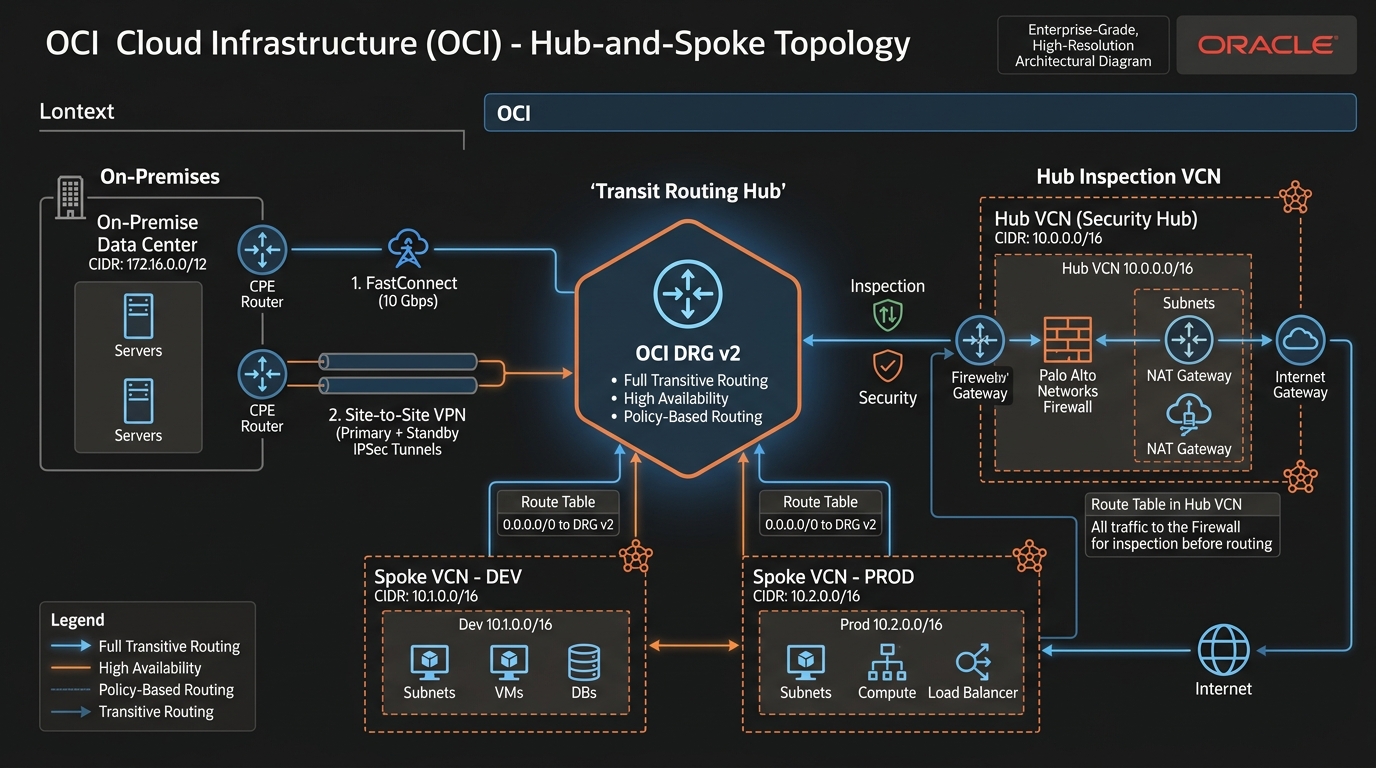
In Oracle Cloud Infrastructure (OCI), deploying virtual firewalls centrally without sacrificing high availability or creating routing loops is achieved using Transit Hub VCN Architecture paired with DRG v2 Route Tables and Network Load Balancers (NLBs).
2. Core Architectural Challenges: Asymmetric Routing
When deploying multiple active virtual firewalls behind a load balancer, the primary threat to connectivity is Asymmetric Routing:
- The Problem: A client request packet routes through
Firewall-01(which logs the active TCP connection state in its state table). The return response packet from the server routes throughFirewall-02. BecauseFirewall-02has no record of the initial TCP handshake, it drops the return packet as an invalid state violation. - The Solution in OCI:
- Symmetric Hashing on NLB: OCI NLB enforces 3-tuple or 5-tuple symmetric hashing, guaranteeing matching bidirectional flows hit the same firewall instance.
- Source NAT (SNAT) at Firewall: Virtual firewalls rewrite the source IP of inspected packets to the firewall’s internal interface IP, forcing return traffic to return back to the initiating firewall instance.
3. Transit Routing Components in DRG v2
Building an inspection hub relies on 3 specific DRG v2 routing features:
- VCN Ingress Route Table (VCN Attachment Route Table): Attached directly to the Hub VCN DRG attachment. Overrides standard routing by forcing incoming packets entering the DRG to route directly to the Firewall Inspection NLB IP address.
- DRG Transit Route Table: Forces all spoke-to-spoke and spoke-to-premises traffic to route into the Hub VCN attachment before reaching its final destination.
- Implicit VCN Route Override: Subnet route tables inside spoke VCNs point default egress (
0.0.0.0/0) to the DRG v2.
4. Operational Inspection Patterns
Pattern A: Spoke-to-Internet (North-South Inspection)
Spoke VM (10.1.1.5) $\rightarrow$ Spoke Subnet Route Table (0.0.0.0/0) $\rightarrow$ DRG v2 $\rightarrow$ Hub Ingress Route Table $\rightarrow$ Hub Ingress NLB $\rightarrow$ Firewall VM (Inspect) $\rightarrow$ Hub Internet Gateway $\rightarrow$ Internet.
Pattern B: Spoke-to-Spoke (East-West Inspection)
Spoke-Dev (10.1.1.5) $\rightarrow$ DRG v2 $\rightarrow$ Hub Ingress NLB $\rightarrow$ Firewall VM (Inspect) $\rightarrow$ DRG v2 $\rightarrow$ Spoke-Prod (10.2.1.50).
5. OCI Web Console (GUI) Step-by-Step Walkthrough
Follow these operational steps to build a Transit Hub Inspection VCN routing pipeline.
Step 1: Configuring the Ingress Route Table on Hub VCN
- Open Navigation Menu (
≡) ➔ Networking ➔ Virtual Cloud Networks ➔ SelectVCN-Hub-Security. - Under Resources, click Route Tables ➔ Click Create Route Table.
- Name:
RT-Hub-Ingress-From-DRG - Compartment:
Network-Compartment - Add Route Rule:
- Target Type:
Private IP - Destination CIDR Block:
0.0.0.0/0 - Target Private IP: Enter private IP of
NLB-Firewall-Ingress(10.0.1.50). - Click Create Route Table.
Console Path: [≡ Main Menu] ➔ [Networking] ➔ [VCNs] ➔ [Hub VCN] ➔ [Route Tables]
Step 2: Binding Ingress Route Table to DRG Attachment
- Navigate to Dynamic Routing Gateways ➔ Select
DRG-Hub-Ashburn. - Under Resources, click VCN Attachments.
- Select the attachment for
VCN-Hub-Security➔ Click Edit. - Under VCN Ingress Route Table, select
RT-Hub-Ingress-From-DRG. - Click Save Changes. All traffic entering the DRG destined for any spoke is immediately redirected to the firewall NLB.
Step 3: Configuring DRG Route Table for Spoke Inspection
- Under Resources inside
DRG-Hub-Ashburn, click DRG Route Tables. - Click Create DRG Route Table:
- Name:
DRG-RT-Spoke-Traffic - Add Static Route Rule:
- Destination CIDR:
0.0.0.0/0 - Next-Hop Attachment: Select
VCN-Hub-Security. - Associate
DRG-RT-Spoke-Trafficwith all Spoke VCN Attachments.
6. Common Architectural Misconceptions & Pitfalls
Misconception 1: “Virtual Firewalls Can Route Traffic Without Enabling IP Forwarding”
- Reality: By default, Linux OS kernels and firewall VM shapes drop packets where the destination IP address does not match local interface IPs. You must enable IP Forwarding on the firewall instance’s primary and secondary VNICs inside the OCI Console (and set
net.ipv4.ip_forward = 1inside OS kernel settings).
Misconception 2: “Transit Routing Can Be Configured Using Local Peering Gateways (LPGs)”
- Reality: As detailed in Article 07, LPGs are strictly non-transitive. You cannot route spoke-to-spoke traffic through a central firewall hub using LPGs; attempting to do so will result in dropped packets. DRG v2 must be used for transit routing.
7. OCI Transit Routing vs. Other Cloud Platforms
| Feature | Oracle Cloud Infrastructure (OCI) | Amazon Web Services (AWS) | Google Cloud Platform (GCP) |
|---|---|---|---|
| Transit Inspection Construct | Hub VCN + DRG v2 + NLB | AWS Transit Gateway + Gateway LB | VPC Network Peering + Internal NLB |
| Ingress Route Override | VCN Ingress Route Table on DRG Attachment | AWS Ingress Route Table on VPC IGW | Custom Route Metrics & Next-Hop NLB |
| Symmetric Firewall Hash | Native on OCI NLB | Native on AWS GWLB | Native on GCP Passthrough NLB |
| Appliance Marketplace | Palo Alto, Fortinet, Check Point | Palo Alto, Fortinet, Check Point | Palo Alto, Fortinet, Check Point |
