
1. Introduction to Layer 7 Perimeter Protection
Public-facing web applications and APIs are continuously targeted by sophisticated application-layer cyber threats—including SQL Injection (SQLi), Cross-Site Scripting (XSS), Remote Code Execution (RCE), Credential Stuffing, and Automated Bot Scrapers. Standard Layer 3/4 firewalls and Security Lists cannot inspect HTTP payload contents to block these attacks.
In Oracle Cloud Infrastructure (OCI), application-layer perimeter protection is provided by OCI Web Application Firewall (WAF).
OCI WAF inspects HTTP/HTTPS traffic in real time, enforcing security rule sets, rate limiting thresholds, access control policies, and bot protection before malicious requests reach application servers.
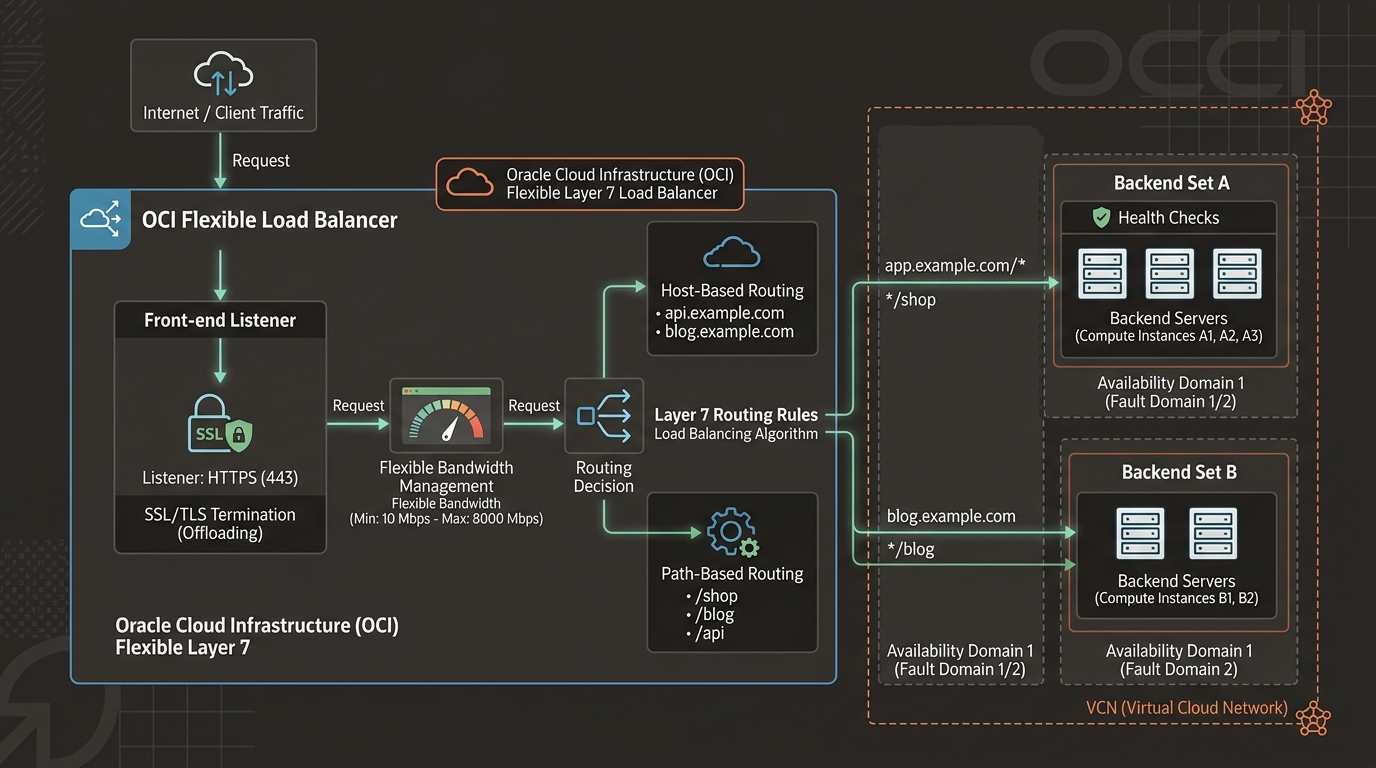
2. Architectural Deployment Models: Edge WAF vs. Regional WAF
OCI WAF supports two primary deployment topologies depending on application entry points:
| WAF Deployment Model | Enforcement Location | Architectural Integration | Primary Use Case |
|---|---|---|---|
| Edge WAF (Global DNS-Based) | Oracle Edge Anycast Global POPs. | Integrated via CNAME DNS redirection (app.example.com $\rightarrow$ waf.oraclegslb.com). | Global web applications requiring DDoS mitigation, Anycast routing, and CDN edge security. |
| Regional WAF (Load Balancer-Attached) | Regional OCI Load Balancers. | Bound directly to OCI Flexible Load Balancer (L7) instances. | Regional public/private web apps, internal microservices, and regional API gateways. |
[!TIP]
Recommended Architectural Pattern
Use Regional WAF attached to Flexible Load Balancers for streamlined management, zero DNS CNAME changes, and direct SSL certificate integration inside your VCN.
3. Core Protection Engine Features
1. OWASP Top 10 Protection Rules
OCI WAF includes hundreds of pre-configured protection rules curated by Oracle Threat Intelligence teams. Rules inspect incoming HTTP parameters, headers, cookies, and request bodies for attack signatures:
* SQL Injection (SQLi): Detects malicious SQL queries in input forms or URL parameters.
* Cross-Site Scripting (XSS): Blocks injected JavaScript payloads.
* Command Injection / RCE: Prevents OS command execution attempts (/bin/sh, cmd.exe).
* Path Traversal: Blocks unauthorized directory access (../../etc/passwd).
2. Access Control Rules & Geo-Fencing
Enforces strict traffic access criteria based on:
* Geo-IP Location: Block or allow traffic originating from specific countries or regions.
* IP CIDR Whitelisting/Blacklisting: Restrict admin URLs (/admin/*) strictly to corporate public egress IPs.
* HTTP Header Inspection: Require custom API security tokens or specific User-Agent strings.
3. Bot Management & Rate Limiting
Defends applications from automated brute-force attacks and web scrapers:
* JavaScript Challenge: Forces client browsers to execute a background JavaScript challenge before granting access, transparently blocking headless bot scripts.
* CAPTCHA Challenge: Displays an interactive CAPTCHA when suspicious request spikes occur.
* Rate Limiting: Restricts requests per IP address (e.g., maximum 50 POST requests per minute to /login).
4. OCI Web Console (GUI) Step-by-Step Walkthrough
Follow these operational steps to create a Regional WAF Policy and attach it to an existing OCI Flexible Load Balancer.
Step 1: Navigating to WAF Policies in the Console
- Open Navigation Menu (
≡) ➔ Identity & Security ➔ Web Application Firewall. - Select your compartment (
Network-Compartment). - Click Create WAF Policy.
Console Path: [≡ Main Menu] ➔ [Identity & Security] ➔ [Web Application Firewall]
Step 2: Provisioning the WAF Policy
- In the creation modal:
- Name:
WAF-Policy-Production - Compartment:
Network-Compartment - Under WAF Enforcement Point, select Load Balancer.
- Select your load balancer:
LB-Public-Production. - Click Next.
Step 3: Configuring OWASP Protection Rules
- Click Protection Rules under Resources inside the policy creation wizard.
- Click Add Protection Rule:
- Rule Name:
Enforce-OWASP-Core - Action: Select Block (Returns HTTP
403 Forbiddento attackers). - Search and select rule categories:
SQL Injection ProtectionCross-Site Scripting (XSS) ProtectionRemote Code Execution (RCE)- Click Add Rules.
Step 4: Configuring Rate Limiting Access Rules
- Click Access Rules ➔ Click Add Access Rule:
- Name:
Protect-Login-Rate-Limit - Action: Select Block.
- Condition: Request URL matches
/api/v1/auth/login. - Enable Rate Limiting: Max 20 requests per 60-second window per IP.
- Click Add Rule ➔ Click Create WAF Policy.
- OCI attaches the WAF policy to
LB-Public-Production. Malicious requests are blocked at the perimeter before reaching backend compute instances.
5. Common Architectural Misconceptions & Pitfalls
Misconception 1: “Deploying WAF in ‘Block’ Mode on Day 1 Is Safe”
- Reality: Deploying new protection rules directly in Block mode risks blocking legitimate user traffic due to false positives. Best Practice: Deploy new WAF policies in Detect / Log Only mode for 1–2 weeks, analyze OCI Logging events, tune rule exceptions, and then switch action to Block.
Misconception 2: “WAF Inspects Encrypted HTTPS Traffic Without SSL Certificates”
- Reality: For a WAF to inspect HTTPS request payloads, it must decrypt the SSL/TLS session. If using Edge WAF, SSL certificates must be uploaded to the WAF policy. If using Regional Load Balancer WAF, decryption is handled automatically by the attached Load Balancer Listener.
6. OCI WAF vs. Other Cloud Platforms
| Feature | Oracle Cloud Infrastructure (OCI) | Amazon Web Services (AWS) | Google Cloud Platform (GCP) |
|---|---|---|---|
| WAF Service | OCI Web Application Firewall (WAF) | AWS WAF | Google Cloud Armor |
| Deployment Options | Edge WAF & Regional Load Balancer WAF | ALB, CloudFront, API Gateway | External HTTP(S) Load Balancer |
| Bot Mitigation | Native JavaScript & CAPTCHA Challenges | AWS WAF Bot Control (Add-on) | Cloud Armor reCAPTCHA Enterprise |
| Managed Rulesets | Included natively | AWS Managed Rules / 3rd Party | Cloud Armor Pre-configured Rules |
| Pricing Model | Fixed monthly policy fee + Request volume | Base rule fee + Web ACL fee + Request fee | Monthly policy fee + Rule fee + Request fee |
