If you come from the world of physical networking—racks of Catalyst or Nexus switches, optical patch panels, trunk ports, and spanning tree—the first time you touch an Azure Virtual Network (VNet), your brain will try to map cloud constructs to physical boxes.
Don’t do that. It’s a trap.
In Azure, there are no top-of-rack switches you can log into. There is no ARP broadcast flooding across your VLAN. There is no Spanning Tree Protocol (STP) calculating blocking ports, and your router’s default gateway isn’t a physical chassis sitting at the end of a cable.
An Azure VNet is an isolated, software-defined Layer 3 overlay network. It lives inside Microsoft’s software-defined networking (SDN) stack, running directly inside the hypervisors on hundreds of thousands of physical compute nodes.
If you want to pass the AZ-700 and actually design networks that don’t fall over when production traffic hits them, you have to peel back the portal GUI and see what the hypervisor host is doing with your packets.
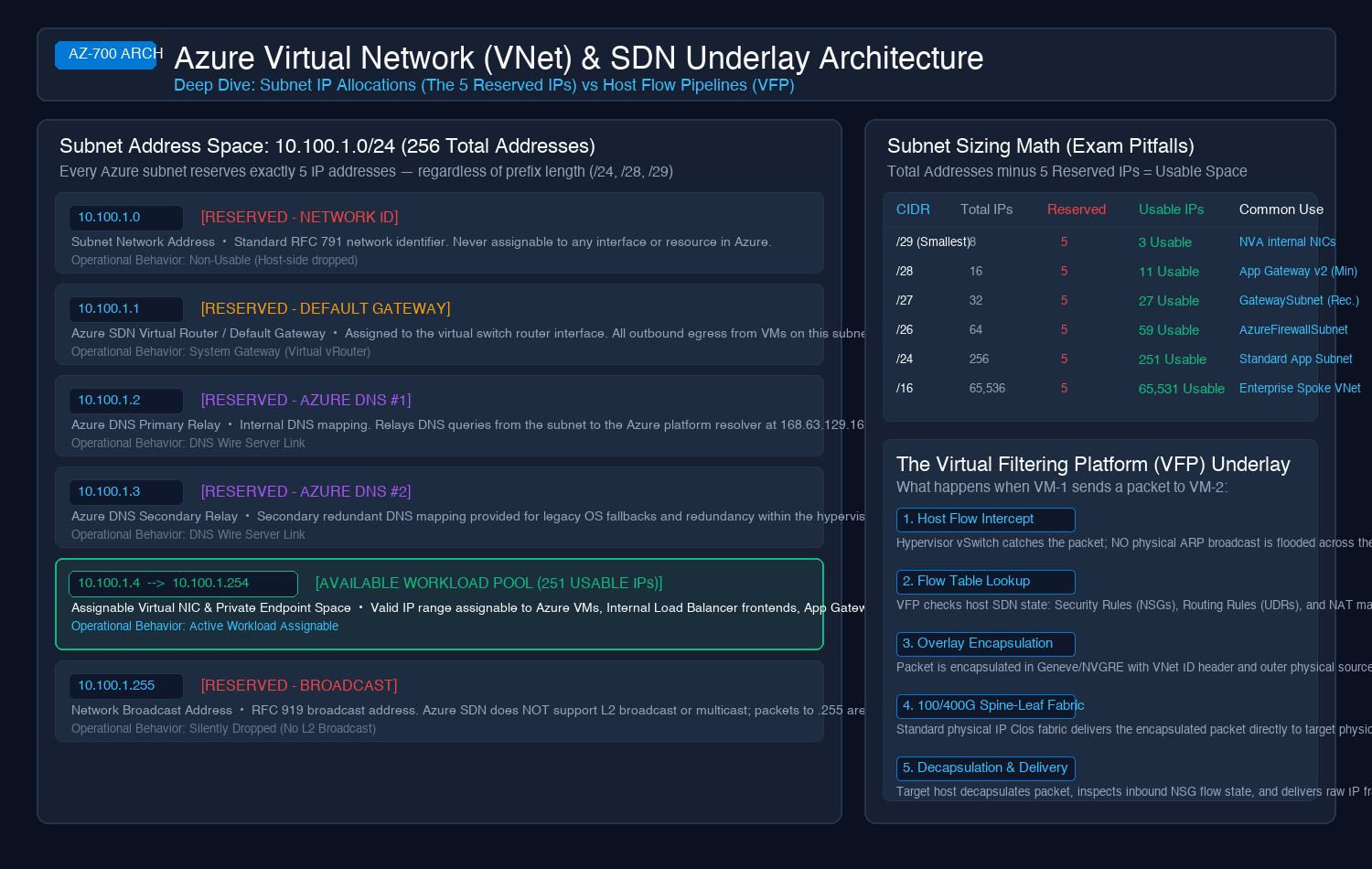
The Virtual Filtering Platform (VFP): What’s Actually Under the Hood
When you spin up an Azure Virtual Machine and assign it a virtual NIC, that vNIC attaches to a virtual switch (vSwitch) inside the Azure Hyper-V host. Inside that vSwitch sits a multi-layer programmable flow engine called the Virtual Filtering Platform (VFP).
Think of VFP as an OpenFlow-style match-action engine implemented directly in host memory and offloaded into physical SmartNICs (via Accelerated Networking / SR-IOV).
When VM-1 on 10.100.1.4 wants to talk to VM-2 on 10.100.1.5:
1. No ARP Broadcasts Exist
On a physical Ethernet segment, VM-1 would scream out an ARP broadcast: “Who has 10.100.1.5? Tell 10.100.1.4!” If Azure let millions of customer VMs blast ARP broadcasts across its datacenters, the physical spine-leaf network would collapse under broadcast storms.
Instead, the hypervisor’s VFP intercepts the ARP request locally. The host already knows the MAC-to-IP mapping for every NIC in that VNet because the Azure SDN controller (the brain) programmed the host flow table the millisecond the target VM was provisioned. The host fabric replies to the ARP request on behalf of the destination.
2. Flow Rule Processing
Before a single packet leaves the hypervisor, VFP runs it through an internal pipeline of rule layers:
* Network Security Groups (NSGs): Evaluates outbound 5-tuple security rules.
* Routing (UDRs & System Routes): Determines the next hop.
* Software Load Balancing (SLB) & NAT: Rewrites source or destination addresses if outbound SNAT or load balancing is configured.
3. Encapsulation Across the Physical Clos Fabric
Once validated, the host takes your raw customer IP frame, slaps on an outer header (encapsulating it via Geneve or NVGRE with a Virtual Network ID tag), and sends it over Microsoft’s high-speed physical 100G/400G spine-leaf network directly to the destination hypervisor host. The destination host decapsulates the packet, runs inbound NSG flow checks, and drops the raw frame straight into VM-2’s virtual interface.
Once you realize that an Azure VNet is just a distributed database of flow rules pushed down to hypervisors, the quirks of Azure networking start making complete sense.
The 5 Reserved IP Addresses: Why Your /29 is Useless
In standard IPv4 networking (RFC 791/RFC 919), any subnet loses exactly 2 IP addresses:
* The Network Address (first IP, all host bits 0).
* The Broadcast Address (last IP, all host bits 1).
In an on-prem /29 network (8 total addresses), you get $8 – 2 = 6$ usable host IPs.
If you create a /29 subnet in Azure expecting to host 6 VMs, you’re going to have a very bad day. Azure reserves exactly 5 IP addresses in every single subnet, regardless of whether that subnet is a massive /16 or a tiny /29.
Let’s dissect 10.100.1.0/24 to see exactly where those 5 IPs go:
Address x.x.x.0: Network Address
- Status: Reserved by RFC.
- Azure Behavior: Represents the wire boundary of the subnet. Azure does not let you assign this address to any network interface or private endpoint.
Address x.x.x.1: The Azure Default Gateway
- Status: Reserved by Azure SDN.
- Azure Behavior: This is the default gateway assigned to every VM living on this subnet. But remember: this is not a physical router interface running HSRP or VRRP. It is a virtual abstraction implemented in the host hypervisor. When your VM sends packets to
10.100.1.1, the local host vSwitch catches them and routes them based on the effective route table.
Address x.x.x.2 and x.x.x.3: Azure DNS Mapping Addresses
- Status: Reserved by Azure.
- Azure Behavior: Azure maps its internal recursive DNS resolvers to the second and third usable IP addresses of the subnet space. These addresses relay DNS queries directly to the Azure platform wire server at
168.63.129.16. Microsoft reserves two separate IPs here to provide redundancy and accommodate legacy client operating systems that expect distinct primary and secondary DNS server addresses in DHCP Option 6.
Address x.x.x.255: The Network Broadcast Address
- Status: Reserved by RFC.
- Azure Behavior: Azure does not support Layer 2 broadcast or multicast inside VNets. If an application inside your VM sends a packet destined to
10.100.1.255, the host vSwitch catches it and silently drops it on the floor. However, to maintain strict RFC compliance, the address is permanently blocked from being assigned to any host.
The Usable Range
For 10.100.1.0/24, your usable workload pool starts at 10.100.1.4 and ends at 10.100.1.254. That gives you $256 – 5 = 251$ usable IP addresses.
Subnet Sizing Math & The /29 Reality Check
Microsoft sets hard boundaries on VNet subnet sizes:
* Largest supported subnet: /8 (16,777,216 addresses—though nobody in their right mind should build a flat /8 VNet).
* Smallest supported subnet: /29 (8 total addresses).
Look at what happens to a /29:
$$\text{Total IPs: } 8 \quad | \quad \text{Reserved IPs: } 5 \quad | \quad \text{Usable IPs: } \mathbf{3}$$
If you deploy a third-party Network Virtual Appliance (NVA) cluster (like a pair of Palo Alto or Fortinet firewalls) into a /29, the primary firewall takes 10.100.1.4, the secondary firewall takes 10.100.1.5, and you have exactly one IP address left. If you later try to add an Internal Load Balancer frontend or a diagnostic agent, the deployment fails with an IP exhaustion error.
The Sacred Subnets (Mandatory Naming Rules)
On the AZ-700 exam, Microsoft will test your knowledge of dedicated subnets that have strict naming and sizing rules. You cannot pick arbitrary names for these; they are hard-coded into Azure’s resource providers:
| Subnet Name | Minimum CIDR | Recommended CIDR | Notes & Restrictions |
|---|---|---|---|
GatewaySubnet | /29 | /27 or /26 | Houses VPN and ExpressRoute gateways. Never place workloads, VMs, or Application Gateways here. Do NOT associate an NSG to this subnet (doing so will break gateway management traffic). |
AzureFirewallSubnet | /26 | /26 | Dedicated strictly to Azure Firewall. Requires at least 64 addresses to allow the firewall to scale out underlying compute instances. |
AzureFirewallManagementSubnet | /26 | /26 | Required only if you use Azure Firewall Forced Tunneling (separating management traffic from customer data path). |
AzureBastionSubnet | /26 | /26 | Dedicated strictly to Azure Bastion host. Basic SKU needs /26; Standard/Premium needs /26 to support autoscaling host instances. |
RouteServerSubnet | /27 | /27 | Dedicated to Azure Route Server. Houses the BGP engine VMs that peer with your SD-WAN / NVAs. |
IPv4 vs. IPv6 Dual-Stack: No NAT64, Just Real Routing
Azure Virtual Networks support native dual-stack IPv4 and IPv6. This is not 6to4 tunneling or NAT64; both protocol stacks run side-by-side on the host underlay.
Key Architectural Rules for Azure IPv6:
- IPv6 Subnets are Fixed at
/64: You cannot carve up custom prefix lengths for IPv6 inside an Azure subnet. When you allocate an IPv6 block to a VNet (e.g.,ace:cab:deca::/48), every subnet you create must have a/64prefix (e.g.,ace:cab:deca:1::/64). - Every IPv6 VM Gets a Public IPv6: In Azure’s IPv6 architecture, there is no outbound SNAT for IPv6. Outbound connectivity to the IPv6 Internet requires the VM’s NIC to be associated with an IPv6 Public IP address (or an IPv6 Standard Load Balancer outbound rule).
- No Direct Inter-VNet Peering Between IPv4-only and IPv6-only: Both VNets must have dual-stack enabled if you intend to route IPv6 between them over VNet Peering.
- NSG Rules Must Explicitly Cover IPv6: Azure Network Security Groups handle IPv4 and IPv6 in separate rules or unified rules using CIDR blocks. Service Tags work for IPv6 as well.
Public IPs: Standard SKU or Nothing
In the old days, Azure had “Basic SKU” public IP addresses. They were dynamically allocated, open to the entire internet by default (unless an NSG blocked them), and did not support Availability Zones.
Basic SKUs are officially dead. Microsoft retired Basic Public IPs on September 30, 2025. Standard SKU is now the only game in town, and AZ-700 tests your understanding of Standard SKU behavior:
Standard Public IP Characteristics:
- Static Allocation Only: When you create a Standard Public IP, you get a fixed IPv4 address that remains bound to your resource until you delete it. Dynamic allocation does not exist on Standard SKUs.
- Secure by Default: A Standard Public IP attached to a VM virtual NIC will drop 100% of inbound traffic unless you explicitly attach a Network Security Group (NSG) with an allow rule. On-prem engineers who forget this spend hours troubleshooting why their web server isn’t responding to pings or curl requests.
- Zone-Redundant by Default: You can deploy Standard Public IPs as zone-redundant (survives a single datacenter/availability zone failure), or pin them to a specific Availability Zone (Zone 1, 2, or 3) for zonal symmetry with your backend VMs.
Public IP Prefixes & Custom IP Prefixes (BYOIP)
In enterprise networks, having random, disconnected public IP addresses scattered across your cloud footprint causes operational headaches. Your external SaaS partners, banking clearinghouses, or customer firewalls will refuse to whitelist 50 individual /32 IP addresses.
1. Azure Public IP Prefixes
Instead of provisioning individual public IPs, you create an Azure Public IP Prefix.
* Microsoft hands you a contiguous block of public IPv4 addresses owned by Microsoft (ranging from /28 down to /31).
* A /28 prefix yields 16 contiguous public IPs.
* When you spin up a Firewall, VPN Gateway, or Load Balancer, you carve addresses directly out of this contiguous prefix.
* Your customers only need to whitelist a single CIDR block on their perimeter firewalls.
2. Custom IP Prefixes (Bring Your Own IP – BYOIP)
What if your organization already owns a publicly routable /24 IPv4 block registered to your own Autonomous System Number (ASN) with ARIN, RIPE, or APNIC? You don’t want to re-architect your external partner whitelists. You want Azure to advertise your public IP range to the global internet via BGP.
This is Custom IP Prefix (BYOIP). The setup process is a high-yield exam topic because it requires strict cryptographic proof of ownership before Microsoft’s BGP routers will announce your route:
[Customer On-Premises / RIR]
   │
   ├── 1. Generate RSA Key Pair
   ├── 2. Create RPKI ROA (Route Origin Authorization) in ARIN/RIPE
   │      └── Authorizes Microsoft AS8075 to announce prefix
   └── 3. Draft Letter of Authorization (LOA) signed by Org Admin
         │
         ▼
[Azure Platform (BYOIP Pipeline)]
   │
   ├── Validation Phase: Verifies ROA, DNS reverse lookup, LOA
   ├── Provisioning Phase: Ingests prefix into Azure Resource Manager
   └── Commissioning Phase: Microsoft Edge Routers advertise your /24 via BGP
The Lifecycle States of BYOIP:
- Pending Verification: You submit the prefix, the signed LOA, and create a Route Origin Authorization (ROA) in your regional registry (ARIN/RIPE) stating that Microsoft’s ASN (
AS8075) is authorized to originate your prefix. - Provisioning: Azure verifies the cryptographic signature against the RIR database.
- Provisioned: The prefix is inside your Azure tenant, but not yet advertised to the internet.
- Commissioning $\rightarrow$ Commissioned: Microsoft’s edge routers start advertising your IP block to global Tier-1 transit providers via BGP.
- Carving Sub-prefixes: Once commissioned, you carve Public IP Prefixes (e.g.,
/28s) out of your/24, which can then be assigned to Azure Firewalls, Load Balancers, or NAT Gateways.
Subnet Delegation: Handing Over Control to PaaS
When you look at an Azure subnet in the portal or via CLI, you will see a setting called Subnet Delegation.
In traditional networking, a VLAN is dumb. It carries packets for whatever machine connects to an access port. But in Azure, certain platform-as-a-service (PaaS) offerings need to inject dedicated networking components (container instances, compute nodes, serverless backend instances) directly into your private VNet topology.
Examples include:
* Microsoft.Web/serverFarms (Azure App Service Regional VNet Integration)
* Microsoft.ContainerInstance/containerGroups (Azure Container Instances)
* Microsoft.Netapp/volumes (Azure NetApp Files)
* Microsoft.Sql/managedInstances (Azure SQL Managed Instance)
What Delegation Actually Does:
When you delegate a subnet to a service like Microsoft.Web/serverFarms, you are assigning explicit Azure Resource Manager permissions to that service’s internal Resource Provider.
1. The service gets the authority to establish pre-requisite networking configurations, inject virtual NICs, and provision dynamic routing rules inside that subnet.
2. Exclusive Ownership: In almost all cases, once a subnet is delegated, you cannot mix workloads. You cannot put standard general-purpose VMs or storage private endpoints into an App Service delegated subnet. If you try, the deployment will throw a SubnetIsDelegatedForAnotherService error.
Real-World Solution Scenarios: Overcoming IP Clashes & Subnet Traps
Let’s step out of the textbook and tackle the messy, real-world engineering crises that appear in enterprise migrations and on the AZ-700 exam:
Scenario 1: The Acquired Company IP Address Clash (Overlapping Subnets)
- The Problem: Your enterprise network runs on
10.100.0.0/16. Your company just acquired a startup whose entire Azure VNet is also built on10.100.0.0/16. Both networks need to communicate immediately so their Kubernetes clusters can query your core database. - Why VNet Peering Fails: You cannot peer VNets with overlapping address spaces. Azure Resource Manager will reject the peering operation immediately with an
OverlappingAddressSpaceexception. Re-IPing 500 virtual machines and database connection strings in the acquired company would take six months. - The Solution Architecture:
- Option A: Azure VPN Gateway NAT (The Network-Level Fix):
Deploy an active-active Site-to-Site VPN between the two VNets (or between on-prem and Azure). Configure Azure VPN Gateway NAT Rules using Ingress SNAT and Egress DNAT. You map the remote overlapping10.100.0.0/16into an unused virtual address space (e.g.,172.16.0.0/16). Your workloads talk to172.16.x.x, and the VPN Gateway translates the packets on the fly. - Option B: Azure Private Link (The Application-Level Fix):
If the startup only needs to access specific database or API endpoints, avoid L3 network routing altogether. Expose your database behind an Internal Load Balancer with Azure Private Link Service (Article-16). The startup provisions a Private Endpoint in their VNet. Private Link translates the addresses at Layer 4, making overlapping IP addresses completely irrelevant!
Scenario 2: The “We Ran Out of Subnet Space” Crisis
- The Problem: A development team deployed a production VNet with an initial address space of
10.1.0.0/24(256 addresses). Over two years, they spun up 240 VMs. Now, central IT mandates that they must deploy an Azure Firewall (/26required) and an Azure VPN Gateway (/27required) inside the VNet. The existing/24has zero contiguous space left. - The Naive (and Terrifying) Thought: “We have to delete the VNet, recreate it as a
/16, and redeploy all production servers.” - The Zero-Downtime Solution:
Azure VNets support multiple non-contiguous address spaces. - Navigate to the existing VNet configuration.
- Add a secondary, non-overlapping address block: e.g.,
10.2.0.0/16. - Inside this new
10.2.0.0/16space, carve outAzureFirewallSubnet(10.2.1.0/26) andGatewaySubnet(10.2.2.0/27). - The Azure SDN fabric automatically links the new subnets to the existing workloads with zero downtime and zero re-IPing of active production VMs.
Scenario 3: The Standalone Public IP Blackhole
- The Problem: You assign a Standard Public IP to a newly deployed Linux VM for urgent SSH access. You didn’t associate an NSG because you “just wanted to test for five minutes.”
- The Trap: Port 22 times out completely. You check the Linux firewall (
iptables/ufw) and verifysshdis running on0.0.0.0:22. Everything looks perfect locally. - The Reality: Standard Public IPs are closed by default. Without an explicit NSG associated either to the VM’s subnet or directly to the VM’s NIC containing an Inbound Allow rule for TCP 22, the Azure SDN flow engine drops the TCP SYN packet at the physical host edge before it ever reaches your virtual NIC.
Hands-On Azure CLI: Deploying the SDN Underlay & Subnets
Let’s step out of the Azure Portal and wire up this foundational underlay directly from the terminal. In production and in AZ-700 scenarios, scripting your VNets ensures zero configuration drift.
1. Create the Resource Group
az group create --name rg-az700-networking --location eastus
2. Provision Multi-Prefix VNet (Carving Usable Workloads)
Remember our golden rule: Azure reserves 5 IPs. In this /24 subnet, 10.100.1.0 through 10.100.1.3 and 10.100.1.255 are locked by the platform.
az network vnet create \
  --resource-group rg-az700-networking \
  --name vnet-hub-eastus \
  --address-prefixes 10.100.0.0/16 10.200.0.0/16 \
  --subnet-name snet-workload-01 \
  --subnet-prefixes 10.100.1.0/24
3. Carve Dedicated Subnets for Critical Platform Services
Never undersize these. We allocate a /26 for Azure Firewall and a /27 for the VPN/ExpressRoute Gateway.
# Azure Firewall Subnet (Requires minimum /26)
az network vnet subnet create \
  --resource-group rg-az700-networking \
  --vnet-name vnet-hub-eastus \
  --name AzureFirewallSubnet \
  --address-prefixes 10.200.1.0/26

# Gateway Subnet (Minimum /27 recommended for coexistence)
az network vnet subnet create \
  --resource-group rg-az700-networking \
  --vnet-name vnet-hub-eastus \
  --name GatewaySubnet \
  --address-prefixes 10.200.2.0/27
4. Delegate a Subnet for PaaS VNet Integration
Notice the --delegations flag. This locks the subnet exclusively to App Service container workers.
az network vnet subnet create \
  --resource-group rg-az700-networking \
  --vnet-name vnet-hub-eastus \
  --name snet-appservice \
  --address-prefixes 10.100.10.0/24 \
  --delegations Microsoft.Web/serverFarms
5. Allocate a Static Standard Public IP
Standard Public IPs are static and secure-by-default (closed until bound to an NSG).
az network public-ip create \
  --resource-group rg-az700-networking \
  --name pip-edge-gateway \
  --sku Standard \
  --allocation-method Static \
  --version IPv4
6. Verify Subnet Usable Space & Delegations
az network vnet subnet list \
  --resource-group rg-az700-networking \
  --vnet-name vnet-hub-eastus \
  --output table
The GIST: Important Summary & Key Points
When you design VNets for AZ-700, remember the golden rules of the underlay:
1. Every subnet burns 5 IP addresses immediately. Calculate your usable workload needs using $2^{(32 – \text{prefix})} – 5$.
2. Never treat the SDN default gateway (.1) like a physical router—it’s a distributed hypervisor hook that enforces your UDRs and system routes.
3. Don’t skimp on dedicated subnets (GatewaySubnet, AzureFirewallSubnet); undersizing them creates massive downtime down the road.
4. Overlapping IP addresses kill peering; solve clashes using VPN Gateway NAT rules or Azure Private Link.
5. Standard Public IPs are static and secure-by-default; no NSG means no traffic.