If you build a traditional hub-and-spoke network in Azure for five VNets and two branch offices, life is good. You create a couple of VNet peerings, write a few User-Defined Routes (UDRs), deploy an Azure Firewall, and call it a day.
Then your enterprise grows.
Suddenly you have fifty spoke VNets spread across three continents, twenty remote factory branches on SD-WAN, two global datacenters on ExpressRoute, and 5,000 remote workers on VPN.
Now, look at what happens to your DIY hub-and-spoke:
* You are maintaining hundreds of directional VNet peering links.
* You are managing dozens of subnet Route Tables, desperately trying to keep 0.0.0.0/0 and GatewaySubnet return routes in sync.
* Cross-region transit requires complex NVA chains or expensive peering meshes.
* Spoke-to-spoke traffic requires hair-pinning through firewall VMs that choke on throughput limits.
At scale, manual DIY hub-and-spoke collapses under its own operational weight.
Microsoft’s answer to this enterprise sprawl is Azure Virtual WAN (vWAN).
Virtual WAN is not just a bundle of gateways; it is a managed, cloud-native global transit architecture that turns Microsoft’s dark fiber backbone into your private worldwide software-defined WAN.
Let’s tear down how Virtual WAN operates, demystify the critical exam concepts of Association vs. Propagation, and see how Routing Intent eliminates manual UDR scripting forever.
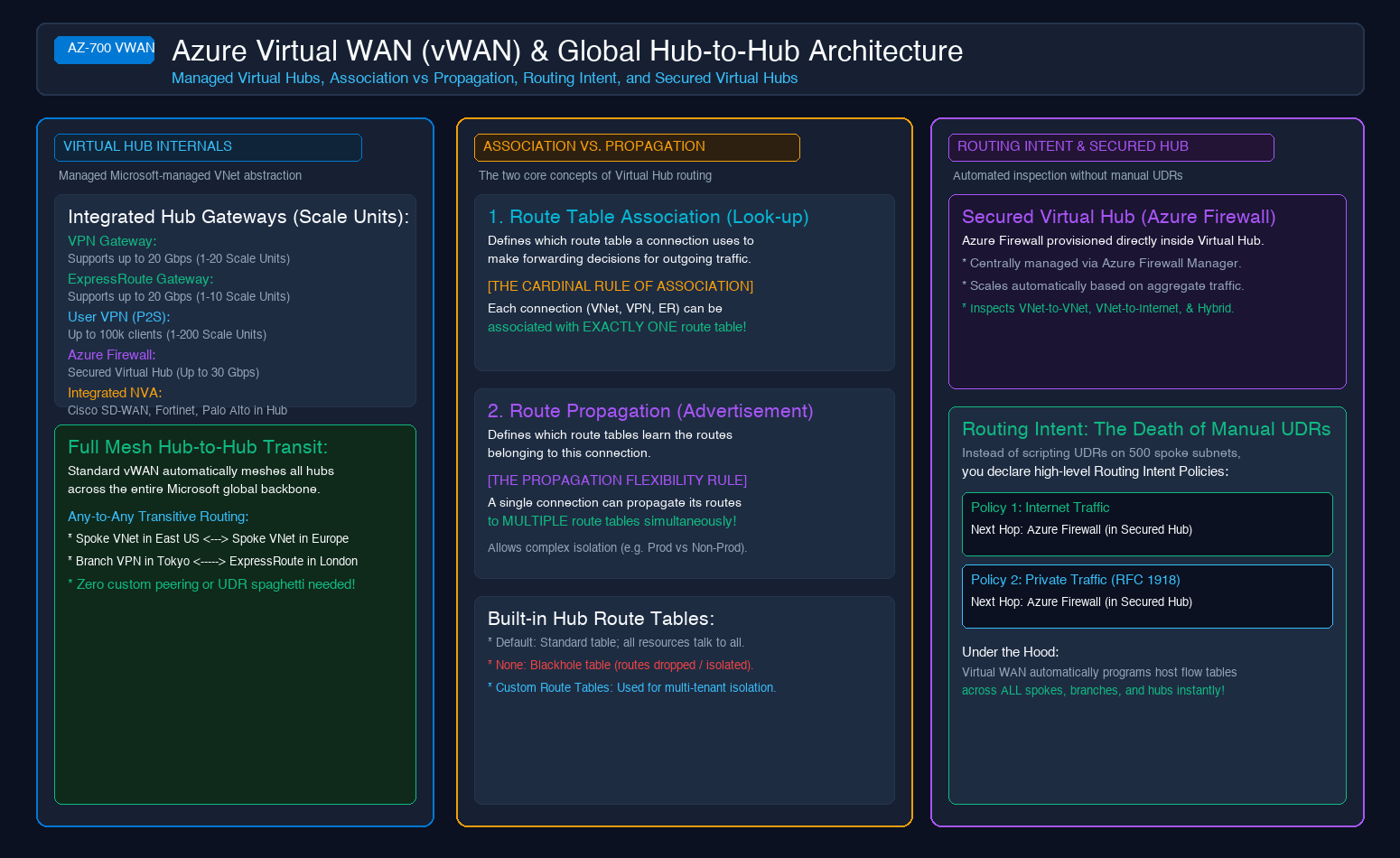
The Core Building Blocks of Azure Virtual WAN
When you deploy Azure Virtual WAN, you are abstracting away the low-level mechanics of VNets and subnets. It consists of four primary components:
1. The Virtual WAN Resource
The overarching parent container representing your entire global enterprise network.
* Basic vWAN: Supports Site-to-Site VPN only. It does not support ExpressRoute, Point-to-Site VPN, hub-to-hub transit, or custom routing tables. (Rarely used in enterprise).
* Standard vWAN: The true enterprise tier. Supports any-to-any transitive communication across ExpressRoute, S2S VPN, User VPN (P2S), VNet-to-VNet, and integrated third-party SD-WAN NVAs.
2. The Virtual Hub
A Virtual Hub is an Azure-managed resource deployed into a specific region (e.g., East US, West Europe, Southeast Asia).
* Behind the scenes, Azure provisions a dedicated, Microsoft-managed Virtual Network.
* Inside this hub sits a managed, highly available routing core called the Virtual Hub Router, capable of scaling aggregate throughput up to 50 Gbps.
* You carve out an address prefix for each hub (e.g., 10.100.0.0/24), which Azure uses internally to provision gateway scale units.
3. Integrated Gateway Scale Units
Unlike DIY hub-spoke where you manually size VM SKUs (VpnGw2, ErGw1AZ), in Virtual WAN you provision Scale Units:
* VPN Gateway: Scales from 1 to 20 Scale Units (1 Gbps up to 20 Gbps aggregate throughput).
* ExpressRoute Gateway: Scales from 1 to 10 Scale Units (up to 20 Gbps throughput).
* User VPN (P2S): Scales up to 100,000 concurrent remote users.
4. Automated Hub-to-Hub Global Mesh
In a DIY architecture, connecting a hub in East US to a hub in Europe requires manual Global VNet Peering, transit NVAs, and custom routing.
In Standard Virtual WAN, all Virtual Hubs are automatically meshed together over Microsoft’s private global backbone.
A spoke VNet attached to Hub East US can communicate with a spoke VNet attached to Hub West Europe natively with zero peering configuration.
The Soul of vWAN Routing: Association vs. Propagation
The single most heavily tested concept on the AZ-700 exam regarding Virtual WAN is the distinction between Association and Propagation.
If you conflate these two terms, you will fail the routing scenario questions.
Inside a Virtual Hub, you have Hub Route Tables. Connections (Spoke VNets, VPN tunnels, ExpressRoute circuits) interact with these route tables through two distinct mechanisms:
[Spoke VNet Connection]
         │
         ├── 1. ASSOCIATION (Strictly 1:1)
         │      "Which single route table do I look at to decide where to send my packets?"
         │
         └── 2. PROPAGATION (Flexible 1:Many)
                "Which route tables should learn about my CIDR block (10.1.0.0/16)?"
1. Route Table Association (The Egress Look-up)
- What it means: When a packet leaves a connection (e.g., a Spoke VNet) and enters the Virtual Hub router, which route table does the router consult to determine the next hop?
- The Cardinal Rule: Each connection can be associated with EXACTLY ONE route table. You cannot associate a VNet connection with two route tables simultaneously.
2. Route Table Propagation (The Prefix Advertisement)
- What it means: When a connection joins the hub, which route tables should receive and store that connection’s IP address space?
- The Flexibility Rule: A single connection can propagate its routes to MULTIPLE route tables simultaneously (or zero route tables if you want total isolation).
The Built-in Route Tables
Every Virtual Hub comes with two pre-configured route tables:
* Default Route Table: The standard catch-all table. By default, all VNet connections associate with Default and propagate to Default, creating an open any-to-any network.
* None Route Table: A blackhole table. If you associate a connection with None, that connection cannot route anywhere through the hub.
Multi-Tenant Isolation: Production Routing Example
Let’s see how Association and Propagation solve enterprise network segmentation without firewalls.
The Requirement:
* You have a Production VNet (10.1.0.0/16) and a Development VNet (10.2.0.0/16).
* Production and Development must never be allowed to talk to each other.
* Both Production and Development must be able to reach on-premises via ExpressRoute.
How You Configure Virtual WAN Routing:
- Create a custom Hub Route Table named
RT-Production. - Create a custom Hub Route Table named
RT-Development. - Configure Production VNet Connection:
- Associate with:
RT-Production(Production queriesRT-Productionfor routing). - Propagate to:
RT-ProductionandDefault. - Configure Development VNet Connection:
- Associate with:
RT-Development(Development queriesRT-Developmentfor routing). - Propagate to:
RT-DevelopmentandDefault. - Configure ExpressRoute Connection:
- Associate with:
Default. - Propagate to: Both
RT-ProductionANDRT-Development!
The Result:
- When Prod looks at
RT-Production, it sees its own routes and the ExpressRoute routes. It cannot see Development. - When Dev looks at
RT-Development, it sees its own routes and the ExpressRoute routes. It cannot see Production. - Both environments communicate with on-premises, but Prod and Dev are 100% cryptographically and logically isolated inside the hub router without running traffic through a firewall appliance!
Secured Virtual Hub & Routing Intent: The Death of Manual UDRs
In traditional networking, if you want all spoke subnets to send internet traffic and inter-VNet traffic through a central Azure Firewall, you have to write Route Tables with 0.0.0.0/0 and associate them with every single spoke subnet. If someone creates a new subnet and forgets the Route Table, security is bypassed.
In Virtual WAN, this problem is solved natively using Secured Virtual Hubs paired with Routing Intent.
What is a Secured Virtual Hub?
A Secured Virtual Hub is a Virtual WAN Hub that has an Azure Firewall (or supported third-party NVA like Fortinet or Palo Alto) deployed directly inside the hub fabric. The firewall is managed centrally via Azure Firewall Manager.
How Routing Intent Works
Instead of writing static UDRs on hundreds of subnets, you configure declarative Routing Intent Policies at the Virtual Hub level:
1. Internet Traffic Routing Policy
- Configuration: Next Hop $\longrightarrow$ Azure Firewall
- What Azure Does: The Virtual WAN controller automatically injects
0.0.0.0/0into the effective route tables of every single Spoke VNet, Branch, and Gateway connected to that hub. All egress internet traffic is automatically steered to the Azure Firewall for inspection and SNAT.
2. Private Traffic Routing Policy
- Configuration: Next Hop $\longrightarrow$ Azure Firewall
- What Azure Does: The Virtual WAN controller automatically programs the underlay so that all RFC 1918 traffic—VNet-to-VNet, VNet-to-Branch, and Branch-to-Branch—is automatically diverted to the Azure Firewall private IP for deep packet inspection.
High-Yield AZ-700 Exam Traps & Gotchas
Trap 1: Basic vs. Standard vWAN Migration
- The Scenario: An organization deployed a Basic Virtual WAN for Site-to-Site VPN to save money. A year later, they buy ExpressRoute and want to link the circuit.
- The Exam Trap: Basic vWAN does not support ExpressRoute.
- The Fix: You can upgrade a Virtual WAN from Basic to Standard in-place without deleting resources. However, you cannot downgrade a Standard vWAN back to Basic!
Trap 2: Overlapping Hub Address Spaces
- The Scenario: An administrator creates Virtual Hub 1 in East US with address space
10.100.0.0/24, and tries to create Virtual Hub 2 in West Europe with address space10.100.0.0/24. - The Error: Virtual WAN blocks deployment immediately. Because Standard vWAN builds an automated full mesh between all hubs globally, no two hubs within the same Virtual WAN can have overlapping or duplicate address spaces.
Trap 3: Spoke VNet Overlapping with Virtual Hub
- The Rule: The CIDR block you assign to a Virtual Hub (e.g.,
10.100.0.0/24) must never overlap with any spoke VNet connected to that hub, nor can it overlap with any on-premises connected subnets.
Real-World Solution Scenarios: Virtual WAN Segmentation & Routing Intent
Scenario 11.1: Production vs. Development Spoke Segmentation (Association vs. Propagation)
- The Problem: An enterprise consolidates 30 spoke VNets into an Azure Virtual WAN Standard Hub. The corporate security policy strictly forbids Production spokes (
Prod-Spokes) from communicating with Development spokes (Dev-Spokes). However, both Prod and Dev must access shared domain controllers in a Shared Services spoke and reach on-premises mainframes over ExpressRoute. - Underlay Mechanics & Failure Root Cause: By default in a Virtual WAN hub, all spoke connections associate with the
DefaultHub Route Table and propagate their CIDRs into theDefaultHub Route Table. This creates a flat, any-to-any routed mesh where every connected spoke can reach every other spoke, violating compliance boundaries. - The Architecture Solution:
- Create Custom Hub Route Tables: Provision two dedicated route tables in the Virtual Hub:
RT_ProductionandRT_Development. - Configure 1:1 Association:
- Associate all
Prod-Spokeconnections withRT_Production. - Associate all
Dev-Spokeconnections withRT_Development.
- Associate all
- Configure 1:Many Propagation:
- Configure
Prod-Spokeconnections to propagate routes exclusively toRT_Production. - Configure
Dev-Spokeconnections to propagate routes exclusively toRT_Development. - Configure the on-premises ExpressRoute connection and the Shared Services connection to propagate their CIDRs to both
RT_ProductionandRT_Development. - Propagate
ProdandDevspoke routes into theDefaultroute table so on-premises routers learn paths to both tiers.
- Configure
- Underlay Isolation: When a Prod VM initiates traffic, the hub router consults
RT_Production. It sees paths to Prod, Shared Services, and on-premises, but has zero entries for Dev. Spoke-to-spoke isolation is enforced directly at the SDN hub fabric without deploying firewalls or managing route tables on individual subnets.
Scenario 11.2: Banishing UDR Sprawl with Secured Virtual Hub Routing Intent
- The Problem: A cloud architecture team manages 75 spoke VNets connected to a hub. Enterprise security mandates that all outbound internet egress and all private East-West (spoke-to-spoke and spoke-to-onprem) traffic must be inspected by an Azure Firewall inside the hub. Previously, the team maintained 75 individual Route Tables with hundreds of manual static UDRs. Any new spoke deployment required painstaking route scripting, and human errors regularly produced asymmetric routing blackholes.
- Underlay Mechanics & Failure Root Cause: Managing static UDRs across large-scale enterprises does not scale. If a route table is omitted, misconfigured, or left with default internet routes, packets bypass security inspection or drop asymmetrically.
- The Architecture Solution:
- Convert Hub to Secured Virtual Hub: Deploy an Azure Firewall directly inside the Virtual WAN Hub.
- Configure Hub Routing Intent: In the Virtual WAN Hub settings, configure Routing Intent:
- Internet Traffic Routing Intent: Point to Azure Firewall.
- Private Traffic Routing Intent: Point to Azure Firewall.
- Automated Fabric Programming: The Virtual WAN control plane automatically programs the SDN underlay across all 75 spoke VNets. It dynamically injects default routes (
0.0.0.0/0and private RFC 1918 summary ranges) directly into the spoke hypervisor vSwitches, directing all traffic into the central Azure Firewall. - Eliminate Spoke UDRs: The engineering team deletes all 75 spoke Route Tables. When a new spoke VNet connection is added to the hub, Virtual WAN automatically extends security inspection policies to the new spoke without a single manual route table edit.
Hands-On Azure CLI: Deploying Azure Virtual WAN & Routing Intent
Here is how to deploy a Standard Virtual WAN, establish a Virtual Hub, connect your spokes, and enforce security policies via Hub Routing Intent.
1. Provision Standard Virtual WAN with Branch-to-Branch Enabled
az network vwan create \
  --resource-group rg-az700-networking \
  --name vwan-global-core \
  --type Standard \
  --branch-to-branch-traffic true
2. Deploy Secured Virtual Hub
az network vhub create \
  --resource-group rg-az700-networking \
  --name vhub-eastus \
  --vwan vwan-global-core \
  --location eastus \
  --address-prefix 10.150.0.0/24
3. Connect Spoke VNet to Virtual Hub
SPOKE_ID=$(az network vnet show -g rg-az700-networking -n vnet-spoke-prod --query id -o tsv)

az network vhub connection create \
  --resource-group rg-az700-networking \
  --name conn-vhub-to-spoke \
  --vhub-name vhub-eastus \
  --remote-vnet "$SPOKE_ID"
4. Enforce Hub Routing Intent (Zero-UDR Security Architecture)
Route all Internet and Private traffic automatically through Azure Firewall.
FIREWALL_ID="<your-azure-firewall-resource-id>"

az network vhub routing-intent create \
  --resource-group rg-az700-networking \
  --name intent-eastus \
  --vhub vhub-eastus \
  --routing-policies "[{name:InternetTraffic,destinations:[Internet],nextHop:'$FIREWALL_ID'},{name:PrivateTraffic,destinations:[PrivateTraffic],nextHop:'$FIREWALL_ID'}]"
The GIST: Important Summary & Key Points
Lock down these Virtual WAN principles for AZ-700 mastery:
1. Choose Standard Tier: Basic is strictly Site-to-Site VPN; Standard unlocks any-to-any global transit, ExpressRoute, P2S, and custom routing.
2. Automated Hub Mesh: Standard vWAN automatically interconnects all regional hubs across Microsoft’s private global backbone.
3. Association is 1:1: A connection can only associate with one route table for next-hop lookups.
4. Propagation is 1:Many: A connection can propagate its prefixes to multiple route tables for isolation topologies.
5. Routing Intent kills UDR sprawl: Declarative policies at the hub level enforce private and internet traffic inspection across all spokes without touching individual subnet route tables.
6. Hub address spaces must be globally unique: No overlapping CIDRs across hubs.