When you sign a contract for an ExpressRoute circuit, the sales rep will tell you that you’ve bought enterprise-grade connectivity with a 99.95% SLA.
What they leave out in the marketing pitch is that a single ExpressRoute circuit is still vulnerable to backhoe cuts, regional carrier fiber outages, Meet-Me room power drops, and local peering exchange failures.
If your corporate database lives in Azure and your hospital, factory, or trading floor stops communicating with it, saying “our telco had a fiber cut” won’t save your job.
To build a bulletproof hybrid architecture, you have to engineer for the inevitable moment when the primary physical circuit drops. That means mastering:
1. Intra-Circuit MSEE failover (with BFD).
2. ExpressRoute and Site-to-Site VPN Coexistence (Active/Standby failover).
3. Multi-Circuit / Multi-Metro Dual-Homed disaster recovery.
4. ExpressRoute Global Reach (using Microsoft’s dark fiber as a private WAN).
Let’s tear down the routing tables, BGP metrics, and stateful traps governing hybrid failover in Azure.
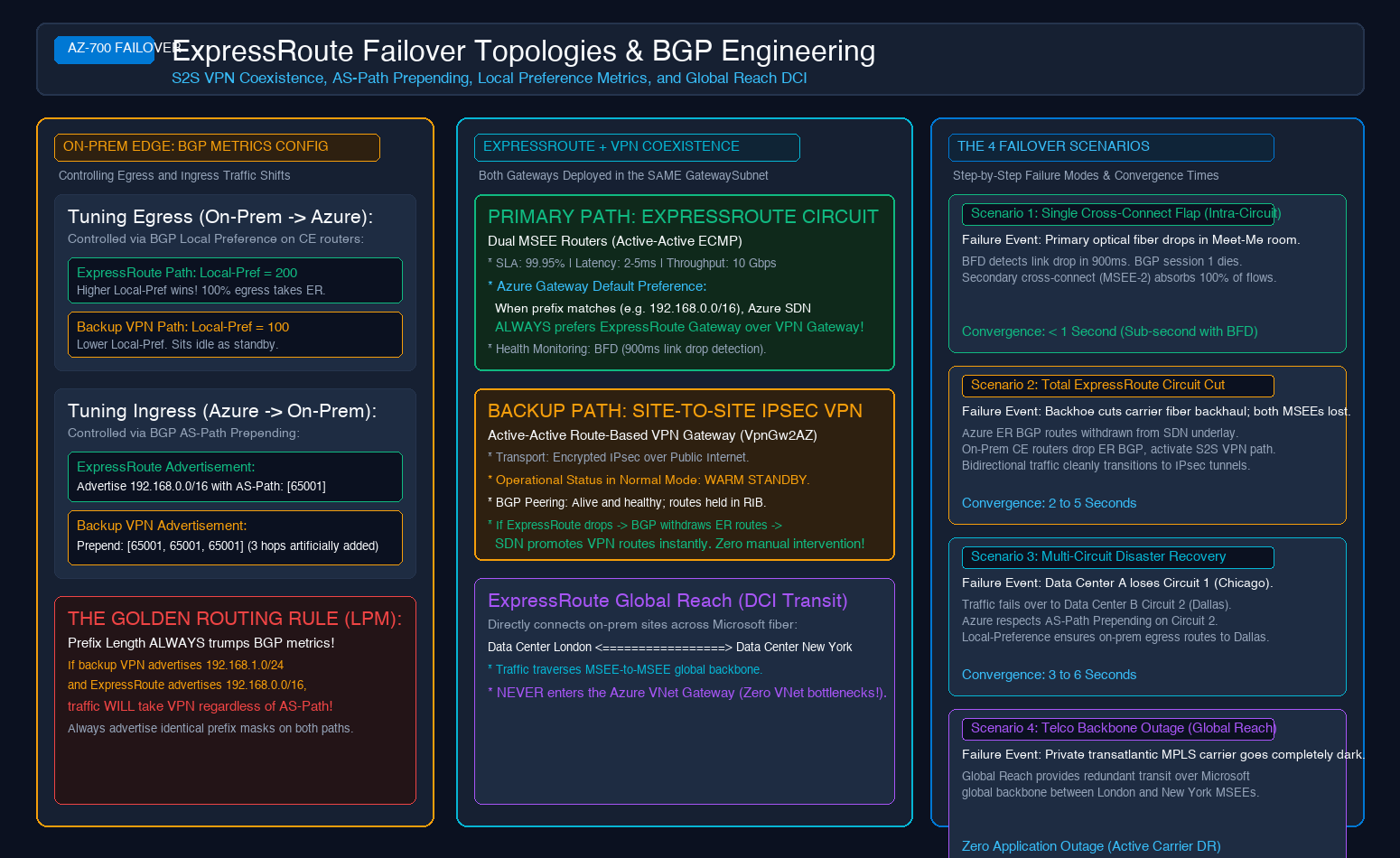
Failover Scenario 1: Intra-Circuit Redundancy (The Dual MSEE Baseline)
Before designing multi-circuit or VPN backups, you must understand the redundancy built inside a single ExpressRoute circuit.
Every ExpressRoute circuit connects to two separate Microsoft Enterprise Edge (MSEE) routers in the Peering Location:
* Primary Cross-Connect: Customer Edge (CE-1) $\longleftrightarrow$ MSEE-1
* Secondary Cross-Connect: Customer Edge (CE-2) $\longleftrightarrow$ MSEE-2
How Intra-Circuit Failover Behaves:
- By default, Azure runs BGP across both cross-connects simultaneously.
- If both links advertise the same on-premises prefixes with identical AS-path lengths, Azure uses Equal-Cost Multi-Path (ECMP) to distribute outbound flows across both MSEE routers.
- If an optical fiber snaps or
MSEE-1reboots for maintenance: - With BFD (Bidirectional Forwarding Detection): In under 900 milliseconds (300ms $\times$ 3 heartbeats), BFD declares the link dead, tears down BGP neighbor 1, and shifts 100% of live sessions to
MSEE-2. - Without BFD (Standard BGP): The routers wait for the 180-second hold timer to expire. You endure three full minutes of dropped packets.
Failover Scenario 2: ExpressRoute as Primary with S2S VPN Backup (Coexistence)
This is the most common hybrid architecture tested on the AZ-700 exam: You use high-speed ExpressRoute as your primary data highway, and you deploy an encrypted Site-to-Site (S2S) VPN tunnel over the public internet as a warm backup.
The GatewaySubnet Coexistence Rule
In Azure, you can deploy an ExpressRoute Gateway and a Virtual Network VPN Gateway inside the exact same GatewaySubnet of a single Hub VNet.
- The ExpressRoute Gateway terminates Private Peering.
- The VPN Gateway terminates the IPsec tunnels to your on-premises edge router.
- Both gateways are active simultaneously and both exchange BGP routes with your on-premises routers.
The Azure Routing Law: ExpressRoute Precedence
What happens inside Azure’s SDN underlay when a VM in a spoke subnet sends a packet to 192.168.10.50, and both the ExpressRoute Gateway and the VPN Gateway are advertising the exact same prefix (192.168.0.0/16)?
Azure always prefers ExpressRoute.
Within Azure’s internal route evaluation engine:
$$\text{Prefix Match Being Equal: } \mathbf{ExpressRoute\;Gateway} \;\;>\;\; \mathbf{VPN\;Gateway}$$
Azure automatically assigns a higher gateway preference to ExpressRoute over VPN. You do not need to configure any custom metrics inside Azure for ingress traffic—Azure naturally sends 100% of cloud-to-on-prem traffic down the ExpressRoute circuit.
The Asymmetric Routing Catastrophe: Egress Tuning
While Azure naturally prefers ExpressRoute for ingress (Azure $\rightarrow$ On-Prem), your on-premises routers will NOT automatically prefer ExpressRoute for egress (On-Prem $\rightarrow$ Azure) unless you configure them properly!
If your on-premises network has an equal-cost default route or a basic BGP setup, your edge router might send outbound packets to Azure over the S2S VPN tunnel while receiving return packets over ExpressRoute.
If you have a stateful firewall (Palo Alto, Fortinet, Check Point) on-premises:
1. Outbound packet leaves on-prem via VPN. The on-prem firewall records the session.
2. Return packet comes back from Azure via ExpressRoute.
3. The return packet hits an interface that didn’t initiate the session, or bypasses the firewall entirely.
4. State check fails: TCP RST sent, connection dies.
The Solution: BGP Metric Engineering
To guarantee symmetric routing and clean automated failover, you must tune two standard BGP attributes on your on-premises edge routers:
1. Local Preference (Controls Egress: On-Prem $\rightarrow$ Azure)
Local-Preference is an internal BGP attribute (not advertised outside your AS). Higher Local-Pref wins.
* Set Local-Pref = 200 on routes received from the ExpressRoute BGP session.
* Set Local-Pref = 100 on routes received from the S2S VPN BGP session.
* Result: 100% of outbound packets from your datacenter leave via ExpressRoute. If ExpressRoute drops, the ER routes disappear from the routing table, and the router immediately falls back to the VPN routes (Local-Pref 100).
2. AS-Path Prepending (Influences Ingress: Azure $\rightarrow$ On-Prem)
While Azure already prefers ExpressRoute natively, best practice dictates using AS-Path Prepending on your outbound VPN route advertisement to reinforce path selection.
* Over ExpressRoute: Advertise your on-prem prefix (192.168.0.0/16) with your normal AS-path: [65001].
* Over S2S VPN: Prepend your AS number three times: [65001, 65001, 65001].
* Result: Azure sees the VPN path as 3 hops longer, ensuring that even if gateway preference logic were to fluctuate, the ExpressRoute path is unequivocally chosen.
The Longest Prefix Match (LPM) Trap: How to Break Failover
There is one critical trap that will invalidate all your BGP metric tuning: Longest Prefix Match (LPM).
Imagine this configuration:
* Your primary ExpressRoute circuit advertises: 192.168.0.0/16 (Summary).
* Your backup S2S VPN advertises: 192.168.1.0/24 and 192.168.2.0/24 (Specific subnets).
You look at your router: Local-Pref is 200 on ER; AS-Path is prepended on VPN. You think ExpressRoute is primary.
It isn’t.
When an Azure VM sends a packet to 192.168.1.10:
1. The Azure virtual switch compares 192.168.1.0/24 (VPN) against 192.168.0.0/16 (ER).
2. /24 is a longer prefix match than /16.
3. The packet takes the S2S VPN tunnel!
The routing engine never evaluates gateway preference or AS-Path length because prefix length matching happens first.
Rule: Always advertise identical prefix lengths on both your primary and backup paths.
Failover Scenario 3: Multi-Circuit / Multi-Metro Dual-Homed DR
What if your enterprise operates two physically separate datacenters:
* Datacenter A (Chicago): Connected to ExpressRoute Circuit 1 (Peering Location: Chicago).
* Datacenter B (Dallas): Connected to ExpressRoute Circuit 2 (Peering Location: Dallas).
* Both circuits are linked to the same Azure Virtual Network (or Virtual WAN Hub).
How Path Selection Works:
- Azure $\rightarrow$ On-Premises (Ingress):
- If you want Azure to treat Chicago as Primary and Dallas as Standby, your Dallas router must advertise the corporate prefixes with AS-Path Prepending (e.g., prepending your ASN 3 times). Azure will route all traffic into Chicago. If Chicago’s circuit fails, Azure shifts traffic to Dallas.
- On-Premises $\rightarrow$ Azure (Egress):
- Azure advertises your VNet prefixes (
10.0.0.0/16) down both circuits. - On your on-premises core routers, you configure BGP Local Preference: set Local-Pref = 200 on the Chicago edge, and Local-Pref = 100 on the Dallas edge.
Active-Active Load Balancing across Circuits:
If both datacenters are active and you want to use both circuits simultaneously:
* Do not prepend AS-Path.
* Keep Local-Preference equal.
* Azure and your on-prem routers will load balance flows across both circuits using ECMP.
Failover Scenario 4: ExpressRoute Global Reach (DC-to-DC Transit)
In traditional hybrid networking, if Data Center 1 in London wants to send data to Data Center 2 in New York, you must buy a dedicated transatlantic private leased line (MPLS/E-Line) from a telecom carrier.
If that transatlantic circuit is cut, your datacenters are cut off from each other.
ExpressRoute Global Reach solves this by turning Microsoft’s private global fiber network into your private WAN transit backbone:
[On-Premises DC 1: London] <=====> [MSEE London]
                                       ║
                            (Microsoft Global Backbone)
                                       ║
[On-Premises DC 2: New York] <====> [MSEE New York]
How Global Reach Operates:
- You link ExpressRoute Circuit 1 (London) directly to ExpressRoute Circuit 2 (New York) using Global Reach.
- The MSEEs in London and New York peer directly across Microsoft’s high-speed private fiber network.
- Traffic between DC 1 and DC 2 travels from your edge router $\rightarrow$ London MSEE $\rightarrow$ Microsoft Backbone $\rightarrow$ New York MSEE $\rightarrow$ New York edge router.
- Zero VNet Transit: Notice that the packets never enter an Azure VNet or VNet Gateway. There are no gateway CPU limits, no VNet bandwidth caps, and no cloud compute latency.
- Requirements: Both ExpressRoute circuits must be Premium SKU.
Encryption over ExpressRoute: MACsec vs. IPsec
By default, ExpressRoute traffic is private (isolated on dedicated 802.1Q VLANs), but the payload is unencrypted plaintext. In regulated industries (PCI-DSS, HIPAA, FedRAMP), compliance mandates encryption in transit over all physical circuits.
You have two choices:
1. MACsec (Point-to-Point Layer 2 Encryption)
- Where it runs: Operates at the physical link layer (IEEE 802.1AE) directly between your router interface and the MSEE port.
- Prerequisite: Requires ExpressRoute Direct (dedicated 10 Gbps or 100 Gbps physical ports on the MSEE).
- Advantage: Hardware-line-rate encryption with zero packet overhead and sub-microsecond latency. Encrypts all traffic (Private and Microsoft peering).
2. IPsec over ExpressRoute Private Peering (Layer 3 Encryption)
- Where it runs: You deploy an Azure VPN Gateway and configure a Route-Based IPsec tunnel terminating on the VPN Gateway’s private IP address over ExpressRoute Private Peering.
- Prerequisite: Works with any standard ExpressRoute circuit provider (no ExpressRoute Direct required).
- Advantage: Satisfies end-to-end payload encryption requirements without purchasing dedicated 100G physical ports.
Real-World Solution Scenarios: Advanced Hybrid Convergence & Asymmetric Defense
Scenario 10.1: The Asymmetric Firewall Blackhole (Coexistence Return-Path Failure)
- The Problem: An enterprise configures ExpressRoute as its primary connection and establishes a Site-to-Site VPN as standby for disaster recovery. Stateful firewalls protect both the on-premises datacenter edge and the Azure Hub VNet (
AzureFirewallSubnet). Outbound traffic from Azure to on-premises travels across ExpressRoute as expected. However, return traffic from on-premises to Azure enters via the S2S VPN tunnel. Stateful firewalls on both sides immediately drop 100% of packets due to asymmetric state violation, causing an immediate total outage. - Underlay Mechanics & Failure Root Cause: Azure’s SDN engine automatically prefers ExpressRoute over VPN Gateway when receiving identical prefixes. However, on-premises Customer Edge (CE) routers have no inherent preference unless explicitly engineered. If on-premises BGP neighbors are configured with default equal metrics, on-premises routers will either load-balance egress traffic across both paths or prefer the VPN tunnel due to router-specific IGP metrics. Outbound enters Azure via VPN; return exits Azure via ExpressRoute. Stateful firewalls drop the return flows because they never observed the initial TCP SYN.
- The Architecture Solution:
- Enforce BGP Local Preference On-Premises: On the customer edge routers, apply inbound route maps: set
Local-Preference = 200on all BGP routes received from the ExpressRoute MSEEs, and setLocal-Preference = 100on routes received from the Azure VPN Gateway. In BGP path selection, Local-Preference is evaluated before AS-Path length, guaranteeing on-premises egress always selects ExpressRoute. - AS-Path Prepending on VPN Egress: On the on-premises router’s BGP outbound advertisement over the VPN tunnel, prepend the local Autonomous System Number (ASN) three times. This ensures that in the event of an Azure route evaluation tie, the VPN path appears longer and less desirable.
- Result: Traffic flows symmetrically across ExpressRoute in both directions. If the physical ExpressRoute circuit drops, on-premises Local-Preference for ER disappears, and BGP seamlessly fails over both ingress and egress to the VPN tunnel in seconds.
Scenario 10.2: The Mismatched Prefix LPM Trap (The Subnet-Mask Sabotage)
- The Problem: To provide emergency backup during an ExpressRoute maintenance window, a junior engineer sets up an S2S VPN connection. The engineer configures the VPN to advertise the datacenter management subnet
192.168.10.0/24, while ExpressRoute continues advertising the datacenter aggregate supernet192.168.0.0/16. Despite setting ExpressRoute as primary, all management traffic persistently travels across the lower-bandwidth VPN tunnel instead of ExpressRoute. - Underlay Mechanics & Failure Root Cause: Azure’s SDN underlay routing engine honors Longest Prefix Match (LPM) above all routing metrics. Because
192.168.10.0/24has a/24prefix length and192.168.0.0/16has a/16prefix length, LPM dictates that packets addressed to192.168.10.xmust take the/24path via the VPN Gateway. BGP path attributes, AS-Path prepending, and Azure’s native ExpressRoute-over-VPN preference are completely ignored when prefix masks differ. - The Architecture Solution:
- Enforce Prefix Mask Parity: Ensure that both ExpressRoute and S2S VPN advertise identical CIDR boundaries. Either advertise the aggregate
192.168.0.0/16on both paths, or advertise explicit/24subnets on both paths. - Activate Gateway Preference Tie-Breakers: Once prefix lengths match identically (
/16vs/16), Azure’s internal BGP tie-breaker activates: ExpressRoute takes 100% of the traffic, and the VPN sits in standby until ExpressRoute routes are withdrawn.
Scenario 10.3: Multi-Continent Datacenter Transit (Replacing Leased Lines with Global Reach)
- The Problem: A multinational corporation operates datacenters in London and New York. The dedicated trans-Atlantic leased line costs \$40,000 per month. The enterprise attempts to decommission the leased line by hairpinning inter-datacenter traffic through an Azure Hub VNet in East US. However, large data replication flows choke the VNet Gateway, and replication latency fluctuates wildly.
- Underlay Mechanics & Failure Root Cause: Azure Virtual Network Gateways (
GatewaySubnet) are built to bridge on-premises networks into Azure virtual networks. They are not designed to serve as high-throughput WAN transit routers. Hairpinning datacenter-to-datacenter traffic through VNet gateways adds software encapsulation overhead, incurs gateway bandwidth caps, and introduces unnecessary latency. - The Architecture Solution:
- Upgrade to ExpressRoute Premium SKU: Ensure both the London and New York ExpressRoute circuits are provisioned with the Premium SKU.
- Link Circuits Directly via Global Reach: In Azure, establish an ExpressRoute Global Reach peering connection between the London circuit and the New York circuit using an authorization key.
- Zero-Gateway Backbone Transit: The London MSEEs and New York MSEEs establish direct BGP peering across Microsoft’s high-speed private optical backbone. Datacenter-to-datacenter traffic flows directly between customer edge routers and MSEEs, never entering an Azure VNet or touching a VNet gateway. The expensive physical leased line is decommissioned, cutting WAN costs by 80% while delivering guaranteed line-rate speed and sub-70ms trans-Atlantic latency.
Hands-On Azure CLI: Coexistence Failover & ExpressRoute Global Reach
Let’s configure routing weights for seamless ER/VPN coexistence and interconnect global data centers using ExpressRoute Global Reach.
1. Configure Connection Routing Weights for Coexistence Failover
Higher weight on ExpressRoute ensures primary traffic preference, with automatic fallback to S2S VPN.
# Prioritize ExpressRoute Connection
az network vpn-connection update \
  --resource-group rg-az700-networking \
  --name conn-er-fastpath \
  --routing-weight 100

# Standby S2S VPN Connection
az network vpn-connection update \
  --resource-group rg-az700-networking \
  --name conn-hub-to-onprem \
  --routing-weight 0
2. Connect Two Global Circuits via ExpressRoute Global Reach
Interconnect your Chicago and Dallas circuits directly over Microsoft’s high-speed global WAN backbone.
PEER_CIRCUIT_ID="/subscriptions/<remote-sub>/resourceGroups/rg-er/providers/Microsoft.Network/expressRouteCircuits/er-circuit-dallas"

az network express-route peering connection create \
  --resource-group rg-az700-networking \
  --circuit-name er-circuit-siliconvalley \
  --peering-name AzurePrivatePeering \
  --name conn-global-reach-dallas \
  --peer-circuit "$PEER_CIRCUIT_ID" \
  --address-prefix 10.254.254.0/29
3. Audit BGP Learned Routes on Gateway
az network vnet-gateway list-learned-routes \
  --resource-group rg-az700-networking \
  --name ergw-hub \
  --output table
The GIST: Important Summary & Key Points
Here is your failover master checklist for AZ-700:
1. Intra-Circuit Redundancy: Always configure both primary and secondary MSEE cross-connects with BFD (900ms failover).
2. Coexistence Ingress: Azure automatically prefers ExpressRoute over S2S VPN for identical prefixes.
3. Coexistence Egress: You must configure BGP Local Preference = 200 on ER and 100 on VPN on-premises to prevent asymmetric drops.
4. AS-Path Prepending: Prepend your ASN 3 times on the backup VPN path to reinforce path selection.
5. Beware LPM: If your VPN advertises a /24 and ER advertises a /16, traffic will take the VPN regardless of BGP metrics.
6. Global Reach: Requires Premium SKU circuits; connects on-prem sites directly across Microsoft’s backbone without touching VNet gateways.
7. Encryption: Use MACsec on ExpressRoute Direct; use IPsec over Private Peering for standard circuits.