If Site-to-Site VPN is an encrypted tunnel over the public highway, ExpressRoute is a private bullet train riding on dedicated tracks.
When enterprises move petabytes of data, run mission-critical ERP backbones (SAP HANA, Oracle RAC), or demand sub-millisecond database queries between on-premises datacenters and Azure, the unpredictable latency and jitter of the public internet are unacceptable. You buy an ExpressRoute circuit.
Yet, despite being one of the most expensive networking assets an enterprise can purchase, ExpressRoute is routinely misunderstood. Engineers treat it like a long yellow Ethernet cable plugged directly into their VNet.
It isn’t.
ExpressRoute is a complex Layer 3 interconnect built on Carrier Meet-Me rooms, redundant BGP peerings, QinQ VLAN tagging, and a pair of massive telco-grade routers called the Microsoft Enterprise Edge (MSEE).
Let’s peel back the physical fiber layers, master the difference between Private and Microsoft peering, and learn how to bypass gateway CPU bottlenecks using ExpressRoute FastPath.
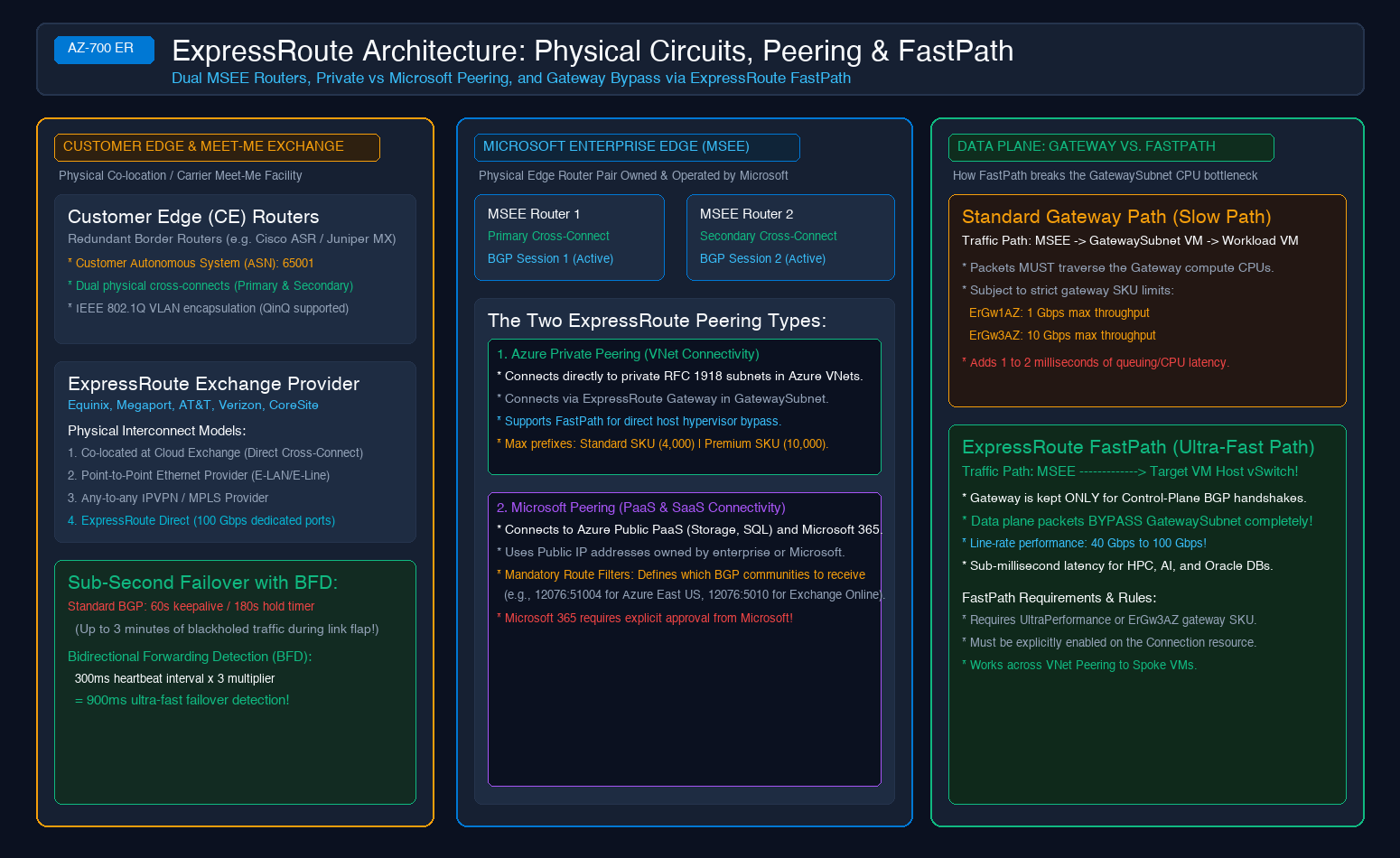
The Physical Reality: Inside the Meet-Me Room
An ExpressRoute circuit does not terminate inside your office building. It terminates in a third-party co-location facility or cloud exchange (such as an Equinix, Megaport, CoreSite, or AT&T facility) called a Peering Location (or Meet-Me Room).
Inside this facility sit two physical router pairs:
1. Customer Edge (CE) Routers: Your routers (or your telco’s managed PE routers) running BGP with your enterprise ASN (e.g., AS 65001).
2. Microsoft Enterprise Edge (MSEE) Routers: Two separate, chassis-grade physical routers owned, operated, and maintained by Microsoft.
The Redundant Cross-Connect Mandate (High Exam Yield)
Microsoft’s ExpressRoute SLA is 99.95%. But that SLA comes with an absolute contractual prerequisite:
* Every ExpressRoute circuit consists of two physical cross-connects: a Primary Link terminating on MSEE-1, and a Secondary Link terminating on MSEE-2.
* You must configure BGP sessions across both physical links.
* If you or your carrier only configure the primary cross-connect and leave the secondary unprovisioned, Microsoft’s SLA is void (0%). When Microsoft performs scheduled maintenance on MSEE-1, your hybrid connection will go completely dark.
802.1Q QinQ Encapsulation
ExpressRoute uses IEEE 802.1Q VLAN tagging to multiplex multiple logical peerings across the same physical fiber pair:
* S-Tag (Service Tag): Used by your carrier to route your traffic across their backbone.
* C-Tag (Customer Tag): The specific VLAN ID you assign in Azure to identify whether the packet belongs to Private Peering or Microsoft Peering.
Private Peering vs. Microsoft Peering: The Two Paths
When you provision an ExpressRoute circuit, it is an empty pipe until you configure Peerings. There are only two active peering types in modern Azure:
[On-Premises Data Center]
         │
         ├── VLAN 10 (Private Peering)   ──> [MSEE] ──> Hub VNet (Private RFC 1918)
         │
         └── VLAN 20 (Microsoft Peering) ──> [MSEE] ──> Azure PaaS / Microsoft 365 (Public IPs)
1. Azure Private Peering (Connecting to Virtual Networks)
- What it connects to: Private subnets within your Azure Virtual Networks (IaaS VMs, Internal Load Balancers, Private Endpoints).
- IP Addressing: Uses RFC 1918 private IP space (
10.0.0.0/8,172.16.0.0/12,192.168.0.0/16). - Under the Hood: Traffic arriving on Private Peering is handed off by the MSEE routers to an ExpressRoute Gateway deployed in your VNet’s
GatewaySubnet. - Route Limits:
- Standard SKU Circuit: Supports receiving up to 4,000 routes from on-premises.
- Premium SKU Circuit: Supports receiving up to 10,000 routes.
- Warning: If you exceed these route limits, the MSEE routers drop the BGP session immediately.
2. Microsoft Peering (Connecting to PaaS and SaaS)
- What it connects to: Public Microsoft services—Azure Storage Accounts, Azure SQL, Azure Key Vault, Power BI, and Microsoft 365 (Exchange Online, SharePoint, Teams).
- IP Addressing: Public IP addresses only. You cannot use RFC 1918 addresses on Microsoft Peering. The IPs must be registered to your enterprise in ARIN/RIPE or provided by your telco carrier.
- Route Filters (Mandatory):
Microsoft Peering advertises thousands of public IP prefixes owned by Microsoft. To prevent your on-prem routers from being overwhelmed by global BGP tables, you must attach a Route Filter. - A Route Filter specifies which BGP Communities your on-premises edge should receive (e.g.,
12076:51004for Azure East US,12076:51006for Azure West US). - The Microsoft 365 Approval Gate (Exam Essential):
You cannot simply check a box and route Microsoft 365 traffic across ExpressRoute. Microsoft actively discourages using ExpressRoute for M365 because direct local internet breakout (Split-Tunneling) delivers better latency for Teams and SharePoint. If an enterprise insists on M365 over ExpressRoute, they must submit an explicit business justification and obtain formal approval from Microsoft.
The Circuit SKUs: Local vs. Standard vs. Premium
Picking the wrong circuit SKU will either waste hundreds of thousands of dollars or break cross-region disaster recovery:
1. ExpressRoute Local
- Designed for: Cost-conscious hybrid architectures where your on-prem datacenter is in the same metro area as the Azure region.
- The Catch: You can only connect to VNets in the same region (or within the local metro boundary). You cannot peer with VNets across geopolitical regions.
- Pricing: Includes unlimited egress data transfer at zero additional variable cost.
2. ExpressRoute Standard
- Designed for: The standard enterprise workhorse.
- Connectivity Scope: You can connect your circuit to VNets located in any Azure region within the same geopolitical continent (e.g., an ExpressRoute circuit in Chicago can connect to VNets in East US, West US, Central US, and South Central US).
- Pricing: Available as Metered (pay per GB of outbound data) or Unlimited.
3. ExpressRoute Premium (The Powerhouse)
- Designed for: Global multi-national enterprises.
- Superpowers:
- Global Connectivity: Connect your circuit to VNets located in any Azure region across the entire world (e.g., a London circuit connecting to an Azure Tokyo VNet).
- Max Route Limit Bump: Increases the BGP route limit from 4,000 to 10,000 prefixes.
- Increased VNet Links: Connects to more VNets per circuit (up to 100 VNets).
- Enables ExpressRoute Global Reach: Links physical on-prem datacenters across Microsoft’s backbone (covered deeply in Article-10).
FastPath: Breaking the GatewaySubnet Bottleneck
In a standard ExpressRoute architecture, look at the path every data packet must travel:
$$\text{On-Prem} \;\longrightarrow\; \text{MSEE} \;\longrightarrow\; \mathbf{ExpressRoute\;Gateway\;(GatewaySubnet)} \;\longrightarrow\; \text{Target VM}$$
The ExpressRoute Gateway inside GatewaySubnet is a pair of compute instances running on CPU cores. Those CPU cores must inspect, queue, and forward every single packet.
The Gateway Bottlenecks:
- Throughput Throttles: An
ErGw1AZgateway caps your bandwidth at 1 Gbps. AnErGw3AZgateway caps your bandwidth at 10 Gbps. If you bought a 40 Gbps or 100 Gbps ExpressRoute circuit, the gateway becomes a massive choke-point! - Latency Penalties: The gateway CPU adds 1 to 2 milliseconds of buffering latency to every packet. For high-frequency trading or database synchronization, this is a non-starter.
How ExpressRoute FastPath Works
FastPath removes the ExpressRoute Gateway from the data plane entirely.
When you enable FastPath on the ExpressRoute Connection resource:
1. The ExpressRoute Gateway remains active, but it handles only Control-Plane BGP handshakes.
2. When the MSEE receives a data packet destined for a VM, the MSEE encapsulates the packet and sends it directly to the hypervisor host virtual switch where the destination VM lives!
3. The GatewaySubnet is completely bypassed.
FastPath Performance Gains:
- Line-rate throughput: 40 Gbps to 100 Gbps line rate.
- Sub-millisecond latency: Reduces latency to raw physical fiber limits.
- Works across VNet Peering: FastPath delivers packets directly to spoke VMs across VNet peering without hair-pinning through the hub gateway.
BFD (Bidirectional Forwarding Detection): The Link Flap Killer
Standard BGP has conservative default timers:
* Keepalive Interval: 60 seconds
* Hold Timer: 180 seconds
Imagine an optical transceiver starts failing on your primary cross-connect in the Meet-Me room. The physical link stays up, but packets are dropping.
Under standard BGP, your routers will wait up to 180 seconds (3 full minutes) before declaring the BGP neighbor dead and shifting traffic to the secondary cross-connect. In production, 3 minutes of packet loss is an unmitigated disaster.
The Fix: Native BFD
Azure ExpressRoute natively enables Bidirectional Forwarding Detection (BFD) on all Private and Microsoft peering BGP sessions:
* Transmit/Receive Interval: 300 milliseconds
* Detection Multiplier: 3
* The Math: $300\text{ ms} \times 3 = \mathbf{900\text{ ms}}$
If three consecutive 300ms heartbeats fail, BFD tears down the BGP session in under 1 second. The MSEE and your CE routers immediately shift all live traffic to the healthy secondary link before application sessions time out.
Real-World Solution Scenarios: ExpressRoute Performance & Resilience
Scenario 9.1: The 10 Gbps Gateway CPU Choke (Unlocking Wire Speed with FastPath)
- The Problem: A financial analytics firm provisions a 10 Gbps ExpressRoute Direct circuit to replicate hundreds of terabytes of market data nightly between an on-premises storage cluster and Azure High-Performance Compute (HPC) VMs in a spoke VNet. Despite purchasing a 10 Gbps pipe, replication throughput stalls at 4.2 Gbps, and Azure Monitor indicates near 100% CPU utilization on the
ErGw3AZgateway instances inGatewaySubnet. - Underlay Mechanics & Failure Root Cause: In a traditional ExpressRoute architecture, every single packet traveling between the MSEE edge and the virtual network must be received, inspected, and forwarded by the Virtual Network Gateway compute VMs in
GatewaySubnet. Even top-tier gateway SKUs (ErGw3AZ) have finite CPU and packet-per-second (PPS) limits. When saturated with high-throughput streams, the gateway CPUs choke, introducing buffering latency and dropped packets. - The Architecture Solution:
- Enable ExpressRoute FastPath: In the ExpressRoute Connection resource settings, toggle FastPath to Enabled (
enable-fast-path: true). - Underlay Bypass Execution: The MSEE routers receive an SDN control-plane directive to bypass the
GatewaySubnetVMs entirely. The MSEE encapsulates incoming customer packets directly into Geneve/VXLAN frames addressed straight to the physical hypervisor hosting the destination VMs. - Throughput & Latency Gains: Replication speed instantly scales from 4.2 Gbps to full 10 Gbps line rate, gateway CPU drops to near zero (handling only lightweight BGP control traffic), and network latency drops by 1 to 2 milliseconds.
- Architectural Caveat: FastPath bypasses
GatewaySubnetUser-Defined Routes (UDRs). If traffic must transit an Azure Firewall on the ingress path, FastPath cannot be used for those specific destination subnets.
Scenario 9.2: The “Single-Legged” SLA Forfeiture (The Maintenance Window Outage)
- The Problem: An enterprise deploys a 1 Gbps ExpressRoute circuit through a colocation provider. To simplify edge router configuration, a network engineer configures BGP on only the Primary MSEE cross-connect (
169.254.21.0/30), leaving the Secondary link unconfigured. Months later, Microsoft performs scheduled software maintenance onMSEE-1. Connectivity between the on-premises datacenter and Azure drops completely for 45 minutes. The enterprise files an SLA credit claim with Microsoft citing the 99.95% ExpressRoute uptime guarantee, but Microsoft immediately rejects the claim. - Underlay Mechanics & Failure Root Cause: Microsoft’s 99.95% ExpressRoute Service Level Agreement (SLA) strictly requires active-active dual redundancy across both MSEE routers. Microsoft routinely updates MSEE routers one at a time during maintenance windows, gracefully draining traffic to the secondary MSEE. If the customer has only connected the primary link, any maintenance or hardware event on
MSEE-1causes total network isolation. - The Architecture Solution:
- Always Provision Dual Cross-Connects: Plumb both Primary and Secondary VLAN cross-connects on the on-premises Customer Edge (CE) routers (ideally split across two independent physical CE router chassis).
- Establish Dual BGP Sessions: Establish concurrent BGP peerings to both MSEE-1 and MSEE-2 with identical route metrics.
- Enable BFD: Turn on Bidirectional Forwarding Detection on both BGP peerings. When Microsoft drains MSEE-1, BFD tears down the session in 900ms, shifting traffic seamlessly to MSEE-2 with zero packet loss, preserving 99.95% SLA compliance.
Scenario 9.3: The Carrier Fiber Cut (Sub-Second BFD Convergence vs. BGP Hold-Down)
- The Problem: An enterprise connects its on-premises datacenter to Azure via ExpressRoute. A construction backhoe severs a metro fiber line between the customer’s datacenter and the carrier meet-me room. While the physical interface on the customer router stayed “up” (because it connected to an intermediate metro-Ethernet switch), TCP sessions hung, database transactions failed, and traffic was blackholed for nearly 3 minutes before rerouting to a backup path.
- Underlay Mechanics & Failure Root Cause: Standard BGP uses default keepalive timers of 60 seconds and a hold-down timer of 180 seconds (3 minutes). When a transport failure occurs upstream without an interface flap, the router waits for three consecutive missed keepalives (180 seconds) before declaring the neighbor dead and purging the route from the routing table.
- The Architecture Solution:
- Leverage ExpressRoute Native BFD: Azure MSEEs have BFD permanently active on all BGP sessions (Tx/Rx: 300ms, Multiplier: 3).
- Enable BFD on Customer Edge Routers: Configure BFD on the on-premises CE router’s BGP neighbor sessions pointing to the MSEE IPs.
- Microsecond Failure Detection: BFD transmits lightweight 300ms UDP heartbeat probes (port 3784). When the metro fiber is cut, BFD misses three consecutive packets and signals BGP to terminate the neighbor session in 900 milliseconds, failing over to the secondary MSEE path before application TCP timeouts trigger.
Hands-On Azure CLI: ExpressRoute Circuit & FastPath Deployment
Here is how to provision an ExpressRoute circuit, establish Private Peering, and link it to an UltraPerformance Gateway with FastPath enabled.
1. Provision ExpressRoute Circuit
az network express-route create \
  --resource-group rg-az700-networking \
  --name er-circuit-siliconvalley \
  --peering-location "Silicon Valley" \
  --provider "Equinix" \
  --bandwidth 1000 \
  --sku-family MeteredData \
  --sku-tier Standard
2. Configure Azure Private Peering with BGP Details
az network express-route peering create \
  --resource-group rg-az700-networking \
  --circuit-name er-circuit-siliconvalley \
  --name AzurePrivatePeering \
  --peer-asn 65001 \
  --primary-peer-subnet 192.168.10.0/30 \
  --secondary-peer-subnet 192.168.10.4/30 \
  --vlan-id 100
3. Deploy ExpressRoute Gateway (ErGw3AZ for FastPath Support)
az network public-ip create -g rg-az700-networking -n pip-ergw --sku Standard --allocation-method Static

az network vnet-gateway create \
  --resource-group rg-az700-networking \
  --name ergw-hub \
  --vnet vnet-hub-eastus \
  --gateway-type ExpressRoute \
  --sku ErGw3AZ \
  --public-ip-address pip-ergw
4. Link Circuit to Gateway with FastPath Enabled
FastPath programs flows directly into physical SmartNICs, bypassing the gateway CPU entirely.
CIRCUIT_ID=$(az network express-route show -g rg-az700-networking -n er-circuit-siliconvalley --query id -o tsv)

az network vpn-connection create \
  --resource-group rg-az700-networking \
  --name conn-er-fastpath \
  --vnet-gateway1 ergw-hub \
  --express-route-circuit2 "$CIRCUIT_ID" \
  --enable-fast-path true
The GIST: Important Summary & Key Points
Here are the immutable rules of ExpressRoute fundamentals:
1. Always provision both MSEE cross-connects: A single cross-connect drops your SLA to zero.
2. Private Peering is RFC 1918 to VNets; Microsoft Peering is Public IPs to PaaS/SaaS.
3. Microsoft Peering requires Route Filters: Target specific regional BGP communities; M365 requires Microsoft approval.
4. Choose the right SKU: Local for single-region unmetered; Standard for continent-wide; Premium for global reach and 10,000 BGP routes.
5. FastPath eliminates gateway CPU bottlenecks: Requires ErGw3AZ/UltraPerformance and delivers line-rate 100 Gbps directly to VM hosts.
6. BFD gives you sub-second failover (900ms): Never disable BFD on your customer edge routers.