
1. Introduction to OCI VCN Routing
In Oracle Cloud Infrastructure (OCI), traffic flow inside a Virtual Cloud Network (VCN) is controlled by software-defined Route Tables. Every subnet within a VCN must be associated with exactly one Route Table.
Unlike physical network routers that run dynamic routing protocols (such as OSPF or IS-IS) between subnets, OCI VCN routing operates using a deterministic Control Plane Lookup Engine. Understanding how route evaluation functions, how targets are resolved, and how custom route tables override default behaviors is essential for building secure multi-tier topologies and virtual appliance chains.
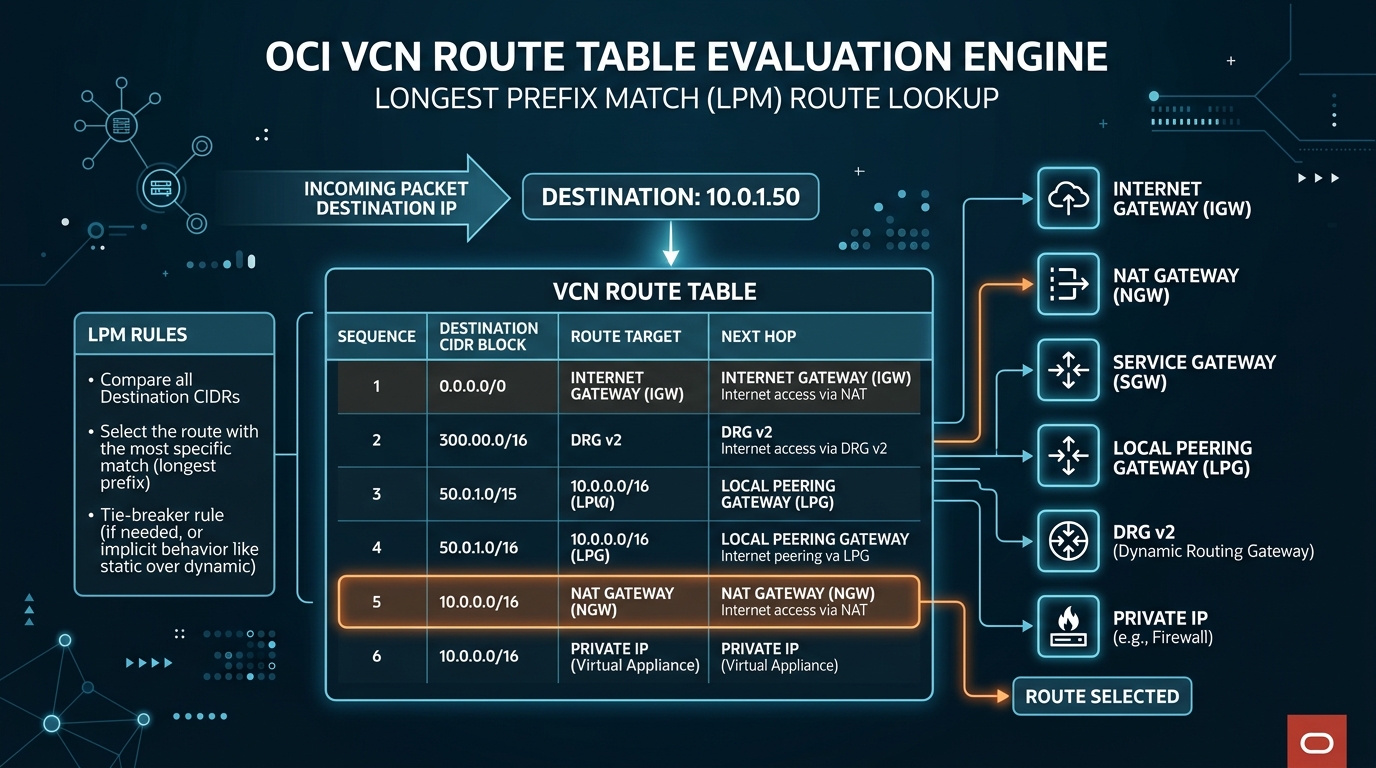
2. Route Table Architecture & Evaluation Mechanics
1. Default vs. Custom Route Tables
When a VCN is created, OCI automatically provisions a Default Route Table.
* Default Route Table: Initially created with no route rules. If subnets are associated with the Default Route Table without modification, traffic can only flow locally within the VCN CIDR blocks.
* Custom Route Tables: Architects create dedicated custom route tables tailored to specific subnet tiers (e.g., RT-Public, RT-Private, RT-Database, RT-DMZ-Firewall).
[!IMPORTANT]
Implicit Local VCN Routing
Every route table in an OCI VCN contains an implicit default local rule for the VCN’s CIDR blocks (e.g.,10.0.0.0/16 ➔ Local VCN). This rule is invisible in the Console GUI and cannot be deleted or overridden by custom rules pointing to the same exact destination prefix.
2. Longest Prefix Match (LPM) Algorithm
When a VNIC transmits a packet to a destination IP address outside its local subnet, the OCI virtual router evaluates the subnet’s associated route table using Longest Prefix Match (LPM) logic.
If multiple route rules match the destination IP address, OCI selects the rule with the most specific subnet mask (highest CIDR prefix length).
Example Evaluation Scenario:
Suppose a route table contains the following rules:
| Rule # | Destination CIDR | Target Gateway / Next Hop | Prefix Length |
|---|---|---|---|
| Rule A | 0.0.0.0/0 | NAT Gateway (NGW-Prod) | /0 (Default Route) |
| Rule B | 10.200.0.0/16 | Dynamic Routing Gateway (DRG-v2) | /16 |
| Rule C | 10.200.50.0/24 | Local Peering Gateway (LPG-Analytics) | /24 |
| Rule D | 10.200.50.12/32 | Private IP (10.0.1.99 – Firewall VNIC) | /32 (Specific Host) |
- If packet destination is
8.8.8.8: Matches Rule A (/0) $\rightarrow$ Sent to NAT Gateway. - If packet destination is
10.200.15.5: Matches Rule B (/16) $\rightarrow$ Sent to DRG v2. - If packet destination is
10.200.50.88: Matches Rule C (/24) $\rightarrow$ Sent to LPG-Analytics. - If packet destination is
10.200.50.12: Matches Rule D (/32) $\rightarrow$ Sent to Firewall VNIC.
3. Supported Route Target Types
OCI route rules support 6 distinct target types:
1. Internet Gateway (IGW): Direct bidirectional route to the public internet (Public Subnets only). Target syntax: Internet Gateway.
2. NAT Gateway (NGW): Outbound-only internet egress for private subnets. Target syntax: NAT Gateway.
3. Service Gateway (SGW): Private access to Oracle Services Network (OSN). Target syntax: Service Gateway with CIDR label (e.g., All us-ashburn-1 Services in Oracle Services Network).
4. Local Peering Gateway (LPG): Routes traffic to a peered VCN within the same region.
5. Dynamic Routing Gateway (DRG v2): Routes traffic to on-premises networks (VPN/FastConnect) or remote/local spoke VCNs attached to the DRG.
6. Private IP: Routes traffic to a specific private IP address on a VNIC attached to a compute instance (used for Third-Party Virtual Firewalls, Proxies, or NAT instances).
4. OCI Web Console (GUI) Step-by-Step Walkthrough
Follow these steps to create a Custom Route Table for a Private Subnet and attach it to an outbound NAT Gateway and Service Gateway.
Step 1: Navigating to Route Tables in the Console
- Open the Navigation Menu (
≡) ➔ Networking ➔ Virtual Cloud Networks. - Select your VCN (
VCN-Production-Ashburn). - Under Resources in the left menu, click Route Tables.
Console Path: [≡ Main Menu] ➔ [Networking] ➔ [Virtual Cloud Networks] ➔ [VCN Details] ➔ [Route Tables]
Step 2: Creating a Custom Private Route Table
- Click Create Route Table.
- Set configuration:
- Name:
RT-Private-Subnets - Compartment:
Network-Compartment - Under Route Rules, click + Additional Route Rules:
- Rule 1 (Internet Egress):
- Target Type:
NAT Gateway - Destination CIDR Block:
0.0.0.0/0 - Target NAT Gateway: Select
NGW-Production.
- Target Type:
- Rule 2 (Oracle Services Egress):
- Target Type:
Service Gateway - Destination Service: Select
All us-ashburn-1 Services in Oracle Services Network. - Target Service Gateway: Select
SGW-Production.
- Target Type:
- Click Create Route Table.
Step 3: Associating the Route Table with a Private Subnet
- On the VCN details page, click Subnets under Resources.
- Click
Subnet-Private-Regional. - Click Edit at the top of the Subnet Details page.
- Under Route Table, change from
Default Route TabletoRT-Private-Subnets. - Click Save Changes. The private subnet now instantly routes internet traffic via NGW and Oracle service traffic via SGW.
5. Common Architectural Misconceptions & Pitfalls
Misconception 1: “Subnets Without an Explicit Route Table Selection Have No Routing”
- Reality: If you do not assign a custom route table during subnet creation, OCI automatically binds the subnet to the Default Route Table of the VCN. If the Default Route Table is later modified with a
0.0.0.0/0 ➔ IGWrule, all unassigned subnets instantly become internet-routable.
Misconception 2: “Targeting a Private IP Automatically Configures Forwarding on the Target Instance”
- Reality: Placing a Private IP target in an OCI Route Table routes network packets to that VNIC. However, if IP Forwarding (
net.ipv4.ip_forward = 1) and firewall rules (iptables / firewalld) are not enabled on the target OS, the compute instance will drop incoming packets.
6. OCI VCN Routing vs. Other Cloud Platforms
| Feature | Oracle Cloud Infrastructure (OCI) | Amazon Web Services (AWS) | Google Cloud Platform (GCP) |
|---|---|---|---|
| Routing Construct | Route Table per Subnet | Route Table per Subnet | VPC Routes (Global Scope) |
| Longest Prefix Match | Evaluated dynamically per rule | Evaluated dynamically per rule | Priority-based evaluation + Prefix length |
| Implicit Local Route | Automatic & Immutably enforced | Automatic & Immutably enforced | Default system routes created automatically |
| Virtual Appliance Next-Hop | Private IP Target | ENI Target / Network Interface | Instance Name / IP Target |
