
1. Introduction to Credential-Less Authentication
When applications running on compute instances interact with cloud services—such as uploading files to Object Storage or querying Autonomous Databases—storing hardcoded API signing keys, passwords, or credentials on the server disk introduces severe security risks.
Oracle Cloud Infrastructure (OCI) solves this using Dynamic Groups and Instance Principals.
Instead of creating credentialed service account files, OCI allows compute instances to authenticate dynamically using their own cryptographic identity verified by the Instance Metadata Service (IMDSv2).
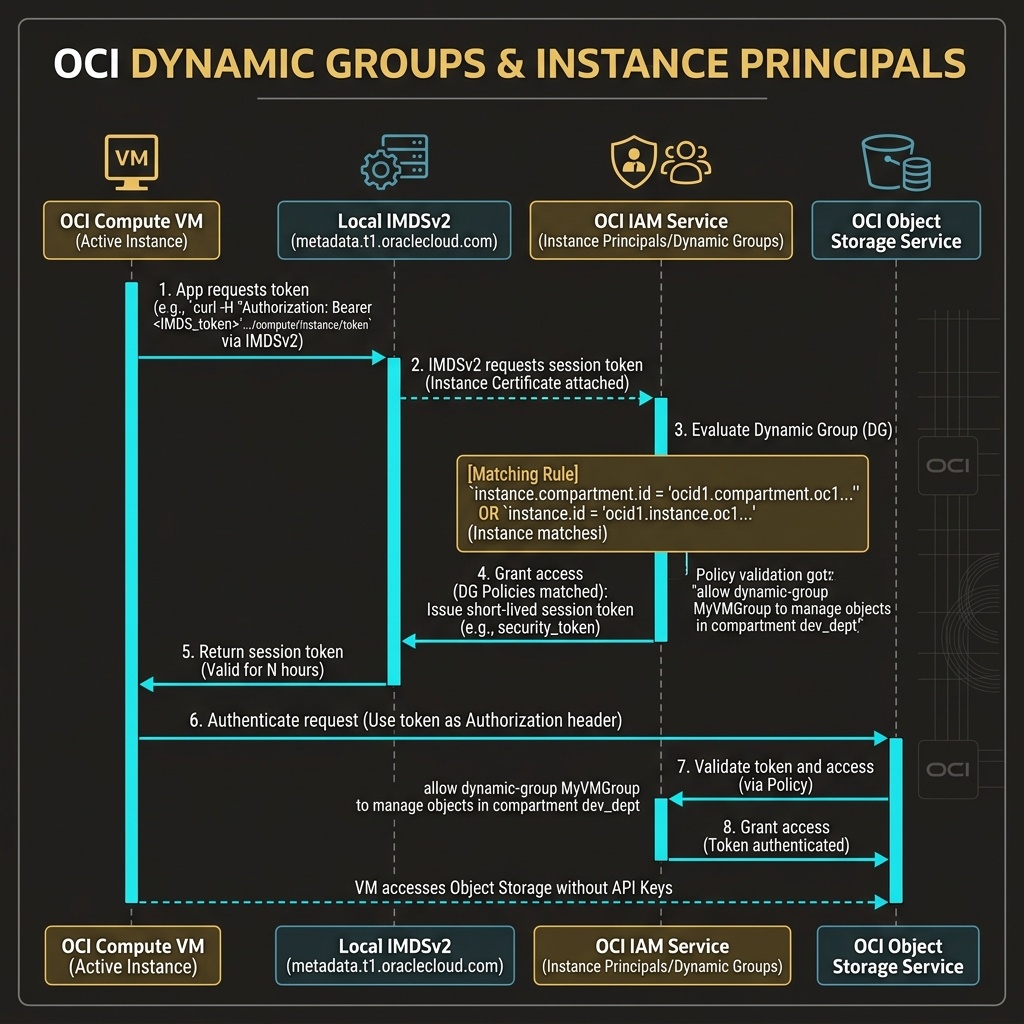
2. Dynamic Groups and Instance Principals Architecture
What is a Dynamic Group?
A Dynamic Group is a specialized IAM identity container where membership is determined dynamically by evaluating matching rules against resource metadata (such as compartment OCID, instance OCID, or resource tags).
Any compute VM that satisfies the rule automatically becomes a member of the group. If a VM is terminated, it is instantly removed from the group without manual intervention.
What is an Instance Principal?
An Instance Principal is the mechanism that allows a compute instance to make authorized API calls to OCI services. When code running on a VM calls the OCI SDK, the SDK queries the local Instance Metadata Service (IMDSv2) located at http://169.254.169.254/opc/v2/.
IMDSv2 issues a temporary, short-lived cryptographic session token signed by the OCI Security Authority, authorizing the VM to execute API actions permitted for its Dynamic Group.
3. Dynamic Group Matching Rule Syntax
Matching rules use plain-text boolean logic syntax:
Pattern A: Match All Instances in a Specific Compartment
Any {instance.compartment.id = 'ocid1.compartment.oc1..aaaaaaaaxxxsamplecompartment'}
Pattern B: Match Instances by Defined Tag
Any {instance.tag.Operations.AppRole = 'Backend-Worker'}
Pattern C: Match Multiple Compartments (Logical OR)
Any {instance.compartment.id = 'ocid1.compartment.oc1..dev111', instance.compartment.id = 'ocid1.compartment.oc1..stage222'}
4. Binding Policies to Dynamic Groups
Once a Dynamic Group is defined, permissions are granted using standard IAM policy statements referencing dynamic-group:
Allow dynamic-group App-Worker-DynamicGroup to read objects in compartment Production-Data
5. OCI Web Console (GUI) Step-by-Step Walkthrough
Configuring Dynamic Groups and Instance Principals is executed directly in the OCI Web Console GUI.
Step 1: Creating a Dynamic Group
- Log in to the Oracle Cloud Console (
https://cloud.oracle.com). - Open the Navigation Menu (
≡) ➔ Identity & Security ➔ Domains ➔ Select Domain (e.g.,Default). - Click Dynamic Groups in the left-hand navigation panel.
- Click Create Dynamic Group.
- Enter details:
- Name:
Dev-VM-DynamicGroup - Description:
Dynamic group for all compute instances in Dev-Compartment. - Matching Rule: Paste the rule:
text

Any {instance.compartment.id = 'ocid1.compartment.oc1..aaaaaaaaxxxdevcompartment'} - Click Create Dynamic Group.
Step 2: Granting Policy Access to the Dynamic Group
- Open the Navigation Menu
≡➔ Identity & Security ➔ Policies. - Select
Dev-Compartment. - Click Create Policy.
- Name the policy:
AllowVMObjectAccess. - Enter the policy statement:
text

Allow dynamic-group Dev-VM-DynamicGroup to manage objects in compartment Dev-Compartment - Click Create.
Compute VMs in Dev-Compartment can now interact with Object Storage using OCI SDKs without storing API keys on disk.
6. Common Architectural Misconceptions & Pitfalls
Misconception 1: “Instance Principals Require Hardcoded Credentials in Application Code”
- Reality: OCI SDKs automatically detect when they are running on a compute VM and initialize
InstancePrincipalsAuthenticationDetailsProviderautomatically without requiring API key paths or configuration files.
Misconception 2: “Matching Rule Compartment OCIDs Update Automatically When Compartments Are Renamed”
- Reality: Matching rules reference the compartment OCID (
ocid1.compartment.oc1..), NOT the compartment display name. OCIDs are permanent and immutable, ensuring matching rules remain valid even if compartment display names change.
7. OCI Instance Principals vs. Google Cloud (GCP) Service Accounts
For cloud architects familiar with Google Cloud, the following table compares workload authentication:
| Feature | Google Cloud (GCP) | Oracle Cloud Infrastructure (OCI) | Key Technical Difference |
|---|---|---|---|
| VM Identity Model | GCP Service Accounts attached directly to VM instances | Dynamic Groups query VM metadata dynamically | OCI does not attach identity files to VMs; VMs match dynamic group rules automatically. |
| Credential Management | OAuth2 tokens retrieved via GCP Metadata Server (169.254.169.254) | Short-lived JWT session tokens retrieved via OCI IMDSv2 (169.254.169.254/opc/v2/) | Both platforms use local metadata endpoints, but OCI groups instances dynamically. |
| Group Membership | Service accounts assigned individually per VM | VMs grouped dynamically by rules (compartment.id / tags) | OCI allows scaling instance permissions across hundreds of VMs using one dynamic group rule. |
