
1. Introduction to Enterprise Identity Federation
In modern enterprise architectures, organizations maintain a centralized identity directory—such as Microsoft Entra ID (formerly Azure AD), Okta, or Ping Identity. Requiring employees to manage separate login credentials for Oracle Cloud Infrastructure introduces credential fatigue and compliance risks.
OCI Identity Domains support native Identity Federation using the SAML 2.0 and SCIM 2.0 open standards.
Federation delegates authentication to your external Identity Provider (IdP), enabling Single Sign-On (SSO), automated user provisioning, and centralized Multi-Factor Authentication (MFA) enforcement.
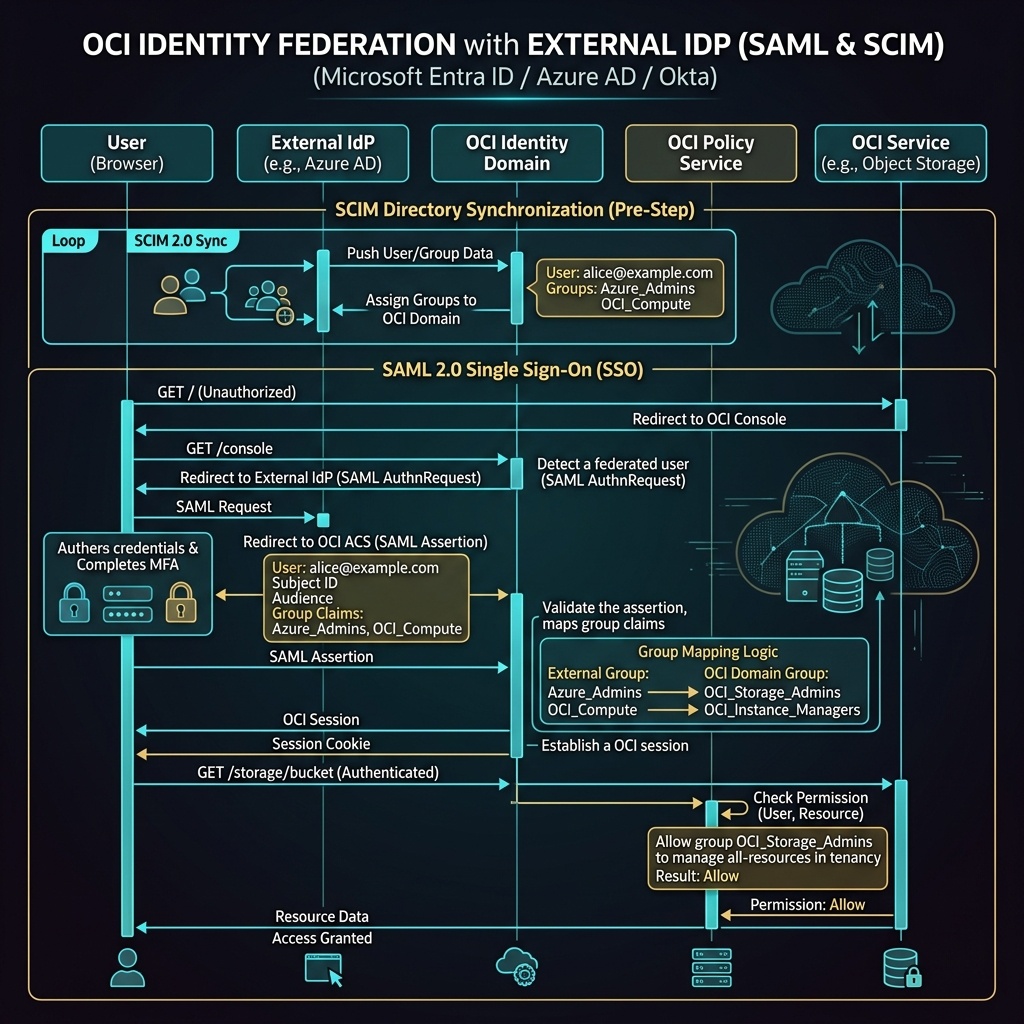
2. SAML 2.0 and SCIM Architecture
SAML 2.0 (Authentication & SSO)
SAML 2.0 handles authentication assertions during login:
1. A user navigates to the OCI Console login page and selects their enterprise IdP.
2. OCI redirects the user to the enterprise IdP (e.g., Microsoft Entra ID) for authentication.
3. Upon successful login, the IdP generates a signed SAML Assertion containing user attributes and group memberships.
4. OCI validates the SAML Assertion signature against the IdP metadata certificate and grants console access.
SCIM 2.0 (Directory Synchronization)
While SAML provisions users during active login (Just-In-Time), System for Cross-domain Identity Management (SCIM 2.0) provides automated, real-time background synchronization. When an employee is added or removed from Entra ID, SCIM automatically creates or deactivates the corresponding user in OCI Identity Domains instantly.
3. External IdP Group Mapping
Federated users inherit OCI IAM permissions by mapping external IdP group claims to internal OCI Identity Domain Groups.
External IdP Group (Entra ID) ──► SAML Group Assertion ──► OCI Group Mapping ──► OCI IAM Policy
Example Mapping:
- External Group Claim:
Entra-OCI-CloudAdmins - Mapped OCI Group:
OCI-Tenancy-Admins - Result: When a user in
Entra-OCI-CloudAdminslogs into OCI via SSO, OCI places them inOCI-Tenancy-Adminsfor that session, granting access to associated policies.
4. OCI Web Console (GUI) Step-by-Step Walkthrough
Configuring SAML Federation and Group Mapping is executed directly in the OCI Web Console GUI.
Step 1: Creating an Identity Provider Entry in OCI
- Log in to the Oracle Cloud Console (
https://cloud.oracle.com). - Open Navigation Menu (
≡) ➔ Identity & Security ➔ Domains ➔ Select Target Domain (e.g.,Default). - Click Security ➔ Identity Providers in the domain left-hand menu.
- Click Add IdP ➔ Select Add SAML IdP.
- Enter details:
- Name:
Microsoft-Entra-ID - Description:
Enterprise SAML Single Sign-On. - Upload the IdP Metadata XML file downloaded from Entra ID.
- Click Next and complete the setup wizard.
Step 2: Configuring Group Mapping Rules
- On the Identity Provider Details page for
Microsoft-Entra-ID, click Group Mapping under Resources. - Click Edit Group Mapping.
- Click Add Mapping:
- IdP Group Name: Enter the exact external group claim string (e.g.,
Entra-OCI-SecOps). - OCI Identity Domain Group: Select local group
SecOps-Admins-Group. - Click Save Changes.
Federated users belonging to Entra-OCI-SecOps now inherit all permissions assigned to SecOps-Admins-Group automatically upon SSO login.
5. The “Break-Glass” Emergency Admin Requirement
[!IMPORTANT]
Maintaining Local Emergency Admin Accounts
When enforcing enterprise SSO, ALWAYS maintain at least two local administrative accounts directly inside the OCI Default Identity Domain. If your external IdP suffers an outage or SAML signing certificates expire, local “break-glass” accounts ensure administrators can still log in to fix federation settings.
6. Common Architectural Misconceptions & Pitfalls
Misconception 1: “SAML Group Mapping Is Case-Insensitive”
- Reality: The IdP Group Name string in OCI Group Mapping must match the SAML assertion group claim character-for-character, including exact case. A capitalization typo will cause federated users to log in successfully, but receive zero group permissions.
Misconception 2: “Disabling a User in Entra ID Instantly Revokes Active OCI Console Sessions”
- Reality: SAML authentication evaluates during login. If a user is deactivated in Entra ID, their active OCI console session remains valid until the session token expires, unless SCIM background deprovisioning is configured or the session is forcibly terminated in the OCI Console.
7. OCI Identity Federation vs. Google Cloud (GCP) Federation
For cloud architects familiar with Google Cloud, the following table compares federation features:
| Federation Feature | Google Cloud (GCP) | Oracle Cloud Infrastructure (OCI) | Key Technical Difference |
|---|---|---|---|
| SSO Standard | SAML 2.0 / OIDC via Google Cloud Identity | SAML 2.0 natively integrated into Identity Domains | Both platforms support standard SAML 2.0 enterprise providers. |
| Directory Provisioning | Google Cloud Directory Sync (GCDS) or SCIM | Native SCIM 2.0 Server inside Identity Domains | OCI provides native SCIM API endpoints for push synchronization from Azure/Okta. |
| Group Mapping | Mapped via Google Groups or SAML attribute mapping | Mapped directly inside Identity Domain IdP Settings GUI | OCI maps external group claims directly to internal IAM groups inside the Console GUI. |
