
1. Introduction to OCI Site-to-Site VPN
Connecting on-premises enterprise data centers to Oracle Cloud Infrastructure (OCI) requires secure, encrypted network transport across public internet infrastructure. OCI delivers this through Site-to-Site VPN (formerly known as OCI IPSec VPN).
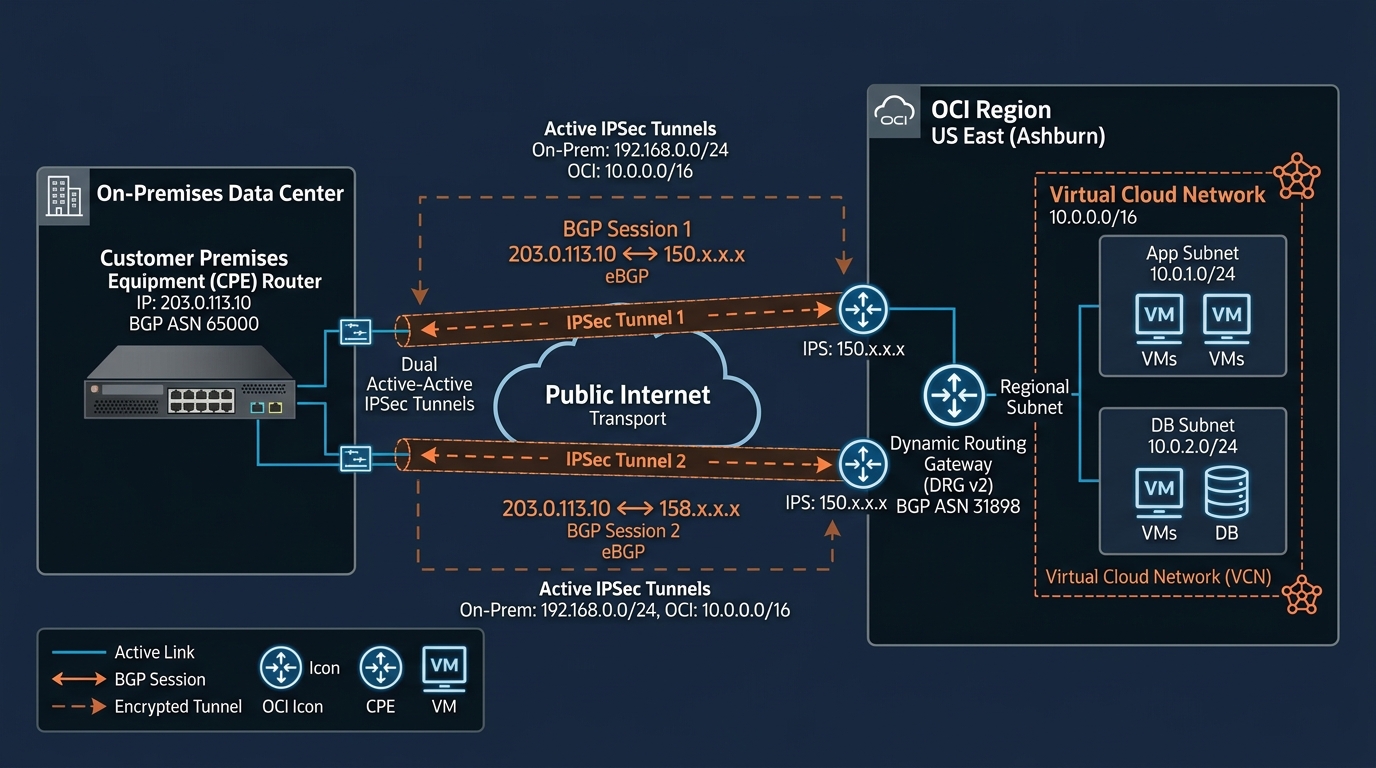
OCI Site-to-Site VPN provisions redundant, IPSec-encrypted tunnels connecting an on-premises firewall/router (Customer Premises Equipment – CPE) to an OCI Dynamic Routing Gateway (DRG v2).
OCI Site-to-Site VPN supports both Static Routing and Dynamic BGP Routing (Border Gateway Protocol) with active-active dual-tunnel failover.
2. Core Architectural Concepts
1. Customer Premises Equipment (CPE) Object
A CPE object in OCI is a software representation of your on-premises edge router or hardware firewall (e.g., Cisco ASA/Firepower, Palo Alto Networks, Fortinet FortiGate, Juniper SRX).
* Stores the Public IP Address of your on-premises firewall interface.
* Optionally defines vendor-specific device shapes for automated configuration helper generation.
2. Dual IPsec Tunnels for High Availability
For every Site-to-Site VPN connection provisioned, OCI automatically deploys two separate IPSec tunnels terminate on distinct, geographically redundant OCI VPN headend routers.
- Active-Active Dual Tunnels: Both tunnels carry traffic simultaneously if BGP dynamic routing is configured with equal-cost multi-pathing (ECMP).
- Active-Passive Dual Tunnels: If static routing is used or BGP AS-Path Prepending is enforced, Tunnel 1 serves as primary and Tunnel 2 acts as automatic hot-standby.
3. Static Routing vs. Dynamic BGP Routing
| Feature | Static Routing | Dynamic BGP Routing (Recommended) |
|---|---|---|
| Route Management | Subnet CIDRs manually entered into OCI Console. | Routes dynamically advertised between CPE and DRG. |
| Failover Convergence | Slow (Requires dead peer detection timeouts). | Fast (< 3 seconds) via BGP Keepalive / Hold timers. |
| Subnet Expansion | Manual route updates required for new on-prem subnets. | Zero manual updates; new subnets advertised automatically. |
| BGP ASN Requirement | Not required. | Requires On-Premises BGP ASN (e.g., 65000 – 65534). |
4. IPSec Cryptographic Parameters
OCI Site-to-Site VPN supports industry-standard IKE (Internet Key Exchange) parameters:
- IKE Versions: IKEv1 and IKEv2 (Recommended).
- Phase 1 (IKE SA):
- Encryption: AES-256-GCM, AES-256-CBC, AES-128-CBC.
- Authentication: SHA-384, SHA-256.
- Diffie-Hellman (DH) Groups: Group 20, Group 19, Group 14, Group 24.
- Phase 2 (IPSec SA):
- Encryption: AES-256-GCM, AES-256-CBC.
- Authentication: HMAC-SHA2-256-96.
- PFS (Perfect Forward Secrecy): DH Group 20, Group 19, Group 14.
5. OCI Web Console (GUI) Step-by-Step Walkthrough
Follow these steps to configure a BGP-based Site-to-Site VPN connection.
Step 1: Creating the CPE Object in OCI
- Open Navigation Menu (
≡) ➔ Networking ➔ Customer Premises Equipment. - Click Create CPE.
- Configure:
- Name:
CPE-Corporate-HQ - Compartment:
Network-Compartment - Public IP Address:
203.0.113.10(On-Premises Gateway IP) - Click Create CPE.
Console Path: [≡ Main Menu] ➔ [Networking] ➔ [Customer Premises Equipment]
Step 2: Provisioning the Site-to-Site VPN Connection
- Navigate to Networking ➔ Site-to-Site VPN.
- Click Create IPSec Connection.
- Fill out configuration parameters:
- Name:
VPN-HQ-To-Ashburn - Compartment:
Network-Compartment - CPE: Select
CPE-Corporate-HQ. - Dynamic Routing Gateway: Select
DRG-Hub-Ashburn. - Routing Type: Select BGP Dynamic Routing.
- Configure Tunnel 1 & Tunnel 2 Details:
- BGP ASN (On-Premises):
65000 - Shared Secret (Pre-Shared Key): Auto-generate or enter custom complex PSK.
- IPv4 Inside Tunnel Interface: Specify
/30point-to-point IP range (e.g.,10.255.0.0/30). - Click Create IPSec Connection.
Step 3: Downloading CPE Configuration Helper File
- On the newly created IPSec Connection details page, click Download CPE Configuration.
- Select your firewall vendor (e.g., Cisco, Palo Alto, Fortinet) and model.
- Click Download Configuration. OCI generates a customized CLI configuration script containing pre-filled IP addresses, PSKs, and BGP statements ready to paste into your on-premises firewall.
6. Common Architectural Misconceptions & Pitfalls
Misconception 1: “A Single IPSec Tunnel Provides Production High Availability”
- Reality: Provisioning only 1 of the 2 provided IPSec tunnels exposes your enterprise to downtime during scheduled OCI maintenance windows. Both Tunnel 1 and Tunnel 2 must be configured and active on your CPE for SLA coverage.
Misconception 2: “Inside Tunnel IP Addresses Conflict with VCN Subnets”
- Reality: The point-to-point
/30IP addresses assigned to the inside tunnel interfaces (e.g.,10.255.0.1and10.255.0.2) are strictly used for BGP session peering between CPE and DRG. They do not consume VCN subnet IP space.
7. OCI Site-to-Site VPN vs. Other Cloud Platforms
| Feature | Oracle Cloud Infrastructure (OCI) | Amazon Web Services (AWS) | Google Cloud Platform (GCP) |
|---|---|---|---|
| VPN Service | Site-to-Site VPN | AWS Site-to-Site VPN | Cloud VPN (HA VPN) |
| Redundant Tunnels per VPN | 2 Active Tunnels included by default | 2 Active Tunnels included by default | 2 Active Tunnels (HA VPN interface pair) |
| BGP Dynamic Routing | Supported | Supported | Supported via Cloud Router |
| Managed VPN Pricing | Free (Zero hourly connection fee; data transfer rates apply) | Hourly fee per VPN connection + Data charges | Hourly fee per tunnel + Data charges |
