
1. Introduction to Multi-Tenancy Governance
In enterprise cloud operations, organizations often maintain multiple distinct OCI Tenancies—such as separate tenancies for different subsidiaries, independent business units, or Managed Service Provider (MSP) partner access.
By default, OCI tenancies are completely isolated cryptographic domains. Users in Tenancy-A cannot access cloud resources in Tenancy-B.
To enable secure inter-organization resource sharing without creating duplicate user accounts or exporting credentials, OCI IAM provides Cross-Tenancy Access Control.
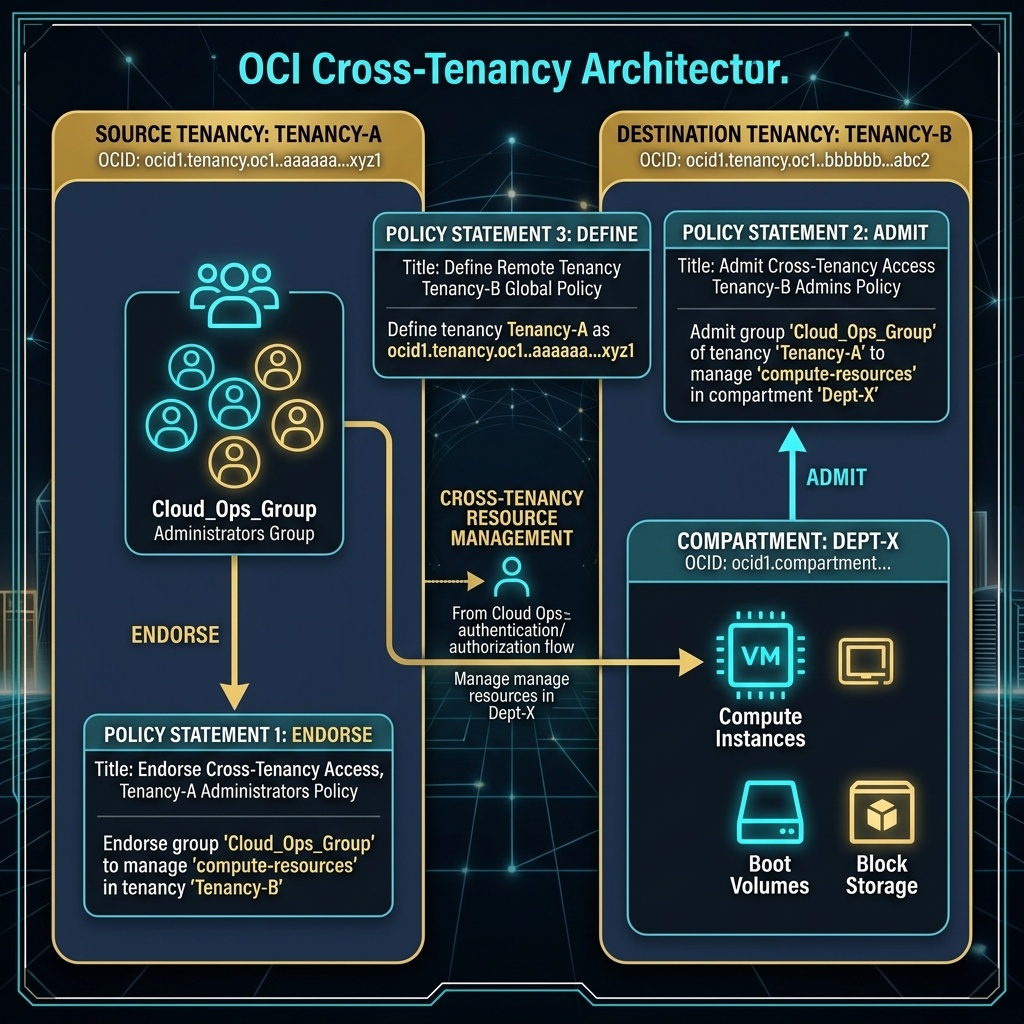
2. The Three Required Policy Statements
Cross-tenancy authorization requires an explicit, bilateral agreement between both tenancies. Establishing access requires writing three specific policy statements across the source and destination tenancies:
Statement 1: Define Statement (Written in BOTH Tenancies)
Assigns a friendly alias to the remote tenancy OCID:
Define tenancy RemoteTenancy as ocid1.tenancy.oc1..aaaaaaaaxxxremotetenancy
Statement 2: Endorse Statement (Written in SOURCE Tenancy)
Written in the source tenancy where the human users or dynamic groups reside. Endorses the local group to request access from the remote tenancy:
Endorse group Dev-Auditors to read buckets in tenancy RemoteTenancy
Statement 3: Admit Statement (Written in DESTINATION Tenancy)
Written in the destination tenancy where the target cloud resources live. Admits the endorsed group from the remote tenancy to perform specific actions:
Admit group Dev-Auditors of tenancy RemoteTenancy to read buckets in compartment Audit-Data
[!IMPORTANT]
All Three Statements Are Mandatory
If any one of the three statements (Define,Endorse, orAdmit) is missing or misconfigured, OCI rejects the cross-tenancy API call. Both tenancy administrators must explicitly opt into the relationship.
3. OCI Web Console (GUI) Step-by-Step Walkthrough
Configuring cross-tenancy access is executed directly in the OCI Web Console GUI.
Step 1: Configuring the Source Tenancy Policy (Endorse)
- Log in to the Source Tenancy Console (
https://cloud.oracle.com). - Open Navigation Menu (
≡) ➔ Identity & Security ➔ Policies. - Select Root Tenancy in the compartment dropdown.
- Click Create Policy.
- Name the policy:
CrossTenancyEndorsePolicy. - Enter statements:
text

Define tenancy DestinationTenancy as ocid1.tenancy.oc1..aaaaaaaaxxxdestination

Endorse group Source-Audit-Group to read all-resources in tenancy DestinationTenancy - Click Create.
Step 2: Configuring the Destination Tenancy Policy (Admit)
- Log in to the Destination Tenancy Console as a Tenancy Admin.
- Open Navigation Menu (
≡) ➔ Identity & Security ➔ Policies. - Select Root Tenancy (or target compartment
Audit-Data). - Click Create Policy.
- Name the policy:
CrossTenancyAdmitPolicy. - Enter statements:
text

Define tenancy SourceTenancy as ocid1.tenancy.oc1..aaaaaaaaxxxsource

Define group Source-Audit-Group as ocid1.group.oc1..aaaaaaaaxxxgroupocid

Admit group Source-Audit-Group of tenancy SourceTenancy to read all-resources in compartment Audit-Data - Click Create.
Users in Source-Audit-Group can now access resources inside Audit-Data in the Destination Tenancy.
4. Common Architectural Misconceptions & Pitfalls
Misconception 1: “Cross-Tenancy Access Can Be Granted by the Source Tenancy Alone”
- Reality: The source tenancy can only
Endorseits users. Access will fail until the destination tenancy administrator writes a correspondingAdmitpolicy statement accepting the connection.
Misconception 2: “Cross-Tenancy Policies Can Reference Local Display Names Without OCIDs”
- Reality: The
Admitpolicy in the destination tenancy must explicitly reference the Group OCID or Tenancy OCID of the remote source organization (Define group <Alias> as <OCID>).
5. OCI Cross-Tenancy Access vs. Google Cloud (GCP) Cross-Project Access
For cloud architects familiar with Google Cloud, the following table compares multi-account governance:
| Governance Aspect | Google Cloud (GCP) | Oracle Cloud Infrastructure (OCI) | Key Technical Difference |
|---|---|---|---|
| Trust Model | GCP IAM Roles granted directly to external emails ([email protected]) | Bilateral Define-Endorse-Admit policy agreement between tenancies | OCI requires explicit policy authorization in both source and destination tenancies. |
| User Identity | Uses single Google identity across projects | User stays in Source Identity Domain; Destination Tenancy admits group identity | Eliminates creating duplicate user accounts in target tenancies. |
| Resource Isolation | Managed via Folders & Org Nodes | Managed via independent Root Tenancies and Compartments | OCI enforces strict cryptographic separation between independent enterprise tenancies. |
