
The Container Orchestration Standard
In Google Cloud, Google Kubernetes Engine (GKE) is the dominant container runtime platform, offering two operational models: GKE Standard (where you manage the VM node pools) and GKE Autopilot (where Google manages the node provisioning, scaling, and security).
Oracle Cloud Infrastructure (OCI) offers an equivalent enterprise-grade Kubernetes service called Container Engine for Kubernetes (OKE). OKE is a fully managed, scalable, and highly available service that you can use to deploy containerized applications to the cloud.
However, OKE has distinct architectural choices—specifically in control plane management, node pool variations, and native networking—that you must understand when transitioning architectures from GCP.
OKE Architecture: Control Plane and Node Pools
Like GKE, OKE separates your cluster into a managed Control Plane and a pool of Worker Nodes.
1. The Control Plane
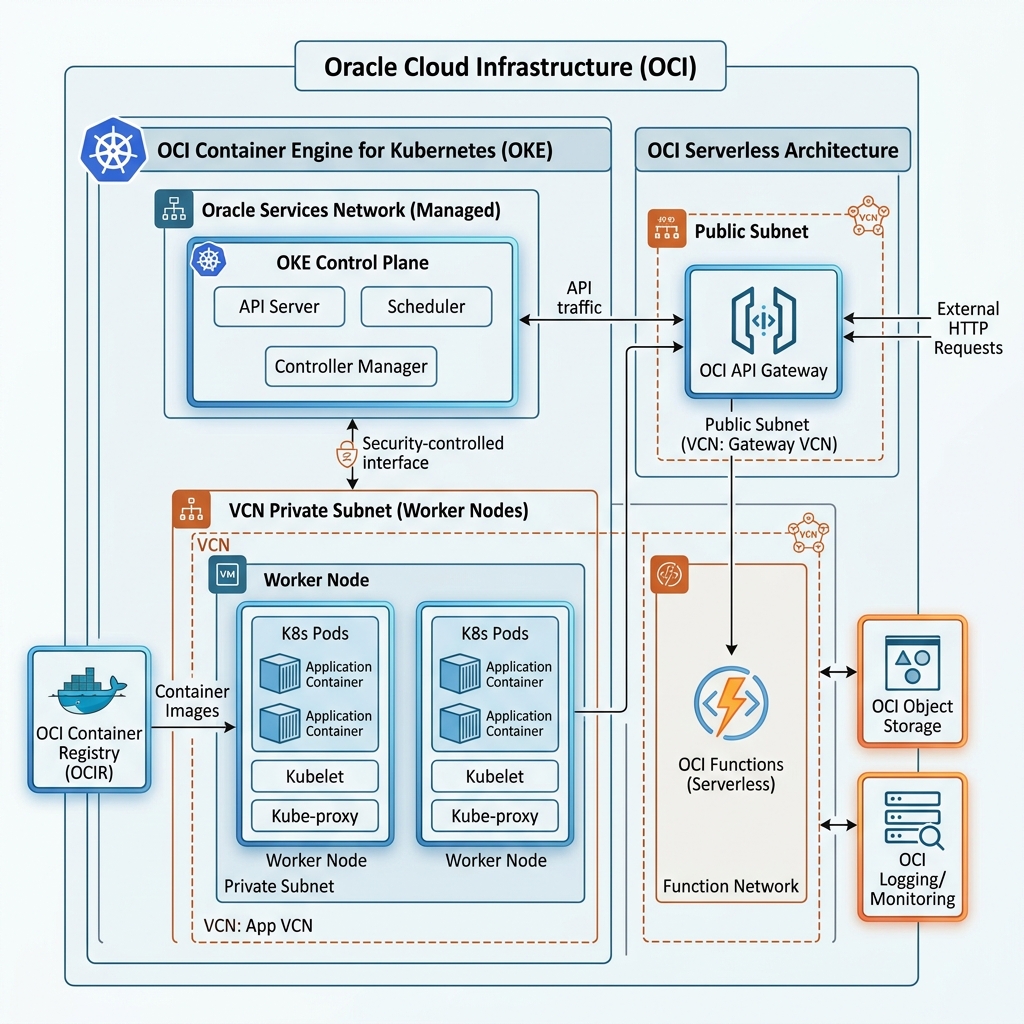
Oracle manages the Kubernetes Control Plane (API Server, scheduler, controller manager, and etcd) in an Oracle-owned services network.
* OKE offers a Basic (free) control plane and a Professional control plane (which offers a financially-backed SLA, supports larger cluster sizes, and supports worker nodes across multiple Availability Domains).
2. Node Pool Types
When provisioning worker nodes where your pods will run, OKE offers three models:
* Virtual Nodes (Serverless): Oracle fully manages the provisioning, scaling, patching, and lifecycle of the underlying VM hosts. You only manage your Pod configurations. This matches the operational model of GKE Autopilot.
* Managed Nodes (Standard): You select OCI compute shapes (including flexible shapes or bare metal) to act as worker nodes. These nodes run inside your VCN subnets, and you retain SSH access to them. This matches GKE Standard.
* Self-Managed Nodes: You spin up custom compute instances manually and register them with your OKE cluster.
Kubernetes Networking: Native Pod IP Allocation
One of the most critical design decisions when building an OKE cluster is the Container Network Interface (CNI) model. OKE offers two options:
1. Flannel Overlay (Basic)
Uses the Flannel CNI to create an isolated overlay network for pods. Pod IPs are not routable outside the Kubernetes cluster. Traffic exiting a pod to talk to a database in the VCN must undergo Source Network Address Translation (SNAT) through the host node’s IP.
2. OCI VCN CNI (Native Pod Networking)
Pods are allocated real, routable IP addresses directly from a dedicated subnet inside your VCN.
* This matches GCP’s VPC-native clusters (which use alias IP ranges).
* Because pods have native VCN IPs, they can communicate directly with other VCN resources (such as Bare Metal databases or File Storage mounts) with no translation latency.
* Crucially, you can attach Network Security Groups (NSGs) directly to Pod vNICs, allowing you to write firewall rules that govern traffic down to individual pod resources.
Here is the high-level architecture of OKE, OCIR, and API Gateway routing to OCI Functions:
OCI Container Registry (OCIR)
To store and secure your container images, OCI provides the Container Registry (OCIR).
* OCIR is a highly available, private Docker registry that supports the Open Container Initiative (OCI) image specification.
* You push and pull images using the standard Docker CLI or Helm client, authenticating via an OCI IAM Auth Token.
* OCIR supports automatic image vulnerability scanning, registry clean-up policies, and cross-region replication.
* This is equivalent to GCP’s Artifact Registry.
Serverless Compute: OCI Functions and API Gateway
In GCP, serverless code is run on Cloud Functions or Cloud Run. In OCI, serverless execution is managed by OCI Functions backed by the API Gateway.
1. Built on Fn Project (Container-Native Serverless)
Unlike Google Cloud Functions, where you deploy code directly and Google compiles it using proprietary buildpacks, OCI Functions is built on the open-source Fn Project.
* OCI Functions is strictly container-native. When you deploy a function, the CLI wraps your code into a Docker image, pushes it to OCIR, and registers it with the Functions service.
* At execution time, OCI pulls the container and runs it. Because it is container-native, you can write functions in any language by providing a custom Dockerfile.
* You write your serverless logic using the Fn FDK (Function Development Kit).
2. OCI API Gateway
To expose your serverless functions as public or private REST endpoints, you front them with the OCI API Gateway.
* The API Gateway is a highly available, regional gateway that handles routing, SSL termination, authentication (via JWT or OAuth2), rate limiting, and CORS headers.
* API Gateway routes incoming HTTP requests directly to backend OCI Functions, compute instances, or database endpoints.
* This matches the GCP API Gateway or Apigee architecture.
Declarative Provisioning via Terraform
Instead of using the Fn CLI tool to manually register functions and deploying clusters, you configure OKE and OCI Functions using Terraform. The following configuration defines a managed OKE Cluster and a serverless OCI Functions Application:
# 1. Define the OCI Container Engine for Kubernetes (OKE) Cluster
resource "oci_containerengine_cluster" "oke_cluster" {
  compartment_id     = "ocid1.compartment.oc1..aaaaaaaadevvv..."
  vcn_id             = "ocid1.vcn.oc1.iad.aaaaaaaaxxx..."
  kubernetes_version = "v1.30.1"
  name               = "Prod-OKE-Cluster"

  options {
    service_lb_subnet_ids = ["ocid1.subnet.oc1.iad.aaaaaaaasub1..."]

    # Configure the native VCN CNI for pod networking
    add_ons {
      is_kubernetes_dashboard_enabled = false
      is_tiller_enabled               = false
    }
  }
}

# 2. Define the OCI Functions Application (linked to VCN Subnets)
resource "oci_functions_application" "prod_app" {
  compartment_id = "ocid1.compartment.oc1..aaaaaaaadevvv..."
  display_name   = "Prod-App"
  subnet_ids     = ["ocid1.subnet.oc1.iad.aaaaaaaasub1..."]

  # Configure application properties (e.g. logging/tracing)
  config = {
    "LOG_LEVEL" = "INFO"
  }
}

# 3. Define an OCI Function inside the Application
resource "oci_functions_function" "hello_function" {
  application_id = oci_functions_application.prod_app.id
  display_name   = "hello-function"
  image          = "iad.ocir.io/tenancy-id/prod-app/hello-function:0.0.1"
  memory_in_mbs  = "128"

  # Set timeout limits (max 300s)
  timeout_in_sqs = 30
}
By leveraging OCI’s container-native serverless model, configuring OKE native pod networking, and declaring these configurations using Terraform, you can build microservices that scale dynamically while maintaining secure integration with your core enterprise network.
