
The Global Namespace Challenge
In many cloud object storage services (like Google Cloud Storage), bucket names reside in a single, globally shared namespace. If another organization has already registered the bucket name production-logs, you cannot use it. This forces teams to adopt complex naming conventions (e.g., myorg-project-prod-logs) to avoid naming collisions, and complicates multi-environment Terraform scripts where you want identical configurations across separate organizations or billing accounts.
Oracle Cloud Infrastructure (OCI) solves this naming constraint through Tenancy Namespaces.
In OCI, every tenancy is allocated a unique, immutable namespace string (usually the name of the tenancy itself). Bucket names only need to be unique within your tenancy namespace. Two entirely separate OCI customers can both create a bucket named backup-data inside their respective namespaces without conflict.
Object Storage Tiers: Standard vs. Archive
OCI Object Storage is a high-performance, regional storage service designed to store unstructured data as objects. Like GCP Cloud Storage, OCI offers different storage tiers optimized for access frequency:
1. Standard (Hot) Tier
The default tier for data requiring immediate, low-latency access. There are no retrieval charges, making it ideal for serving web assets, system backups, and active analytics pipelines.
2. Archive (Cold) Tier
Optimized for long-term retention of data that is rarely accessed (e.g., regulatory compliance logs).
* Unlike the Standard tier, you cannot download an archived object directly. You must first restore the object.
* The time to first byte after initiating a restore operation is typically 1 hour (significantly faster than standard cold storage options that can take up to 5 hours).
* There is a minimum retention period of 90 days for Archive storage.
Auto-Tiering and Lifecycle Management
To optimize costs automatically, OCI Object Storage supports Auto-Tiering.
* When enabled on a bucket, OCI automatically monitors the access patterns of objects. Objects larger than 1 MiB that have not been accessed for 31 days are automatically moved to the lower-cost Infrequent Access tier.
* If an object is subsequently accessed, it is immediately promoted back to the Standard tier with no latency impact or retrieval fees.
* For more complex management, you can define Lifecycle Rules (equivalent to GCP Object Lifecycle Management) to automatically transition objects from Standard to Archive, or permanently delete them after a specified number of days.
Pre-Authenticated Requests (PARs)
In GCP, if you want to allow an external partner to upload a file to a bucket, or grant a customer temporary access to download a software build without giving them IAM credentials, you generate a Signed URL.
OCI implements this capability via Pre-Authenticated Requests (PARs).
* A PAR is a unique, system-generated URL associated with a specific bucket or object.
* When creating a PAR, you specify the target resource, the allowed actions (Read, Write, or ReadWrite), and an expiration date.
* The holder of the PAR URL can execute standard HTTP operations (GET, PUT) to read or write data directly, bypassing OCI console or CLI authentication.
* You can revoke a PAR at any time prior to its expiration date from the OCI console or API.
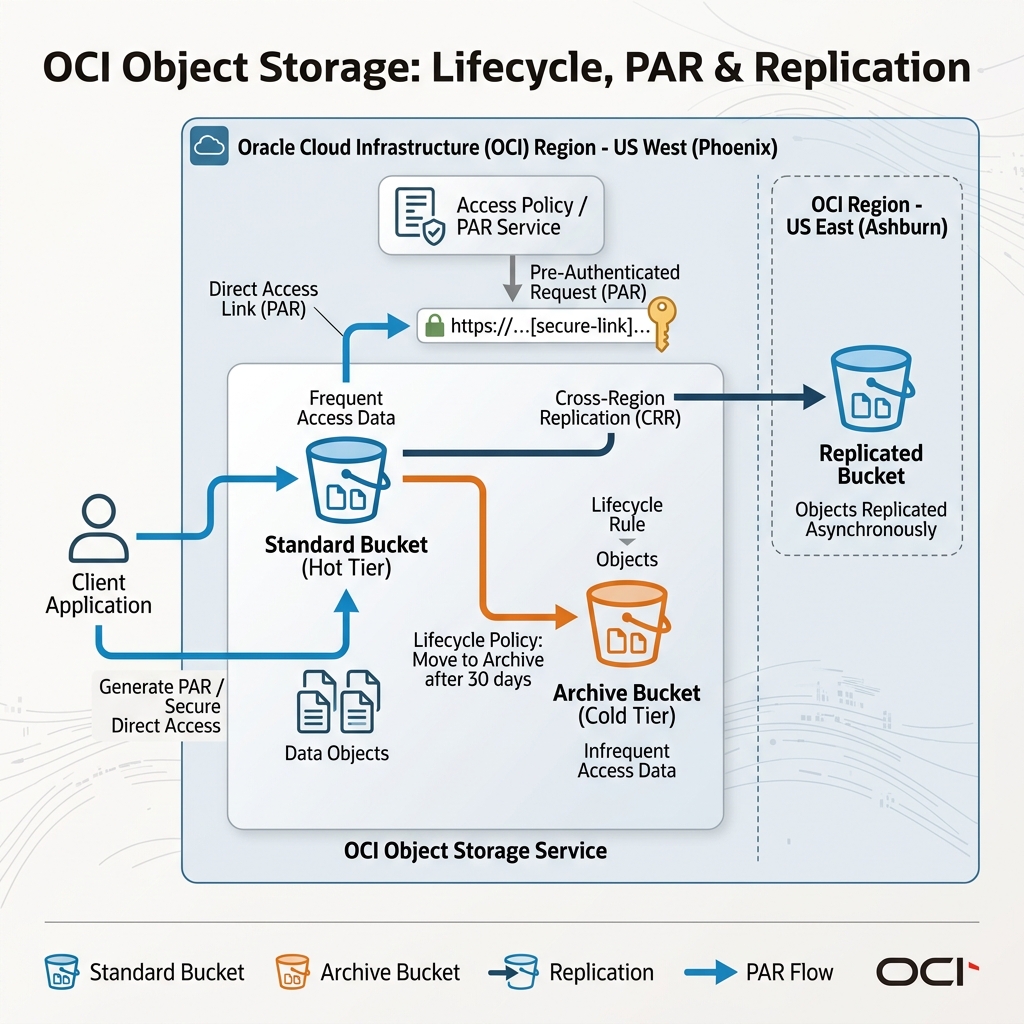
This object storage lifecycle, showing standard/archive tiers, PAR secure links, and cross-region replication, is represented below:
Declarative Provisioning via Terraform
Instead of scripting manual CLI commands, you configure OCI Object Storage resources using Terraform. The following configuration retrieves the tenancy’s default Object Storage namespace, creates a Standard bucket, and defines a Pre-Authenticated Request (PAR) allowing write-only uploads of a specific file:
# 1. Retrieve the tenancy's Object Storage namespace
data "oci_objectstorage_namespace" "ns" {
  compartment_id = "ocid1.compartment.oc1..aaaaaaaadevvv..."
}

# 2. Create the Object Storage Bucket
resource "oci_objectstorage_bucket" "backup_store" {
  compartment_id = "ocid1.compartment.oc1..aaaaaaaadevvv..."
  name           = "backup-store"
  namespace      = data.oci_objectstorage_namespace.ns.namespace
  storage_tier   = "Standard"

  # Optional: Enable versioning
  versioning     = "Enabled"

  # Configure auto-tiering properties if needed
  auto_tiering   = "InfrequentAccess"
}

# 3. Create a Pre-Authenticated Request (PAR) for secure upload
resource "oci_objectstorage_preauthenticated_request" "partner_upload_link" {
  access_type  = "ObjectWrite"
  bucket       = oci_objectstorage_bucket.backup_store.name
  name         = "PartnerUploadLink"
  namespace    = data.oci_objectstorage_namespace.ns.namespace
  object_name  = "db_dump.sql"
  time_expires = "2026-07-23T00:00:00Z"

  # Clients can use the returned access URI in their payload to upload:
  # https://objectstorage.us-ashburn-1.oraclecloud.com${access_uri}
}
By leveraging tenancy namespaces to prevent bucket name collisions and using declarative Terraform configurations to manage buckets and Pre-Authenticated Requests, you can build highly secure, credential-free data sharing patterns.
