
1. Introduction to OCI IP Address Management
Proper Classless Inter-Domain Routing (CIDR) design and IP Address Management (IPAM) are the foundation of enterprise cloud architecture. In Oracle Cloud Infrastructure (OCI), improper CIDR allocation can lead to IP exhaustion, overlapping subnets that break VPN/FastConnect hybrid connectivity, and rigid network boundaries that require destructive rebuilds.
Understanding how OCI allocates, reserves, and routes IPv4 and IPv6 addresses across subnets, Virtual Network Interface Cards (VNICs), and private/public interfaces is essential before deploying enterprise workloads.
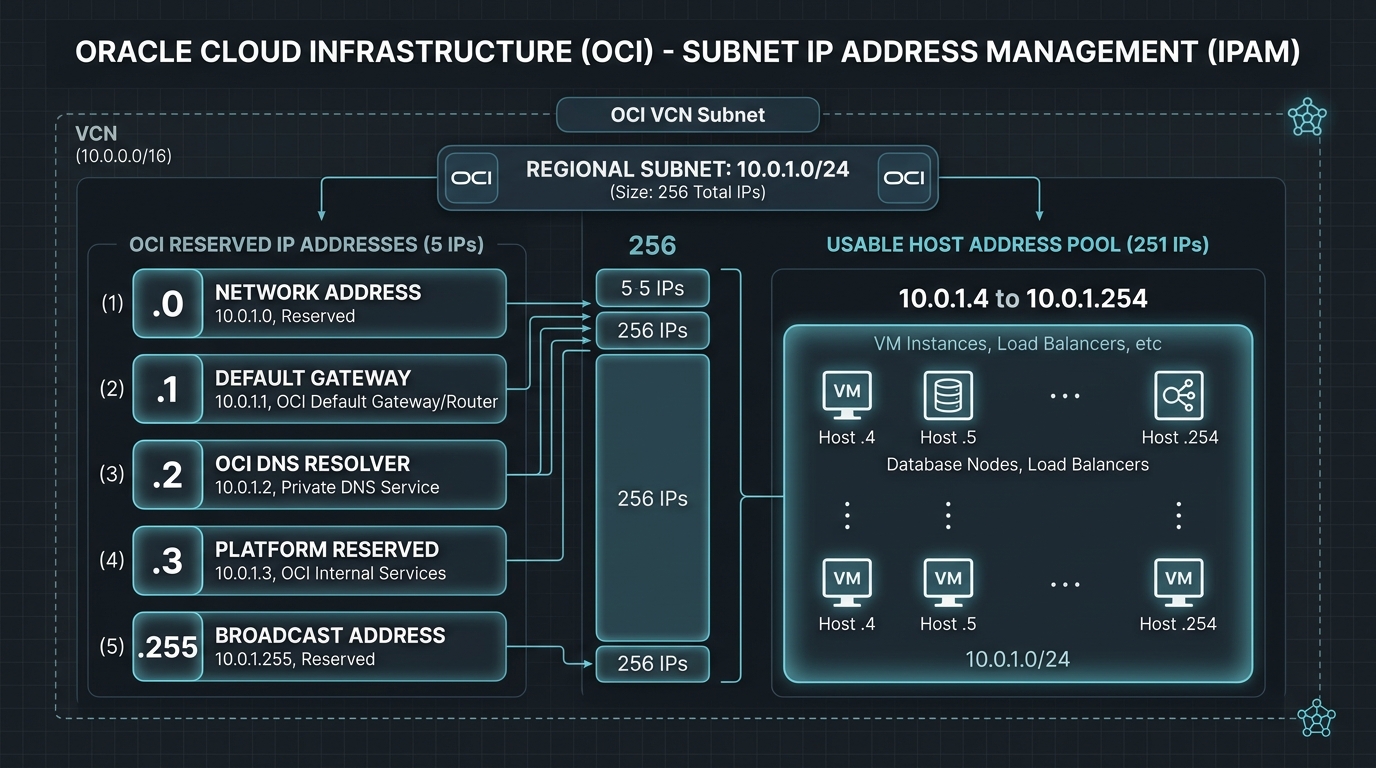
2. OCI Reserved IP Addresses
When you define an IPv4 subnet in OCI, 5 IP addresses within the subnet CIDR range are automatically reserved by the OCI control plane and cannot be assigned to compute instances, load balancers, or virtual appliances.
For example, in a /24 subnet (10.0.1.0/24) containing 256 theoretical IP addresses, only 251 IP addresses are usable:
| IP Address Offset | Function | Administrative Description |
|---|---|---|
.0 (e.g., 10.0.1.0) | Network Address | Identifies the subnet boundary (RFC 1122). |
.1 (e.g., 10.0.1.1) | Default Gateway | Virtual gateway address where instances route outbound traffic. |
.2 (e.g., 10.0.1.2) | OCI DNS Resolver | OCI VCN Resolver Endpoint for internal DNS queries. |
.3 (e.g., 10.0.1.3) | Platform Reserved | Reserved by OCI for infrastructure expansion and internal routing services. |
.255 (e.g., 10.0.1.255) | Broadcast Address | Standard subnet broadcast address (RFC 919). |
[!IMPORTANT]
Calculating Usable Host Addresses
Formula for usable IPv4 addresses in an OCI subnet:
$$\text{Usable IPs} = 2^{(32 – \text{CIDR Mask})} – 5$$
For a/28subnet: $2^{(32-28)} – 5 = 16 – 5 = 11 \text{ usable IPs}$.
Smallest allowable OCI subnet:/30($4 – 5 \Rightarrow 0$ usable hosts;/30is permitted for point-to-point router links where OCI waives standard host allocations).
3. Advanced VNIC IP Management
1. Primary vs. Secondary Private IPv4 Addresses
Each VNIC attached to a compute instance is assigned a Primary Private IP Address during provisioning. However, a single VNIC can hold up to 31 Secondary Private IP Addresses within the same subnet.
Use Cases for Secondary Private IPs:
- Host-Based SSL/TLS Multi-Tenancy: Binding multiple HTTPS web applications to distinct IP addresses on a single server.
- Database Failover & High Availability: Floating IP patterns (such as Keepalived or Corosync/Pacemaker clusters) where an IP address moves dynamically between primary and secondary nodes during failover.
VNIC OCID: ocid1.vnic.oc1.iad.samplevnic123
├── Primary Private IP: 10.0.1.15 (Bound to eth0)
├── Secondary Private IP 1: 10.0.1.16 (VIP for App A)
└── Secondary Private IP 2: 10.0.1.17 (VIP for App B)
2. Public IPv4 Types: Ephemeral vs. Reserved
In public subnets, private IPs can be paired with public IPv4 addresses for internet accessibility. OCI provides two types of public IPs:
- Ephemeral Public IP:
- Auto-assigned during instance launch.
- Free of charge.
- Transient: If the instance is terminated or the public IP is unassigned, it returns to the global OCI public IP pool and cannot be recovered.
- Reserved Public IP:
- Created as a standalone OCI object with its own OCID (
ocid1.publicip.oc1..). - Persistent: Remains assigned to your tenancy indefinitely until explicitly deleted.
- Remappable: Can be unassigned from a failed firewall or instance and immediately reassigned to a standby instance in seconds.
3. IPv6 Dual-Stack Addressing
OCI supports native IPv6 addressing across VCNs, subnets, and VNICs.
* VCN Prefix: Assigned as an Oracle-allocated Global Unicast Address (GUA) /56 CIDR or a custom BYOIPv6 block.
* Subnet Prefix: Subnets receive a /64 IPv6 prefix carved from the VCN /56.
* VNIC Address: VNICs receive a /128 global IPv6 address auto-configured via stateless address autoconfiguration (SLAAC) or static assignment.
4. OCI Web Console (GUI) Step-by-Step Walkthrough
Follow these steps to create a Reserved Public IP and reassign it dynamically between compute instances.
Step 1: Reserving a Persistent Public IP Address
- Open the Navigation Menu (
≡) ➔ Networking ➔ IP Management ➔ Reserved Public IPs. - Select your target compartment.
- Click Reserve Public IP Address.
- In the dialog box:
- Name:
VIP-Firewall-Production - Compartment:
Network-Compartment - Click Reserve Public IP Address.
- Copy the allocated IPv4 address (e.g.,
129.213.45.89).
Console Path: [≡ Main Menu] ➔ [Networking] ➔ [IP Management] ➔ [Reserved Public IPs]
Step 2: Assigning the Reserved Public IP to a Primary VNIC
- Navigate to Compute ➔ Instances ➔ Select
FW-Node-01. - Under Attached VNICs, click
Primary VNIC. - Select IPv4 Addresses under Resources in the left menu.
- Click the action menu (
⋮) next to the Primary Private IP (10.0.1.15) ➔ Edit. - Under Public IP Type, select Reserved Public IP.
- Select Select Existing Reserved Public IP and choose
VIP-Firewall-Production. - Click Update.
Step 3: Dynamically Remapping the Reserved Public IP during Failover
If FW-Node-01 experiences a failure, remap the public IP to FW-Node-02:
- Repeat Step 2 on
FW-Node-01and set Public IP Type to No Public IP (Unassign). - Open
FW-Node-02details page ➔ Primary VNIC ➔ IPv4 Addresses ➔ Edit. - Select Reserved Public IP ➔ Choose
VIP-Firewall-Production. - Click Update. Traffic shifts to
FW-Node-02immediately without changing DNS records.
5. Common Architectural Misconceptions & Pitfalls
Misconception 1: “OCI Subnets Support Arbitrary VRRP Multicast Heartbeats”
- Reality: OCI network virtualization drops multicast and broadcast packets at the SmartNIC boundary. VRRP (Virtual Router Redundancy Protocol) heartbeat packets will fail. High availability clusters must use OCI SDK/CLI script-driven API failover or OCI Network Load Balancers to shift floating private IPs.
Misconception 2: “Expanding a VCN CIDR Automatically Expands Existing Subnets”
- Reality: Adding a new CIDR block to an existing VCN (e.g., adding
172.16.0.0/16to a VCN with10.0.0.0/16) does not automatically resize existing subnets. You must manually create new subnets within the newly added CIDR space.
6. OCI IPAM vs. Other Cloud Platforms
| Feature | Oracle Cloud Infrastructure (OCI) | Amazon Web Services (AWS) | Google Cloud Platform (GCP) |
|---|---|---|---|
| Reserved Subnet IPs | 5 IPs (.0, .1, .2, .3, .255) | 5 IPs (.0, .1, .2, .3, .255) | 4 IPs (.0, .1, .2, .255) |
| Secondary Private IPs per VNIC | Up to 31 Secondary IPs | Varies by EC2 instance shape | Alias IP Ranges |
| Reserved Public IP Scope | Region / Tenancy Level | Elastic IP (EIP) per Region | Static External IP per Region/Global |
| VCN CIDR Expansion | Up to 5 IPv4 CIDR blocks | Up to 5 IPv4 CIDR blocks | Expandable subnet mask on the fly |
